



Arduino Tutorial 02: Buttons & PWM – Master Digital I/O & LED Control
Welcome to the second Arduino Tutorial from our Arduino Tutorial Series. In this tutorial we will learn how the Digital Input and Output pins work and we will make few examples using Buttons and LEDs. Also we will learn what is PWM (Pulse Width Modulation) and make examples for controlling the LED brightness using PWM. This is a Step by Step Video Tutorial which is easy to be followed. Also, below the video you can find what Parts do we need for this tutorial and the Source Codes of the Examples in the video. Components needed for this tutorial
Circuit schematic of the examples
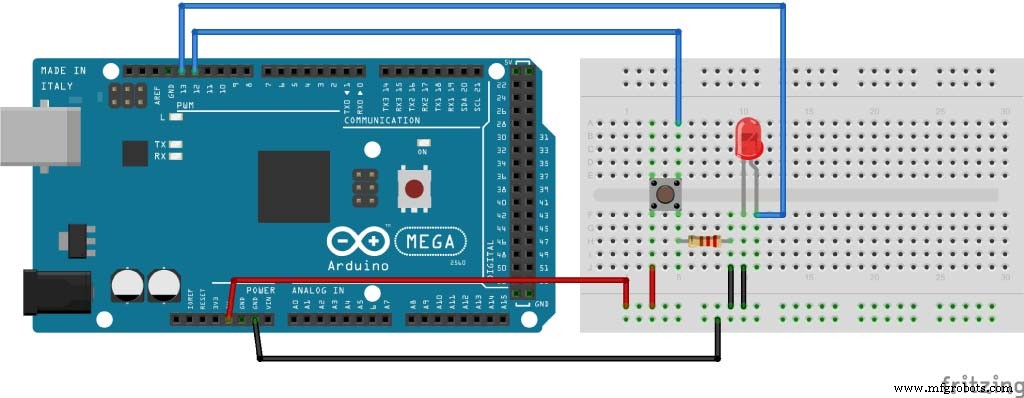
Source code of the first example
int button = 12;
int led = 13;

int buttonState = 0;

void setup() {
pinMode(led, OUTPUT);
pinMode(button, INPUT);
}

void loop() {
buttonState = digitalRead(button);
if (buttonState == HIGH)) {
digitalWrite(led, HIGH);
}
else {
digitalWrite(led, LOW);
}
}Code language: Arduino (arduino)
Source Code of the second example
int led = 13;
int button = 12;

int buttonState =0;
int brightness = 0;
int brightup = 2;

void setup() {
pinMode(led, OUTPUT);
pinMode(button, INPUT);
}

void loop() {
analogWrite(led, brightness);

buttonState = digitalRead(button);

if ( buttonState == HIGH ) {
brightness = brightness + brightup;
}
if ( brightness == 255 ) {
brightness = 0;
}
delay(30);
}Code language: Arduino (arduino)
Manufacturing process
- Build a Smart Arduino Quadruped Robot: Step‑by‑Step Guide
- Build Stunning Web-Driven LED Animations with Raspberry Pi & Arduino
- Master the MPU6050: Accelerometer & Gyro Tutorial for Arduino
- Arduino Data Logging with SD Card & DS3231 RTC – Step‑by‑Step Tutorial
- Mastering Arduino with DS3231 RTC: Step‑by‑Step Tutorial
- Master Arduino Bluetooth: HC‑05 Module Tutorial for Smartphone & PC Control
- Master Arduino Control with MATLAB GUI: Step-by-Step Tutorial
- Master Arduino & MATLAB Integration: Step‑by‑Step Serial Communication Tutorial
- Arduino Tutorial 06: Connecting Arduino to Processing via Serial Communication
- Arduino Tutorial 02: Buttons & PWM – Master Digital I/O & LED Control