



Master DC & Servo Motor Control with Arduino – Step-by-Step Tutorial
Welcome to the fourth Arduino Tutorial from our Arduino Tutorial Series. In this tutorial we will learn how to control DC and Servo Motors using PWM (Pulse Width Modulation). This is a Step by Step Video Tutorial which is easy to be followed. Also, below the video you can find what Parts do we need for this tutorial and the Source Codes of the Examples in the video. Components needed for the first example Disclosure: These are affiliate links. As an Amazon Associate I earn from qualifying purchases.
Circuit schematic of the first example, controlling a DC Motor
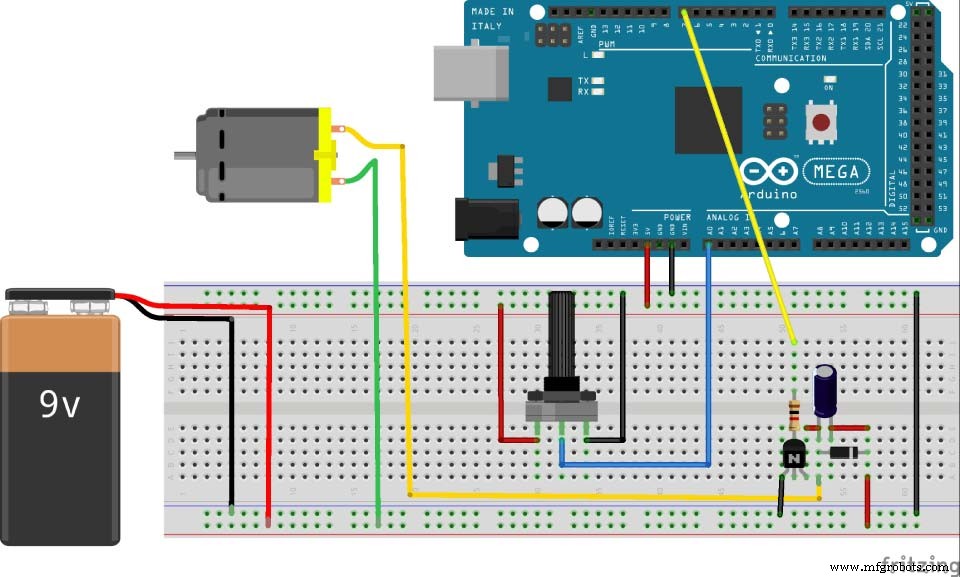
Source Code of the first example, controlling a DC Motor
int pwmPin = 7;

void setup() {
Serial.begin(9600);
pinMode( pwmPin, OUTPUT);
}

void loop () {
int potValue = analogRead(A0);

int newpotValue = map(potValue, 0, 1023, 0 , 255);

analogWrite(pwmPin, newpotValue);
}Code language: Arduino (arduino)
Parts needed for the second example, controlling a Servo Motor
Circuit schematic of the second example, controlling a Servo Motor
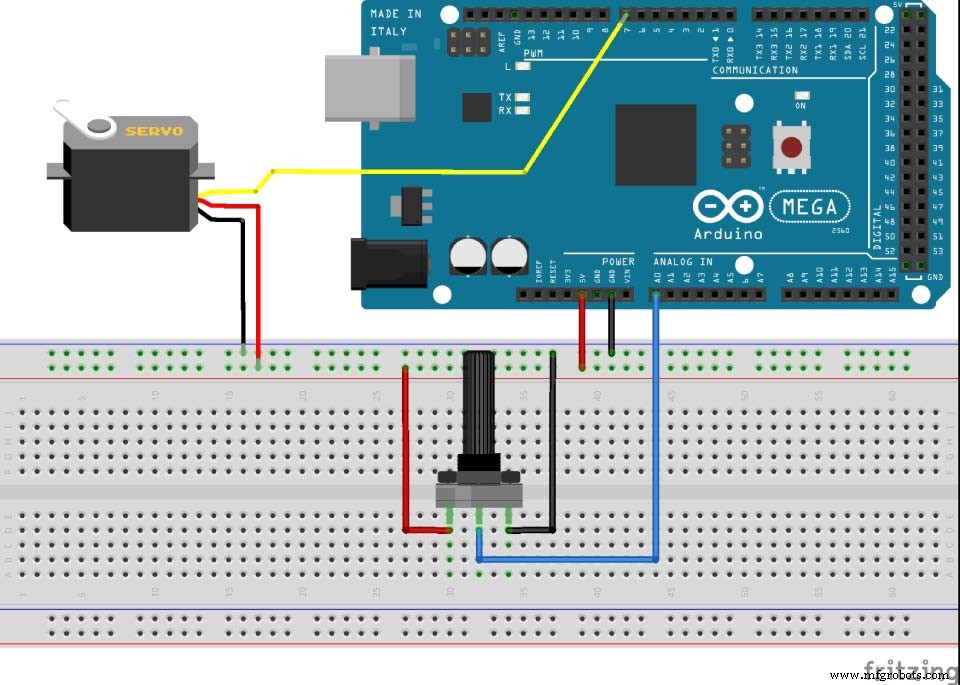
Source Code of the second example, controlling a Servo Motor
#include <Servo.h>

Servo myServo;

void setup() {

myServo.attach(7);
}

void loop() {
int potValue = analogRead(A0);

int angleValue = map(potValue, 0, 1023, 0, 180);
myServo.write(angleValue);
delay(10);
}Code language: Arduino (arduino)
Manufacturing process
- Stepper Motors: Types, Characteristics, and Practical Applications
- Understanding AC Commutator Motors: Design, Types, and Applications
- Create a Secure Arduino RFID Lock – Step‑by‑Step Guide
- Arduino Nano Fingerprint Sensor Project – Step‑by‑Step Tutorial
- Master Brushless Motor Control with Arduino, ESC, and BLDC – Step‑by‑Step Tutorial
- Master Arduino & MATLAB Integration: Step‑by‑Step Serial Communication Tutorial
- Arduino Tutorial 06: Connecting Arduino to Processing via Serial Communication
- Master Serial Communication with Arduino – Step-by-Step Video Guide
- Mastering Arduino Analog Inputs: A Step‑by‑Step Video Guide
- Arduino Beginner Tutorial 01: Get Started with Your First Project