Industrial manufacturing
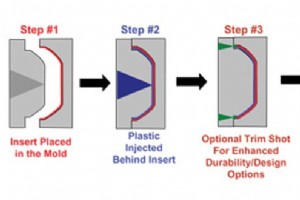
Manufacturing process


The Smart Traffic Light is an IoT‑enabled street lighting system that automatically turns on during low ambient light and turns off when daylight returns. It also monitors lamp health and reports faults to maintenance teams. Overview Traditional street lights often stay on after sunset or remain lit
Create a cost‑effective, smart home entry system that unlocks automatically when a registered face is detected. DIY security solutions give you full control and customization while keeping installation costs low. Thanks to Microsoft’s Azure Face API (formerly Project Oxford), makers can now build re
Why pay high prices at bars when you can create a custom, automated cocktail station at home? Our Raspberry Pi‑powered Smart Bartender mixes up to six ingredients simultaneously, saving money and impressing guests. Story Tired of spending $12 for a modest drink? The Smart Bartender lets you craft an
Updated guide for letting your Amazon Echo command a Google Chromecast via a Raspberry Pi running Python. Overview Bridging Alexa and Chromecast Ever wondered if your Alexa can control a Chromecast? This step‑by‑step tutorial explains how to make it happen with a Raspberry Pi, MySQL, and AWS Lam
This tutorial walks you through building a real‑time face‑recognition system on a Raspberry Pi using OpenCV and a Pi‑Cam. From hardware setup to training the recognizer, every step is presented with clear code snippets and practical tips. Below you’ll see a live demo of the Pi‑Cam detecting faces in
Project Overview Transform an ordinary LCD monitor into a chilling, motion‑activated haunted portrait. Using a Raspberry Pi 3 B, Python, and AtmosFX’s Unliving Portrait videos, you can create a realistic jump‑scare that reacts to motion. This step‑by‑step guide covers hardware assembly, image/video
Create a self‑watering system that monitors soil moisture and waters your indoor plant automatically, all controlled from a web interface. Overview This guide walks you through every step—from selecting components to wiring, coding, and launching a Flask web dashboard. The result is a reliable, low‑
Sensor Telemetry 2.0.1 delivers real‑time temperature data from an MCP9808 sensor to Microsoft Azure IoT Hub. The system processes telemetry with Azure Stream Analytics, stores results in Azure SQL, and visualises history in a Windows Universal mobile app. Updated 17 May 2017. Story UPDATE: Sensor T
Helium-Based Solar‑Powered Air Quality Sensor: Design & Deployment Guide As environmental awareness grows, I built a wireless, self‑contained, weather‑resistant, solar‑powered air‑quality sensor array—known as the WSPAQS—that can be deployed anywhere in the world and streams data in real time via He
If you’re a Raspberry Pi enthusiast looking to add voice‑enabled capabilities, the official Google AIY Projects Kit Voice HAT is an excellent starting point. While Google offered the kit for free in MagPi Magazine Issue 57, it has not yet entered the retail market. This guide walks you through creat
In many IoT projects, Arduino shines as the ideal platform for sensor interfacing, thanks to its vast library ecosystem and straightforward hardware setup. While the Raspberry Pi offers a richer operating system and broader connectivity options, combining the two can deliver the best of both worlds:
Contents 1 Working of the HC‑SR501 PIR Sensor 1.1 Adjusting Sensitivity and Delay 2 Circuit Diagram and Wiring 3 Python Code to Read Motion Events 4 Sample Output and Next Steps Every living creature emits infrared radiation, invisible to the naked eye. A passive infrared (PIR) sensor, such as
Our Smart Garbage Can is equipped with sensors that can monitor the level of garbage in your bin and alert you when it needs removal. Story What Did You Create? The system is built around a Raspberry Pi Zero, an ultrasonic distance sensor, and a LED indicator. It uses a Soracom SIM and a 3G USB don
Hardware Components Camera Module PIR Motion Sensor (JST) Raspberry Pi 3 Model B Software and Services Gmail account (sender and recipient) SSH access for remote configuration Project Overview In this project, a Raspberry Pi 3 Model B is paired with a camera module and a
The goal of this tutorial is to guide you through capturing temperature and humidity data with a DHT11 sensor on a Raspberry Pi 3 and sending it to the ThingsIo.ai cloud platform for storage and visualization. Overview This step‑by‑step guide covers hardware setup, Raspberry Pi configuration, Things
MQTT is the lightweight messaging backbone of most IoT solutions. This guide shows how to launch a complete, code‑free workflow: an ESP8266 sensor publishes data to a Raspberry Pi running Node‑RED, where the readings appear in a live dashboard. Why MQTT Matters for IoT MQTT’s publish/subscribe model
Walabasquiat is a live generative art installation that turns motion detected by a Walabot 3D imaging sensor into dynamic visual patterns. The system runs on a Raspberry Pi, uses Processing for rendering, and streams sensor data via a lightweight Flask RESTful API to an Android live‑wallpaper app. S
Monitoring century‑old industrial processes is challenging, but a network of nRF24L01 RF transmitters makes it safer, faster, and more reliable. Story Modern factories rely on digital monitoring to enhance safety, productivity, and ease of operation. In contrast, an 18th‑century gristmill—powered p
This guide shows how to connect a 16x2 HD44780‑compatible LCD to a Raspberry Pi 3 and display live temperature and humidity readings from a DHT11 sensor. The instructions cover hardware selection, wiring (both 4‑bit and 8‑bit modes), required libraries, and a complete Python script. Story Introducti
This system employs a Walabot RF sensor to determine whether a toilet is clean and whether it is currently in use, without the need for cameras. Background Why It Matters Dirty or partially flushed public toilets are a widespread hygiene concern. Because a camera cannot be placed inside a toilet, al
Manufacturing process