


Industrial manufacturing
Manufacturing process


Raspberry Pi is a compact, powerful, low‑power computer beloved by hobbyists and professionals alike. Its versatility makes it ideal for on‑the‑go projects such as an IP camera that streams live video to any device worldwide. What You’ll Need Raspberry Pi (any model with a camera interface) Micro‑S
Are you tired of button‑based controls? Imagine steering a robot with simple hand gestures while lounging on your couch. This tutorial shows how to build a dual‑motor robot that responds to hand movements using a Raspberry Pi, accelerometer, and RF communication. Overview We use a Raspberry Pi 3 at
Step 1: Gather Materials Raspberry Pi 2 with Raspbian installed, powered by a 5 V AC‑to‑DC adapter – $45.00 USB Wi‑Fi adapter (e.g., Edimax) – $10.00 Two DC motors, two wheels, a lightweight car frame, acrylic sheets, motor brackets, brass studs, shaft couplings, and assorted screws – $50.00 Motor
If you’re new to Raspberry Pi and want a hands‑on project that blends software and hardware, this guide walks you through building a Python‑controlled robot that detects and avoids obstacles using infrared sensors. Obstacle‑avoiding robots are popular for learning robotics and are surprisingly strai
Compatible with Raspberry Pi 2 and later models. The RasPiRobot Board V2 is a ready‑to‑use expansion board that transforms your Raspberry Pi into a fully‑featured robotic controller. Sold fully assembled, it includes a switch‑mode power supply, allowing you to power the Pi and your robot from a vari
Adding a camera to a remote‑controlled car or robot gives you instant visual feedback and the ability to stream live video to a smartphone or tablet. With a Raspberry Pi and a USB webcam, you can set up real‑time streaming with minimal latency. This guide walks you through connecting the webcam, ins
Introduction Have an unused infrared remote lying around? Turn it into a convenient power control for your Raspberry Pi—no keyboard or mouse required. Scope This guide covers how to install and configure the LIRC client irexec to map remote button presses to Pi shutdown and reboot commands. Adding t
Ever find yourself turning off your alarm clock only to wake up an hour later and rush out the door? Build a robot alarm clock that forces you to move—then you’ll actually get up. Step 1: Introduction Today most of us use our smartphones as alarm clocks because they’re convenient, versatile, and can
Below is a complete, step‑by‑step guide for assembling a Wi‑Fi‑controlled robot that streams live video and relays sensor data. The design uses a Raspberry Pi 2 B (or any Pi model), an Arduino Uno, an L298N dual H‑bridge, DC motors, a Pi Camera, and optional ultrasonic sensors. Step 1: Safety Notice
Welcome to this step‑by‑step tutorial for building an affordable glove controller that can drive an Arduino‑based propeller car. The design uses only inexpensive, readily available components, making it ideal for hobbyists and educators who want a quick, low‑budget solution. Step 1: Gather the Parts
Give a second life to an old toy truck by turning it into a fully controllable RC vehicle powered by a Raspberry Pi and Adafruit’s DC & Stepper Motor HAT. This guide walks you through every step—from disassembling the truck to mounting the Pi and wiring the motors—so you can impress friends at t
NOTE: THIS INSTRUCTABLE IS BEING WRITTEN This guide documents a quadcopter that combines a Multiwii flight controller with a Raspberry Pi 2 B. Its standout feature is the ability to pilot the aircraft either with a conventional RC transmitter or via a smartphone app. The Multiwii handles motor powe
In this guide we’ll extend the classic Raspberry Pi robot project by adding Bluetooth control and dynamic sound effects. We’ll connect an Arduino Uno to a Bluetooth module, relay commands to a Raspberry Pi, and use Python to play .wav files that correspond to each command. The result is a robot that
Step 1: Select Sensors For the Raspberry Pi‑controlled tank, we selected an SRF02 ultrasonic rangefinder and a CMPS10 3‑axis digital compass, both sourced from robot‑electronics.co.uk. Their I2C interfaces keep wiring simple, and their low cost makes them ideal for prototyping while still delivering
Create a compact, mobile robot powered by a Raspberry Pi using the PiCy kit and a few essential tools. Follow this step‑by‑step guide for a reliable build. What you’ll need: A Raspberry Pi (any model with GPIO pins will work) The PiCy pack kit, which includes: Two DC motors and two wheels A battery
"Have you ever dreamed of building your own Linux‑based droid that could roam around your home autonomously, intelligently obeying your commands?" asks Dafydd Walters. "You may now finally bring that dream to life." Walters founded and leads the Open Automaton Project (OAP), whic
How the Software Works Below is a concise overview of Andy’s operating cycle, from boot to shutdown. The entire codebase is open‑source and can be examined here. A simplified flowchart illustrates the process. Step One: Startup Andy Activate Andy by flipping the rear power switch. Power flows from a
The goal of this tutorial is to help you begin programming with Python to control your Arduino robots with a Raspberry Pi. We will go over the basics like installation and some simple examples to control your robot from a Python GUI from Raspberry Pi. Step 1: Parts list Below is a curated list of co
Introduction This weekend project brings a touch of cinematic robotics to your living room. Inspired by the film Wall‑E and a design from DX.com, we built a four‑wheel robot using a recycled CD tube, a Raspberry Pi, and inexpensive motors. The result is a functional, low‑cost robot that’s fun to ass
Introduction The XMOS startKIT, available through Farnell (or Newark) for just £12 (VAT included), offers a compact, credit‑card‑sized platform that pairs seamlessly with a Raspberry Pi. With minimal soldering—only a screwdriver, wire cutters, and pliers—developers can assemble a functional robotics
Manufacturing process
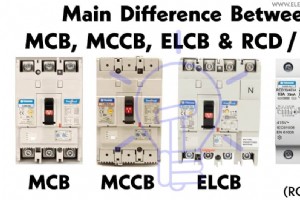
MCB, MCCB, ELCB, and RCD (RCB/RCCB): Understanding Circuit Breaker Differences

Boosting Production with Advanced Automation & Cybersecurity Solutions

Understanding PETG: Properties, Applications, and Benefits for 3D Printing
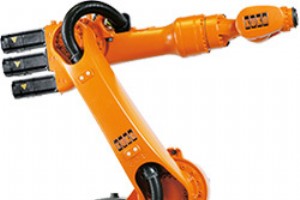
Ohio Northern University Enhances Robotics Center with KUKA Robotics Partnership
