



Campus Facility Management: Mastering Maintenance in a Dynamic Environment
Campus maintenance teams are the backbone of any higher‑education facility, ensuring safety, reliability, and an optimal learning environment. With responsibilities ranging from groundskeeping to high‑tech lab upkeep, they operate around the clock, ready to respond to any issue—big or small.
Just as the military relies on specialized gear, campus facilities need advanced tools to stay ahead. In this guide, we explore how a Computerized Maintenance Management System (CMMS) can streamline operations, boost productivity, and give you real‑time insight into every asset on campus.
Do You Work on Campus?
Maintenance managers on college and university campuses handle a diverse array of tasks while supporting thousands of students and faculty. From landscaping to HVAC, the scope of responsibility is vast and critical to institutional success.
Key Responsibilities
Grounds Maintenance:
- Maintain lush, functional lawns despite heavy foot traffic.
- Ensure healthy, attractive landscaping—flowers, shrubs, trees.
- Oversee waste collection and disposal.
- Keep parking lots safe, well‑signposted, and operational.
Building Maintenance:
- Electrical: manage thousands of outlets, fixtures, and integrated systems.
- Plumbing: oversee sinks, toilets, fountains, heaters, and drains.
- Interior finishes: paint, flooring, and wall/ceiling fixtures.
- Exterior cladding: maintain the unique aesthetic of each building.
- Doors & windows: ensure secure, functional operation.
- Access control: manage keys, locks, and rekeying.
- HVAC: supervise large heating and cooling systems.
- Janitorial: routine cleaning, maintenance, and equipment upkeep.
- Property management: from student housing to sports arenas and historic buildings.
Equipment Maintenance:
- Climate‑controlled storage for high‑value instruments, e.g., $200,000 Steinway pianos.
Room Setup & Event Support:
- Modify classroom layouts, add or remove whiteboards, and configure large event spaces.
Fleet Management:
- Maintain vehicles—including golf carts, buses, forklifts, and Zambonis.
- Handle routine servicing and repair of student‑operated equipment.
Mail Management:
- Coordinate shipping and receiving of parcels worldwide.
- Ensure timely mail delivery amid high turnover.
The Campus Management Challenge: Everything is an Emergency
From a clogged toilet to a jammed lock, a single incident can disrupt hundreds of people. When emergencies occur, emotions run high, but a robust CMMS keeps the response organized, transparent, and efficient.
On‑Site Realities
Maintenance managers rarely leave work. On arrival, they inventory new work requests, update progress with supervisors, and assign tasks to teams. Their day is filled with meetings—faculty scheduling, HVAC upgrades, union negotiations—each requiring immediate attention.
- The Astronomy Department requests late‑night observatory events; the maintenance team must coordinate with floor replacement schedules.
- The Dean of Students wants upgraded air filters, but older HVAC units cannot support the increased pressure.
- Negotiating union and HR grievances.
Keeping It All Together with a CMMS
A comprehensive CMMS consolidates key functions: asset management, planned maintenance, work requests, inventory, purchasing, and vendor relationships. We’ll compare a campus without a CMMS to one using Limble, a proven CMMS solution.
Asset Management
Without a CMMS
Listing every asset in a spreadsheet is impractical. Documentation quickly becomes outdated, scattered across paper, emails, and disparate documents.
With Limble CMMS
Every asset is logged at first use, creating a searchable database organized by location, building, and room. Each work order links to the relevant parts, vendors, and work history, evolving into a living asset record.
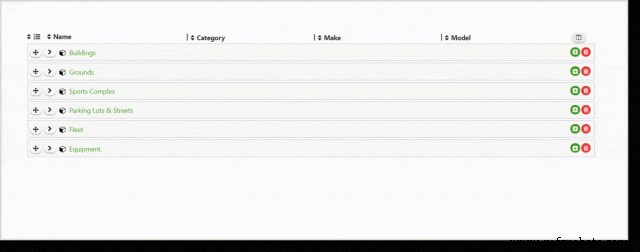
Asset hierarchy in Limble CMMS
Asset History
Limble provides a single view of work history, scheduled maintenance, spare parts inventory, and vendor performance, with the ability to attach manuals and notes.
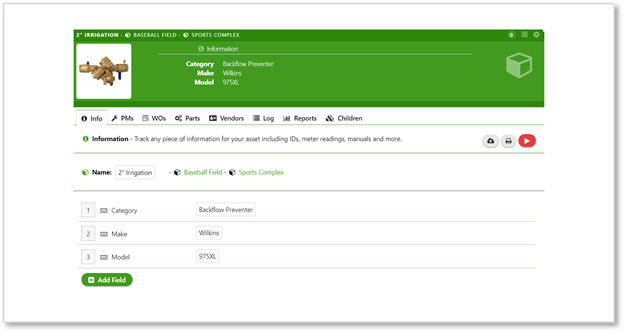
Asset information tab
Financial Planning
With all assets consolidated, Limble generates reports on capital value, depreciation schedules, and replacement recommendations, empowering facility managers to negotiate cost‑saving initiatives with Finance.
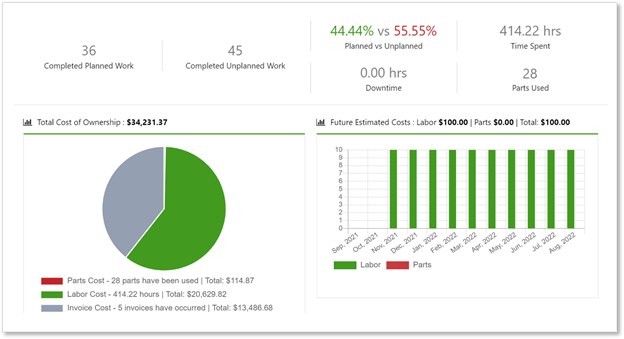
Custom dashboard showing financial insights
Planned Maintenance (PM)
Without a CMMS
Reactive maintenance dominates, leaving little capacity for preventive measures.
With Limble CMMS
Preventive schedules with checklists are automatically assigned, shifting focus to proactive care and reducing unplanned downtime.

Creating PM checklists
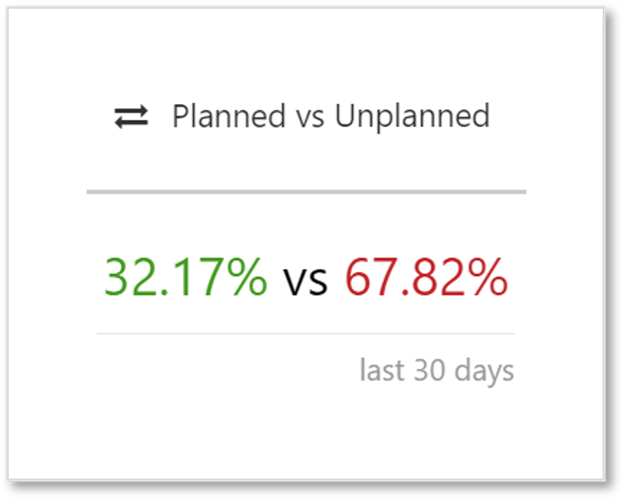
PM vs. unplanned work overview
Task Scheduling
Limble auto‑assigns PM tasks based on calendar or usage, ensuring timely service and streamlined workflow.
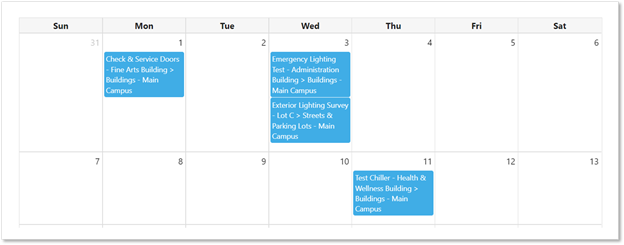
Maintenance calendar snapshot
Asset Status Tracking
Dynamic status updates—from “Running” to “In Repair”—provide instant visibility into equipment health.
Equipment status in Limble
Spare Parts Management
Parts are linked to assets and PM checklists. Techs receive precise part lists, location, and inventory levels directly in their task view.
Parts management view
Work Requests
Submitting Requests
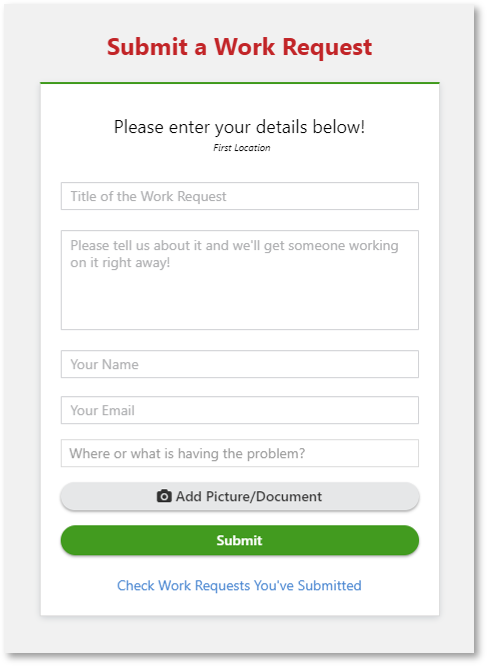
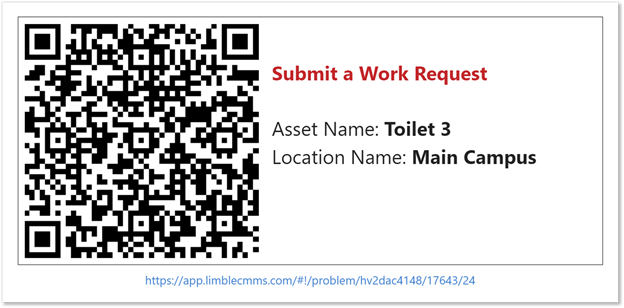
Limble’s portal, QR codes, and email integration allow any campus member to submit a request, automatically capturing requester details and timestamps for prioritization.
QR code workflow for quick ticket submission
Work request portal
Each request is time‑stamped, linked to the exact asset, and includes optional photo uploads, ensuring clarity and reducing duplicate tickets.
Duplicate Prevention
Limble’s algorithm flags similar requests, prompting confirmation before a new ticket is created, minimizing redundant work.
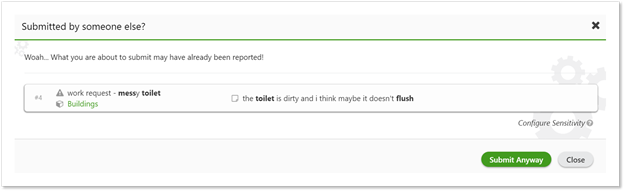
Duplicate detection
Communication with Requesters
Automatic email notifications keep requesters informed from ticket creation to completion, enhancing transparency and trust.
Task Assignment & Execution
Assignment Process
All tasks reside in Limble, where team members view updated to‑do lists on desktop or mobile. Auto‑assignment by trade and location further streamlines operations.
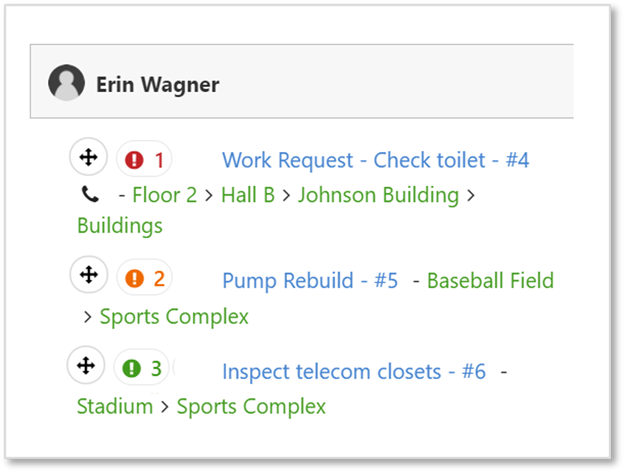
Technician workload snapshot
Information Retrieval
Each task links to the asset’s manuals, work history, SOPs, and spare parts data—no more hunting through disparate documents.
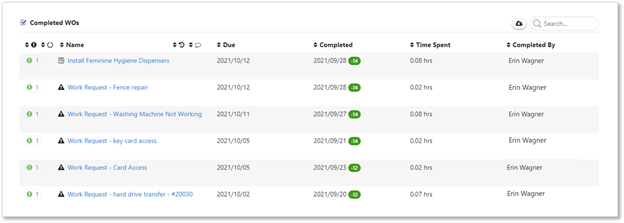
Work order details
Communication & Collaboration
Team discussions occur within task comments, creating a complete digital paper trail and eliminating reliance on radios or ad‑hoc calls.
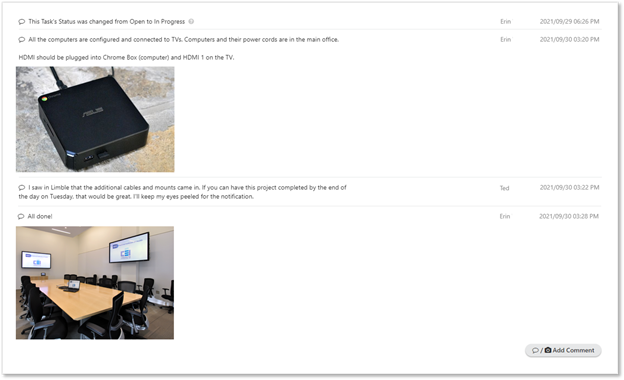
Task discussion in Limble
Work Order History & Reporting
Limble logs every action, time spent, and cost, enabling comprehensive TCO reports and performance analytics.
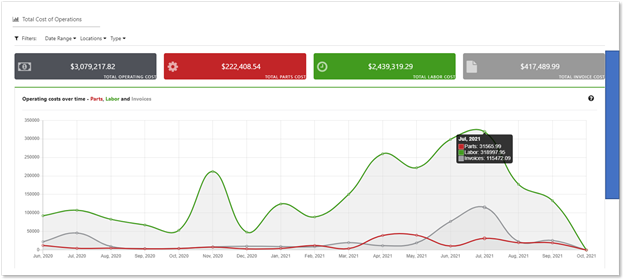
TCO report
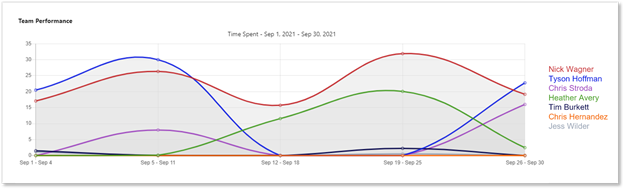
Team performance report
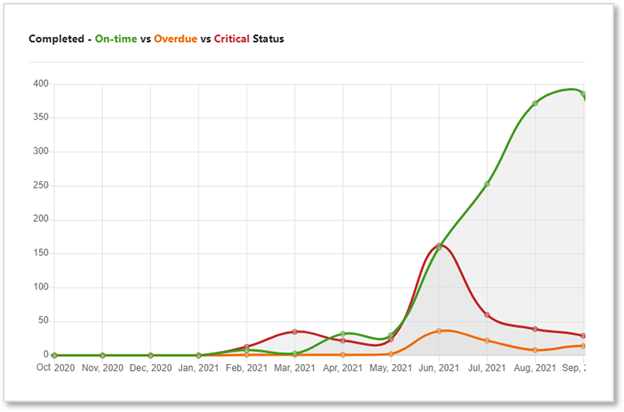
Task completion status
Inventory Management
Current Challenges
Manual inventory checks lead to over‑stock or shortages, increasing costs and downtime.
Limble Solution
Real‑time inventory levels are updated automatically with each work order. QR codes on shelves allow workers to adjust counts on the fly.
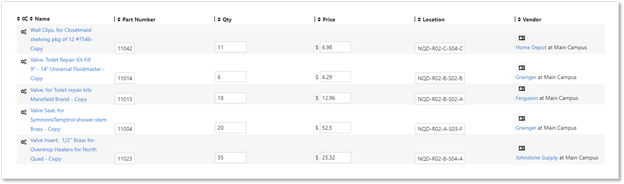
Parts inventory view
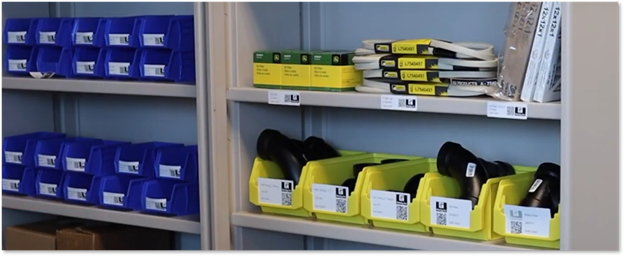
QR‑enabled shelf management
Optimizing Inventory
Set usage thresholds to receive alerts for stale parts and trigger purchase orders automatically when stock falls below set limits.
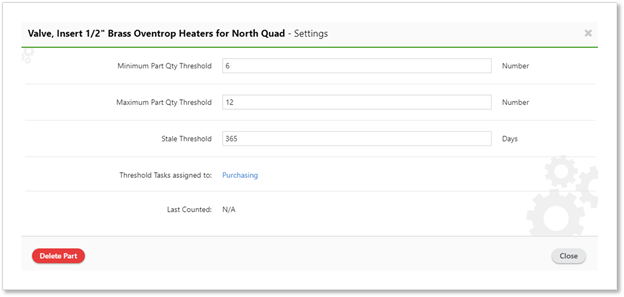
Stale part alerts
Purchasing Workflow
Challenges
Paper trails and manual approvals delay procurement and obscure cost data.
Limble Workflow
Automated purchase requests, approvals based on budget thresholds, and instant PO generation streamline procurement and ensure all purchases tie back to work orders and vendor invoices.
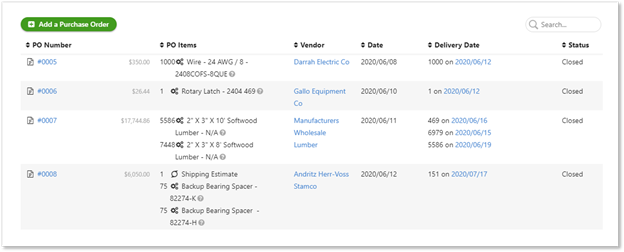
Purchase order list
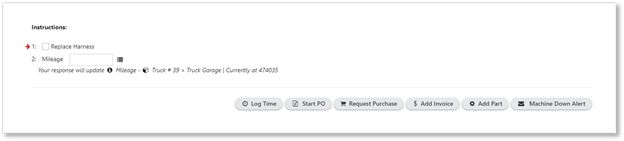
Tech‑initiated purchase requests
Financial Integration
Limble’s API syncs with ERP and accounting systems, ensuring accurate budgeting, cost allocation, and vendor billing.
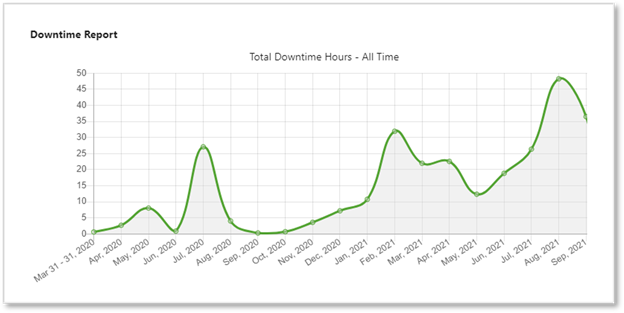
Total downtime report
Vendor Management
Challenges
Unclear vendor lists and inconsistent communication hinder accountability.
Limble Solution
All vendors are stored in a central list with contact details, performance history, and custom fields. Tasks are shared via unique links, and vendors can upload photos, time logs, and invoices directly into Limble.
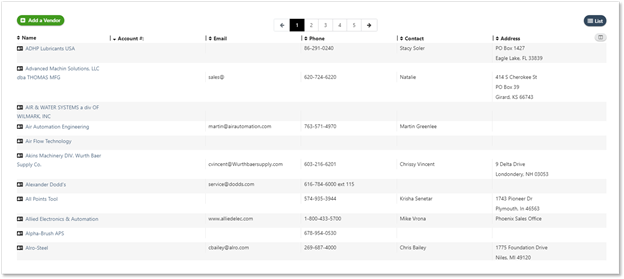
Vendor list
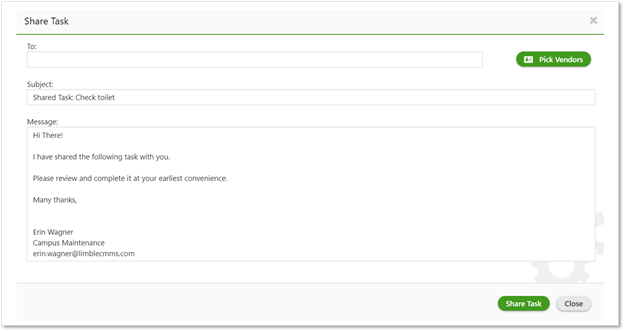
Vendor task view
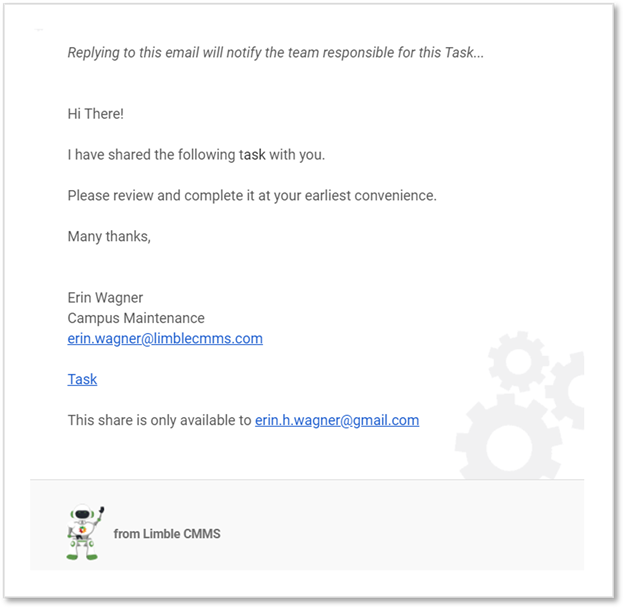
Vendor portal
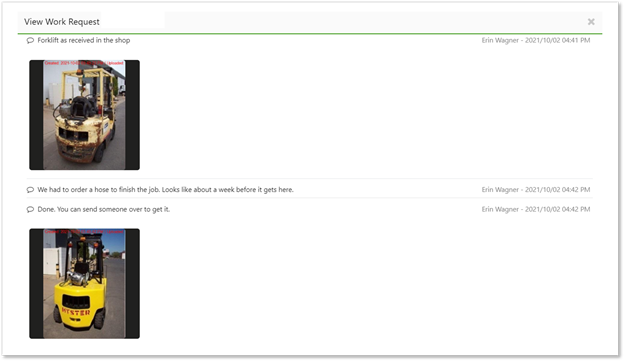
Before/after images for accountability
Long‑Term Planning for Campus Facilities
With more than 60% of the maintenance workforce projected to retire in the next decade, institutional knowledge loss could cripple operations. Leveraging Limble’s checklists and historical data preserves expertise, ensures continuity, and reduces the cost of re‑training.
Getting Started with Limble CMMS
Begin without commitment by exploring Limble’s options:
- Free 30‑day trial
- Live demo with a sales representative
- Self‑service sandbox to test features firsthand
Equipment Maintenance and Repair
- Modernizing Facilities Management: Key Trends for a 40% Construction Growth
- Maintenance Management 101: How CMMS Drives Efficiency, Cost Control, and Asset Longevity
- Reliability & Asset Management: Foundations for Production Excellence
- Maintenance & Reliability: Why ‘Good Enough Never Is’ Drives Business Success
- How to Persuade Top Management to Invest in Maintenance
- Why Top Manufacturers Rely on World‑Class Motor Management & Maintenance
- Why Maintenance & Asset Management Software Is Essential Now
- Overcoming the 4 Key Barriers to Adopting Maintenance Management Software
- Campus Facility Management: Mastering Maintenance in a Dynamic Environment
- The Role of a Maintenance Director: Responsibilities & Impact