



Battery Terminal Corrosion: Causes, Prevention, and Cleaning Guide
A vehicle’s battery is the lifeline that powers ignition, lighting, and accessories. Maintaining its health is critical for reliable performance.
Regular inspections help catch issues early, saving time and money.
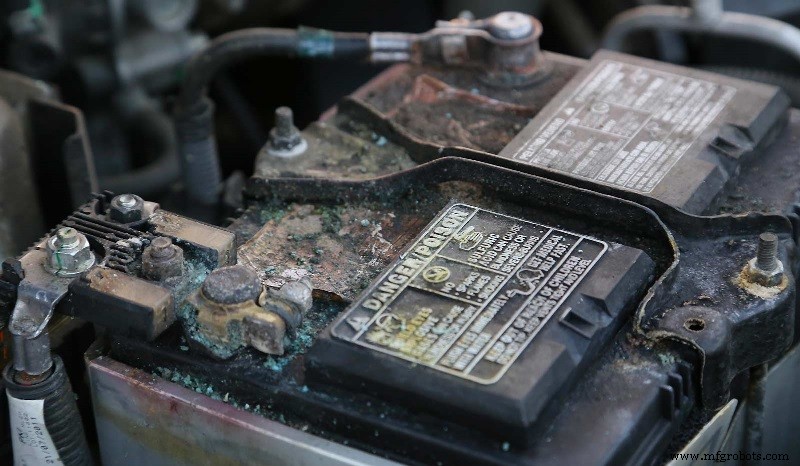
One common issue is battery terminal corrosion, visible as a white, bluish, or greenish film on terminals, cables, or posts. This buildup increases resistance, disrupting electrical flow.
In this article, we’ll explore the root causes, offer step‑by‑step cleaning instructions, and share preventive measures to keep your battery system running smoothly.
What Causes Battery Terminal Corrosion?
Several factors contribute to corrosion on battery terminals. When a battery runs, hydrogen gas is released and reacts with surrounding elements, forming corrosive deposits. Key culprits include:
Overfull Battery
If your battery requires periodic refilling, exceeding the recommended water level forces excess electrolyte to vent and contact the terminals, accelerating corrosion.
Leaking Battery Fluid
Physical damage such as cracks or punctures lets electrolyte spill onto the terminals, where it reacts with air and metal.
Overcharging
Charging for too long raises the battery temperature, causing electrolyte expansion and venting that deposits corrosive residues on terminals.
Chemical Reaction with Copper Clamps
Clamps made of copper exposed to sulfuric acid vapor produce copper sulfate, a corrosive compound.
Age
Even without obvious damage, aging batteries—typically five years old—naturally accumulate corrosion.
How to Clean Battery Terminal Corrosion
Cleaning is straightforward but must be performed safely. Disconnect the battery first, inspect cables for wear, and replace any damaged ones. Use a stainless‑steel brush and a baking soda‑water paste to neutralize acid and remove deposits. Rinse with clean water, dry thoroughly, then re‑attach.
Preventing Battery Terminal Corrosion
- Use an anti‑corrosive spray: Apply preventive sprays or brush‑on compounds to terminals and posts. Disconnect the battery before application.
- Coat with petroleum jelly or dielectric grease: These affordable alternatives also protect against corrosion. Disconnect the battery before use.
- Avoid overcharging or undercharging: If overcharging occurs, consult an automotive technician to diagnose electrical faults. Undercharging can happen if the battery doesn’t receive enough power to recharge fully.
- Perform routine checks: Inspect the battery and related components regularly to catch corrosion early before it spreads.
Train to Work on Starting Systems and More at UTI
Being able to diagnose and repair your own vehicle is valuable, but you can also turn that skill into a career. The Automotive Technology program at Universal Technical Institute (UTI) teaches students comprehensive maintenance and repair of both import and domestic vehicles.
You’ll gain hands‑on experience working on engines, starting systems—including batteries and associated components—and more. After graduation, you’ll have the skills to launch a career in the automotive industry.
Request more information today to find out how you can graduate in less than a year.1
Industrial equipment
- Understanding the Oxygen (O2) Sensor: Role, Placement, and Failure Signs
- Parasitic Battery Drain: Symptoms, Causes, and How to Fix It
- Graphene Batteries Explained: The Future of Long-Lasting Energy
- Remote Terminal Units (RTUs): Key Components of SCADA Systems
- Corrosion Explained: Causes, Effects, and Prevention Techniques
- Consequences of Connecting a Battery to an AC Power Source
- Understanding the Negative Terminal of a Car Battery
- Understanding the Positive Terminal: Definition and Importance in DC Equipment
- Understanding Battery Trays: Purpose, Features, and Benefits
- Decoding 'N' in Pump Calculations: Its Role and Significance