



Embedded Firmware: Best Practices for Initializing C Arrays with External File Data and Signal Waveforms
Learn how to initialize C arrays using external text files.
This guide explains how to populate arrays in a C program with data stored in separate text files. The values are not embedded in the source code; instead, they are loaded at compile time. We cover one‑dimensional and multi‑dimensional arrays, show how to control whether the array lives in RAM or non‑volatile memory, and illustrate how to choose between multiple data files for initialization.
The examples target a 32‑bit ARM microcontroller and are compiled with GCC. All snippets use standard C and work with this compiler.
Basics of Initializing an Array
When you declare an array in C, you can supply a list of values—known as initializers—inside curly braces. For example:

If you omit the size in brackets, the compiler infers it from the number of initializers. If the array is declared larger than the initializer list, the remaining elements default to zero. Providing more initializers than the declared size triggers a compilation error.
White Space
Initializers are separated by commas, and you can freely add whitespace—spaces, tabs, newlines, carriage returns, vertical tabs, or form feeds—between them. In C, statements may span multiple lines; this is especially useful for large arrays that may fill several pages of source code.

Initializing an Array from a File
The C preprocessor can include arbitrary text files using the #include directive. This feature is not limited to header or source files; any plain‑text file is acceptable. A simple file containing numbers, commas, and whitespace can be used to initialize an array:

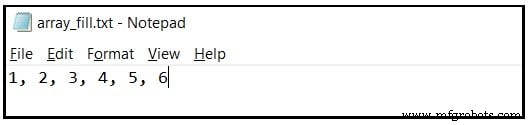
The included file must be plain text—no rich‑text formatting, headers, or other artifacts. A quick example created with Windows Notepad looks like this:
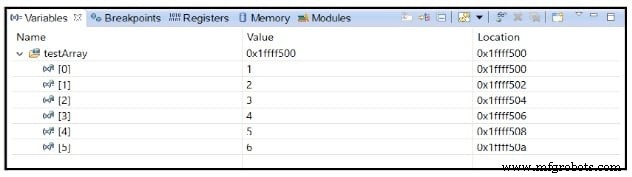
When compiled, the array appears in memory as shown in the debugger screenshot. In this case the array resides in RAM, indicated by the high addresses in the “Location” column.
Storing an Array in Non‑Volatile Memory and Selecting a Data File
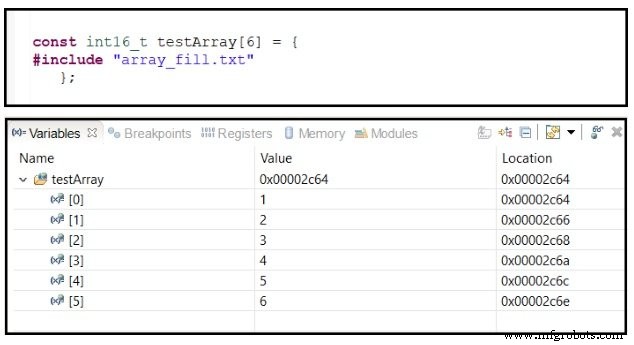
In the example above, the array is a global variable without any explicit placement. The compiler assumes it may be modified at runtime, so it places the variable in RAM. The initial values live in non‑volatile memory (typically Flash) and a boot‑up routine copies them into RAM. If the array is truly constant, declaring it const tells the compiler to keep it in Flash only, saving precious RAM. The following screenshot shows the effect: the array’s “Location” points to low Flash addresses.
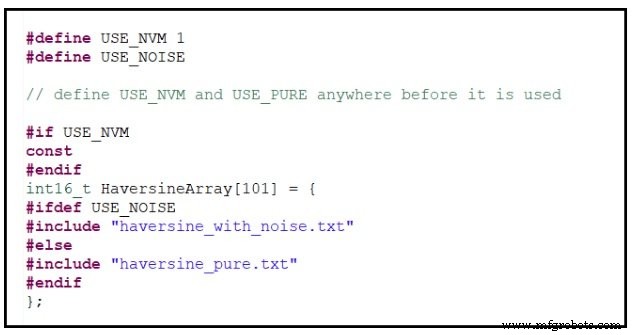
You can use #define and #if directives to switch between RAM and Flash storage, or to pick different data files for initialization. For example, the following code lets you choose the storage location at compile time:
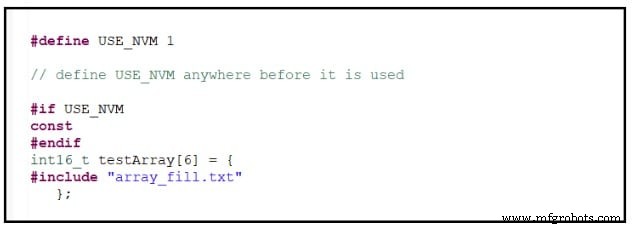
The #if construct is a classic example of conditional inclusion. It determines whether the const qualifier is applied based on a compile‑time flag.
Similarly, you can conditionally select which file supplies the initial data:
Testing with a Large Array
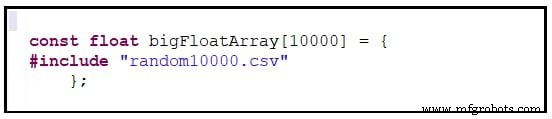
To validate the technique, I used a 10,000‑sample noise waveform stored in a CSV file. The plot below shows the waveform, while the declaration demonstrates how the data is incorporated into the program:
The original CSV file lacked commas after each value. Using a regular‑expression find/replace (search for \R and replace with ,\R) added commas to all 10,000 entries in a single operation.
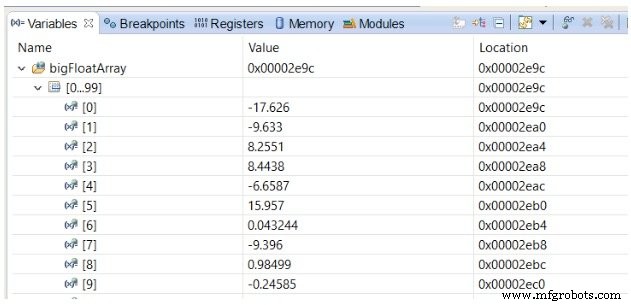
The resulting array is visible in the debugger, neatly grouped in rows of 100 elements.
Multi‑Dimensional Arrays
When working with two‑ or three‑dimensional data, remember that C stores arrays in row‑major order. For example, a uint16_t test[2][3] array is laid out in memory as:
[0,0] [0,1] [0,2] [1,0] [1,1] [1,2]
Accessing consecutive elements along the rightmost subscript is faster because the data is contiguous. If you need two vectors of 1,000 samples, declare test[2][1000] to maximize cache friendliness.
The initializer for a two‑dimensional array is normally grouped with nested braces:

However, you can omit the outer braces; the compiler then fills the array left‑to‑right. It emits a warning: missing braces around initializer. As long as the total number of values matches the array size, the code compiles.

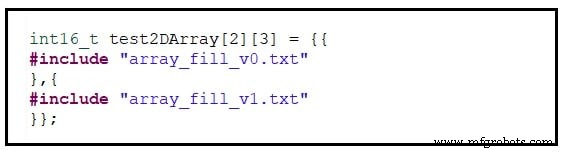
To spread the data across multiple files, simply include each file in sequence, wrapping the entire list with a pair of braces:
Initializing Arrays in Unions
A union allows different types to share the same memory. For example, a union containing a one‑dimensional vector and a two‑dimensional matrix occupies the same address space:
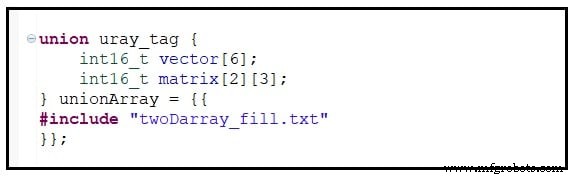
When initializing, the compiler fills the first member first. If the order is reversed, you may see a warning because the initializer list is not fully bracketed. Double braces around the #include ensure the correct grouping:
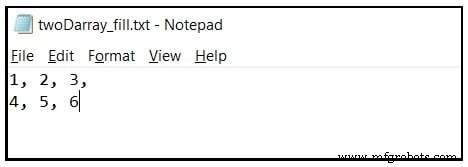
The data file for the union looks like this:
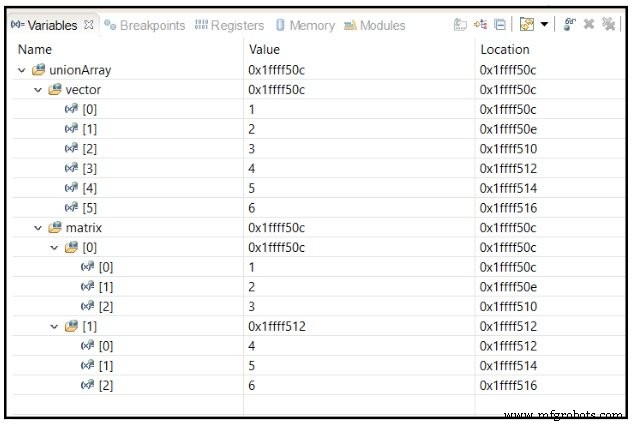
In memory, both vector and matrix start at the same location, as shown in the debugger:
Do you know another method to initialize a multi‑dimensional array from a single numeric file? Share your ideas in the comments.
Bonus Tip: Strings
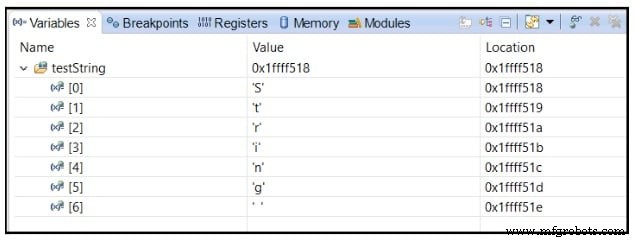
Initializing a string from an external file requires the quotation marks to be inside the file itself. A direct #include inside the string literal breaks the compiler. Instead, place the quotes in the file and include it like this:
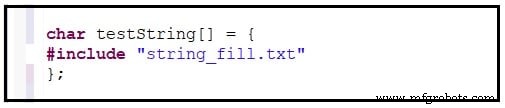
The resulting string resides in RAM, as illustrated in the screenshot.
These examples are theoretical and should work with any standard C compiler. If you encounter compiler‑specific quirks, let us know in the comments.
Source provided.
Embedded
- Accelerate Industrial Automation: Optimizing RS‑485 Fieldbus for Speed, Reach, and EMC
- Leveraging Embedded AI to Convert Big Data into Actionable Smart Insights
- Streamlining AC/DC Data Acquisition: Overcoming ADC Challenges with Continuous‑Time Sigma‑Delta Technology
- Mastering Digital Filtering on Embedded Microcontrollers: PowerQuad’s Dual Biquad IIR Engine in the LPC55S69
- Managing & Storing Project Data in Fusion 360: A Comprehensive Guide
- Verilog Arrays and Memories: Mastering Multi-Dimensional Data Structures
- Bringing IoT to Life with IBM & Tech Data – Part 2
- Turning IoT Into Reality: Tech Data & IBM Insights – Part 1
- Use Data Analytics to Quickly Identify and Resolve Production Issues
- Comparing Nexus Integra with Leading IoT & Big Data Platforms