



Mastering C# Queues: Enqueue, Dequeue, and First‑In‑First‑Out Operations Explained
What is a Queue in C#?
A Queue implements the First‑In‑First‑Out (FIFO) principle, much like a line of people waiting for a bus. The first element added is the first one to be processed or removed.
In C#, queues are defined in the System.Collections namespace and offer methods such as Enqueue and Dequeue that mirror the behaviour of real‑world queues.
Declaring a Queue
Instantiate a queue using the Queue type and the new keyword:
Queue qt = new Queue();
Adding Elements (Enqueue)
Use Enqueue to append an item to the back of the queue:
qt.Enqueue(1);
Removing Elements (Dequeue)
The Dequeue method removes and returns the item at the front of the queue:
var first = qt.Dequeue();
Useful Properties and Methods
- Count – returns the number of items currently stored.
int total = qt.Count;
- Contains – checks if a specific value exists in the queue.
bool hasThree = qt.Contains(3);
Practical Example
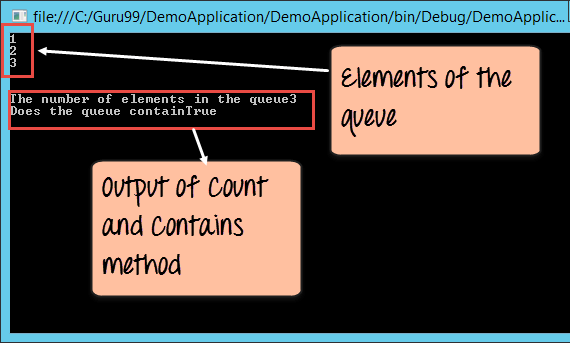
The following console application demonstrates queue creation, iteration, and the use of Count and Contains:
using System;
using System.Collections;

namespace DemoApplication
{
    class Program
    {
        static void Main(string[] args)
        {
            Queue qt = new Queue();
            qt.Enqueue(1);
            qt.Enqueue(2);
            qt.Enqueue(3);

            foreach (Object obj in qt)
            {
                Console.WriteLine(obj);
            }

            Console.WriteLine();
            Console.WriteLine("Total items: " + qt.Count);
            Console.WriteLine("Contains 3? " + qt.Contains(3));
            Console.ReadKey();
        }
    }
}
Output:
Removing the First Element
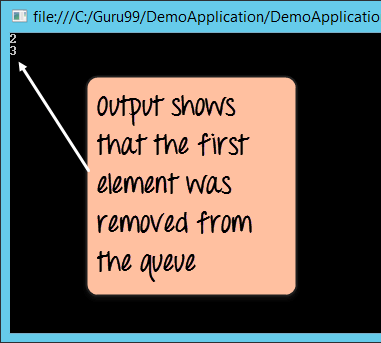
Calling Dequeue removes the earliest enqueued item. The following snippet shows the effect:
qt.Dequeue();
foreach (Object obj in qt)
{
    Console.WriteLine(obj);
}
Result:
Summary
A C# Queue adheres to FIFO semantics. Use Enqueue to add items, Dequeue to remove the front item, and properties like Count and methods such as Contains to inspect the queue.
C Language
- P‑F Curve Explained: Mastering Reliability‑Centred Maintenance
- Breakdown Maintenance Explained: Rapid Response & Cost Control
- Mastering Java's String compareTo() Method: Syntax, Use Cases, and Practical Examples
- Master Rotary Encoders with Arduino: How They Work & Step‑by‑Step Integration
- Mastering the Raspberry Pi Camera Pinout: A Complete Guide to Setup and Usage
- PIC18 Microcontrollers: Features, Performance, and How to Use Them
- Water Flow Sensors: How They Work & How to Use Them
- Arduino SD Card 101: Setup, Connection, and Usage Guide
- Understanding Reference Designators: How to Label PCB Assembly Connections
- Community Cloud Explained: Benefits, Examples, and Real-World Use Cases