



Mastering Scientific Notation in SPICE: A Practical Guide
SPICE (Simulation Program with Integrated Circuit Emphasis) is the industry‑standard tool for circuit simulation. Its output is presented in scientific notation, and the input netlists accept both scientific notation and metric prefixes. To fully grasp SPICE analyses, you must understand how SPICE expresses voltages, currents, and power.
A Simple Circuit Simulation with SPICE
We begin with the simplest possible circuit: a 24‑V battery connected to a 5‑Ω resistor. The schematic looks like this:
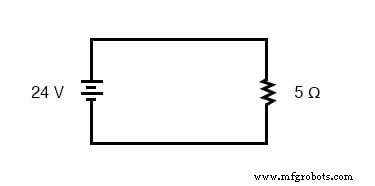
To run a simulation, we must assign node numbers, list the components with those node numbers, and then write a netlist. Although overkill for a single resistor, this example illustrates SPICE’s handling of scientific notation.
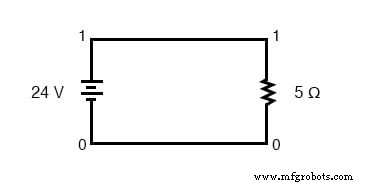
The corresponding netlist is:
simple circuit
 v1 1 0 dc 24
 r1 1 0 5
 .end
“v1 1 0 dc 24” defines the battery between nodes 1 and 0 with a 24‑V DC source. “r1 1 0 5” defines a 5‑Ω resistor between the same nodes.
Running SPICE Analysis on the Example Circuit
Executing the netlist in SPICE yields:
node    voltage
 ( 1)    24.0000
voltage source currents

name    current
 v1    -4.800E+00

total power dissipation    1.15E+02 watts
The node voltage of 24.0000 V is expected. SPICE reports the battery current as -4.800E+00 A, meaning –4.800 A (the negative sign is a SPICE convention, not an indication of a circuit issue). The total power dissipation appears as 1.15E+02 W, i.e., 115 W.
Modifying the Original Example Circuit in SPICE
Now replace the 5‑Ω resistor with a 5 kΩ resistor and observe the change.
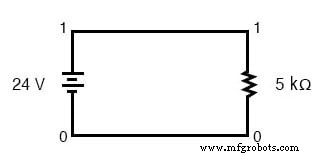
The updated netlist is:
simple circuit
 v1 1 0 dc 24
 r1 1 0 5k
 .end
Running this netlist gives:
node    voltage
 ( 1)    24.0000
voltage source currents

name    current
 v1    -4.800E-03

total power dissipation    1.15E-01 watts
While the voltage remains 24 V, the current drops to –4.800E-03 A, or –4.800 mA. The power dissipation becomes 1.15E-01 W, equivalent to 0.115 W or 115 mW—converting the exponent to a familiar metric prefix simplifies interpretation.
Converting Figures from Scientific to Common Metric Prefixes
The quickest way to translate a scientific‑notation number to an engineering (metric) form is to use a calculator in “engineering” mode. Enter the value in scientific notation, press “=” or “Enter,” and the display will show the equivalent figure with the appropriate metric prefix (e.g., 4.800E‑03 A → 4.8 mA).
Understanding scientific notation is essential for interpreting SPICE output accurately, and it will make your subsequent analyses smoother and more reliable.
Industrial Technology
- Circuit With a Switch: A Practical Guide to Basic Electrical Circuits
- Voltage Follower Amplifier: Design, Build, and Measurement Guide
- Mastering AC Circuit Equations: Impedance, Reactance & Resonance
- Getting Started with SPICE: A Text‑Based Circuit Simulation Tool
- Mastering SPICE Netlist Syntax: Component Naming, Passive & Active Elements, and Source Definitions
- SPICE Diode Modeling: A Practical Guide to Accurate Simulation
- Mastering Electric Circuit Simulation with SPICE: A Practical Guide for Designers and Students
- Mastering Scientific Notation: Simplifying Extreme Numbers in Science
- Mastering Multiplication and Division with Scientific Notation
- Metric Notation: Understanding SI Prefixes and the New Decimal‑Point‑Free Electrical Format