



ATmega328P Alien Slot Machine Kit
Components and supplies
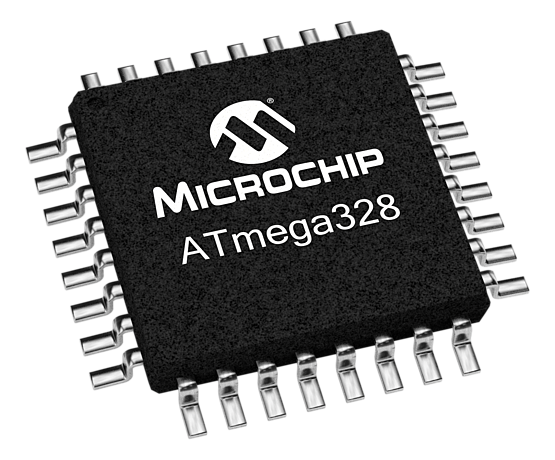 |
| × | 2 | |||
| × | 1 | ||||
| × | 1 | ||||
| × | 1 | ||||
 |
| × | 2 | |||
| × | 6 | ||||
 |
| × | 1 | |||
|
| × | 1 | |||
 |
| × | 6 | |||
 |
| × | 4 | |||
 |
| × | 3 | |||
 |
| × | 2 | |||
 |
| × | 1 | |||
 |
| × | 2 | |||
 |
| × | 4 | |||
| × | 6 | ||||
 |
| × | 1 | |||
 |
| × | 2 | |||
 |
| × | 1 | |||
 |
| × | 1 | |||
| × | 1 | ||||
 |
| × | 1 | |||
| × | 1 | ||||
| × | 1 | ||||
 |
| × | 1 | |||
 |
| × | 1 | |||
| × | 1 |
Necessary tools and machines
 |
| |||
|
Apps and online services
 |
| |||
| ||||
| ||||
| ||||
|
About this project
ATmega Alien Themed Slot Machine
This project is my implementation of an alien themed slot machine using two ATmega328P-PU micro-controllers. I was inspired by Cory Potter's Alien Invasion Slot Machine, and I wanted to expand on that idea. The slot machine is for entertainment and educational purposes only. I tried my best to make the game simulate a real slot machine as closely as possible. The project is currently bread boarded. An enclosure will be added as soon as the parts arrive from China and I've had a chance to solder everything up. The project took about two months for me to build in my spare time. The most difficult part of the build for me was understanding all of the math involved in making the game behave the way the casino industry would expect a simple slot machine it to behave after a half billion or so simulations.
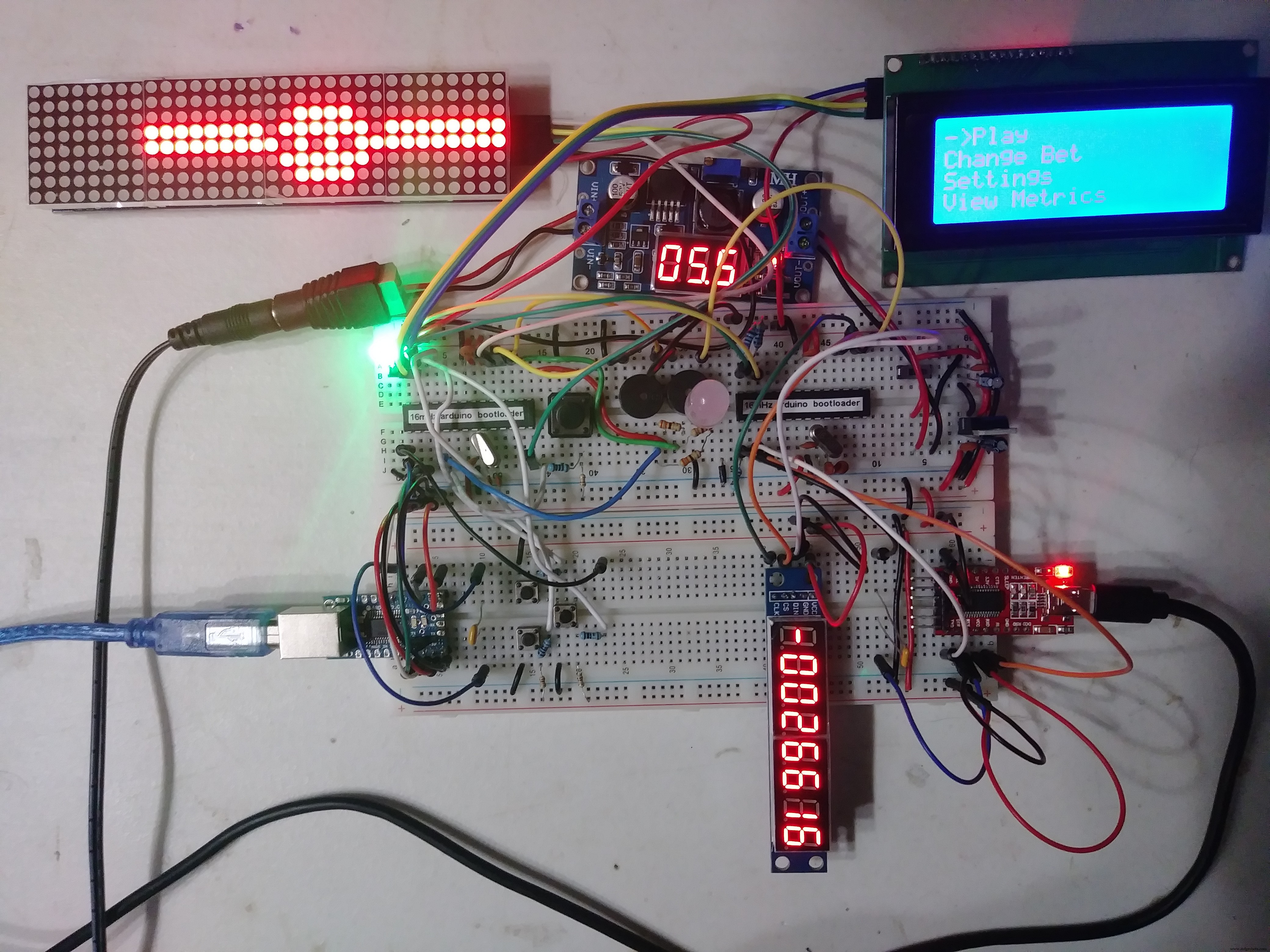
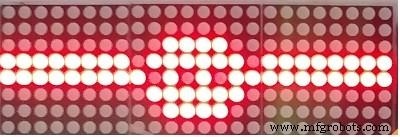
The game has three reels with the same unique 25 symbols appearing on each reel (one of the 8x8 matrices on the component with 4 8x8 matrices isn't used.) There are five different ways to win. If you get three spaceships, you win the jackpot. If you get one or two spaceships you also win some credits. If you get two or three symbols to match you also win. If you get a spaceship and two symbols matching, as depicted below, the game pays out based on the winning event with the lowest probability/highest payout; in other words winning events are mutually exclusive, you can't win two different ways on a single spin of the reels. This kept the programming a little simpler. There were plenty of other challenges for me.
The slot machine has several interesting features which are accessed via the 20 x 4 I2C capable LCD display using two navigation buttons and a select button. The buttons use a fairly sophisticated de-bouncing algorithm that takes advantage of the micro-controller's external interrupt capability. This is the main menu.
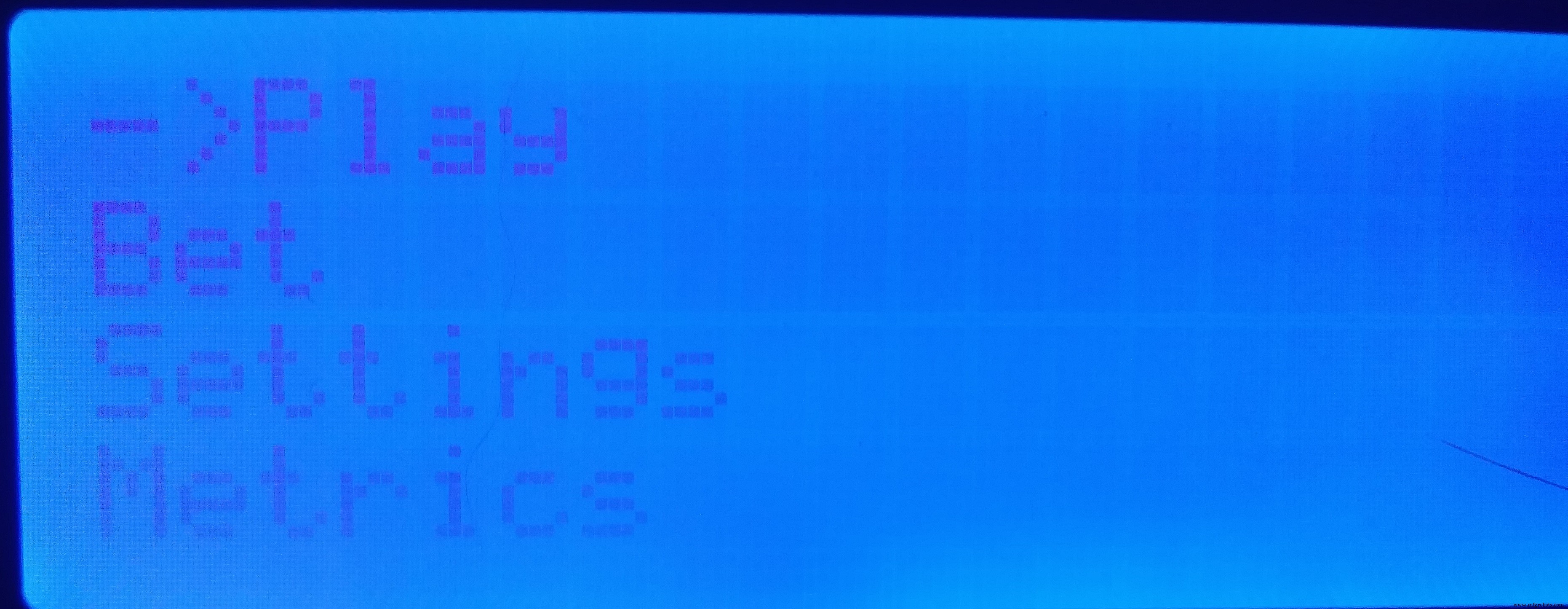
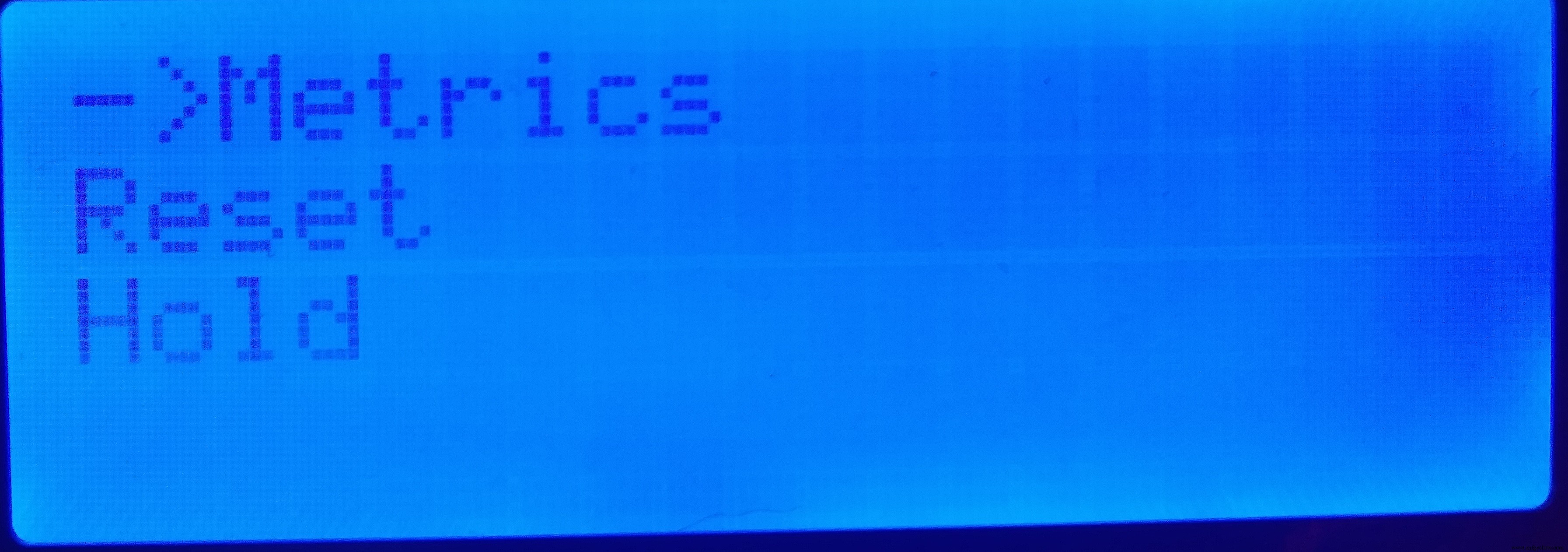
Since there are six lines in the menu you have to scroll down using the 'navigate down' button to see the entire menu. There is a button dedicated to 'spinning' the reels. In addition to that you can also select 'Play' from the main menu. You can change your bet at any time.
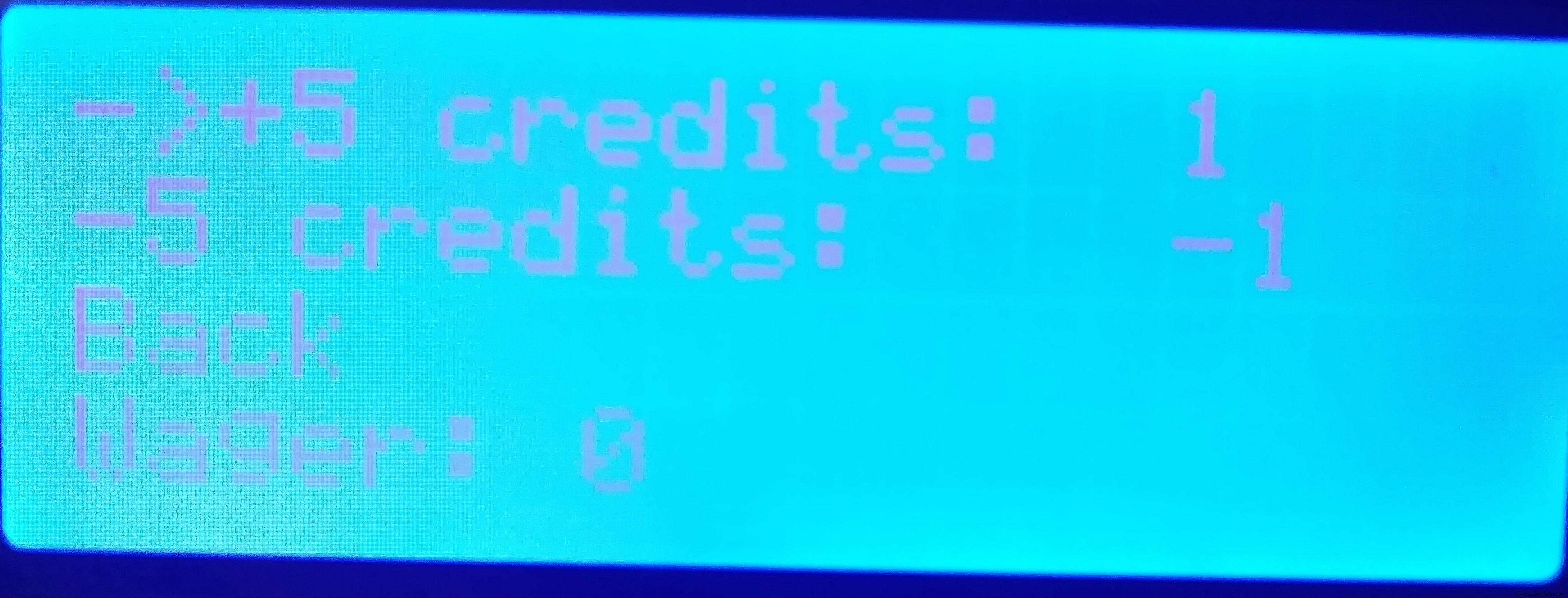
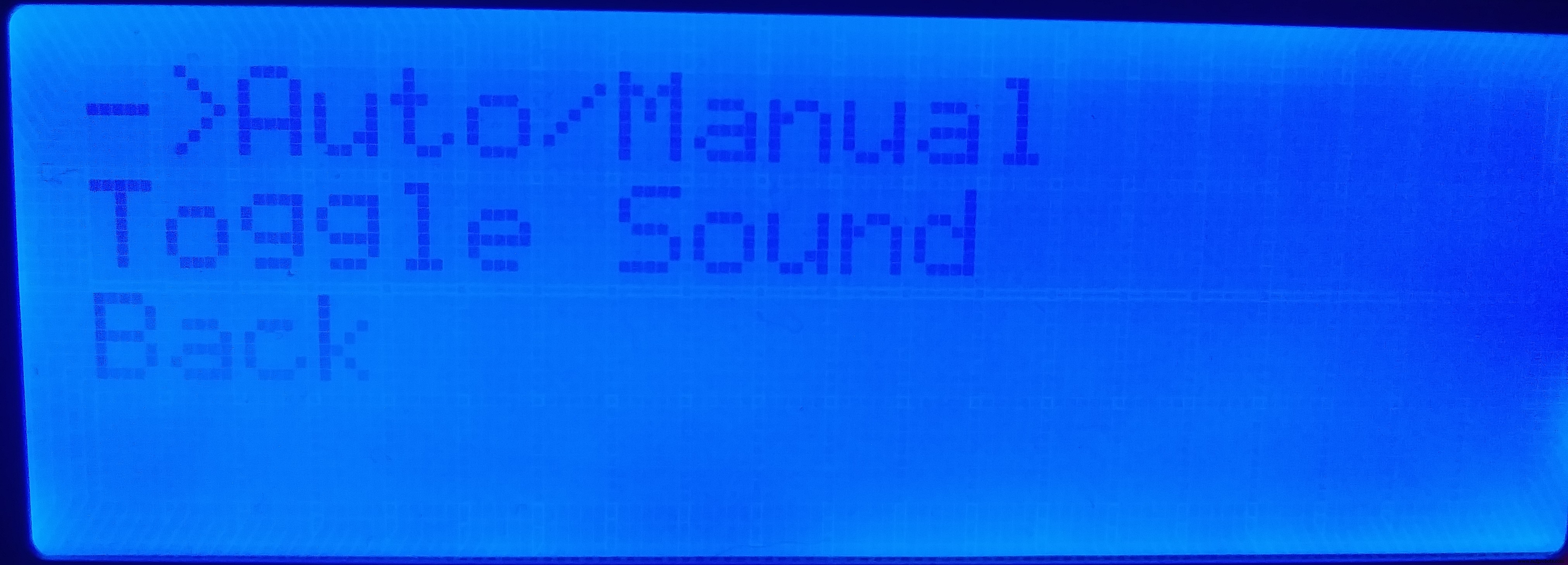
The most exciting feature is that the game can be played in 'auto' mode; i.e. you select the auto mode option from the settings menu on the LCD screen and the game plays over and over again until you select the option again or 1 million plays have occurred. This is a critical function for testing the game. You can also disable the sound here.
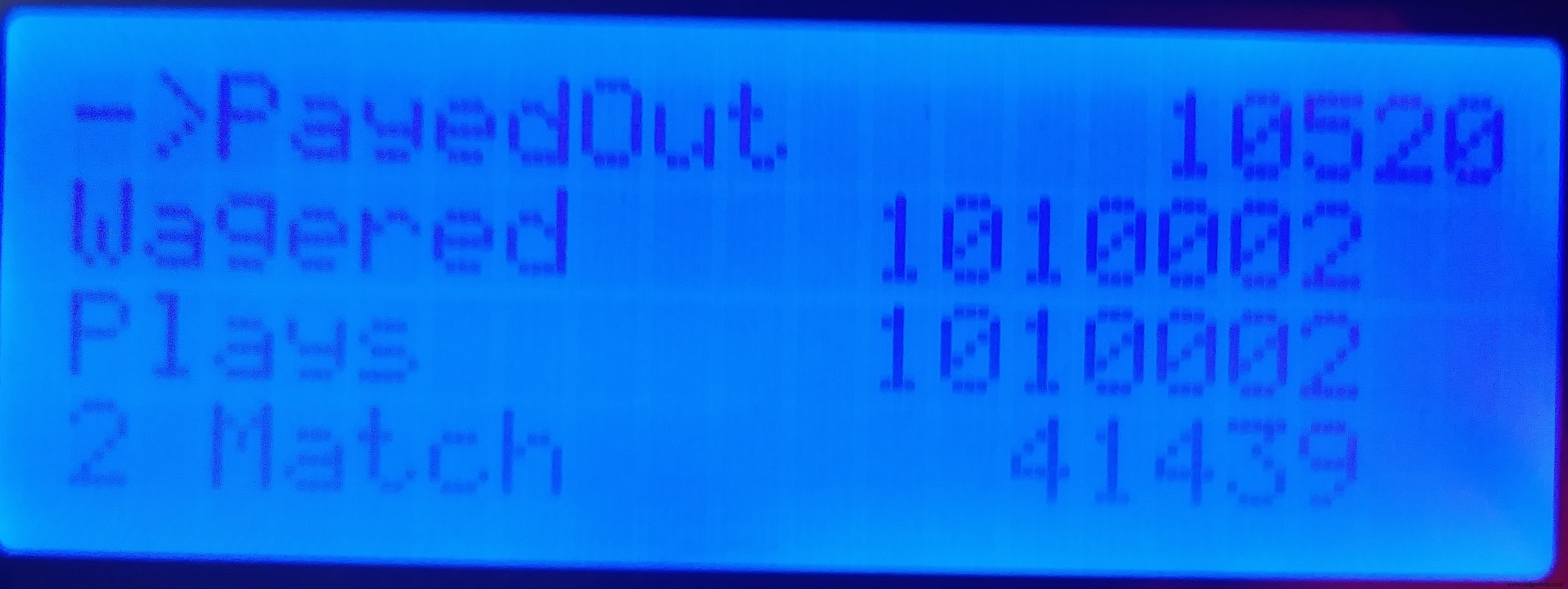
Via the menu on the LCD it's also possible to view all of the metrics generated from the simulation. These metrics are also output and may be viewed in the serial monitor if you connect your micro-controller to the monitor via the RX and TX pins using a USB cable. The list of displayed metrics includes your credit balance, the number of times you hit the jackpot, and the number of times you won credits by any other means. This allowed me to run simulations based on the various payouts, and was useful for establishing and proving out the payout table. The payout table itself is not configurable; once it is set it should stay the same. I suppose it would be possible to make the volatility index configurable by using it to drive the payout tables, but that would require a lot more work.
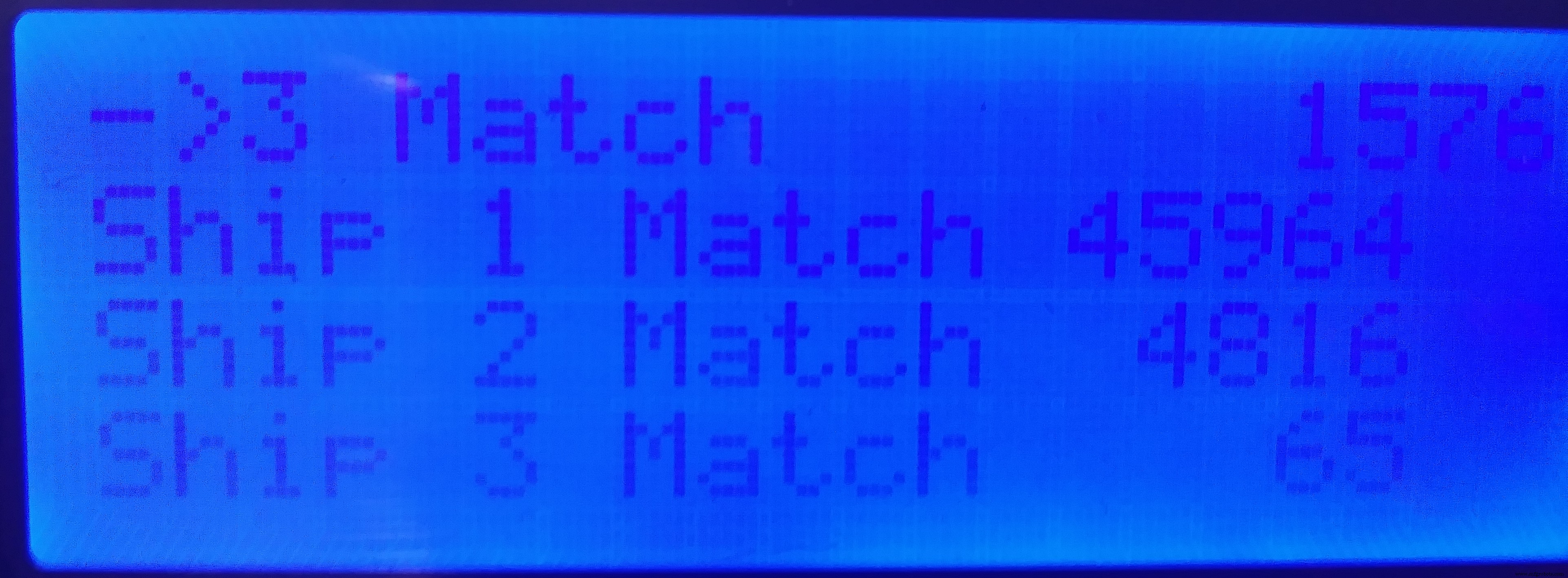
The Reset option allows you to reset all of the metrics (except EEprom writes), back to zero. The chip will work for about 100, 000 writes to EEprom. Since there's 512k of EEprom available on the chip, and we're only using a fraction of that, it would be possible to actually move the location of the metrics in EEprom as we approach 100, 000 writes. I have not implemented this feature but it would be a means by which to extend the life of the chip.
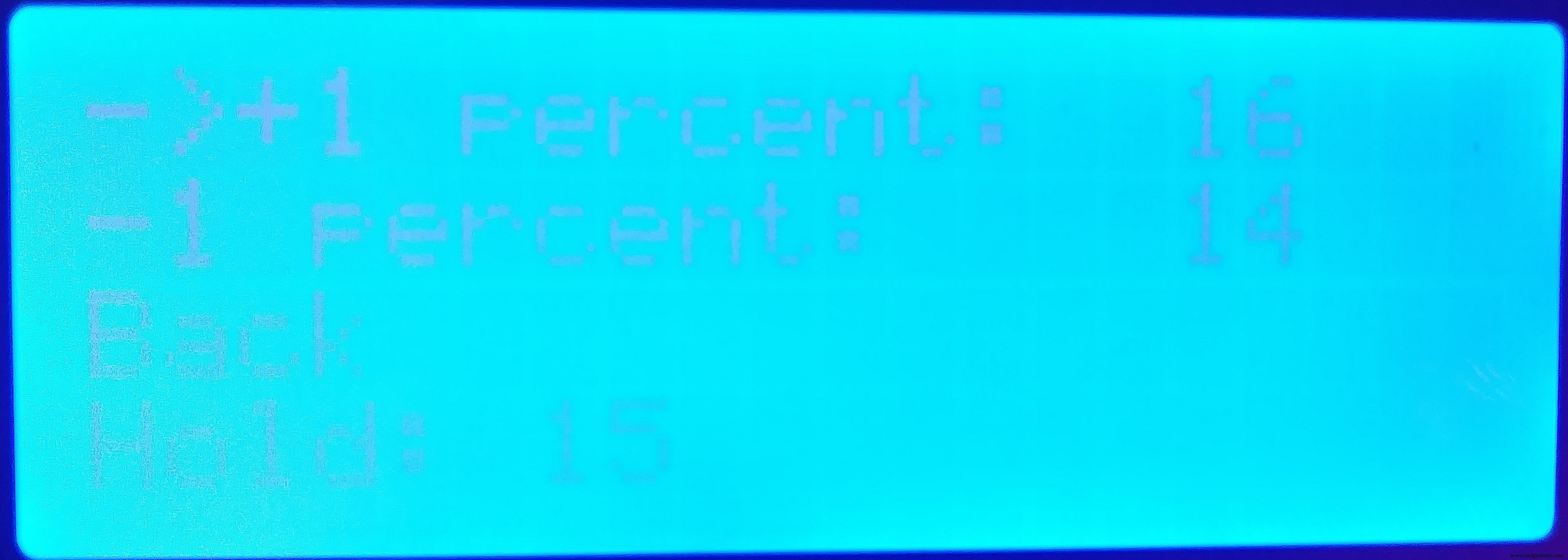
Finally, the hold, or the percentage of each wager kept by the house (over time), is configurable. Remember that after performing a Reset operation the hold needs to be set again.
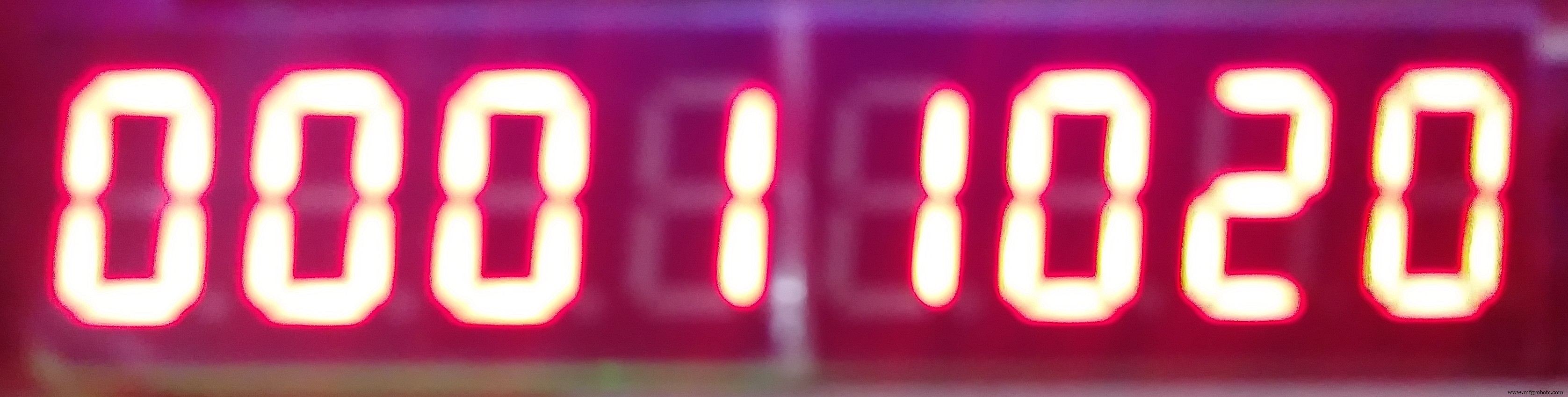
The player's credit balance is always shown in an eight digit seven segment display.
A lot of work went into making sure that the game was realistic. The probabilities were calculated and the payout table was designed so that the game has an acceptable Volatility Index (VI). This index measures how predictable the machine's behavior is. A machine with a higher VI is more likely to make the player (or the house) more money. It is less predictable than a machine with a lower VI. It's true that the same exact game will exist in different casinos (or even the same casino) with different VIs. The VI is changed by manipulating the payout schedule. For our game, here are the probabilities and payouts for each kind of win.
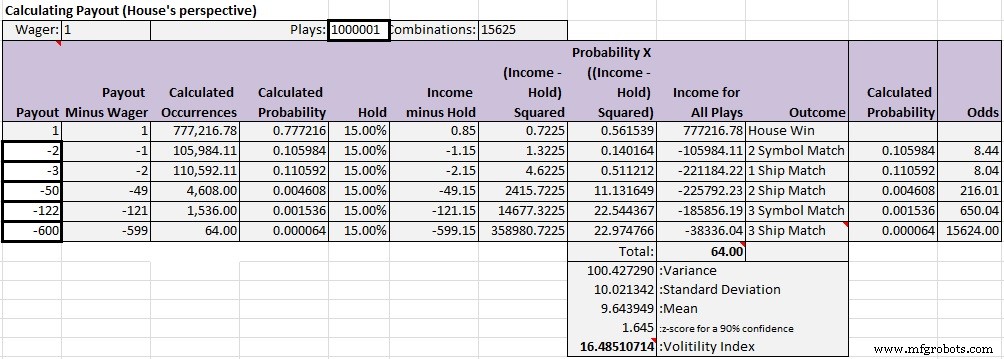
Note that the odds (far right) and the payout (far left) are dramatically different. If this game was programmed so that the payout table matched or closely followed the odds, it's VI would be unacceptably high. The hold is calculated as a percentage of the payout, and is the portion of a wager kept by the house/casino. As stated you can set the hold via the LCD menu. Bear in mind that different jurisdictions have different regulations that govern the maximum hold for slot machines in that jurisdiction. A typical maximum hold is 15%. Understand that setting the hold to the maximum allowed by law doesn't necessarily maximize the profit generated by that machine, because a higher hold might discourage players from using the machine. I suspect, however, that many players ignore the hold, which is typically buried in fine print, and that the demand curve for a machine is relatively vertical (meaning that the cost of using the machine, the hold, is largely ignored), and that profit generated by the machine is far more dependent on the location or placement of the machine as well as the design of the game itself. But that's just speculation. I'm sure there are some savvy gamblers out there who are sensitive to the hold.
The spreadsheet, available with the code, with three tables was built to prove that the game is working correctly (the first table appears above). The first step in building the spreadsheet was to accurately calculate the odds of each type of win (the Calculated Probability columns).
Three Spaceships
The probability that three spaceships will appear is the inverse of the total number of possible combinations. The number of winning combinations, one, over the total number of possible combinations, 15625. There are 25 unique symbols on each reel, so the probability is 1 / (25 x 25 x 25), or 0.000064. That makes the odds, 1/probability - 1, equal 1 to 15624. I learned how to calculate the odds from the probability here.
Three Symbols Match (except spaceships)
The probability that three symbols, other than the spaceships, will match is 24 (the number of unique symbols on each reel minus the spaceships) divided by the number of possible combinations. 24 is the numerator because there are 24 combinations of three symbols matching. 24/15625 = 0.001536. That makes the odds about 1 to 650.04.
Two Spaceships
There are 24 x 3 total combinations of two spaceships matching. That's because there are thee ways to make two matches of a spaceship. Give X = spaceship and Y = any other symbol, XXY, XYX, and YXX. There are 24 possible values for Y. So 24 X 3 / 15625 = 0.004608. The odds are 1 to 216.01.
One Spaceship Appears
For each reel there are 24 x 24 combinations possible for a single spaceship appearing.
A spaceship can appear on any reel, so you need to multiply the number of combinations available on a single reel by three reels. So the probability is 24 x 24 x 3 / 15625 = 0.110592. Odds are 1 to 8.04.
Two Symbols Match
For any given two symbols, except the spaceships, there are 23 (25 minus one spaceship minus one symbol that would make it a three symbol match) x 3 reels x 24 symbols that are not spaceships. The probability is (23 X 3 X 24)/15625 = 0.105984. Odds are 1 to 8.44.
Now that I have the probabilities for each kind of win I can use the spreadsheet to design the payout table in a way that makes the volatility index acceptable (< ~20). To understand how to do this I relied heavily on this post. I entered values in the House Income column of the first table, using a process of trial and error, until the VI was under 20 and the Total in cell J10 was as close to zero as I could get it. Using those values I set THREE_SPACESHIP_PAYOUT, THREE_SYMBOL_PAYOUT, TWO_SPACESHIP_PAYOUT, ONE_SPACESHIP_PAYOUT, and TWO_SYMBOL_PAYOUT in SlotMachine.ino accordingly. Then, first by using a hold of zero percent, I ran five simulations of 1, 000, 001 plays, and entered the values from the metrics menu into the appropriate rows and columns in the Actual Results table (the third table).
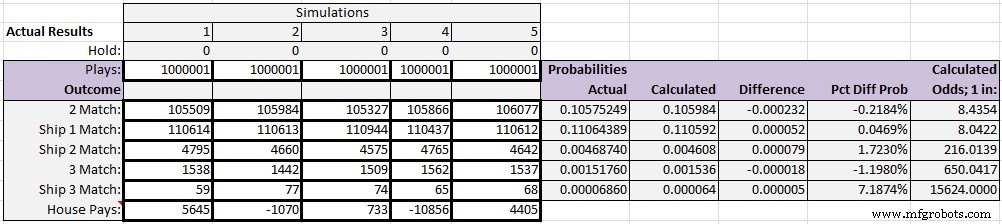
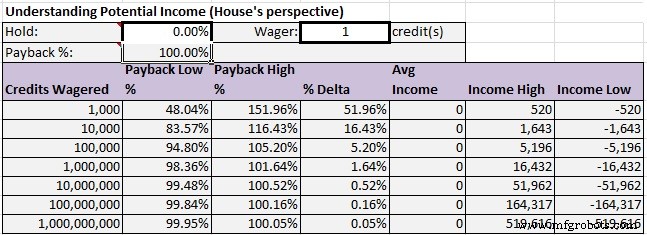
I observed that the Probabilities Actual closely tracked with the Calculated probabilities, and that the Pct Diff Prob column was reasonable. I also matched the values in the House Pays row up with the range of values from the Income High and Income Low columns of the 1, 000, 000 row of the Understanding Potential Income table (the second table), and observed that the values from the Actual Results table were inside of the range specified by the Income High and Income Low columns. The Understanding Potential Income table defines the expected range of income for a given hold value with a 90% confidence interval. In the example below the hold is set to 0, so the likelihood of winning match the likelihood of losing. If you play the game 1 million times there is a 90% likelihood that the Income will be between 16, 432 and - 16, 432.
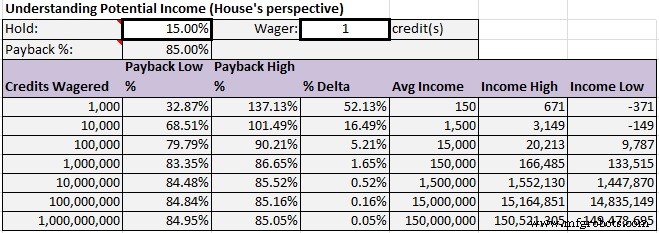
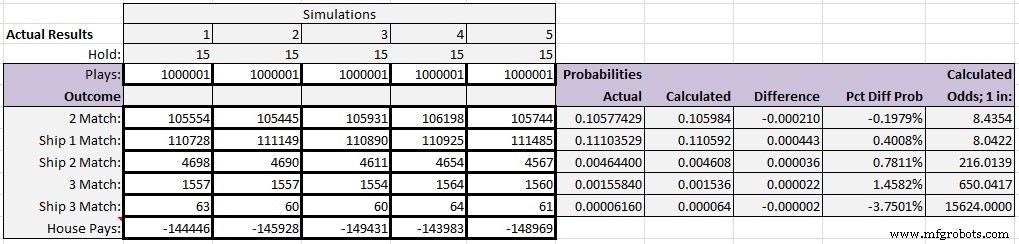
After working with the spreadsheet and the program and running millions of simulations I was able to work out the defects in the program, to address the defects in the spreadsheet and to define values for the payout table that kept the VI < 20. Finally I changed the hold to 15% and ran another set of 5 simulations to verify that the game's income is in line with expectations if it were to be deplyed in a real world situation Here is the income table for a 15% hold.
And here are the actual results.
If you want to really understand all of the math behind setting the payout values I encourage you to examine the formulas in the spreadsheet. If you find any errors kindly point them out to me; I am not a mathematician (or a C programmer) by trade, so the standard disclaimer applies.
The CodeI will not be taking you through the code line by line. It's extensively commented and there's nothing tricky going on anywhere. So use the Force, read the source. If you're not familiar with the manipulation of registers on the ATmega386 and would like to understand more about how to write code for the AVR micro-controller without relying on the Arduino library, I'd encourage you to get a copy of Elliott William's excellent book, "Make: AVR Programming". If you happen to have a subscription to safaribooksonline.com, you'll find it there. Otherwise it's available here on Amazon. In these programs I use the Arduino functions in some places, and in other places I manipulate the registers directly. Sorry about that.
The first thing you might notice is that the program makes extensive use of global variables. There's a good discussion on this topic at Stack Overflow. I'm not going to promote or defend heavy use of global variables here, but I would encourage you to understand all perspectives on the topic and recognize that there's a strong argument for using them on an embedded application project with a single programmer and limited resources.
I do make use of some libraries, without which this project would have been impossible for me. The Timer Free Tone Library is used to drive various frequencies through the passive piezo speaker. In SlotMachine.h you'll notice that there are a slew of defines for musical notes. You can use that to put together any melody you wish. I only use a handful of them to play part of the theme from "Close Encounters of the Third Kind" when the SlotMachine's micro-controller starts and the setup function runs. I selected the timer free library because I thought I was going to need the timer for something, but I ended up not using the timer at all. It's available if you need it. The LED Control Library is used in both SlotMachine.ino and slotCreditDisplaySlave.ino. In the former it's used to control the three 8 x 8 LED matrices that serve as the slot machines reels. In slotCreditDisplaySlave.ino the library facilitates access to the 8 digit seven segment display that displays the player's credit balance. This would be a good time to mention that I tried to avoid using another AVR chip (ATmega328) just to serve up the credit balance, but I could not find a way to control the 8 x 8 matrices and the 8 digit seven segment display from a single micro-controller. So in the end I had to create an I2C slave to serve that purpose. It's definitely the case that you could use a less expensive AVR to do the job of displaying the credit balance, but to keep things simple for this article I elected to use another ATmega328P-PU chip. On the bright side, when you win a large jackpot the credits continue to count up on the credit display slave while you can go ahead and spin again. The LiquidCrystal/LCD and the LiquidCrystal I2C libraries are needed to facilitate access to the 20 line x 4 row LCD display. As mentioned you can substitute a 20 x 2 LCD if that's all you have on hand, just by changing the definition of LCD_SCREEN_HEIGHT from 4 to 2. Be sure that the LCD display you acquire for this project is I2C capable. If it isn't you'll need to acquire an I2C SPI serial interface board port module for LCD1602 adapter plate, part number PCF8574, depicted below, and solder it to your LCD1602 display.
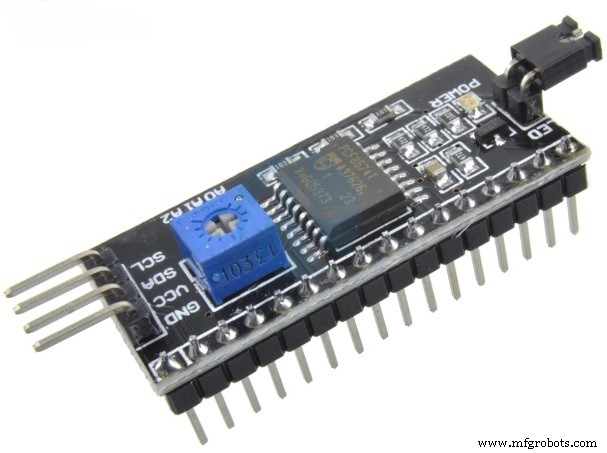
The game can be in a number of different states at the same time, and the machineState variable tracks the states. For example, it can be 'spinning' and in 'auto mode' at the same time. I don't really make heavy use of this concept inside of the program; not as much as I have in other programs, anyhow. But there is some conditional branching based on the state. There is also the concept of events, and events are dispatched and handled in the ProcessEvents function. It would probably be better if there was an event queue, but I didn't go that far.
There's a list of known defects and 'to dos' in the comments section of SlotMachine.ino. Sometimes when you 'spin' the reels (by pressing the spin button or selecting the 'Play' option from the LCD menu) one or even two of the reels don't move. That's because the random number generator behind the scenes picked symbol that's already displaying for that reel. This could be fixed to make the game appear more realistic, but it's not really a defect. The reels don't finish spinning left to right, as they do on most slot machines. This is done by design, to keep things simple. It would be possible to have the reels finish spinning from left to right by sorting the three random numbers that are generated for each spin in ascending order before the reels actually spin, and I didn't bother.
As far as 'todos', I would at some point like to add brown out protection and watch dog protection, just to go through the exercise and learn how to do it. Note that 80% of the space allocated for global variables is already consumed. This is the point at which things can start to become unstable with the ATmega386 and Arduino programs. We're at that point with this program. I've had to do some budgeting the keep things working, and I wouldn't recommend adding any more globals to the program. This would make it difficult to add more functionality to the Settings portion of the menu, for example, because the menu consumes a lot of global variable space. I did try to solve the global variable problem by moving the menus into program memory, but I couldn't get that to reduce the space used by globals, I think because the compiler needs to pre-allocate all of the space for the menus anyhow. More work could be done to spice up the game a bit; I could make more use of the RGB LED and the piezo buzzer, celebrate a win a little more, maybe make a better sound when money is lost, but I'll leave that to anyone who wants to play with it.
I had to design all of the symbols for the game. Some of them will remind you of the classic arcade game 'Space Invaders', and I may have borrowed those from somewhere. The rest of them I designed by hand, and some of them are less than professional looking. I used this site to help design the symbols. If you want to adjust the symbols you can do that in SlotMachine.h, and play with them to your heart's content. It won't affect the program logic. For the symbols I represent the numbers in base 2 / binary so that you can design them with your text editor.
The code is available here on GitHub.
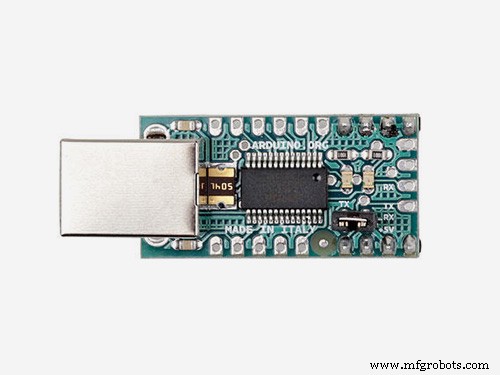
Building the Slot MachineI used an FTDI USB to serial board to program both ATmega328P-PU micro-controllers in-place. These connections are not depicted in the Fritzing schematic. For instructions on setting up the FTDI break out board on your solder-less breadboard follow this link. You may need to google around a bit to nail the setup. I believe this post also helped me troubleshoot an issue I was having trying to get the micro-controller to automatically reset at the start of programming via the FTDI breakout board. Remember to place a 100 nF capacitor in series with the connection between the ATmega328 reset pin (position 1/PC6/reset pin) and RTS on the FTDI break out board so that you don't have to hold down the reset button when you want to program the chip. If you elect to use your Arduino Uno to program the chips, instructions are found here. If you're just going to program the chips once with the supplied code it's probably quickest and easiest to just program them from the Arduino Uno.
Both mico-controllers are set up with the 'Arduino' chip (the ATmega328P-PU) on the breadboard. If you're planning on ultimately building this project by soldering the components together, or if you just want to copy what I've done here when you breadboard the project, you'll want to understand how to set up the Arduino on a breadboard. Follow the excellent instructions here for doing that. Those instructions include the procedure necessary to follow if you need to load the Arduino bootloader on the two chips, which you will most likely need to do if you purchase the chips from a supplier in China and/or via e-bay, as suggested here in the part's list. To do that you'll need an AVR programmer like the AVRISP mk II or the USBTiny ISP. You can also just use your Arduino, if you have one, to burn the bootloader. All of your options are explained when you follow the link above.
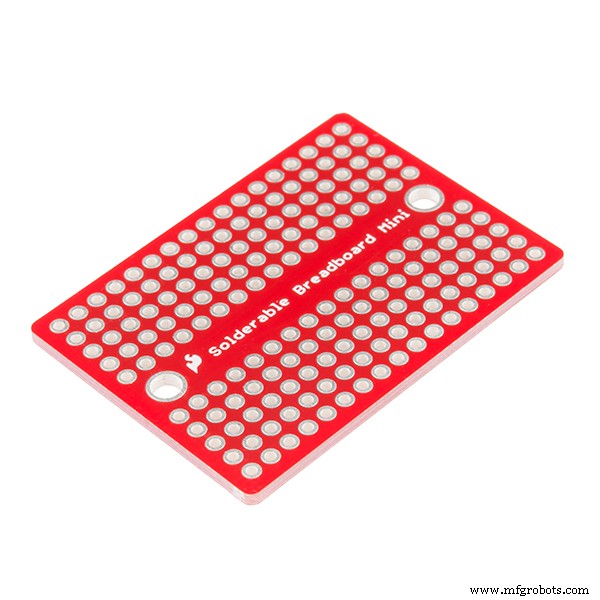
PartsIf you have some of the smaller components in your inventory already (resistors, capacitors, the crystal and the regulator) then you can get away with spending < $40 on parts for this build. If you add in the cost of the enclosure and the perfboard, it's probably approaching $60. I've tried to include the supplier I used for all of the pieces. I use AliExpress.com, Amazon.com, and ebay.com for most of my parts and tools, and all of these parts are easily sourced at any of those locations. Also, if you don't want to purchase a 20 x 4 LCD display, and you already have a 20 x 2 LCD display on hand, you can simply change LCD_SCREEN_HEIGHT in SlotMachine.ino from 4 to 2.
Here is the enclosure I've ordered, into which I'll insert the components:
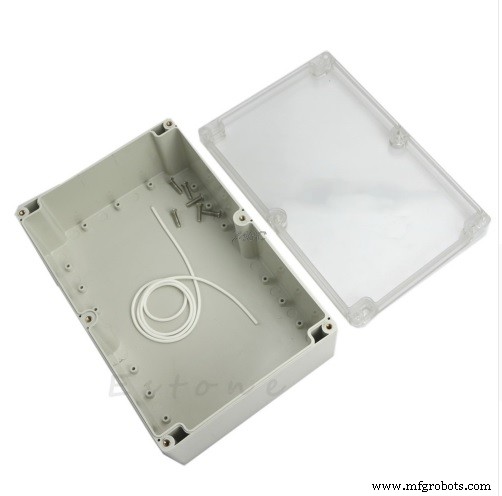
This item is available here for $13.80. That's a little on the pricey side in my view. I'm hoping that everything will fit and that the top is very transparent so that I don't have to cut holes in it to see the reels and the credit balance display. We'll see how it goes when it gets here! Suggestions welcome.
SoftwareAll of these libraries listed in the parts section will need to be installed into your Arduino development environment if you wish to compile the code so that you can upload it onto your ATmega chip. This page explains how to install an Arduino library.
Hand Tools- Soldering iron
- Helping Hands
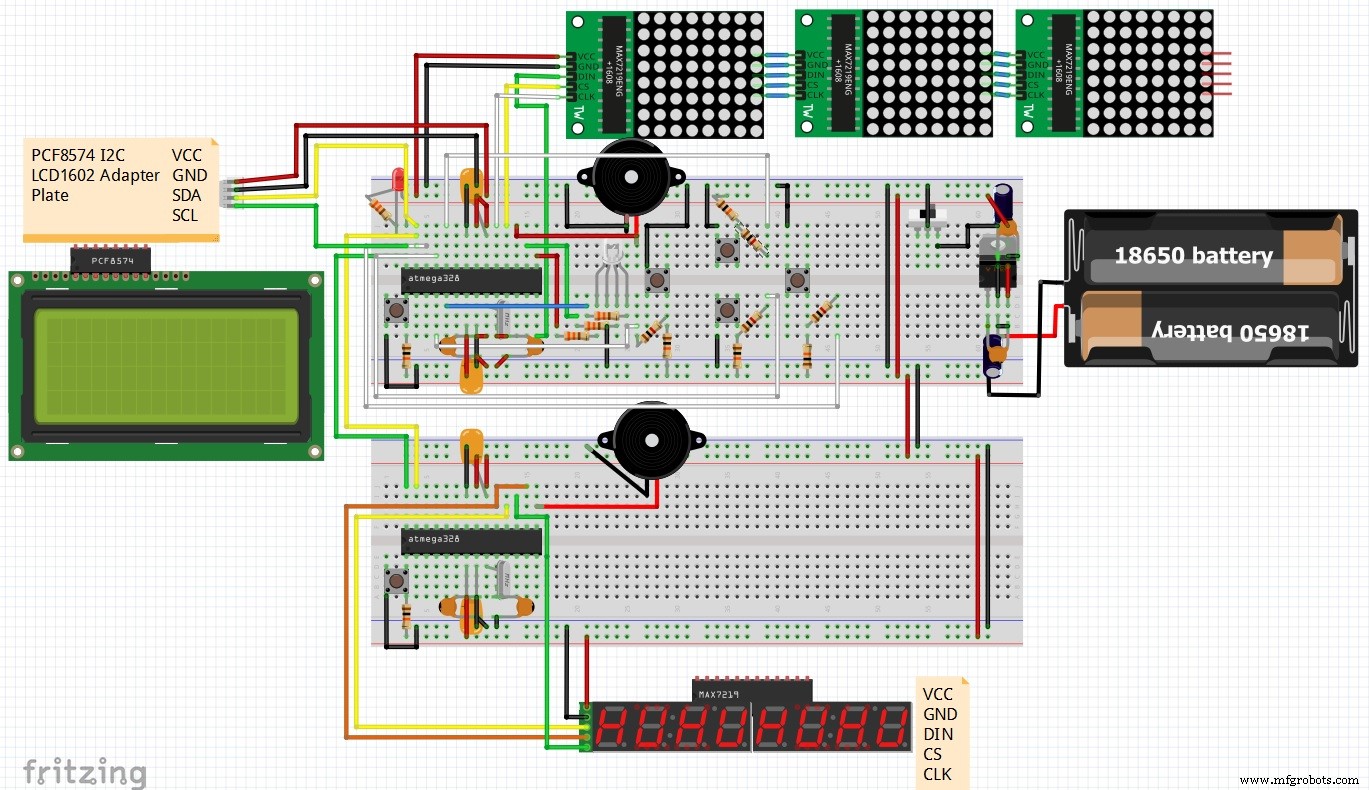
The Fritzing schematic is available here, and the.fzz file is included with the code on GitHub.
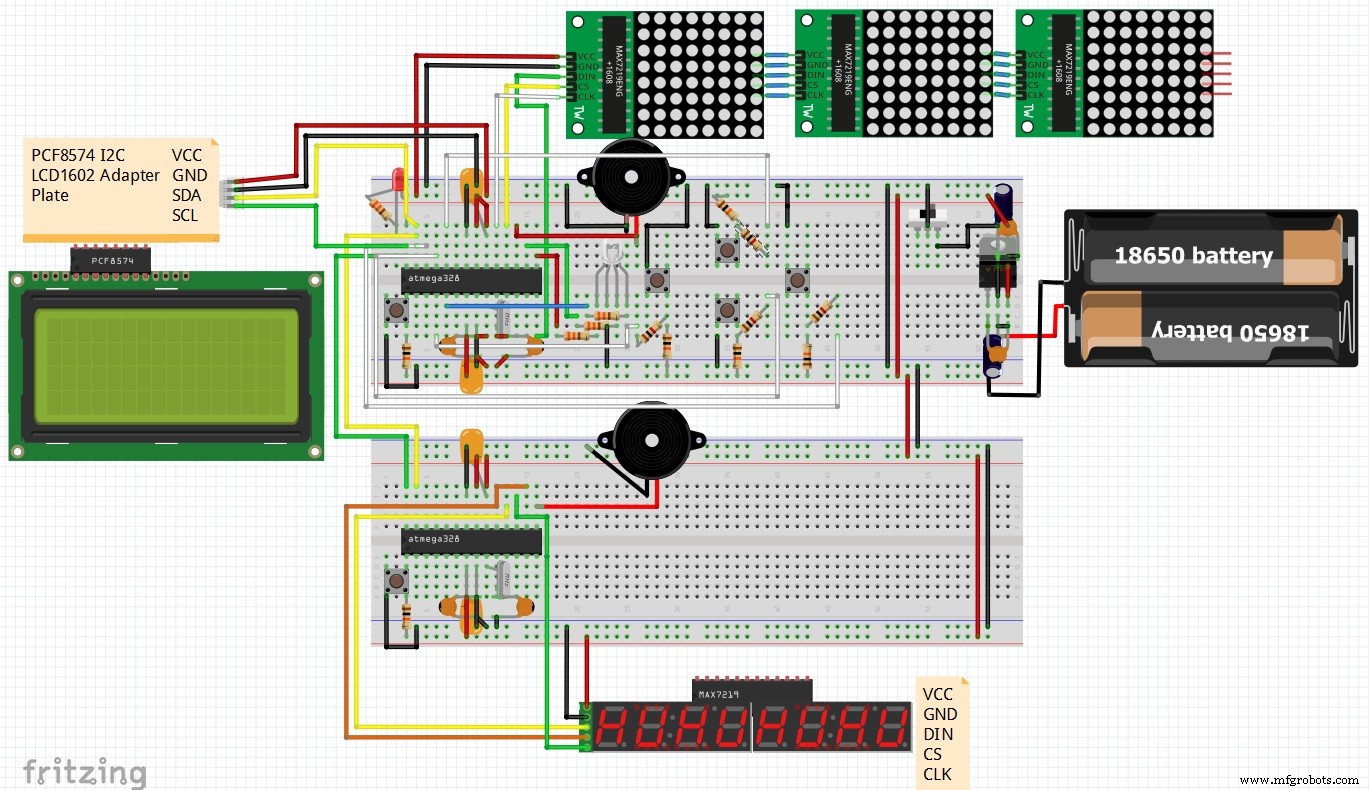
Below I've included some directions on wiring the micro-controllers, because the Fritzing diagram is crowded. This doesn't represent all of the connections necessary, but it should clear up any confusion. I haven't grounded all of the unused pins, but I am probably going to do that in the final product. If you're having trouble following the Fritzing diagram with respect to setting up the circuitry for the power supply, remember to look here, under Adding circuitry for a power supply. Remember to add the switch between the breadboard ground rail and the power supply circuit so that you can power the circuit off and on without having to unplug or disconnect the power supply. That will be important when we put everything into an enclosure.
Slot Machine
- Pin 1 - RTS on the FTDI USB to Serial break out board, reset button
- Pin 2 - TXD on the FTDI USB to Serial break out board
- Pin 3 - RXD on the FTDI USB to Serial break out board
- Pin 4 - 1K ohm resistor - momentary 'spin' button
- Pin 5 - 330 ohm resistor - RGB LED blue pin
- Pin 6 - unused, consider grounding it
- Pin 7 VCC - breadboard power rail, 0.1uF capacitor
- Pin 8 GND - breadboard ground rail, 0.1uF capacitor
- Pin 9 XTAL1 - 16MHz crystal, 22pF capacitor to breadboard ground rail
- Pin 10 XTAL2 - 16MHz crystal, 22pF capacitor to breadboard ground rail
- Pin 11 - unused, consider grounding it
- Pin 12 - unused, consider grounding it
- Pin 13 - unused, consider grounding it
- Pin 14 - DIN on the 8x8 matrices
- Pin 15 - 330 ohm resistor - RGB LED red pin
- Pin 16 - 330 ohm resistor - RGB LED green pin
- Pin 17 - piezo buzzer positive - negative piezo buzzer - breadboard ground rail
- Pin 18 - CS on the 8x8 matrices
- Pin 19 - CLK on the 8x8 matrices
- Pin 20 AVCC - breadboard power rail, 0.1uF capacitor
- Pin 21 AREF - breadboard power rail
- Pin 22 GND - breadboard ground rail
- Pin 23 - leave this pin floating, it's used to seed the random number generator
- Pin 24 - 1K ohm resistor - momentary 'navigate up' button
- Pin 25 - 1K ohm resistor - momentary 'navigate down' button
- Pin 26 - 1K ohm resistor - momentary 'select' button
- Pin 27 SDA - Pin 27 SDA on the display I2C ATmega328P-PU slave
- Pin 28 SCL - Pin 28 SCL on the display I2C ATmega328P-PU slave
Display Slave
- Pin 1 - RTS on the FTDI USB to Serial break out board, reset button
- Pin 2 - TXD on the FTDI USB to Serial break out board
- Pin 3 - RXD on the FTDI USB to Serial break out board
- Pin 4 - unused, consider grounding it
- Pin 5 - unused, consider grounding it
- Pin 6 - unused, consider grounding it
- Pin 7 VCC - breadboard power rail, 0.1uF capacitor
- Pin 8 GND - breadboard ground rail, 0.1uF capacitor
- Pin 9 XTAL1 - 16MHz crystal, 22pF capacitor to breadboard ground rail
- Pin 10 XTAL2 - 16MHz crystal, 22pF capacitor to breadboard ground rail
- Pin 11 - unused, consider grounding it
- Pin 12 - unused, consider grounding it
- Pin 13 - unused, consider grounding it
- Pin 14 - unused, consider grounding it
- Pin 15 - piezo buzzer positive - negative piezo buzzer - breadboard ground rail
- Pin 16 - CS on the seven segment display
- Pin 17 - CLK on the seven segment display
- Pin 18 - DIN on the seven segment display
- Pin 19 - unused, consider grounding it
- Pin 20 AVCC - breadboard power rail, 0.1uF capacitor
- Pin 21 AREF - breadboard power rail
- Pin 22 GND - breadboard ground rail
- Pin 23 - unused, consider grounding it
- Pin 24 - unused, consider grounding it
- Pin 25 - unused, consider grounding it
- Pin 26 - unused, consider grounding it
- Pin 27 SDA - Pin 27 SDA on the slot machine I2C ATmega328P-PU
- Pin 28 SCL - Pin 28 SCL on the slot machineI2C ATmega328P-PU
This project was a lot of fun to build. The most challenging part was understanding all of the math necessary to create a payout table that works. I hope you can have fun with this project too, if you decide to build it. If you have any problems, questions, or, most importantly, discover any defects in the code or with the math, please contact me so I can fix any problems! My email address is dan-murphy@comcast.net. I'll be creating part II of this article when I enclose all of the components.
Code
- SlotMachine.ino
- SlotMachine.h
- slotCreditsDisplaySlave.ino
SlotMachine.inoArduino
/*SlotMachine.ino
Version: 1.0
Date: 2018/07/01 - 2018/08/29
Device: ATMega328P-PU @ 16mHz
Language: C
Purpose
=======
A slot machine for entertainment and educational purposes only,
with the following features:
- AtMega328P microcontroller running at 16mHz
- Custom I2C seven segment display for displaying credit balance,
also built with an ATMega328P running at 16mHz. That program is
supplied in a seperate file.
- Three 8x8 LED matricies for displaying symbols driven by MAX7219.
- I2C LCD display 20x4, to show menus
- various buzzers, buttons and an RGB LED.
- the ability to update various settings via the LCD menu to
influence the machine's behavior.
- the ability to change the amount of the wager.
Known Defects
=============
- Sometimes one or two of the reels won't spin, not really a defect.
- crash as soon as payed out exceeds 1,000,000.
TODO
====
- add brown out detection
- add watch dog protection (wdt_enable(value), wdt_reset(), WDTO_1S, WDTO_250MS)
Warnings
========
- Beware of turning on too much debugging, it's easy to use all
of the data memory, and in general this makes the microcontroller
unstable.
- Gambling is a tax on people who are bad at math. This is for
entertainment only. It was the intent of the author to program this game
to return ~%hold of every wager to the house, similar to many slot machines.
- Why not control the LED that displays the credits with the LedControl
library? I tried that and couldn't get more than one LedControl object to
work at a time. So I had to create an I2C slave instead and use another
AVR.
Suggestions
===========
- Best viewed in an editor w/ 160 columns, most comments are at column 80
- Please submit defects you find so I can improve the quality of the program
and learn more about embedded programming.
Author
======
- Copyright 2018, Daniel Murphy <dan-murphy@comcast.net>
- Contributors: Source code has been pulled from all over the internet,
it would be impossible for me to cite all contributors.
Special thanks to Elliott Williams for his essential book
"Make: AVR Programming", which is highly recommended. Thanks also
to Cory Potter, who gave me the idea to do this.
License
=======
Daniel J. Murphy hereby disclaims all copyright interest in this
program written by Daniel J. Murphy.
This program is free software: you can redistribute it and/or modify
it under the terms of the GNU General Public License as published by
the Free Software Foundation, either version 3 of the License, or
any later version.
This program is distributed in the hope that it will be useful,
but WITHOUT ANY WARRANTY; without even the implied warranty of
MERCHANTABILITY or FITNESS FOR A PARTICULAR PURPOSE. See the
GNU General Public License for more details.
You should have received a copy of the GNU General Public License
along with this program. If not, see <http://www.gnu.org/licenses/>.
Libraries
=========
- https://github.com/wayoda/LedControl
- https://bitbucket.org/teckel12/arduino-timer-free-tone/wiki/Home
- https://github.com/fdebrabander/Arduino-LiquidCrystal-I2C-library
- https://bitbucket.org/fmalpartida/new-liquidcrystal/wiki/Home
The Program
===========
- Includes */
#include <avr/io.h>
#include <avr/eeprom.h>
#include <stdlib.h> // for the abs function
#include "LedControl.h" // https://github.com/wayoda/LedControl
#include "SlotMachine.h"
#include <TimerFreeTone.h> // https://bitbucket.org/teckel12/arduino-timer-free-tone/wiki/Home
#include <Wire.h>
#include <LCD.h> // https://bitbucket.org/fmalpartida/new-liquidcrystal/wiki/Home
#include <LiquidCrystal_I2C.h> // https://github.com/fdebrabander/Arduino-LiquidCrystal-I2C-library
//- Payout Table
/* Probabilities based on a 1 credit wager
Three spaceships: 1 / (25 * 25 * 25) = 0.000064
Any three symbols: 24 / 15625 = 0.001536
Two spaceships: (24 * 3) / 15625 = 0.004608
One spaceship: (24 * 24 * 3)/ 15625 = 0.110592
Two symbols match: (23 * 3 * 24) / 15625 = 0.105984
House win, 1 minus sum of all probabilities = 0.777216
_
Use the spreadsheet to work out the payout table remembering to keep the
volatility resonable i.e. < 20.
P R O O F
Actual Actual
Winning Combination Payout Probablility Count Probability
=================== ====== ============ ======== ===========*/
#define THREE_SPACESHIP_PAYOUT 600 // 0.000064 0.00006860 see the excel spreadsheet
#define THREE_SYMBOL_PAYOUT 122 // 0.001536 0.00151760 that accompanies this program.
#define TWO_SPACESHIP_PAYOUT 50 // 0.004608 0.00468740
#define ONE_SPACESHIP_PAYOUT 3 // 0.110592 0.11064389
#define TWO_SYMBOL_PAYOUT 2 // 0.105984 0.10575249
//
// With these payouts the Volatility Index is 16.43
//
//- Macros
#define ClearBit(x,y) x &= ~y
#define SetBit(x,y) x |= y
#define ClearBitNo(x,y) x &= ~_BV(y)
#define SetState(x) SetBit(machineState, x)
//- Defines
#define DEBUG 1 // turns on (1) and off (0) output from debug* functions
#define BAUD_RATE 38400 // Baud rate for the Serial monitor
#define NUMFRAMES 25 // Number of symbols in each "reel" or "slot". e.g three reels: |7|7|7|
#define LINESPERFRAME 8 // each line corresponds to one row on the 8x8 dot matrix LED
#define FRAME_DELAY 100 // milliseconds, controls the speed of the spinning reels
#define NUMREELS 3 // the hardware (8x8 matricies) accomodates 4 reels, we're only using three now
#define DEBOUNCE_TIME 1000 // microseconds (changed from 500 to 1000 to cut down on double press problem)
#define BUTTON_DDR DDRD // this accomodates the button that starts the reels spinning
#define BUTTON_PORT PORTD
#define BUTTON_PIN PIND
#define PCMSK_BUTTON PCMSK2
#define PCIE_BUTTON PCIE2
#define BUTTON_SPIN_PIN DDD2 // the actual spin button
#define BUTTON_SPIN_INT PCINT18
#define BUTTON_SPIN_PORT PORTD2
#define NAV_DDR DDRC // this is for the buttons that control menu navigation on the 20x4 LCD
#define NAV_PORT PORTC
#define NAV_PIN PINC
#define PCMSK_NAV PCMSK1
#define PCIE_NAV PCIE1
#define NAV_UP_PIN DDC1 // Navigate up button
#define NAV_UP_INT PCINT9
#define NAV_UP_PORT PORTC1
#define NAV_DOWN_PIN DDC2 // Navigate down button
#define NAV_DOWN_INT PCINT10
#define NAV_DOWN_PORT PORTC2
#define SELECT_PIN DDC3 // Select current menu item button
#define SELECT_INT PCINT11
#define SELECT_PORT PORTC3
#define BUZZER_DDR DDRB // This is for the slot machines piezo buzzer
#define BUZZER_PORT PORTB
#define BUZZER_PIN DDB3
#define TONE_PIN 11 // Pin you have speaker/piezo connected to (TODO: be sure to include a 100ohm resistor).
#define EVENT_NONE 0 // These are all of the various events that can occur in the machine
#define EVENT_SPIN 1
#define EVENT_SHOW_MENU 2
#define EVENT_SELECT 3
#define EVENT_NAV_UP 4
#define EVENT_NAV_DOWN 5
#define EVENT_BACK 6
#define EVENT_PLAY 10
#define EVENT_BET 11
#define EVENT_SETTINGS 12
#define EVENT_VIEW_METRICS 13
#define EVENT_RESET 14
#define EVENT_HOLD 15
#define STATE_IDLE B00000001 // These are the various states the machine can be in, not all are
#define STATE_SPINNING B00000010 // mutually exclusive.
#define STATE_AUTO B00000100 // This state is for automatically running the program to gather metrics.
#define STATE_SHOW_MENU B00001000 // State we're in when showing the menu. Note you can spin and show menu
// concurrently.
#define MINIMUM_WAGER 5 // TODO: consider this something that can be changed via settings
#define WAGER_INCREMENT 5 // TODO: consider this something that can be changed via settings
#define ONE_SECOND 1000 // # milliseconds in one second. Used to control how long the siren sounds.
#define SHIP_LOC 144 // Location of various symbols in the array of symbols maintained in SlotMachine.h
#define ALIEN_1_LOC 152 // needed for animation
#define ALIEN_2_LOC 160
#define EEPROM_FREQ 10000 // Write to EEPROM every Nth play
#define AUTO_MODE_MAX 1000000 // stop after this many plays in auto mode
#define RED 1 // TODO: should we use an enum here? Must be a better way...
#define GREEN 2
#define BLUE 3
#define PURPLE 4
#define WHITE 5
#define OFF 6
#define MAX_NOTE 4978 // Maximum high tone in hertz. Used for siren.
#define MIN_NOTE 31 // Minimum low tone in hertz. Used for siren.
#define STARTING_CREDIT_BALANCE 500 // Number of credits you have at "factory reset".
#define DEFAULT_HOLD 0 // default hold is zero, over time the machine pays out whatever is wagered
#define NUM_LED_DATAIN 7
#define NUM_LED_CLK 6
#define NUM_LED_LOAD 5
#define NUM_CHIP_COUNT 1
#define MATRIX_LED_DATAIN 8
#define MATRIX_LED_CLK 13
#define MATRIX_LED_LOAD 12
#define MATRIX_CHIP_COUNT 4
#define LOW_INTENSITY 1 // dim
#define HIGH_INTENSITY 10 // bright
#define SIREN_FLASHES 1
#define LCD_SCREEN_WIDTH 20
#define LCD_SCREEN_HEIGHT 4
#define CREDITS_I2C_SLAVE_ADDR 0x10 // I2C addresses
#define LCD_I2C_ADDR 0x3F // LCD display w/ 4 lines
#define BACKLIGHT_PIN 3
#define En_pin 2
#define Rw_pin 1
#define Rs_pin 0
#define D4_pin 4
#define D5_pin 5
#define D6_pin 6
#define D7_pin 7
#define MENU_SIZE 17
#define MAIN_MENU_NUMBER 0
#define MAIN_MENU_ELEMENTS 6
char *mainMenu[] = { "Play",
"Bet",
"Settings",
"Metrics",
"Reset",
"Hold",
" ",
" ",
" ",
" ",
" ",
" ",
" ",
" ",
" ",
" ",
" " };
#define BET_MENU_NUMBER 1
#define BET_MENU_ELEMENTS 3
char *betMenu[] = { "+5 credits: ", // TODO: make this dynamic based on WAGER_INCREMENT
"-5 credits: ",
"Back",
" ",
" ",
" ",
" ",
" ",
" ",
" ",
" ",
" ",
" ",
" ",
" ",
" ",
" " };
#define SETTINGS_MENU_NUMBER 2
#define SETTINGS_MENU_ELEMENTS 3
#define SETTINGS_BACK_ITEM 2
char *settingsMenu[] = { "Auto/Manual", // TODO: fill out this menu with more cool options
"Toggle Sound ",
"Back ",
" ",
" ",
" ",
" ",
" ",
" ",
" ",
" ",
" ",
" ",
" ",
" ",
" ",
" " };
#define METRICS_MENU_NUMBER 3
#define METRICS_MENU_ELEMENTS 15
char *metricsMenu[METRICS_MENU_ELEMENTS];
#define HOLD_MENU_NUMBER 4
#define HOLD_MENU_ELEMENTS 3
char *holdMenu[] = { "+1 percent: ",
"-1 percent: ",
"Back",
" ",
" ",
" ",
" ",
" ",
" ",
" ",
" ",
" ",
" ",
" ",
" ",
" ",
" " };
int selectPos = 0;
int menuNumber = MAIN_MENU_NUMBER;
int elements = MAIN_MENU_ELEMENTS;
char *currentMenu[MENU_SIZE];
LiquidCrystal_I2C lcd( LCD_I2C_ADDR, // Create the LCD display object for the 20x4 display
En_pin,
Rw_pin,
Rs_pin,
D4_pin,
D5_pin,
D6_pin,
D7_pin );
LedControl lc=LedControl( MATRIX_LED_DATAIN, // Create the LED display object for the 8x8 matrix
MATRIX_LED_CLK,
MATRIX_LED_LOAD,
MATRIX_CHIP_COUNT ); // Pins: DIN,CLK,CS, # of chips connected
volatile int reelArrayPos[NUMREELS];
volatile byte machineState;
volatile byte event = EVENT_NONE;
volatile byte color = RED;
#define ADC_READ_PIN 0 // we read the voltage from this floating pin to seed the random number generator
#define RED_PIN 9 // Pin locations for the RGB LED
#define GREEN_PIN 10
#define BLUE_PIN 3
#define NUM_NOTES 5 // The number of notes in the melody
// EEProm address locations
#define PAYEDOUT_ADDR 0x00 // 4 bytes
#define WAGERED_ADDR 0x04 // 4 bytes
#define PLAYED_ADDR 0x08 // 4 bytes
#define TWO_MATCH_ADDR 0x12 // 4 bytes
#define THREE_MATCH_ADDR 0x16 // 2 bytes
#define SHIP_ONE_MATCH_ADDR 0x18 // 4 bytes
#define SHIP_TWO_MATCH_ADDR 0x22 // 2 bytes
#define SHIP_THREE_MATCH_ADDR 0x24 // 2 bytes
#define EEPROM_WRITES_ADDR 0x34 // 4 bytes
#define RESET_FLAG_ADDR 0x38 // 4 bytes
#define CREDIT_BALANCE_ADDR 0x42 // 4 bytes
#define HOLD_ADDR 0x46 // 2 bytes
boolean sound = true;
byte reelMatches = 0; // per play variables
byte shipMatches = 0;
unsigned long wagered = 0; // amount wagered on a single spin
double owedExcess = 0; // change, need to track this so hold is accurate
unsigned long twoMatchCount = 0; // 1 if two symbols match
unsigned int threeMatchCount = 0; // 1 if three symbols match
unsigned long shipOneMatchCount = 0; // 1 if there's one ship present
unsigned int shipTwoMatchCount = 0; // 1 if there are two ships present
unsigned int shipThreeMatchCount = 0; // 1 if there are three ships present (Jackpot!)
unsigned long totalCalcs = 0; // total plays only relavent in auto mode
signed long startingCreditBalance; // the credit balance before spinning
int increment = WAGER_INCREMENT;
#define DISP_CREDIT_INCREMENT 1 // on the seven segment display, increment/decrement the balance by this value until the final value is reached.
// lifetime variables (stored in EEprom) Reset sets most back to zero
unsigned long storedPayedOut; // sum of all payouts
unsigned long storedWagered; // sum of all wagers (profit = payouts - wagers)
unsigned long storedPlays; // the number of spins
unsigned long storedTwoMatchCount; // number of times two symbols have matched
unsigned int storedThreeMatchCount; // number of times three symbols have matched
unsigned long storedShipOneMatchCount; // number of times one ship has appeared
unsigned int storedShipTwoMatchCount; // number of time two ships have appeared
unsigned int storedShipThreeMatchCount; // number of times three ships have appeared (Jackpot!)
unsigned long storedEEpromWrites; // number of times we've written to EEprom. 100,000 is the approximate maximum
signed long storedCreditBalance; // the credit balance.
int storedHold = DEFAULT_HOLD; // the house advantage, in percent, usually between 1 and 15, 2 bytes
volatile byte portdhistory = 0b00000100; // default is high because of the pull-up, correct setting
volatile byte portchistory = 0b00001110; // default is high because of the pull-up, correct setting
//- Debugging Routines // These routines are helpful for debugging, I will leave them in for your use.
// For sending output to the serial monitor. Set the baud rate in setup.
void debug(String text) {
if (DEBUG) {
Serial.println(text);
}
}
void debugNoLF(String text) {
if (DEBUG) {
Serial.print(text);
}
}
void debugInt(signed int anInt) {
if (DEBUG) {
char myInt[10];
itoa(anInt,myInt,10);
debug(myInt);
}
}
void debugLong(signed long aLong) {
if (DEBUG) {
char myLong[10];
ltoa(aLong,myLong,10);
debug(myLong);
}
}
void debugDouble(double aDouble) {
if (DEBUG) {
char *myDouble = ftoa(aDouble);
debug(myDouble);
}
}
void debugMetric(const char myString[], signed int anInt) {
if (DEBUG) {
debugNoLF(myString);debugNoLF(F(": "));
debugInt(anInt);
Serial.print(F("\r\n"));
}
}
void debugMetricLong(const char myString[], signed long aLong) {
if (DEBUG) {
debugNoLF(myString);debugNoLF(F(": "));
debugLong(aLong);
Serial.print(F("\r\n"));
}
}
void debugStoredMetrics() {
for (int i = 0; i < 11; i++) {
debug(metricsMenu[i]);
}
}
void debugMetricDouble(const char myString[], double aDouble) {
if (DEBUG) {
debugNoLF(myString);debugNoLF(F(": "));
debugDouble(aDouble);
Serial.print(F("\r\n"));
}
}
// quick and dirty ftoa for legacy code
char *ftoa(double f) // from https://www.microchip.com/forums/m1020134.aspx
{
static char buf[17];
char * cp = buf;
unsigned long l, rem;
if(f < 0) {
*cp++ = '-';
f = -f;
}
l = (unsigned long)f;
f -= (double)l;
rem = (unsigned long)(f * 1e6);
sprintf(cp, "%lu.%10.10lu", l, rem);
return buf;
}
//- All Other Functions
void beep() { // Beep and flash LED green unless STATE_AUTO
setGreen();
if (sound) {
BUZZER_PORT |= (1 << BUZZER_PIN); // turn on buzzer
if (!(STATE_AUTO == (machineState & STATE_AUTO))) {
delay(100);
}
BUZZER_PORT &= ~(1 << BUZZER_PIN); // turn off the buzzer
}
setOff();
}
void beepAuto() { // Beep even during STATE_AUTO, flash LED blue
setBlue();
if (sound) {
BUZZER_PORT |= (1 << BUZZER_PIN); // turn on buzzer
delay(100);
BUZZER_PORT &= ~(1 << BUZZER_PIN); // turn off the buzzer
}
setOff();
}
void beepPurple() { // Beep and flash LED purple unless STATE_AUTO
if (!(STATE_AUTO == (machineState & STATE_AUTO))) {
setPurple();
if (sound) {
BUZZER_PORT |= (1 << BUZZER_PIN); // turn on buzzer
delay(100);
BUZZER_PORT &= ~(1 << BUZZER_PIN); // turn off the buzzer
}
setOff();
}
}
void InitInturrupts() // Initialize interrupts for buttons and switches
{
PCICR |= (1 << PCIE_BUTTON); // Pin Change Interrupt Control Register, set PCIE2 to enable PCMSK2 scan
PCICR |= (1 << PCIE_NAV); // Pin Change Interrupt Control Register, set PCIE1 to enable PCMSK1 scan
// Pin Change Mask Register 2 for port D
PCMSK_BUTTON|=(1<<BUTTON_SPIN_INT); // Set PCINT2 to trigger an interrupt on state change
PCMSK_NAV|=((1<<NAV_UP_INT)|(1<<NAV_DOWN_INT)|(1<<SELECT_INT)); // Set PCINT1 to trigger an interrupt on state change
sei(); // enable interrupts
}
ISR (PCINT1_vect)
{
byte changeddbits;
changeddbits = NAV_PIN ^ portchistory;
ClearBitNo(changeddbits,PORTC0); // not a switch, ignore it
ClearBitNo(changeddbits,PORTC4); // not a switch, ignore it
ClearBitNo(changeddbits,PORTC5); // not a switch, ignore it
ClearBitNo(changeddbits,PORTC6); // not a switch, ignore it
portchistory = NAV_PIN;
ClearBitNo(portchistory,PORTC0); // not a switch, ignore it
ClearBitNo(portchistory,PORTC4); // not a switch, ignore it
ClearBitNo(portchistory,PORTC5); // not a switch, ignore it
ClearBitNo(portchistory,PORTC6); // not a switch, ignore it
if(changeddbits & (1 << NAV_UP_PIN))
{
if( (portchistory & (1 << NAV_UP_PIN)) == (1 << NAV_UP_PIN) ) // TODO: test using this instead of 16
{
_delay_us(DEBOUNCE_TIME);
if (bit_is_set(NAV_PIN, NAV_UP_PIN)) { // LOW to HIGH pin change (button released)
// ADD CODE HERE
int x = 0;
}
}
else
{
_delay_us(DEBOUNCE_TIME);
if (bit_is_clear(NAV_PIN, NAV_UP_PIN)) { // button pressed
// HIGH to LOW pin change (spin switch button pressed)
event = EVENT_NAV_UP;
}
}
}
if(changeddbits & (1 << NAV_DOWN_PIN))
{
if( (portchistory & (1 << NAV_DOWN_PIN)) == (1 << NAV_DOWN_PIN) ) // TODO: test using this instead of 16
{
_delay_us(DEBOUNCE_TIME);
if (bit_is_set(NAV_PIN, NAV_DOWN_PIN)) { // LOW to HIGH pin change (button released)
// ADD CODE HERE
int x = 0;
}
}
else
{
_delay_us(DEBOUNCE_TIME);
if (bit_is_clear(NAV_PIN, NAV_DOWN_PIN)) { // button pressed
// HIGH to LOW pin change (spin switch button pressed)
event = EVENT_NAV_DOWN;
}
}
}
if(changeddbits & (1 << SELECT_PIN))
{
if( (portchistory & (1 << SELECT_PIN)) == (1 << SELECT_PIN) ) // TODO: test using this instead of 16
{
_delay_us(DEBOUNCE_TIME);
if (bit_is_set(NAV_PIN, SELECT_PIN)) { // LOW to HIGH pin change (button released)
int x = 0;
}
}
else
{
_delay_us(DEBOUNCE_TIME);
if (bit_is_clear(NAV_PIN, SELECT_PIN)) { // button pressed
// HIGH to LOW pin change (spin switch button pressed)
event = EVENT_SELECT;
}
}
}
}
ISR (PCINT2_vect)
{
byte changeddbits; // Will have bit corresponding to button pressed flipped on
changeddbits = BUTTON_PIN ^ portdhistory; // flip the bit corresponding to the button that was pressed
ClearBitNo(changeddbits,PORTD0); // not a switch, ignore it
ClearBitNo(changeddbits,PORTD1); // not a switch, ignore it
ClearBitNo(changeddbits,PORTD3); // not a switch, ignore it
ClearBitNo(changeddbits,PORTD4); // not a switch, ignore it
ClearBitNo(changeddbits,PORTD5); // not a switch, ignore it
ClearBitNo(changeddbits,PORTD6); // not a switch, ignore it
ClearBitNo(changeddbits,PORTD7); // not a switch, ignore it
portdhistory = BUTTON_PIN; // set history = to the current state of input
ClearBitNo(portdhistory,PORTD0); // not a switch, ignore it
ClearBitNo(portdhistory,PORTD1); // not a switch, ignore it
ClearBitNo(portdhistory,PORTD3); // not a switch, ignore it
ClearBitNo(portdhistory,PORTD4); // not a switch, ignore it
ClearBitNo(portdhistory,PORTD5); // not a switch, ignore it
ClearBitNo(portdhistory,PORTD6); // not a switch, ignore it
ClearBitNo(portdhistory,PORTD7); // not a switch, ignore it
if(changeddbits & (1 << BUTTON_SPIN_PIN))
{
if( (portdhistory & (1 << BUTTON_SPIN_PIN)) == (1 << BUTTON_SPIN_PIN) ) // TODO: test using this instead of 16
{
_delay_us(DEBOUNCE_TIME);
if (bit_is_set(BUTTON_PIN, BUTTON_SPIN_PIN)) { // LOW to HIGH pin change (button released)
}
}
else
{
_delay_us(DEBOUNCE_TIME);
if (bit_is_clear(BUTTON_PIN, BUTTON_SPIN_PIN)){ // button pressed
// HIGH to LOW pin change (spin switch button pressed)
if(STATE_SPINNING == (machineState & STATE_SPINNING)) {
SetState(STATE_IDLE);
event = EVENT_NONE;
} else if (STATE_IDLE == (machineState & STATE_IDLE)) {
if (STATE_AUTO == (machineState & STATE_AUTO)) {
ClearBit(machineState, STATE_AUTO);
}
event = EVENT_SPIN;
}
}
}
}
}
void spinAndEvaluate() { // runs when the spin button is pressed or we 'Play' from the main menu
//debug("spinAndEvaluate()");
spin();
checkForWin();
signed long winnings = calcWinnings();
calcStored(winnings);
if (!(STATE_AUTO == (machineState & STATE_AUTO))) { // if we're not in auto mode display the credits
storeMetrics();
displayCredits();
if (reelMatches > 0) {
celebrateWin(reelMatches);
}
setupMetricsMenu();
} else if ((totalCalcs++%EEPROM_FREQ) == 0) { // EEPROM can be written ~100,000 times,
storeMetrics();
displayCredits(); // displayCredits takes care of the sign on increment
setupMetricsMenu();
debugStoredMetrics();
debugMetricDouble("owedExcess",owedExcess); // don't want to put owedExcess in metricsMenu because of global var space shortage
if (totalCalcs >= AUTO_MODE_MAX) { // drop out of auto mode when threshold exceeded
ClearBit(machineState, STATE_AUTO);
SetState(STATE_IDLE);
event = EVENT_NONE;
}
}
ClearBit(machineState, STATE_SPINNING);
}
void spin() {
//debug("spin()");
SetState(STATE_SPINNING);
if (!(STATE_AUTO == (machineState & STATE_AUTO))) {
beep();
}
zeroAllBalances();
byte reelsStopped[NUMREELS] = {0,0,0};
byte stopArrayPos[NUMREELS];
for (int reelNum = 0; reelNum < NUMREELS; reelNum++) {
if (!(STATE_AUTO == (machineState & STATE_AUTO))) {
lc.setIntensity(reelNum,LOW_INTENSITY); // Set intensity levels
}
stopArrayPos[reelNum] = random(0,(NUMFRAMES)) * LINESPERFRAME;
while (stopArrayPos[reelNum] == reelArrayPos[reelNum]) { // keep picking a stop array position until it's not equal to the current position
stopArrayPos[reelNum] = random(0,(NUMFRAMES)) * LINESPERFRAME;
}
}
while (!allReelsStopped(reelsStopped)) {
for (int reelNum = 0; reelNum < NUMREELS; reelNum++) {
if (reelArrayPos[reelNum] == ((NUMFRAMES * LINESPERFRAME) + 1)) {
reelArrayPos[reelNum] = 0; // go back to top of reel
}
if(reelArrayPos[reelNum] != (stopArrayPos[reelNum]+1)) {
if (!(STATE_AUTO == (machineState & STATE_AUTO))) {
for (int row = 0; row < LINESPERFRAME; row++) { // simulate a spinning reel
lc.setRow(reelNum,row,reel[reelArrayPos[reelNum] + row]); // output to 8x8x3 matrix
}
}
//delay(FRAME_DELAY);
//reelArrayPos[reelNum] += LINESPERFRAME; // uncomment for fast play
reelArrayPos[reelNum] += 1;
} else {
if (!(STATE_AUTO == (machineState & STATE_AUTO))) {
lc.setIntensity(reelNum,HIGH_INTENSITY); // Set intensity levels
}
reelsStopped[reelNum] = 1;
}
}
}
}
void checkForWin() { // this only works if NUMREELS == 3 ! If you change NUMREELS you must do so programming!
//debug("checkForWin()");
for (int reelNum=0; reelNum < NUMREELS; reelNum++) { // see if ships appeared
if ((reelArrayPos[reelNum] - 1) == SHIP_LOC) {
shipMatches += 1;
}
}
for (int i = 0; i < NUMREELS; i++) { // check to see if other symbols matched
for (int j = 0; j < NUMREELS; j++) {
if (reelArrayPos[i] - 1 == reelArrayPos[j] - 1) {
reelMatches += 1;
}
}
}
if (reelMatches == 9) { // code from the block above sets reelMatches to 9 if 3 symbols match
reelMatches = 3;
threeMatchCount++;
} else if (reelMatches == 5) { // etc...
reelMatches = 2;
twoMatchCount++;
} else if (reelMatches == 3) {
reelMatches = 0;
} else {
reelMatches = -1; // never used
}
if (shipMatches == 3) {
shipThreeMatchCount++;
} else if (shipMatches == 2) {
shipTwoMatchCount++;
} else if (shipMatches == 1) {
shipOneMatchCount++;
}
if (shipThreeMatchCount) { // Wins are mutually exclusive, subsequent code assumes that!
threeMatchCount = 0; // TODO: make this a switch statement
shipTwoMatchCount = 0;
shipOneMatchCount = 0;
twoMatchCount = 0;
reelMatches = 0;
} else if (threeMatchCount) {
shipTwoMatchCount = 0;
shipOneMatchCount = 0;
twoMatchCount = 0;
reelMatches = 0;
} else if (shipTwoMatchCount) {
shipOneMatchCount = 0;
twoMatchCount = 0;
reelMatches = 0;
} else if (shipOneMatchCount) {
twoMatchCount = 0;
reelMatches = 0;
} else if (twoMatchCount) {
reelMatches = 0;
}
}
signed long calcWinnings() {
double winnings = 0;
//debugMetric("storedHold",storedHold);
if(shipThreeMatchCount > 0) {
winnings = wagered * (THREE_SPACESHIP_PAYOUT - (THREE_SPACESHIP_PAYOUT * (storedHold/100.0))); // winnings are the amount wagered times the payout minus the hold.
} else if (threeMatchCount > 0) {
winnings = wagered * (THREE_SYMBOL_PAYOUT - (THREE_SYMBOL_PAYOUT * (storedHold/100.0)));
} else if (shipTwoMatchCount > 0) {
winnings = wagered * (TWO_SPACESHIP_PAYOUT - (TWO_SPACESHIP_PAYOUT * (storedHold/100.0)));
} else if (shipOneMatchCount > 0) {
winnings = wagered * (ONE_SPACESHIP_PAYOUT - (ONE_SPACESHIP_PAYOUT * (storedHold/100.0)));
} else if (twoMatchCount > 0) {
winnings = wagered * (TWO_SYMBOL_PAYOUT - (TWO_SYMBOL_PAYOUT * (storedHold/100.0)));
} else {
winnings = 0;
}
signed long roundWinnings = (signed long) round(winnings);
owedExcess += winnings - roundWinnings; // owedExcess is the change; credits between -1 and 1.
if (owedExcess >= 1 || owedExcess <= -1) { // if we can pay out some excess
int roundOwedExcess = (int) round(owedExcess);
roundWinnings += roundOwedExcess; // add the rounded portion to the winnings
owedExcess -= roundOwedExcess; // subtract out what we added to continue to track the excess
}
roundWinnings -= wagered; // you pay for your bet whether you won or not!
// winnings -= wagered;
return roundWinnings;
// return((signed long) round(winnings));
}
void calcStored(signed long winnings) {
storedPayedOut += winnings;
storedWagered += wagered;
startingCreditBalance = storedCreditBalance;
storedCreditBalance += winnings;
storedPlays += 1; // calcStored is called one time per play
storedTwoMatchCount += twoMatchCount;
storedThreeMatchCount += threeMatchCount;
storedShipOneMatchCount += shipOneMatchCount;
storedShipTwoMatchCount += shipTwoMatchCount;
storedShipThreeMatchCount += shipThreeMatchCount;
}
void storeMetrics() {
beepAuto(); // so we know we're not hung in auto mode.
updateStoredPayedOut();
updateStoredWagered();
updateStoredPlays();
updateStoredTwoMatchCount();
updateStoredThreeMatchCount();
updateStoredShipOneMatchCount();
updateStoredShipTwoMatchCount();
updateStoredShipThreeMatchCount();
storedEEpromWrites++;
updateStoredEEpromWrites();
updateStoredCreditBalance();
updateStoredHold();
}
void displayCredits() {
//debug("displayCredits()");
int xmitIncrement;
if ((STATE_AUTO == (machineState & STATE_AUTO))) { // display the credits here if we're in auto mode.
xmitIncrement = abs(startingCreditBalance - storedCreditBalance); // we don't want the display slave to count up/down
} else {
xmitIncrement = DISP_CREDIT_INCREMENT; // set increment back to what it should be during manual play
}
Wire.beginTransmission(CREDITS_I2C_SLAVE_ADDR);
Wire.write( startingCreditBalance & 0xFF);
Wire.write((startingCreditBalance & 0xFF00) >> 8);
Wire.write((startingCreditBalance & 0xFF0000) >> 16);
Wire.write((startingCreditBalance & 0xFF000000) >> 24); // most sigificant byte sent last
if (startingCreditBalance > storedCreditBalance) { // if the player lost,
xmitIncrement *= -1; // flip the sign on increment so we count down
}
Wire.write( xmitIncrement & 0xFF);
Wire.write((xmitIncrement & 0xFF00) >> 8);
Wire.write( storedCreditBalance & 0xFF);
Wire.write((storedCreditBalance & 0xFF00) >> 8);
Wire.write((storedCreditBalance & 0xFF0000) >> 16);
Wire.write((storedCreditBalance & 0xFF000000) >> 24); // most sigificant byte sent last
byte error = Wire.endTransmission();
if (error==4)
{
debug(F("Unknown error at address")); // I've never seen this happen.
}
}
bool allReelsStopped(byte reelsStopped[]) {
byte sumStopped = 0;
for (int i; i < NUMREELS; i++) {
if (reelsStopped[i] == 1) {
sumStopped += 1;
}
}
if (sumStopped == NUMREELS) { // all reels stopped
return 1;
}
return 0;
}
void celebrateWin(byte matches) { // we can probably do better than this. I've never seen it run for a three ship match...
//debug("celebrateWin()");
for (int i = 0; i < (matches - 1); i++) {
playSiren();
delay(ONE_SECOND);
}
}
void playSiren() { // play siren and toggle the RGB LED blue and red
//debug("playSiren()");
for (int j = 1; j <= SIREN_FLASHES; j++){
setBlue();
for (int note = MIN_NOTE; note <= MAX_NOTE; note+=5){ // 5 = # notes to step over. Necessary only w/ TimerFreeTone library.
if (note%1236==0) { // at the top of the range change RGB color.
if (color == RED) {
for (int reelNum = 0; reelNum < NUMREELS; reelNum++) {
lc.setIntensity(reelNum, LOW_INTENSITY); // this doesn't seem to be working...
}
setBlue();
}
if (color == BLUE) {
for (int reelNum = 0; reelNum < NUMREELS; reelNum++) {
lc.setIntensity(reelNum, HIGH_INTENSITY); // this doesn't seem to be working...
}
setRed();
}
}
if (sound) {
TimerFreeTone(TONE_PIN, note, 1); // third parameter is duration
}
}
}
setOff();
for (int reelNum = 0; reelNum < NUMREELS; reelNum++) {
lc.setIntensity(reelNum, HIGH_INTENSITY);
}
}
void setPurple() {
//debug("setPurple()");
setColor(170, 0, 255); // Purple Color
color = PURPLE;
}
void setRed(){
//debug("setRed()");
setColor(255, 0, 0); // Red Color
color = RED;
}
void setGreen(){
//debug("setGreen()");
setColor(0, 255, 0); // Green Color
color = GREEN;
}
void setBlue(){
//debug("setBlue()");
setColor(0, 0, 255); // Blue Color
color = BLUE;
}
void setWhite(){
//debug("setWhite()");
setColor(255, 255, 255); // White Color
color = WHITE;
}
void setOff(){
//debug("setOff()");
setColor(0,0,0); // Off
color = OFF;
}
void setColor(int redValue, int greenValue, int blueValue) {
//debug("setColor()");
analogWrite(RED_PIN, redValue);
analogWrite(GREEN_PIN, greenValue);
analogWrite(BLUE_PIN, blueValue);
}
void showColor(int color) { // There's got to be a better way to do this...
switch(color) {
case RED :
setRed();
break;
case GREEN :
setGreen();
break;
case BLUE :
setBlue();
break;
...
This file has been truncated, please download it to see its full contents.
SlotMachine.hC Header File
const byte reel[] =
{																			   // 0	star
	B10011001,  															   //0
	B01011010,
	B00111100,
	B11111111,
	B11111111,
	B00111100,
	B01011010,
	B10011001,
				                                                               // 1	one spot on dice
	B00000000,  															   // 8
	B00000000,
	B00000000,
	B00011000,
	B00011000,
	B00000000,
	B00000000,
	B00000000,
																			   // 2	three bars
	B11111111,																   // 16
	B11111111,
	B00000000,
	B11111111,
	B11111111,
	B00000000,
	B11111111,
	B11111111,
																			   // 3	heart
	B01100110,																   // 24
	B11111111,
	B11111111,
	B11111111,
	B11111111,
	B01111110,
	B00111100,
	B00011000,
																			   // 4	two spots on dice
	B00000000,																   // 32
	B01100000,
	B01100000,
	B00000000,
	B00000000,
	B00000110,
	B00000110,
	B00000000,
																			   // 5	seven
	B00000000,	  															   // 40
	B01111110,
	B01111110,
	B00001100,
	B00011000,
	B00111000,
	B00111000,
	B00000000,
																			   // 6	dollar sign
	B00011000,																   // 48
	B00111100,
	B01011010,
	B00111000,
	B00011100,
	B01011010,
	B00111100,
	B00011000,
																			   // 7	three spots on dice
	B00000000,
	B01100000,
	B01100000,
	B00011000,
	B00011000,
	B00000110,
	B00000110,
	B00000000,
																			   // 8	inverse 9 spots, hashtag #
	B00100100,
	B00100100,
	B11111111,
	B00100100,
	B00100100,
	B11111111,
	B00100100,
	B00100100,
																			   // 9	one bar
	B00000000,
	B00000000,
	B00000000,
	B11111111,
	B11111111,
	B00000000,
	B00000000,
	B00000000,
																			   // 10	four on dice
	B00000000,
	B01100110,
	B01100110,
	B00000000,
	B00000000,
	B01100110,
	B01100110,
	B00000000,
																			   // 11	inverse seven
	B11111111,
	B10000001,
	B10000001,
	B11110011,
	B11100111,
	B11000111,
	B11000111,
	B11111111,
																			   // 12	9 spots
	B11011011,
	B11011011,
	B00000000,
	B11011011,
	B11011011,
	B00000000,
	B11011011,
	B11011011,
																			   // 13	five on dice
	B00000000,
	B01100110,
	B01100110,
	B00011000,
	B00011000,
	B01100110,
	B01100110,
	B00000000,
																			   // 14	two bars
	B00000000,
	B11111111,
	B11111111,
	B00000000,
	B00000000,
	B11111111,
	B11111111,
	B00000000,
																			   // 15 Alien 0 (120)
	B01000010,
	B00100100,
	B01111110,
	B11011011,
	B11111111,
	B11111111,
	B10100101,
	B00100100,
																			   // 16	smile face (128)
	B00000000,
	B00100100,
	B00000000,
	B00011000,
	B01000010,
	B01000010,
	B00111100,
	B00011000,
																			   // 17 	6 on dice (136)
	B00000000,
	B11011011,
	B11011011,
	B00000000,
	B00000000,
	B11011011,
	B11011011,
	B00000000,
																			   // 18 SpaceShip (144)
	B00000000,
	B00000000,
	B00111100,
	B01111110,
	B10101011,
	B01111110,
	B00111100,
	B00000000,
																			   // 19 Alien 1 (152)
	B00011000,
	B00111100,
	B01111110,
	B11011011,
	B11111111,
	B00100100,
	B01011010,
	B10100101,
																			   // 20 Alien 2 (160)
	B00011000,
	B00111100,
	B01111110,
	B11011011,
	B11111111,
	B00100100,
	B01011010,
	B01000010,
																			   // 21 Alien 3 (168)
	B00000000,
	B10000001,
	B11111111,
	B11011011,
	B11111111,
	B01111110,
	B00100100,
	B01000010,
																			   // 22	one
	B00010000,
	B00110000,
	B00010000,
	B00010000,
	B00010000,
	B00010000,
	B00010000,
	B00111000,
																			   // 23	two
	B00111000,
	B01000100,
	B10000010,
	B00000100,
	B00001000,
	B00010000,
	B00100000,
	B11111110,
																			   // 24	three
	B11111111,																   // 192
	B00000010,
	B00000100,
	B00011100,
	B00000010,
	B00000100,
	B00001000,
	B11100000
};

/*************************************************
 * Public Constants
 *************************************************/

#define NOTE_B0  31
#define NOTE_C1  33
#define NOTE_CS1 35
#define NOTE_D1  37
#define NOTE_DS1 39
#define NOTE_E1  41
#define NOTE_F1  44
#define NOTE_FS1 46
#define NOTE_G1  49
#define NOTE_GS1 52
#define NOTE_A1  55
#define NOTE_AS1 58
#define NOTE_B1  62
#define NOTE_C2  65
#define NOTE_CS2 69
#define NOTE_D2  73
#define NOTE_DS2 78
#define NOTE_E2  82
#define NOTE_F2  87
#define NOTE_FS2 93
#define NOTE_G2  98
#define NOTE_GS2 104
#define NOTE_A2  110
#define NOTE_AS2 117
#define NOTE_B2  123
#define NOTE_C3  131
#define NOTE_CS3 139
#define NOTE_D3  147
#define NOTE_DS3 156
#define NOTE_E3  165
#define NOTE_F3  175
#define NOTE_FS3 185
#define NOTE_G3  196
#define NOTE_GS3 208
#define NOTE_A3  220
#define NOTE_AS3 233
#define NOTE_B3  247
#define NOTE_C4  262
#define NOTE_CS4 277
#define NOTE_D4  294
#define NOTE_DS4 311
#define NOTE_E4  330
#define NOTE_F4  349
#define NOTE_FS4 370
#define NOTE_G4  392
#define NOTE_GS4 415
#define NOTE_A4  440
#define NOTE_AS4 466
#define NOTE_B4  494
#define NOTE_C5  523
#define NOTE_CS5 554
#define NOTE_D5  587
#define NOTE_DS5 622
#define NOTE_E5  659
#define NOTE_F5  698
#define NOTE_FS5 740
#define NOTE_G5  784
#define NOTE_GS5 831
#define NOTE_A5  880
#define NOTE_AS5 932
#define NOTE_B5  988
#define NOTE_C6  1047
#define NOTE_CS6 1109
#define NOTE_D6  1175
#define NOTE_DS6 1245
#define NOTE_E6  1319
#define NOTE_F6  1397
#define NOTE_FS6 1480
#define NOTE_G6  1568
#define NOTE_GS6 1661
#define NOTE_A6  1760
#define NOTE_AS6 1865
#define NOTE_B6  1976
#define NOTE_C7  2093
#define NOTE_CS7 2217
#define NOTE_D7  2349
#define NOTE_DS7 2489
#define NOTE_E7  2637
#define NOTE_F7  2794
#define NOTE_FS7 2960
#define NOTE_G7  3136
#define NOTE_GS7 3322
#define NOTE_A7  3520
#define NOTE_AS7 3729
#define NOTE_B7  3951
#define NOTE_C8  4186
#define NOTE_CS8 4435
#define NOTE_D8  4699
#define NOTE_DS8 4978
slotCreditsDisplaySlave.inoArduino
/*slotCreditsDisplaySlave.ino

  Version:   1.0
  Date:      2018/07/01 - 2018/07/29
  Device:    ATMega328P-PU @ 16mHz
  Language:  C

  Purpose
  =======
 `The .purpose of this program is to function as an I2C slave
  responsible for displaying credits in a slot machine

  Known Defects
  =============
  -

  TODO
  ====
  - is 38400 an efficient baud rate for arduino running at 16mhz?
  - include a 100 ohm resistor with the piezo buzzer
  - is 100kHz the fastest setting we can accomodate w/ Wire library?

  Warnings
  ========
  -

  Suggestions
  ===========
  -

  Author
  ======
  - Copyright 2018, Daniel Murphy <dan-murphy@comcast.net>

  License
  =======
  Daniel J. Murphy hereby disclaims all copyright interest in this
  program written by Daniel J. Murphy.

  This program is free software: you can redistribute it and/or modify
  it under the terms of the GNU General Public License as published by
  the Free Software Foundation, either version 3 of the License, or
  any later version.

  This program is distributed in the hope that it will be useful,
  but WITHOUT ANY WARRANTY; without even the implied warranty of
  MERCHANTABILITY or FITNESS FOR A PARTICULAR PURPOSE.  See the
  GNU General Public License for more details.

  You should have received a copy of the GNU General Public License
  along with this program.  If not, see <http://www.gnu.org/licenses/>.

  Libraries
  =========
  - https://github.com/wayoda/LedControl

  The Program
  ===========
  - Includes                                                                    */
#include <Wire.h>
#include "LedControl.h"

#define BAUD_RATE           38400
#define CREDITS_SLAVE_ADDR  16
#define DISPLAY_DELAY       5
#define DEBUG               1

#define BUZZER_DDR        DDRB
#define BUZZER_PORT       PORTB
#define BUZZER_PIN        DDB1
#define TONE_PIN          9                                                     // Pin you have speaker/piezo connected to (be sure to include a 100 ohm resistor).
#define BEEP_LENGTH       100
                                                                                // Now we need a LedControl to work with.
                                                                                // pin 12 is connected to the DataIn
                                                                                // pin 11 is connected to the CLK
                                                                                // pin 10 is connected to LOAD
                                                                                // We have only a single MAX72XX.
LedControl lc=LedControl(12,11,10,1);

static const int slaveAddress = CREDITS_SLAVE_ADDR;

long volatile theCredits[10] = {0L,0L,0L,0L,0L,0L,0L,0L,0L,0L};

signed long volatile displayedBalance = 0;
signed long volatile startingCreditBalance = 0;
signed long volatile endingCreditBalance;
signed int volatile increment;
boolean volatile updateDisplayFlag = false;

void debug(String text) {
  if (DEBUG) {
    Serial.println(text);
  }
}

void debugNoLF(String text) {
  if (DEBUG) {
    Serial.print(text);
  }
}

void debugInt(signed int anInt) {
  if (DEBUG) {
    char myInt[10];
    itoa(anInt,myInt,10);
    debug(myInt);
  }
}

void debugLong(signed long aLong) {
  if (DEBUG) {
    char myLong[10];
    ltoa(aLong,myLong,10);
    debug(myLong);
  }
}

void debugMetric(const char myString[], signed int anInt) {
  if (DEBUG) {
    debugNoLF(myString);debugNoLF(": ");
    debugInt(anInt);
    Serial.print("\r\n");
  }
}

void debugMetricLong(const char myString[], signed long aLong) {
  if (DEBUG) {
    debugNoLF(myString);debugNoLF(": ");
    debugLong(aLong);
    Serial.print("\r\n");
  }
}

void beep() {
  BUZZER_PORT |= (1 << BUZZER_PIN);                                               // turn on buzzer
  delay(BEEP_LENGTH);
  BUZZER_PORT &= ~(1 << BUZZER_PIN);                                              // turn off the buzzer
}

void beepLong() {
  BUZZER_PORT |= (1 << BUZZER_PIN);                                               // turn on buzzer
  delay(1000);
  BUZZER_PORT &= ~(1 << BUZZER_PIN);                                              // turn off the buzzer
}

void setup() {
  Serial.begin(BAUD_RATE);
  debug("setup()");

  BUZZER_DDR |= (1 << BUZZER_PIN);                                                // set buzzer pin to output
  BUZZER_PORT &= ~(1 << BUZZER_PIN);                                              // turn off the buzzer

  /*
   The MAX72XX is in power-saving mode on startup,
   we have to do a wakeup call
   */
  lc.shutdown(0,false);
  /* Set the brightness to a medium values */
  lc.setIntensity(0,8);
  /* and clear the display */
  lc.clearDisplay(0);

  Wire.begin(CREDITS_SLAVE_ADDR);                                                 // join i2c bus with address #32
  TWBR=32;                                                                        // == 100kHz SCL frequency
  Wire.onReceive(receiveEvent);                                                   // register event

  scrollDigits();
  beepLong();
}

void loop() {
  //debug("loop()");
  if (updateDisplayFlag) {
    updateDisplay();
  }
}

void updateDisplay() {
  //debug("updateDisplay()");

  for ( signed long displayBalance = startingCreditBalance;
        displayBalance != endingCreditBalance;
        displayBalance += increment) {
    showBalance(displayBalance);
  }
  showBalance(endingCreditBalance);
  beep();
  updateDisplayFlag = false;
}

void showBalance(signed long showBalance) {                                       // display showBalance on the 7-segment LED
  boolean negative = false;
  byte displayDigit = 0;

  if (showBalance < 0) {                                                          // if the balance is negative make it positive
    showBalance *= -1L;                                                           // for display purposes and
    negative = true;                                                              // set the negative flag to true for use next...
  }

  displayDigit = showBalance / 10000000L;                                         // extract the leftmost digit to display, the digit that's in the ten million's place
  if ((negative) && (displayDigit == 0)) {
    lc.setChar(0, 7, '-', false);                                                 // if showBalance was negative display the negative sign here
  } else {
    lc.setDigit(0,7,displayDigit,false);                                          // otherwise just display the digit
  }
  showBalance = showBalance - ((showBalance / 10000000L) * 10000000L);

  displayDigit = showBalance / 1000000L;                                          // extract the digit to display in the million's place
  lc.setDigit(0,6,displayDigit,false);                                            //      "
  showBalance = showBalance - ((showBalance / 1000000L) * 1000000L);              //      "

  displayDigit = showBalance / 100000L;                                           // and so on...
  lc.setDigit(0,5,displayDigit,false);                                            //      "
  showBalance = showBalance - ((showBalance / 100000L) * 100000L);                //      "

  displayDigit = showBalance / 10000L;
  lc.setDigit(0,4,displayDigit,false);
  showBalance = showBalance - ((showBalance / 10000L) * 10000L);

  displayDigit = showBalance / 1000L;
  lc.setDigit(0,3,displayDigit,false);
  showBalance = showBalance - ((showBalance / 1000L) * 1000L);

  displayDigit = showBalance / 100L;
  lc.setDigit(0,2,displayDigit,false);
  showBalance = showBalance - ((showBalance / 100L) * 100L);

  displayDigit = showBalance / 10L;
  lc.setDigit(0,1,displayDigit,false);
  showBalance = showBalance - ((showBalance / 10L) * 10L);

  displayDigit = showBalance;                                                     // finally, only the last digit to display remains.
  lc.setDigit(0,0,displayDigit,false);

  beep();
}

                                                                                  // This function executes whenever data is received from The
                                                                                  // master.  The function is registered as an event (see setup()).
void receiveEvent(int howMany) {
  //debug("receiveEvent()");
  int i = 0;
  while (1 <= Wire.available()) { // loop through all
    theCredits[i] = Wire.read();
    i++;
  }
                                                                                  // transfer the array into startingCreditBalance
                                                                                  // Little endian, least significant byte stored first
  startingCreditBalance = theCredits[0];
  startingCreditBalance = startingCreditBalance | (theCredits[1] << 8 );
  startingCreditBalance = startingCreditBalance | (theCredits[2] << 16);
  startingCreditBalance = startingCreditBalance | (theCredits[3] << 24);

  increment = theCredits[4];
  increment = increment | (theCredits[5] << 8);

  char buffer[50];

  endingCreditBalance = theCredits[6];
  endingCreditBalance = endingCreditBalance | (theCredits[7] << 8 );
  endingCreditBalance = endingCreditBalance | (theCredits[8] << 16);  // when theCredits[8] == 255 value isn't appended to endingCreditBalance
  endingCreditBalance = endingCreditBalance | (theCredits[9] << 24);
  updateDisplayFlag = true;
}

void scrollDigits() {
  //debug("scrollDigits()");
  for(int i=0;i<13;i++) {
    lc.setDigit(0,7,i,false);
    lc.setDigit(0,6,i+1,false);
    lc.setDigit(0,5,i+2,false);
    lc.setDigit(0,4,i+3,false);
    lc.setDigit(0,3,i,false);
    lc.setDigit(0,2,i+1,false);
    lc.setDigit(0,1,i+2,false);
    lc.setDigit(0,0,i+3,false);
    delay(100);
  }
  lc.clearDisplay(0);
}
Schematics
 slotmachine_1nXzMvYVPH.fzzThis spreadsheet was used to prove that the payout table is correct. Sheet password is "password".slotpayouttablecalc_v1_1_SfcpHOBOvf.xlsx
Close Encounters Slot Machine
link to files on Fritzing.orgSchematics on Fritzing.org The Fritzing Schematic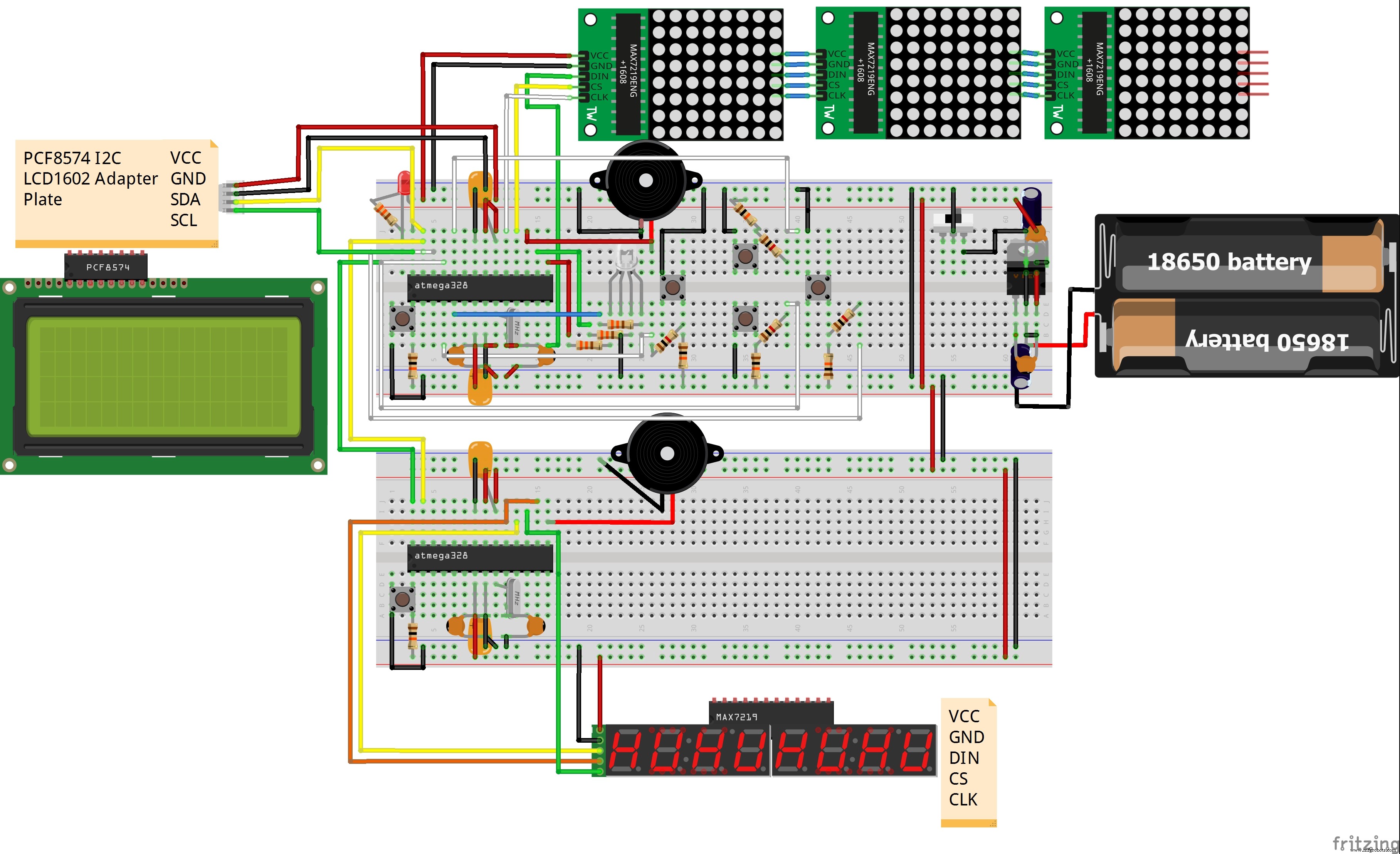
Manufacturing process
- EEG Machines: Design, Manufacturing, and Emerging Applications
- Vending Machines: A $36.6B U.S. Industry Powerhouse
- Voting Machines: History, Technology, and Standards
- Expert Guide to Modern Change Machines: Design, Components, and Future Trends
- Comprehensive Overview of Modern ECG Machines: Technology, Manufacturing, and Future Innovations
- The Evolution and Manufacturing of Sewing Machines: From 19th‑Century Innovation to Modern Automation
- Milking Machines: Design, History, and Future Innovations
- Pantyhose: The Ultimate Guide to Elegant Women’s Hosiery
- Discover the Evolution of Washing Machines: From Hand-Powered to Modern Electric Models
- Laser‑Triggered Slot Car Lap Timer with GLCD Display – Precise Timekeeping for RC Tracks