NeoPixel Matrix Pong on Arduino Nano: Build a Neon Pong Game
Components and supplies
NeoPixel strip
×
1
Jumper wires (generic)
×
1
Arduino Nano R3
×
1
Female Header 8 Position 1 Row (0.1")
×
1
Perma-Proto Breadboard Half Size
×
1
Analog joystick (Generic)
×
1
Rotary potentiometer (generic)
×
1
Necessary tools and machines
Soldering iron (generic)
Apps and online services
Arduino IDE
About this project
The Matrix
No, not the movie, the NeoPixel matrix! To make a matrix, just buy one strip of individually addressable NeoPixel LEDs. Uncoil the strip, and take note of the arrows on it. You can only attach them in ONE DIRECTION, you could ruin them if the orientation is wrong.
I used a 30 led/m 5m strip and cut them into strips of ten LEDs each. I then started laying down the strips on a piece of cardstock, alternating orientations. I then cut wires to the correct lengths and soldered them to the NeoPixel terminals. After doing that 14 times, my matrix was finally done! Next, I checked with a multimeter to ensure that there were no short-circuits, as a short-circuit will fry the Nano, the matrix, and maybe your USB port (I know from experience). Upload the neomatrix test sketch with the "NEO_BOTTOM + NEO_LEFT + NEO_COLUMNS + NEO_ZIGZAG" parameters. If it scroll "howdy" across the display, you're done with the display part!
The Logic
A pong game has several objects: the paddle, walls, and the ball. The code has ball X and ball Y variables, which keep track of the ball's position. The ball's direction is handled by either a 1 or -1 being assigned to the direction variables. The paddle is a rectangle that is controlled via a potentiometer being mapped to 0 through 15. The paddle's Y won't change, so a variable for mapping it isn't needed. At the start of a game, the ball starts at 1,1 and the player must allow the ball to bounce once to begin. The physics take into account the ball's direction and where it hit on the paddle.
Fun time!
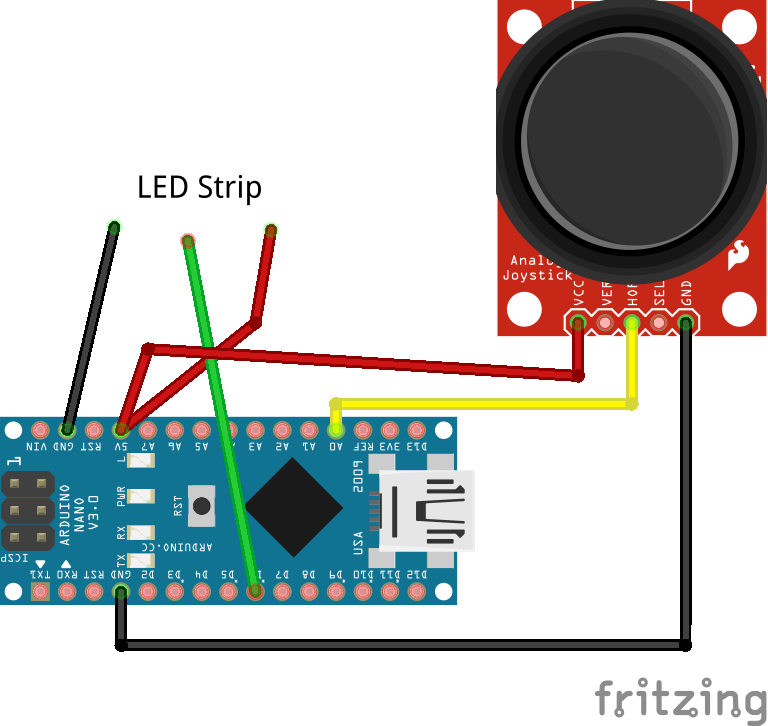
Now, just hook up the NeoPixel matrix your Arduino Nano, the +5V on the joystick to 5v, the GND to Arduino GND, and finally the X axis to A0. Have fun with your new pong game! Try adding more players and better physics for a challenge!
Code
The Arduino Code
Arduino Code
The Arduino CodeC/C++
#include <Adafruit_GFX.h>
#include <Adafruit_NeoMatrix.h>
#include <Adafruit_NeoPixel.h>

#define PIN 6

Adafruit_NeoMatrix matrix = Adafruit_NeoMatrix(15, 10, PIN,
  NEO_MATRIX_BOTTOM     + NEO_MATRIX_LEFT +
  NEO_MATRIX_COLUMNS + NEO_MATRIX_ZIGZAG,
  NEO_GRB            + NEO_KHZ800);

// variables for the position of the ball and paddle
int paddleX = 0;
int paddleY = 0;
int oldPaddleX, oldPaddleY;
int ballDirectionX = 1;
int ballDirectionY = 1;
int score = 0;

int ballSpeed = 10; // lower numbers are faster

int ballX, ballY, oldBallX, oldBallY;

void setup() {
  Serial.begin(9600);
  // initialize the display
  matrix.begin();
  // black background
  matrix.fillScreen(0);
  matrix.setTextColor(matrix.Color(0,255,0));
  matrix.print("GO");
  matrix.show();
  delay(2000);
  matrix.fillScreen(0);
  matrix.show();
}

void loop() {

  // save the width and height of the screen
  int myWidth = matrix.width();
  int myHeight = matrix.height();

  // map the paddle's location to the position of the potentiometers
  paddleX = map(analogRead(A0), 0, 1023, 0, 12);
  paddleY = 8;

  // set the fill color to black and erase the previous
  // position of the paddle if different from present

  if (oldPaddleX != paddleX || oldPaddleY != paddleY) {
    matrix.fillRect(oldPaddleX, oldPaddleY, 4, 1,matrix.Color(0,0,0));
  }

  // draw the paddle on screen, save the current position
  // as the previous.
//if(paddleX >= 0 && paddleX <= 11){
  matrix.fillRect(paddleX, paddleY, 4, 1,matrix.Color(0,0,255));
//}
//else if(paddleX < 0){
  //paddleX = 0;
  //matrix.fillRect(paddleX, paddleY, 3, 1,matrix.Color(0,0,255));
//}
//else if(paddleX >= 13){

//}
  oldPaddleX = paddleX;
  oldPaddleY = paddleY;
  matrix.show();

  // update the ball's position and draw it on screen
  if (millis() % ballSpeed < 2) {
    moveBall();
  }
  matrix.show();
  if(ballY > 8 && (millis() > 10000)){
    score += 1;
    matrix.fillScreen(0);
    matrix.setTextColor(matrix.Color(255,0,0));
    matrix.setCursor(0,2);
    matrix.print(String(score));
    matrix.show();
    delay(4000);
    ballX = random(3,11);
    ballY = random(1,1);
    matrix.fillScreen(0);
    matrix.show();
    delay(1000);
  }
  delay(5);
}

// this function determines the ball's position on screen
void moveBall() {
  // if the ball goes offscreen, reverse the direction:
  if (ballX > matrix.width() - 1 || ballX < 0) {
    ballDirectionX = -ballDirectionX;
  }

  if (ballY > matrix.height() || ballY < 0) {
    ballDirectionY = -ballDirectionY;
  }

  // check if the ball and the paddle occupy the same space on screen
  if (inPaddle(ballX, ballY, paddleX, paddleY, 4, 1)) {
    if(ballX == paddleX && ballY == paddleY){
    ballDirectionX = -ballDirectionX;
    ballDirectionY = -ballDirectionY;
    }
    else if(ballX == paddleX + 3 && ballY == paddleY){
      ballDirectionX = ballDirectionX;
      ballDirectionY = -ballDirectionY;
    }
    else if(ballX == paddleX + 1 && ballY == paddleY){
      ballDirectionX = -ballDirectionX;
      ballDirectionY = -ballDirectionY;
    }
    else if(ballX == paddleX + 2 && ballY == paddleY){
      ballDirectionX = ballDirectionX;
      ballDirectionY = -ballDirectionY;
    }
  }

  // update the ball's position
  ballX += ballDirectionX;
  ballY += ballDirectionY;

  // erase the ball's previous position

  if (oldBallX != ballX || oldBallY != ballY) {
    matrix.drawPixel(oldBallX, oldBallY,matrix.Color(0,0,0));
  }


  // draw the ball's current position
  matrix.drawPixel(ballX, ballY,matrix.Color(150,150,0));

  oldBallX = ballX;
  oldBallY = ballY;

}

// this function checks the position of the ball
// to see if it intersects with the paddle
boolean inPaddle(int x, int y, int rectX, int rectY, int rectWidth, int rectHeight) {
  boolean result = false;

  if ((x >= rectX && x <= (rectX + rectWidth)) &&
      (y >= rectY && y <= (rectY + rectHeight))) {
    result = true;
  }

  return result;
}
Arduino CodeC/C++
#include <Adafruit_GFX.h>
#include <Adafruit_NeoMatrix.h>
#include <Adafruit_NeoPixel.h>

#define PIN 6

Adafruit_NeoMatrix matrix = Adafruit_NeoMatrix(15, 10, PIN,
  NEO_MATRIX_BOTTOM     + NEO_MATRIX_LEFT +
  NEO_MATRIX_COLUMNS + NEO_MATRIX_ZIGZAG,
  NEO_GRB            + NEO_KHZ800);

// variables for the position of the ball and paddle
int paddleX = 0;
int paddleY = 0;
int oldPaddleX, oldPaddleY;
int ballDirectionX = 1;
int ballDirectionY = 1;
int score = 0;

int ballSpeed = 10; // lower numbers are faster

int ballX, ballY, oldBallX, oldBallY;

void setup() {
  Serial.begin(9600);
  // initialize the display
  matrix.begin();
  // black background
  matrix.fillScreen(0);
  matrix.setTextColor(matrix.Color(0,255,0));
  matrix.print("GO");
  matrix.show();
  delay(2000);
  matrix.fillScreen(0);
  matrix.show();
}

void loop() {

  // save the width and height of the screen
  int myWidth = matrix.width();
  int myHeight = matrix.height();

  // map the paddle's location to the position of the potentiometers
  paddleX = map(analogRead(A0), 0, 1023, 0, 12);
  paddleY = 8;

  // set the fill color to black and erase the previous
  // position of the paddle if different from present

  if (oldPaddleX != paddleX || oldPaddleY != paddleY) {
    matrix.fillRect(oldPaddleX, oldPaddleY, 4, 1,matrix.Color(0,0,0));
  }

  // draw the paddle on screen, save the current position
  // as the previous.
//if(paddleX >= 0 && paddleX <= 11){
  matrix.fillRect(paddleX, paddleY, 4, 1,matrix.Color(0,0,255));
//}
//else if(paddleX < 0){
  //paddleX = 0;
  //matrix.fillRect(paddleX, paddleY, 3, 1,matrix.Color(0,0,255));
//}
//else if(paddleX >= 13){

//}
  oldPaddleX = paddleX;
  oldPaddleY = paddleY;
  matrix.show();

  // update the ball's position and draw it on screen
  if (millis() % ballSpeed < 2) {
    moveBall();
  }
  matrix.show();
  if(ballY > 8 && (millis() > 10000)){
    score += 1;
    matrix.fillScreen(0);
    matrix.setTextColor(matrix.Color(255,0,0));
    matrix.setCursor(0,2);
    matrix.print(String(score));
    matrix.show();
    delay(4000);
    ballX = random(3,11);
    ballY = random(1,1);
    matrix.fillScreen(0);
    matrix.show();
    delay(1000);
  }
  delay(5);
}

// this function determines the ball's position on screen
void moveBall() {
  // if the ball goes offscreen, reverse the direction:
  if (ballX > matrix.width() - 1 || ballX < 0) {
    ballDirectionX = -ballDirectionX;
  }

  if (ballY > matrix.height() || ballY < 0) {
    ballDirectionY = -ballDirectionY;
  }

  // check if the ball and the paddle occupy the same space on screen
  if (inPaddle(ballX, ballY, paddleX, paddleY, 4, 1)) {
    if(ballX == paddleX && ballY == paddleY){
    ballDirectionX = -ballDirectionX;
    ballDirectionY = -ballDirectionY;
    }
    else if(ballX == paddleX + 3 && ballY == paddleY){
      ballDirectionX = ballDirectionX;
      ballDirectionY = -ballDirectionY;
    }
    else if(ballX == paddleX + 1 && ballY == paddleY){
      ballDirectionX = -ballDirectionX;
      ballDirectionY = -ballDirectionY;
    }
    else if(ballX == paddleX + 2 && ballY == paddleY){
      ballDirectionX = ballDirectionX;
      ballDirectionY = -ballDirectionY;
    }
  }

  // update the ball's position
  ballX += ballDirectionX;
  ballY += ballDirectionY;

  // erase the ball's previous position

  if (oldBallX != ballX || oldBallY != ballY) {
    matrix.drawPixel(oldBallX, oldBallY,matrix.Color(0,0,0));
  }


  // draw the ball's current position
  matrix.drawPixel(ballX, ballY,matrix.Color(150,150,0));

  oldBallX = ballX;
  oldBallY = ballY;

}

// this function checks the position of the ball
// to see if it intersects with the paddle
boolean inPaddle(int x, int y, int rectX, int rectY, int rectWidth, int rectHeight) {
  boolean result = false;

  if ((x >= rectX && x <= (rectX + rectWidth)) &&
      (y >= rectY && y <= (rectY + rectHeight))) {
    result = true;
  }

  return result;
}