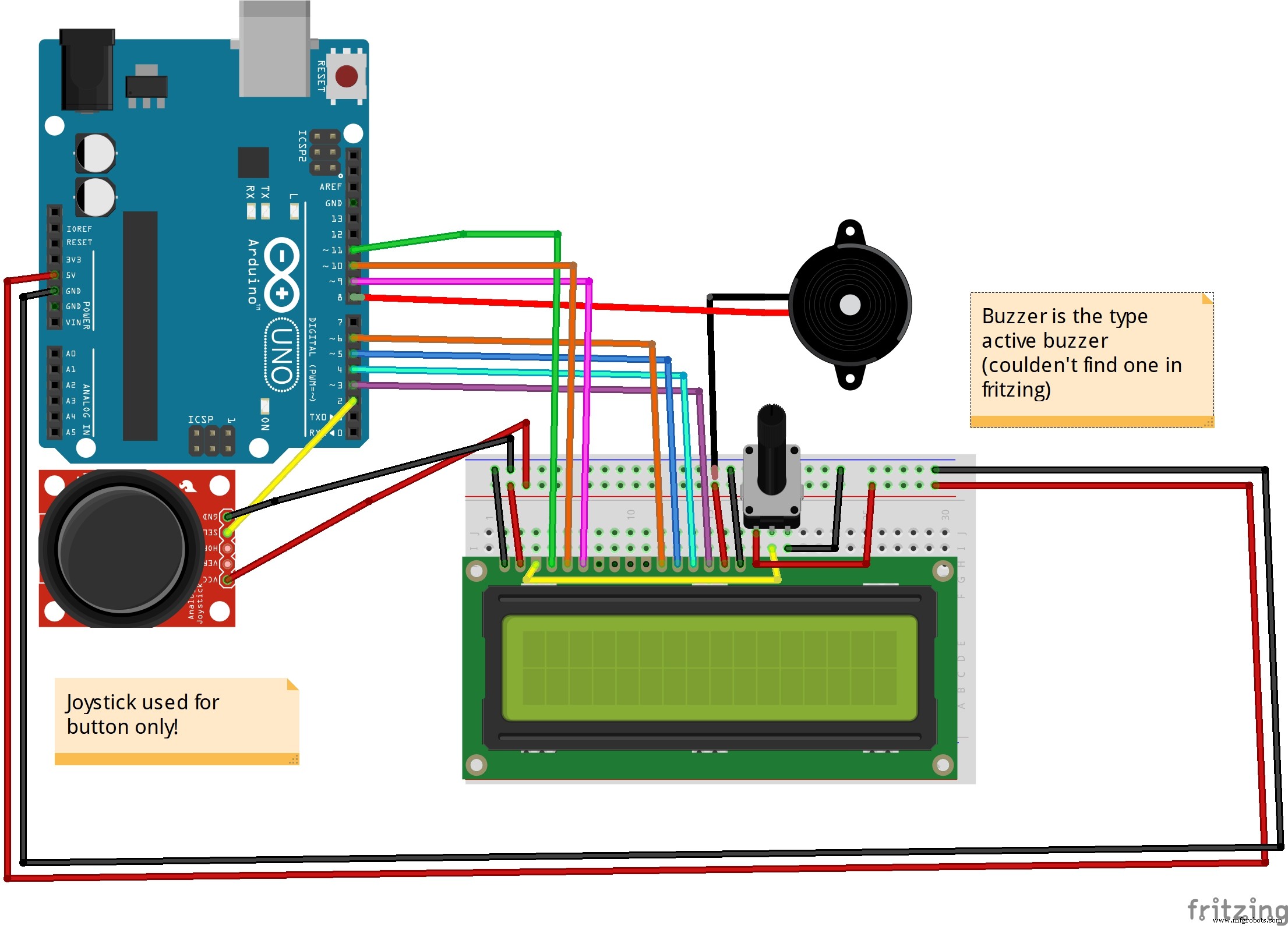
Code
The codeArduino
#include <LiquidCrystal.h>

#define PIN_BUTTON 2
#define PIN_AUTOPLAY 1
#define PIN_BUZZER 8
#define PIN_READWRITE 10
#define PIN_CONTRAST 12

#define SPRITE_RUN1 1
#define SPRITE_RUN2 2
#define SPRITE_JUMP 3
#define SPRITE_JUMP_UPPER '.'         // Use the '.' character for the head
#define SPRITE_JUMP_LOWER 4
#define SPRITE_TERRAIN_EMPTY ' '      // User the ' ' character
#define SPRITE_TERRAIN_SOLID 5
#define SPRITE_TERRAIN_SOLID_RIGHT 6
#define SPRITE_TERRAIN_SOLID_LEFT 7

#define HERO_HORIZONTAL_POSITION 1    // Horizontal position of hero on screen

#define TERRAIN_WIDTH 16
#define TERRAIN_EMPTY 0
#define TERRAIN_LOWER_BLOCK 1
#define TERRAIN_UPPER_BLOCK 2

#define HERO_POSITION_OFF 0          // Hero is invisible
#define HERO_POSITION_RUN_LOWER_1 1  // Hero is running on lower row (pose 1)
#define HERO_POSITION_RUN_LOWER_2 2  //                              (pose 2)

#define HERO_POSITION_JUMP_1 3       // Starting a jump
#define HERO_POSITION_JUMP_2 4       // Half-way up
#define HERO_POSITION_JUMP_3 5       // Jump is on upper row
#define HERO_POSITION_JUMP_4 6       // Jump is on upper row
#define HERO_POSITION_JUMP_5 7       // Jump is on upper row
#define HERO_POSITION_JUMP_6 8       // Jump is on upper row
#define HERO_POSITION_JUMP_7 9       // Half-way down
#define HERO_POSITION_JUMP_8 10      // About to land

#define HERO_POSITION_RUN_UPPER_1 11 // Hero is running on upper row (pose 1)
#define HERO_POSITION_RUN_UPPER_2 12 //                              (pose 2)

LiquidCrystal lcd(11, 9, 6, 5, 4, 3);
static char terrainUpper[TERRAIN_WIDTH + 1];
static char terrainLower[TERRAIN_WIDTH + 1];
static bool buttonPushed = false;

void initializeGraphics(){
  static byte graphics[] = {
    // Run position 1
    B01100,
    B01100,
    B00000,
    B01110,
    B11100,
    B01100,
    B11010,
    B10011,
    // Run position 2
    B01100,
    B01100,
    B00000,
    B01100,
    B01100,
    B01100,
    B01100,
    B01110,
    // Jump
    B01100,
    B01100,
    B00000,
    B11110,
    B01101,
    B11111,
    B10000,
    B00000,
    // Jump lower
    B11110,
    B01101,
    B11111,
    B10000,
    B00000,
    B00000,
    B00000,
    B00000,
    // Ground
    B11111,
    B11111,
    B11111,
    B11111,
    B11111,
    B11111,
    B11111,
    B11111,
    // Ground right
    B00011,
    B00011,
    B00011,
    B00011,
    B00011,
    B00011,
    B00011,
    B00011,
    // Ground left
    B11000,
    B11000,
    B11000,
    B11000,
    B11000,
    B11000,
    B11000,
    B11000,
  };
  int i;
  // Skip using character 0, this allows lcd.print() to be used to
  // quickly draw multiple characters
  for (i = 0; i < 7; ++i) {
	  lcd.createChar(i + 1, &graphics[i * 8]);
  }
  for (i = 0; i < TERRAIN_WIDTH; ++i) {
    terrainUpper[i] = SPRITE_TERRAIN_EMPTY;
    terrainLower[i] = SPRITE_TERRAIN_EMPTY;
  }
}

// Slide the terrain to the left in half-character increments
//
void advanceTerrain(char* terrain, byte newTerrain){
  for (int i = 0; i < TERRAIN_WIDTH; ++i) {
    char current = terrain[i];
    char next = (i == TERRAIN_WIDTH-1) ? newTerrain : terrain[i+1];
    switch (current){
      case SPRITE_TERRAIN_EMPTY:
        terrain[i] = (next == SPRITE_TERRAIN_SOLID) ? SPRITE_TERRAIN_SOLID_RIGHT : SPRITE_TERRAIN_EMPTY;
        break;
      case SPRITE_TERRAIN_SOLID:
        terrain[i] = (next == SPRITE_TERRAIN_EMPTY) ? SPRITE_TERRAIN_SOLID_LEFT : SPRITE_TERRAIN_SOLID;
        break;
      case SPRITE_TERRAIN_SOLID_RIGHT:
        terrain[i] = SPRITE_TERRAIN_SOLID;
        break;
      case SPRITE_TERRAIN_SOLID_LEFT:
        terrain[i] = SPRITE_TERRAIN_EMPTY;
        break;
    }
  }
}

bool drawHero(byte position, char* terrainUpper, char* terrainLower, unsigned int score) {
  bool collide = false;
  char upperSave = terrainUpper[HERO_HORIZONTAL_POSITION];
  char lowerSave = terrainLower[HERO_HORIZONTAL_POSITION];
  byte upper, lower;
  switch (position) {
    case HERO_POSITION_OFF:
      upper = lower = SPRITE_TERRAIN_EMPTY;
      break;
    case HERO_POSITION_RUN_LOWER_1:
      upper = SPRITE_TERRAIN_EMPTY;
      lower = SPRITE_RUN1;
      break;
    case HERO_POSITION_RUN_LOWER_2:
      upper = SPRITE_TERRAIN_EMPTY;
      lower = SPRITE_RUN2;
      break;
    case HERO_POSITION_JUMP_1:
    case HERO_POSITION_JUMP_8:
      upper = SPRITE_TERRAIN_EMPTY;
      lower = SPRITE_JUMP;
      break;
    case HERO_POSITION_JUMP_2:
    case HERO_POSITION_JUMP_7:
      upper = SPRITE_JUMP_UPPER;
      lower = SPRITE_JUMP_LOWER;
      break;
    case HERO_POSITION_JUMP_3:
    case HERO_POSITION_JUMP_4:
    case HERO_POSITION_JUMP_5:
    case HERO_POSITION_JUMP_6:
      upper = SPRITE_JUMP;
      lower = SPRITE_TERRAIN_EMPTY;
      break;
    case HERO_POSITION_RUN_UPPER_1:
      upper = SPRITE_RUN1;
      lower = SPRITE_TERRAIN_EMPTY;
      break;
    case HERO_POSITION_RUN_UPPER_2:
      upper = SPRITE_RUN2;
      lower = SPRITE_TERRAIN_EMPTY;
      break;
  }
  if (upper != ' ') {
    terrainUpper[HERO_HORIZONTAL_POSITION] = upper;
    collide = (upperSave == SPRITE_TERRAIN_EMPTY) ? false : true;
  }
  if (lower != ' ') {
    terrainLower[HERO_HORIZONTAL_POSITION] = lower;
    collide |= (lowerSave == SPRITE_TERRAIN_EMPTY) ? false : true;
  }

  byte digits = (score > 9999) ? 5 : (score > 999) ? 4 : (score > 99) ? 3 : (score > 9) ? 2 : 1;

  // Draw the scene
  terrainUpper[TERRAIN_WIDTH] = '\0';
  terrainLower[TERRAIN_WIDTH] = '\0';
  char temp = terrainUpper[16-digits];
  terrainUpper[16-digits] = '\0';
  lcd.setCursor(0,0);
  lcd.print(terrainUpper);
  terrainUpper[16-digits] = temp;
  lcd.setCursor(0,1);
  lcd.print(terrainLower);

  lcd.setCursor(16 - digits,0);
  lcd.print(score);

  terrainUpper[HERO_HORIZONTAL_POSITION] = upperSave;
  terrainLower[HERO_HORIZONTAL_POSITION] = lowerSave;
  return collide;
}

// Handle the button push as an interrupt
void buttonPush() {
  buttonPushed = true;
}

void setup(){
  pinMode(PIN_READWRITE, OUTPUT);
  digitalWrite(PIN_READWRITE, LOW);
  pinMode(PIN_CONTRAST, OUTPUT);
  digitalWrite(PIN_CONTRAST, LOW);
  pinMode(PIN_BUTTON, INPUT);
  digitalWrite(PIN_BUTTON, HIGH);
  pinMode(PIN_AUTOPLAY, OUTPUT);
  digitalWrite(PIN_AUTOPLAY, HIGH);
  pinMode(PIN_BUZZER,OUTPUT);//initialize the buzzer pin as an output
  digitalWrite(PIN_BUZZER, LOW);

  // Digital pin 2 maps to interrupt 0
  attachInterrupt(0/*PIN_BUTTON*/, buttonPush, FALLING);

  initializeGraphics();

  lcd.begin(16, 2);
}

void loop(){
  static byte heroPos = HERO_POSITION_RUN_LOWER_1;
  static byte newTerrainType = TERRAIN_EMPTY;
  static byte newTerrainDuration = 1;
  static bool playing = false;
  static bool blink = false;
  static unsigned int distance = 0;

  if (!playing) {
    drawHero((blink) ? HERO_POSITION_OFF : heroPos, terrainUpper, terrainLower, distance >> 3);
    if (blink) {
      lcd.setCursor(0,0);
      lcd.print("Press Start");
    }
    delay(250);
    blink = !blink;
    if (buttonPushed) {


      initializeGraphics();
      heroPos = HERO_POSITION_RUN_LOWER_1;
      playing = true;
      buttonPushed = false;
      distance = 0;
    }
    return;
  }

  // Shift the terrain to the left
  advanceTerrain(terrainLower, newTerrainType == TERRAIN_LOWER_BLOCK ? SPRITE_TERRAIN_SOLID : SPRITE_TERRAIN_EMPTY);
  advanceTerrain(terrainUpper, newTerrainType == TERRAIN_UPPER_BLOCK ? SPRITE_TERRAIN_SOLID : SPRITE_TERRAIN_EMPTY);

  // Make new terrain to enter on the right
  if (--newTerrainDuration == 0) {
    if (newTerrainType == TERRAIN_EMPTY) {
      newTerrainType = (random(3) == 0) ? TERRAIN_UPPER_BLOCK : TERRAIN_LOWER_BLOCK;
      newTerrainDuration = 2 + random(10);
    } else {
      newTerrainType = TERRAIN_EMPTY;
      newTerrainDuration = 10 + random(10);
    }
  }

  if (buttonPushed) {
    if (heroPos <= HERO_POSITION_RUN_LOWER_2) heroPos = HERO_POSITION_JUMP_1;
    buttonPushed = false;
    digitalWrite(PIN_BUZZER,HIGH);
  }

  if (drawHero(heroPos, terrainUpper, terrainLower, distance >> 3)) {
    playing = false; // The hero collided with something. Too bad.
    for (int i = 0; i <= 2; i++) {
      digitalWrite(PIN_BUZZER, HIGH);
      delay(100);
      digitalWrite(PIN_BUZZER, LOW);
      delay(100);
    }
  } else {
    if (heroPos == HERO_POSITION_RUN_LOWER_2 || heroPos == HERO_POSITION_JUMP_8) {
      heroPos = HERO_POSITION_RUN_LOWER_1;
    } else if ((heroPos >= HERO_POSITION_JUMP_3 && heroPos <= HERO_POSITION_JUMP_5) && terrainLower[HERO_HORIZONTAL_POSITION] != SPRITE_TERRAIN_EMPTY) {
      heroPos = HERO_POSITION_RUN_UPPER_1;
    } else if (heroPos >= HERO_POSITION_RUN_UPPER_1 && terrainLower[HERO_HORIZONTAL_POSITION] == SPRITE_TERRAIN_EMPTY) {
      heroPos = HERO_POSITION_JUMP_5;
    } else if (heroPos == HERO_POSITION_RUN_UPPER_2) {
      heroPos = HERO_POSITION_RUN_UPPER_1;
    } else {
      ++heroPos;
    }
    ++distance;

    digitalWrite(PIN_AUTOPLAY, terrainLower[HERO_HORIZONTAL_POSITION + 2] == SPRITE_TERRAIN_EMPTY ? HIGH : LOW);
  }
  delay(100);
  digitalWrite(PIN_BUZZER,LOW);
}