



DIY Arduino Nano Oscilloscope (10 Hz–50 kHz) with 128×64 LCD
Components and supplies
 |
| × | 1 | |||
 |
| × | 1 | |||
| × | 1 | ||||
 |
| × | 2 | |||
 |
| × | 3 |
Necessary tools and machines
|
|
Apps and online services
 |
|
About this project
This project describes a way to make a simple oscilloscope that has a range from 10Hz to 50kHz. This is an extremely large range, given that the device does not use an external digital to analog converter chip, but only Arduino.
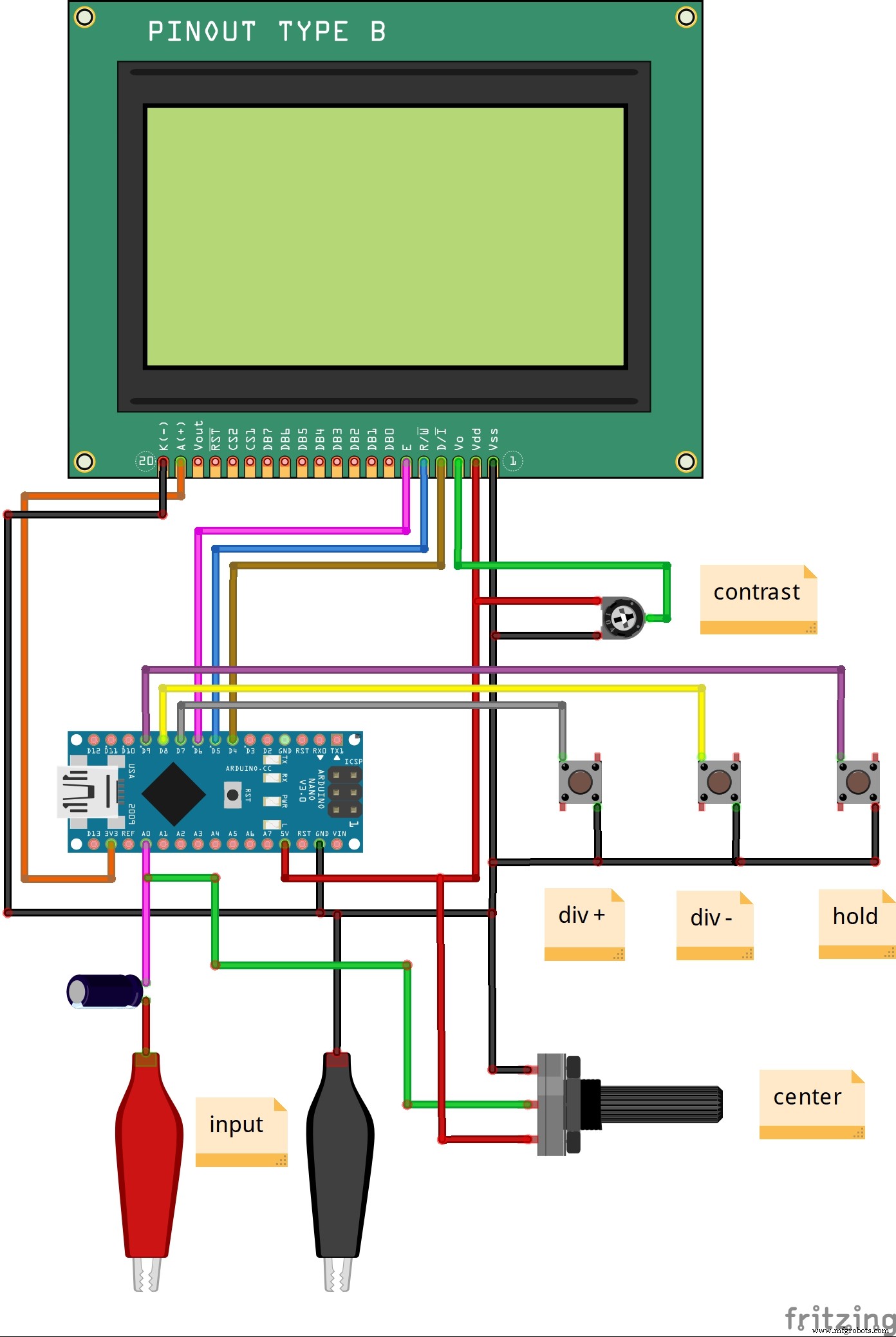
The result is displayed on a relatively large LCD screen (ST7920) with a resolution of 128x64 pixels. Measurement display area is 96x64 and information display area is 32x64, where shown the test signal frequency, Vpp etc.
It is a extremly simple to build and consist only few components:
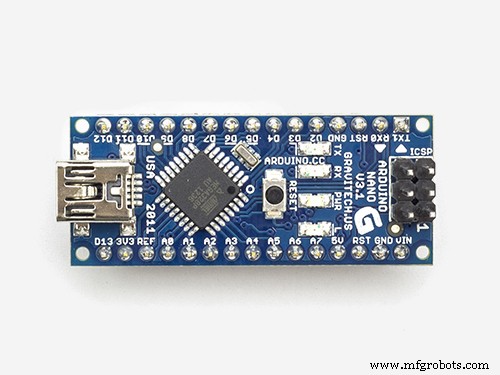
- Arduino Nano
- ST7920 LCDdisplay with 128x64 resolution
- three momentary switches
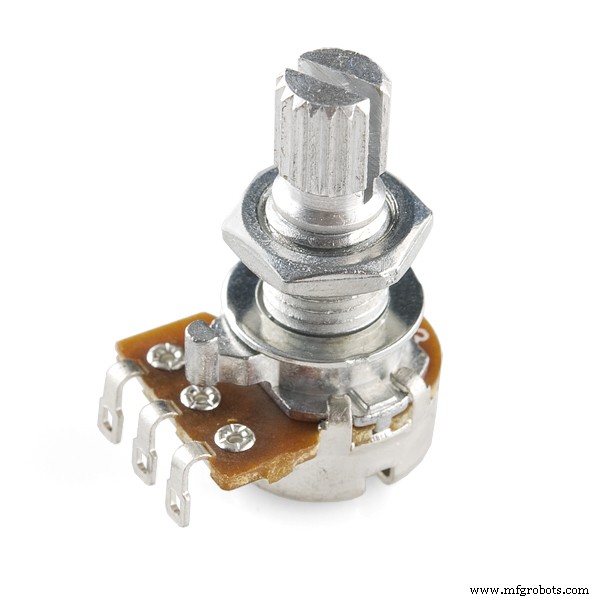
- two potentiomemers
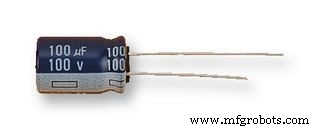
- and one capacitor 100 microF
The device has several functions like: auto trigger (display very stable ), Scanning speed: 0.02ms/div~10ms/div, according to 1-2-5 carry and divide into nine levels and Hold function: Freeze display waveform and parameters. This project is published on Wu Hanqing's blog where you can find the original code. I made minimal changes because I was building the oscilloscope based on the hardware of one of my previous projects. As you can see in the video, the instrument has a very clear view due to the large screen, and also a surprisingly good auto trigger. The vertical position of the image is adjusted with the potentiometer of 50 kohms, and contrast with 10 kohms potentiometer.I tested the oscilloscope with a sine and rectangular signal generator.
Lastly, even though it is not a professional or very usable instrument, it can still be used for educational purposes or in your laboratory, for testing low frequency signals, especially knowing that the device is very easy to make and extremely cheap.
Code
- Arduino code
Arduino codeC/C++
#include <U8glib.h>
U8GLIB_ST7920_128X64_4X u8g(6, 5, 4);
 int Input = A0;
 int Key_add = 8;
 int Key_sub = 9;
 int Key_hold = 10;
 int x,y;
 int i,i1,i2,V_min,V_max,V_mid,t,t0,t1,sta,Key=1,hold=0;
 long Freq;
 float Vpp;
 int Y[96];
 int Buffer[192];
 const uint8_t L[] PROGMEM = {

0x00, 0x00, 0x00, 0x00, 0x00, 0x00, 0x00, 0x00, 0x00, 0x00, 0x00, 0x00, 0x00, 0x00, 0x00, 0x00,
0x00, 0x00, 0x00, 0x00, 0x00, 0x00, 0x00, 0x00, 0x00, 0x00, 0x00, 0x00, 0x00, 0x00, 0x00, 0x00,
0x00, 0x00, 0x00, 0x00, 0x00, 0x00, 0x00, 0x00, 0x00, 0x00, 0x00, 0x00, 0x00, 0x00, 0x00, 0x00,
0x00, 0x00, 0x7F, 0xFF, 0xFF, 0xFF, 0xFF, 0xFF, 0xFF, 0xFF, 0xFF, 0xFF, 0xFF, 0xFE, 0x00, 0x00,
0x00, 0x0F, 0x80, 0x00, 0x00, 0x00, 0x00, 0x00, 0x00, 0x00, 0x00, 0x00, 0x00, 0x01, 0xE0, 0x00,
0x00, 0x30, 0x00, 0x00, 0x00, 0x00, 0x00, 0x00, 0x00, 0x00, 0x00, 0x00, 0x00, 0x00, 0x1C, 0x00,
0x00, 0xC0, 0x00, 0x00, 0x00, 0x00, 0x00, 0x00, 0x00, 0x00, 0x00, 0x00, 0x00, 0x00, 0x03, 0x00,
0x03, 0x00, 0x00, 0x00, 0x00, 0x00, 0x00, 0x00, 0x00, 0x00, 0x00, 0x00, 0x00, 0x00, 0x00, 0x80,
0x04, 0x00, 0x00, 0x00, 0x00, 0x00, 0x00, 0x00, 0x00, 0x00, 0x00, 0x00, 0x00, 0x00, 0x00, 0x60,
0x08, 0x00, 0x00, 0x00, 0x00, 0x00, 0x00, 0x00, 0x00, 0x00, 0x00, 0x00, 0x00, 0x00, 0x00, 0x20,
0x08, 0x00, 0x00, 0x00, 0x00, 0x00, 0x00, 0x00, 0x00, 0x00, 0x00, 0x00, 0x00, 0x00, 0x00, 0x10,
0x10, 0x00, 0x00, 0x00, 0x00, 0x00, 0x00, 0x00, 0x00, 0x00, 0x00, 0x00, 0x00, 0x00, 0x00, 0x10,
0x10, 0x00, 0x00, 0x00, 0x00, 0x00, 0x00, 0x00, 0x00, 0x00, 0x00, 0x00, 0x00, 0x00, 0x00, 0x08,
0x10, 0x00, 0x00, 0x00, 0x00, 0x00, 0x00, 0x00, 0x00, 0x00, 0x00, 0x00, 0x00, 0x00, 0x00, 0x08,
0x10, 0x00, 0x00, 0x00, 0x00, 0x00, 0x00, 0x00, 0x00, 0x00, 0x00, 0x00, 0x00, 0x00, 0x00, 0x08,
0x10, 0x00, 0x00, 0x00, 0xFF, 0xFC, 0x00, 0x00, 0xC0, 0x01, 0x80, 0x60, 0x00, 0x00, 0x00, 0x08,

0x10, 0x00, 0x00, 0x00, 0xFF, 0xFC, 0x00, 0x01, 0xC0, 0x01, 0x80, 0x00, 0x00, 0x00, 0x00, 0x08,
0x10, 0x00, 0x00, 0x03, 0xFF, 0xFF, 0x00, 0x01, 0xE3, 0xDF, 0xB6, 0x6F, 0x8F, 0x00, 0x00, 0x08,
0x10, 0x00, 0x00, 0x03, 0x8F, 0xFF, 0x00, 0x01, 0xE3, 0x1B, 0xB6, 0x6D, 0x9B, 0x80, 0x00, 0x08,
0x10, 0x00, 0x00, 0x03, 0xFF, 0xFF, 0x00, 0x03, 0x33, 0x31, 0xB6, 0x6C, 0xB1, 0x80, 0x00, 0x08,
0x10, 0x00, 0x00, 0x03, 0xFF, 0xFF, 0x00, 0x03, 0xF3, 0x31, 0xB6, 0x6C, 0xB1, 0x80, 0x00, 0x08,
0x10, 0x00, 0x00, 0x03, 0xFF, 0xFF, 0x00, 0x06, 0x33, 0x1B, 0xB6, 0x6C, 0x9B, 0x00, 0x00, 0x08,
0x10, 0x00, 0x00, 0x03, 0xFF, 0xFF, 0x00, 0x06, 0x1B, 0x1F, 0xBE, 0x6C, 0x8F, 0x00, 0x00, 0x08,
0x10, 0x00, 0x00, 0x03, 0xFF, 0xFF, 0x00, 0x00, 0x00, 0x00, 0x00, 0x00, 0x00, 0x00, 0x00, 0x08,
0x10, 0x00, 0x00, 0x03, 0xFF, 0xFF, 0x00, 0x00, 0x00, 0x00, 0x00, 0x00, 0x00, 0x00, 0x00, 0x08,
0x10, 0x00, 0x00, 0x03, 0xFE, 0x00, 0x00, 0x00, 0x00, 0x00, 0x00, 0x00, 0x00, 0x00, 0x00, 0x08,
0x10, 0x00, 0x00, 0x03, 0xFF, 0xF8, 0x00, 0x00, 0x00, 0x00, 0x00, 0x00, 0x00, 0x00, 0x00, 0x08,
0x10, 0x00, 0x00, 0x03, 0xFF, 0xF8, 0x00, 0x00, 0x00, 0x00, 0x00, 0x00, 0x00, 0x00, 0x00, 0x08,
0x10, 0x0C, 0x00, 0x0F, 0xF8, 0x00, 0x00, 0x00, 0x00, 0x00, 0x00, 0x00, 0x00, 0x00, 0x00, 0x08,
0x10, 0x0C, 0x00, 0x0F, 0xFC, 0x00, 0x00, 0x00, 0x00, 0x00, 0x00, 0x00, 0x00, 0x00, 0x00, 0x08,
0x10, 0x0C, 0x00, 0x3F, 0xF8, 0x00, 0x00, 0x00, 0x00, 0x00, 0x00, 0x00, 0x00, 0x00, 0x00, 0x08,
0x10, 0x0E, 0x00, 0xFF, 0xFF, 0x80, 0x00, 0x00, 0x0F, 0x1E, 0x3C, 0xF8, 0xF0, 0x00, 0x00, 0x08,

0x10, 0x0E, 0x01, 0xFF, 0xFF, 0x80, 0x00, 0x00, 0x0D, 0x93, 0x6E, 0xCD, 0x90, 0x00, 0x00, 0x08,
0x10, 0x0F, 0x87, 0xFF, 0xF9, 0x80, 0x00, 0x00, 0x0F, 0x30, 0xC6, 0xCF, 0xF8, 0x00, 0x00, 0x08,
0x10, 0x0F, 0x87, 0xFF, 0xF9, 0x80, 0x00, 0x00, 0x03, 0xB0, 0xC6, 0xCF, 0x00, 0x00, 0x00, 0x08,
0x10, 0x0F, 0xFF, 0xFF, 0xF8, 0x00, 0x00, 0x00, 0x0D, 0x9B, 0x6C, 0xCD, 0xB0, 0x00, 0x00, 0x08,
0x10, 0x0F, 0xFF, 0xFF, 0xF8, 0x00, 0x00, 0x00, 0x07, 0x9E, 0x3C, 0xF9, 0xE0, 0x00, 0x00, 0x08,
0x10, 0x0F, 0xFF, 0xFF, 0xF8, 0x00, 0x00, 0x00, 0x00, 0x00, 0x00, 0xC0, 0x00, 0x00, 0x00, 0x08,
0x10, 0x03, 0xFF, 0xFF, 0xF8, 0x00, 0x00, 0x00, 0x00, 0x00, 0x00, 0xC0, 0x00, 0x00, 0x00, 0x08,
0x10, 0x03, 0xFF, 0xFF, 0xE0, 0x00, 0x00, 0x00, 0x00, 0x00, 0x00, 0x00, 0x00, 0x00, 0x00, 0x08,
0x10, 0x00, 0xFF, 0xFF, 0xE0, 0x00, 0x00, 0x00, 0x00, 0x00, 0x00, 0x00, 0x00, 0x00, 0x00, 0x08,
0x10, 0x00, 0xFF, 0xFF, 0xE0, 0x00, 0x00, 0x00, 0x00, 0x00, 0x00, 0x00, 0x00, 0x00, 0x00, 0x08,
0x10, 0x00, 0x7F, 0xFF, 0x80, 0x00, 0x00, 0x00, 0x00, 0x00, 0x00, 0x00, 0x00, 0x00, 0x00, 0x08,
0x10, 0x00, 0x3F, 0xFF, 0x80, 0x00, 0x00, 0x00, 0x00, 0x00, 0x00, 0x00, 0x00, 0x00, 0x00, 0x08,
0x10, 0x00, 0x1F, 0xFF, 0x00, 0x00, 0x00, 0x00, 0x00, 0x00, 0x00, 0x00, 0x00, 0x00, 0x00, 0x08,
0x10, 0x00, 0x07, 0xCF, 0x00, 0x00, 0x00, 0x00, 0x00, 0x00, 0x00, 0x00, 0x00, 0x00, 0x00, 0x08,
0x10, 0x00, 0x07, 0xCF, 0x00, 0x00, 0x00, 0x00, 0x00, 0x00, 0x00, 0x00, 0x00, 0x00, 0x00, 0x08,
0x10, 0x00, 0x07, 0x83, 0x00, 0x00, 0x00, 0x00, 0x00, 0x00, 0x00, 0x00, 0x00, 0x00, 0x00, 0x08,

0x10, 0x00, 0x07, 0x83, 0x00, 0x00, 0x00, 0x00, 0x00, 0x00, 0x00, 0x00, 0x00, 0x00, 0x00, 0x08,
0x10, 0x00, 0x06, 0x03, 0x00, 0x00, 0x00, 0x00, 0x00, 0x00, 0x00, 0x00, 0x00, 0x00, 0x00, 0x08,
0x10, 0x00, 0x07, 0x83, 0x80, 0x00, 0x00, 0x00, 0x00, 0x00, 0x00, 0x00, 0x00, 0x00, 0x00, 0x08,
0x10, 0x00, 0x07, 0x83, 0xC0, 0x00, 0x00, 0x00, 0x00, 0x00, 0x00, 0x00, 0x00, 0x00, 0x00, 0x08,
0x10, 0x00, 0x00, 0x00, 0x00, 0x00, 0x00, 0x00, 0x00, 0x00, 0x00, 0x00, 0x00, 0x00, 0x00, 0x10,
0x08, 0x00, 0x00, 0x00, 0x00, 0x00, 0x00, 0x00, 0x00, 0x00, 0x00, 0x00, 0x00, 0x00, 0x00, 0x10,
0x04, 0x00, 0x00, 0x00, 0x00, 0x00, 0x00, 0x00, 0x00, 0x00, 0x00, 0x00, 0x00, 0x00, 0x00, 0x20,
0x02, 0x00, 0x00, 0x00, 0x00, 0x00, 0x00, 0x00, 0x00, 0x00, 0x00, 0x00, 0x00, 0x00, 0x00, 0x40,
0x01, 0x80, 0x00, 0x00, 0x00, 0x00, 0x00, 0x00, 0x00, 0x00, 0x00, 0x00, 0x00, 0x00, 0x01, 0x80,
0x00, 0x60, 0x00, 0x00, 0x00, 0x00, 0x00, 0x00, 0x00, 0x00, 0x00, 0x00, 0x00, 0x00, 0x0E, 0x00,
0x00, 0x1E, 0x00, 0x00, 0x00, 0x00, 0x00, 0x00, 0x00, 0x00, 0x00, 0x00, 0x00, 0x00, 0x70, 0x00,
0x00, 0x01, 0xFF, 0xFF, 0xFF, 0xFF, 0xFF, 0xFF, 0xFF, 0xFF, 0xFF, 0xFF, 0xFF, 0xFF, 0x80, 0x00,
0x00, 0x00, 0x00, 0x00, 0x00, 0x00, 0x00, 0x00, 0x00, 0x00, 0x00, 0x00, 0x00, 0x00, 0x00, 0x00,
0x00, 0x00, 0x00, 0x00, 0x00, 0x00, 0x00, 0x00, 0x00, 0x00, 0x00, 0x00, 0x00, 0x00, 0x00, 0x00,
0x00, 0x00, 0x00, 0x00, 0x00, 0x00, 0x00, 0x00, 0x00, 0x00, 0x00, 0x00, 0x00, 0x00, 0x00, 0x00,
0x00, 0x00, 0x00, 0x00, 0x00, 0x00, 0x00, 0x00, 0x00, 0x00, 0x00, 0x00, 0x00, 0x00, 0x00, 0x00


};

 void setup( )
 {
   pinMode(Key_add,INPUT);
   digitalWrite(Key_add,HIGH);
   pinMode(Key_sub,INPUT);
   digitalWrite(Key_sub,HIGH);
   pinMode(Key_hold,INPUT);
   digitalWrite(Key_hold,HIGH);
   ADMUX=0x60;
   ADCSRA=0xe2;
   u8g.setFont(u8g_font_5x7);
    u8g.firstPage();
   do {
    u8g.drawBitmapP( 0, 0, 16, 64, L);
    } while( u8g.nextPage() );
   delay(2000);
 }

void loop( )
 {
   sample( );
   Measure( );
   Transform( );
   Key_scan( );
   if(hold==0)
   {
     u8g.firstPage( );
     do
     {
       draw( );
     }
     while( u8g.nextPage( ));
   }
 }

 void sample( )
{  for(i = 0;i < 192;i++)
   {
    Buffer[i] = ADCH;
    switch(Key)
     {
       case 1:
       break;
       case 2:
       delayMicroseconds(4);
       break;
       case 3:
       delayMicroseconds(10);
       break;
       case 4:
       delayMicroseconds(23);
       break;
       case 5:
       delayMicroseconds(60);
       break;
       case 6:
       delayMicroseconds(123);
       break;
       case 7:
       delayMicroseconds(248);
       break;
       case 8:
       delayMicroseconds(623);
       break;
       case 9:
       delayMicroseconds(1247);
       break;
       default:break;
     }
   }
}

void Measure()
{
  V_max=Buffer[0];
  V_min=Buffer[0];
  for(i=0;i<192;i++)
  {
    if(Buffer[i]>V_max)
    V_max=Buffer[i];
    if(Buffer[i]<V_min)
    V_min=Buffer[i];
  }
  V_mid=(V_max+V_min)/2;
  Vpp=(V_max-V_min)*5/255;
  for(i=0;i<97;i++)
  {
    if(Buffer[i]<V_mid&&Buffer[i+1]>=V_mid)
    {
      i1=i;
      break;
    }
  }
  for(i=i1+1;i<98+i1;i++)
  {
    if(Buffer[i]<V_mid&&Buffer[i+1]>=V_mid)
    {
      i2=i;
      break;
    }
  }
  t=i2-i1;
  if(t>0)
  Freq=8000/t;
  else
  Freq=0;
}

 void Transform( )
{
  for(sta=0;sta<96;sta++)
  {
    if(Buffer[sta]<128&&Buffer[sta+2]>128)
    break;
  }
  for(i = 0;i < 96;i++)
  Y[i] =  63-(Buffer[i+sta]>>2);
}

void draw( )
{
for(x = 0;x < 95;x++)
  u8g.drawLine(x,Y[x],x,Y[x+1]);


u8g.drawFrame(0,0,97,64);

 u8g.drawLine(48,0,48,63);
 u8g.drawLine(0,32,96,32);
 for(x=0;x<96;x+=8)
   u8g.drawLine(x,31,x,33);
 for(y=0;y<64;y+=8)
   u8g.drawLine(47,y,49,y);

for(x=8;x<96;x+=8)
 {
    for(y=8;y<64;y+=8)
    u8g.drawPixel(x,y);
 }

 u8g.drawStr(98,7,"MS/div");
 u8g.drawStr(98,23,"V/div");
 u8g.drawStr(98,30,"0.324");
 u8g.drawStr(98,40,"Vpp");
 u8g.setPrintPos( 98, 47);
 u8g.print(Vpp);
 u8g.drawStr(118,47,"V");
 u8g.drawStr(98,55,"F(HZ)");
 switch(Key)
 {
      case  1:
      u8g.drawStr(98,14,"0.02");
      u8g.setPrintPos( 98, 62);
      u8g.print(Freq*50);
      break;
      case  2:
      u8g.drawStr(98,14,"0.05");
      u8g.setPrintPos( 98, 62);
      u8g.print(Freq*20);
      break;
      case  3:
      u8g.drawStr(98,14," 0.1");
      u8g.setPrintPos( 98, 62);
      u8g.print(Freq*10);
      break;
      case  4:
      u8g.drawStr(98,14," 0.2");
      u8g.setPrintPos( 98, 62);
      u8g.print(Freq*5);
      break;
      case  5:
      u8g.drawStr(98,14," 0.5");
      u8g.setPrintPos( 98, 62);
      u8g.print(Freq*2);
      break;
     case  6:
      u8g.drawStr(98,14,"  1");
      u8g.setPrintPos( 98, 62);
      u8g.print(Freq);
      break;
     case  7:
      u8g.drawStr(98,14,"  2");
      u8g.setPrintPos( 98, 62);
      u8g.print(Freq/2);
      break;
     case  8:
      u8g.drawStr(98,14,"  5");
      u8g.setPrintPos( 98, 62);
      u8g.print(Freq/5);
      break;
      case  9:
      u8g.drawStr(98,14," 10");
      u8g.setPrintPos( 98, 62);
      u8g.print(Freq/10);
      break;
    default:break;
   }
}


void Key_scan()
{
    if(digitalRead(Key_add)==LOW)
	{
	  while(digitalRead(Key_add)==LOW);
	  Key++;
	  if(Key==10)
	  Key=9;
	  delay(10);
	}
	if(digitalRead(Key_sub)==LOW)
	{
	  while(digitalRead(Key_sub)==LOW);
	  Key--;
	  if(Key==0)
	  Key=1;
	  delay(10);
        }
        if(digitalRead(Key_hold)==LOW)
	{
	  while(digitalRead(Key_hold)==LOW);
          hold=~hold;
	  delay(10);
        }
}
Schematics
Manufacturing process
- Build Your Own LUMAZOID: A DIY Arduino Music Visualizer
- Build a 20 kHz Arduino Oscilloscope on a Nokia 5110 LCD – Easy DIY Guide
- Find Me: Smart Item Locator with Arduino and Bluetooth
- Build a Custom Arduino Joystick Steering Wheel for Gaming
- Build a Reliable LCD Stopwatch with Arduino Nano – No Potentiometer Needed
- Build a Classic Arduino LCD Arcade Game with Buzzer and Joystick
- 128x64 LCD Smart Clock with Analog/Digital Time & Temperature – Arduino Nano + DS3231 RTC
- Build an Ultra‑Sensitive EMF Detector with Arduino Nano
- Real-Time Soil Moisture Monitoring with LCD Display – Arduino DIY Kit
- Build an Interactive LCD Game with Arduino UNO