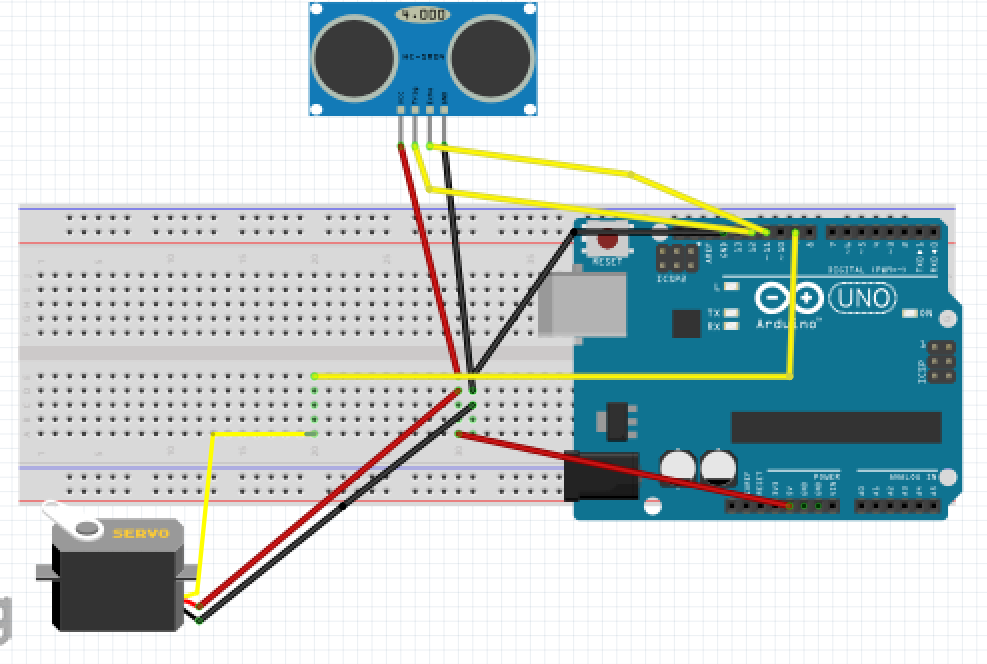
Code
- Sonar code for arduino IDE
- Sonar code for processing IDE
Sonar code for arduino IDEC/C++
#include <Servo.h>
const int trigPin=12;
const int echoPin=11;
long duration;
int distance;
Servo s1;

void setup() {
  Serial.begin(9600);
  pinMode(trigPin,OUTPUT);
  pinMode(echoPin,INPUT);
  s1.attach(9);
}

void loop(){
    for(int i=0;i<180;i=i+1){
        s1.write(i);
        delay(30);
        distance = calDist();
        Serial.print(i);
        Serial.print(",");
        Serial.print(distance);
        Serial.print(".");
     }
    for(int i=180;i>0;i=i-1){
        s1.write(i);
        delay(30);
        distance = calDist();
        Serial.print(i);
        Serial.print(",");
        Serial.print(distance);
        Serial.print(".");
    }
}

    int calDist(){
       digitalWrite(trigPin, LOW);
       delayMicroseconds(2);
       digitalWrite(trigPin, HIGH);
       delayMicroseconds(10);
       digitalWrite(trigPin, LOW);
       duration = pulseIn(echoPin, HIGH);
       distance= duration*0.034/2;
       return distance;
}
Sonar code for processing IDEJava
import processing.serial.*;
Serial myPort;

String ang="";
String distance="";
String data="";

int angle, dist;

void setup() {
   size (2000,800);
   myPort = new Serial(this,"COM3", 9600);
   myPort.bufferUntil('.');
   background(0);
}

void draw() {
      fill(0,5);
      noStroke();
      rect(0, 0, width, height*0.93);
      noStroke();
      fill(0,255);
      rect(0,height*0.93,width,height);
      drawRadar();
      drawLine();
      drawObject();
      drawText();
}


void serialEvent (Serial myPort) {
      data = myPort.readStringUntil('.');
      data = data.substring(0,data.length()-1);
      int index1 = data.indexOf(",");
      ang= data.substring(0, index1);
      distance= data.substring(index1+1, data.length());
      angle = int(ang);
      dist = int(distance);
      System.out.println(angle);
}

void drawRadar(){
    pushMatrix();
    noFill();
    strokeWeight(0.5);
    stroke(10,255,10);
    translate(width/2,height-height*0.06);
    line(-width/2,0,width/2,0);
    arc(0,0,(width*0.5),(width*0.5),PI,TWO_PI);
    arc(0,0,(width*0.25),(width*0.25),PI,TWO_PI);
    arc(0,0,(width*0.75),(width*0.75),PI,TWO_PI);
    arc(0,0,(width*0.95),(width*0.95),PI,TWO_PI);
    line(0,0,(-width/2)*cos(radians(30)),(-width/2)*sin(radians(30)));
    line(0,0,(-width/2)*cos(radians(60)),(-width/2)*sin(radians(60)));
    line(0,0,(-width/2)*cos(radians(90)),(-width/2)*sin(radians(90)));
    line(0,0,(-width/2)*cos(radians(120)),(-width/2)*sin(radians(120)));
    line(0,0,(-width/2)*cos(radians(150)),(-width/2)*sin(radians(150)));
    stroke(175,255,175);
    line(0,0,(-width/2)*cos(radians(15)),(-width/2)*sin(radians(15)));
    line(0,0,(-width/2)*cos(radians(45)),(-width/2)*sin(radians(45)));
    line(0,0,(-width/2)*cos(radians(75)),(-width/2)*sin(radians(75)));
    line(0,0,(-width/2)*cos(radians(105)),(-width/2)*sin(radians(105)));
    line(0,0,(-width/2)*cos(radians(135)),(-width/2)*sin(radians(135)));
    line(0,0,(-width/2)*cos(radians(165)),(-width/2)*sin(radians(165)));
    popMatrix();
}

void drawLine() {
  pushMatrix();
  strokeWeight(9);
  stroke(0,255,0);
  translate(width/2,height-height*0.06);
  line(0,0,(width/2)*cos(radians(angle)),(-width/2)*sin(radians(angle)));
  popMatrix();
}

void drawObject() {
    pushMatrix();
    strokeWeight(9);
    stroke(255,0,0);
    translate(width/2,height-height*0.06);
    float pixleDist = (dist/40.0)*(width/2.0);
    float pd=(width/2)-pixleDist;
    float x=-pixleDist*cos(radians(angle));
    float y=-pixleDist*sin(radians(angle));
    if(dist<=40){
       line(-x,y,-x+(pd*cos(radians(angle))),y-(pd*sin(radians(angle))));
    }
    popMatrix();
}

void drawText(){
    pushMatrix();
    fill(100,200,255);
    textSize(25);
    text("10cm",(width/2)+(width*0.115),height*0.93);
    text("20cm",(width/2)+(width*0.24),height*0.93);
    text("30cm",(width/2)+(width*0.365),height*0.93);
    text("40cm",(width/2)+(width*0.45),height*0.93);
    if(dist<=40) {
      text("Distance :"+dist,width*0.7,height*0.99);
    }
    translate(width/2,height-height*0.06);
    textSize(25);
    text(" 30",(width/2)*cos(radians(30)),(-width/2)*sin(radians(30)));
    text(" 60",(width/2)*cos(radians(60)),(-width/2)*sin(radians(60)));
    text("90",(width/2)*cos(radians(91)),(-width/2)*sin(radians(90)));
    text("120",(width/2)*cos(radians(123)),(-width/2)*sin(radians(118)));
    text("150",(width/2)*cos(radians(160)),(-width/2)*sin(radians(150)));
    popMatrix();
}