Smartphone-Based Temperature Monitoring System with Arduino and Bluetooth
Components and supplies
Arduino Uno
×
1
Arduino Uno
×
1
Analog Devices LM35 Temp Sensor
×
1
HC-06 Wireless bluetooth Module
×
1
Adafruit HC-05 Bluetooth Module
×
1
Necessary tools and machines
Soldering Iron 60 Watt With 5 pcs Solder Tip
Solder Soldering Wire
Apps and online services
Teamperature Monitoring App
Arduino IDE
About this project
This article describes a temperature monitoring system on an Android smartphone. Temperature is sensed by a temperature sensor installed in the circuit and is sent over Bluetooth to the smartphone. An Android application is used in the smartphone to display temperature data. The system provides easy monitoring of process data on a smartphone.
You can connect the smartphone wirelessly with the system and monitor the process variable, when desired. The system can easily be customised to monitor other process variables also. Authors’ prototype of the transmitter side is shown in Fig. 1. The receiver side consists of the smartphone. A screenshot of the Android app is shown in Fig. 2. Block diagram of the project is shown in Fig. 1.
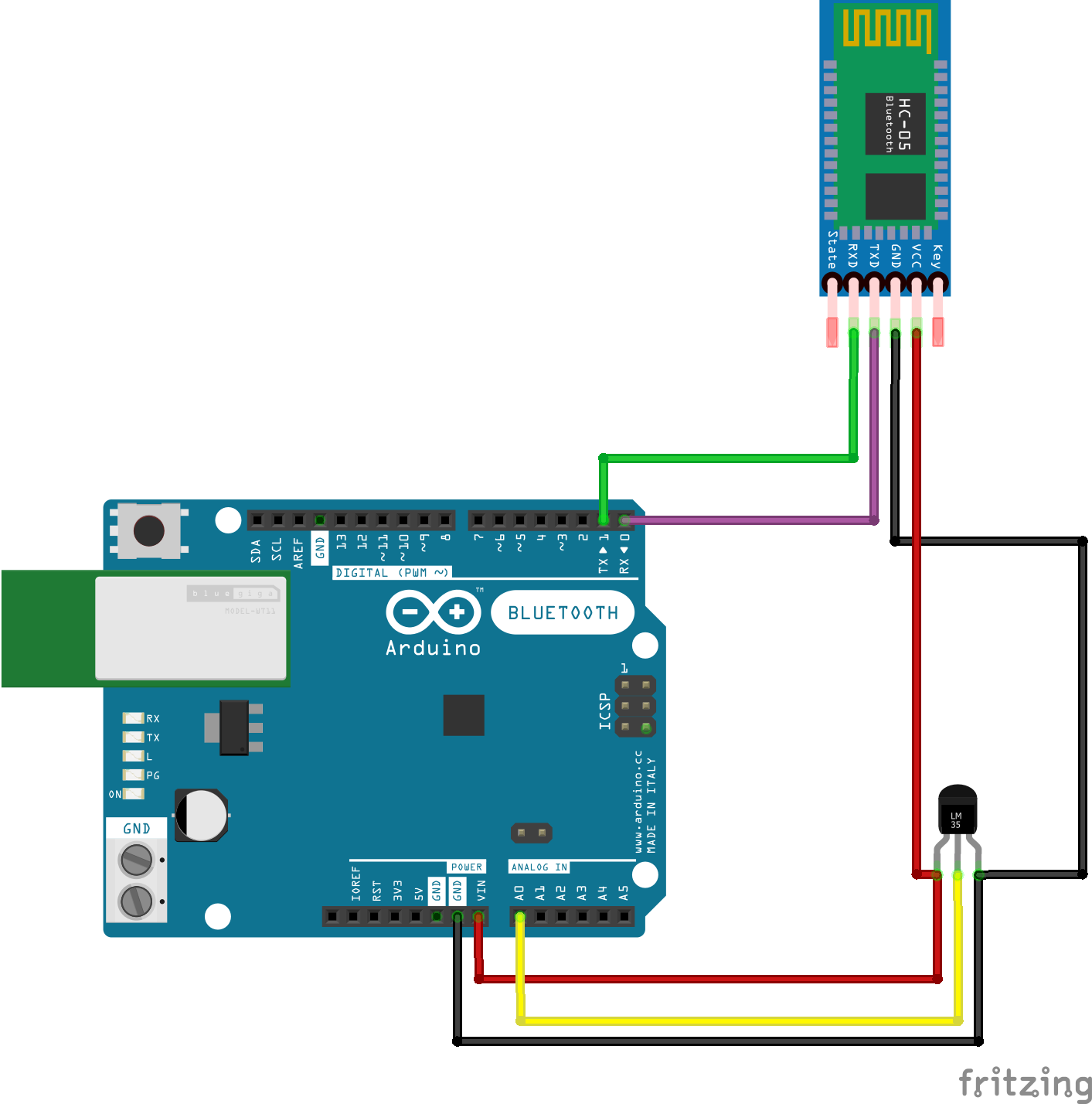
Circuit and Working for Temperature Monitoring System
(Connect RX & TX pin after uploading the code)
(Connect RX & TX pin after uploading the code)
Components Requirement :
Arduino Uno
LM35 Temp Sensor
Bluetooth Module HC - 05
Android App ( TemperatureMonitroing ) apk file
Jumper Wires
Connections of HC-05 Bluetooth Module:
VCC – to VCC of Arduino.GND – to GND of Arduino.RX – to digital pin 0(TX pin) of Arduino.(connect RX & TX pin after uploading the code)TX – to digital pin 1(RX pin) of Arduino. (connect RX & TX pin after uploading the code)
Connecting with Arduino Uno :
Make the connections as shown in the above image. Don’t connect the RX & TX pins WHILE/BEFORE uploading the code!
Copy the code given below.
Select proper COM port and Board from Tools menu in the IDE.
Download the app called BlueControl (It’s free). Here is the Link
When you are connecting to the Bluetooth module for the first time, it will ask you the password. Enter 0000 OR 1234.
Open the app TemperatureMonitoring Go to options. Click on “click on Bluetooth logo ”. Choose the device – HC 05. The paired devices list will appear. Select the HC-05 device from the list to connect the smartphone with HC-05 Bluetooth module.
When the device gets successfully paired with the sensor, the LED lights on sensor will start blinking at a slower rate than usual.
After successful connection, ‘connected’ message will be displayed on the main screen of the application.
DONE. Copy the code given below & test it out !
Connect RX & TX pin
Connect RX & TX pin
Connect RX & TX pin
Android app will start to display the data received from the transmitter side.
Android app will start to display the data received from the transmitter side.
Android app will start to display the data received from the transmitter side.