Code
Arduino Nano CodeArduino
Time and animation codes are in files#include <DS3231.h>
#include <Adafruit_NeoPixel.h>
#ifdef __AVR__
#include <avr/power.h>
#endif
#define PIN 6
#define PIN2 7
#define NUMPIXELS 60
DS3231 rtc(SDA, SCL);
Time t;
int hr;
int mnt;
int sc;
char data;
char color_select;
int h_red_deger=255;
int h_green_deger=0;
int h_blue_deger=0;
int m_red_deger=0;
int m_green_deger=255;
int m_blue_deger=0;
int s_red_deger=255;
int s_green_deger=255;
int s_blue_deger=0;
Adafruit_NeoPixel pixels = Adafruit_NeoPixel(NUMPIXELS, PIN, NEO_GRB + NEO_KHZ800);
Adafruit_NeoPixel pixels2 = Adafruit_NeoPixel(12, PIN2, NEO_GRB + NEO_KHZ800);
Adafruit_NeoPixel strip = Adafruit_NeoPixel(60, PIN, NEO_GRB + NEO_KHZ800);
Adafruit_NeoPixel strip2 = Adafruit_NeoPixel(12, PIN2, NEO_GRB + NEO_KHZ800);
int delayval = 10;
void setup() {
Serial.begin(9600);
rtc.begin();
#if defined (__AVR_ATtiny85__)
if (F_CPU == 16000000) clock_prescale_set(clock_div_1);
#endif
// End of trinket special code
pixels.begin(); // This initializes the NeoPixel library.
pixels2.begin();
strip.begin();
strip.show();
strip2.begin();
strip2.show();
//
}
void loop() {
while(Serial.available() > 0) // balant kuruluyken
{
delay(10);
char c = Serial.read();
data=c;
if(data=='m')
{
data=' ';
t = rtc.getTime();
hr=t.hour;
mnt=t.min;
sc=t.sec;
while(data!='m')
{
data=Serial.read();
if(data=='+')
{
hr++;
}
if(data=='-')
{
hr--;
}
for(int i=0;i<12;i++){pixels2.setPixelColor(i, pixels2.Color(0,255,10));}
pixels2.show();
if(hr>=12){hr=hr-12;}
if(hr<0){hr=hr+12;}
pixels2.setPixelColor(hr, pixels2.Color(255,0,0));
pixels2.show();
delay(100);
pixels2.setPixelColor(hr, pixels2.Color(0,0,0));
pixels2.show();
delay(100);
}
rtc.setTime(hr,mnt,sc);
if(data=='m')
{
data=' ';
t = rtc.getTime();
hr=t.hour;
mnt=t.min;
sc=t.sec;
while(data!='m')
{
data=Serial.read();
if(data=='+')
{
mnt++;
if(mnt==60)
{mnt=0;}
}
if(data=='-')
{
if(mnt==0)
{mnt=60;}
mnt--;
}
for(int k=0;k<60;k++){pixels.setPixelColor(k, pixels.Color(0,0,0));}
for(int k=0;k<60;k++){pixels.setPixelColor(k, pixels.Color(25,25,255));k=k+4;}
pixels.setPixelColor(mnt, pixels.Color(0,250,0));
pixels.show();
delay(100);
pixels.setPixelColor(mnt, pixels.Color(0,0,0));
pixels.show();
delay(100);
}
}
rtc.setTime(hr,mnt,sc);
data=' ';
}
if(data=='H')
{
color_select=data;
}
if(data=='M')
{
color_select=data;
}
if(data=='S')
{
color_select=data;
}
if(data=='A')
{
data=' ';
colorWipe(strip.Color(255, 0, 0), 50); // Red
colorWipe(strip.Color(0, 255, 0), 50); // Green
colorWipe(strip.Color(0, 0, 255), 50); // Blue
//colorWipe(strip.Color(0, 0, 0, 255), 50); // White RGBW
// Send a theater pixel chase in...
theaterChase(strip.Color(127, 127, 127), 50); // White
theaterChase(strip.Color(127, 0, 0), 50); // Red
theaterChase(strip.Color(0, 0, 127), 50); // Blue
rainbow(20);
rainbowCycle(20);
theaterChaseRainbow(50);
}
if(data=='r'&&color_select=='H')
{
h_red_deger=Serial.parseInt();
pixels2.setPixelColor(hr, pixels2.Color(h_red_deger,h_green_deger, h_blue_deger));
pixels2.show();
}
if(data=='g'&&color_select=='H')
{ h_green_deger=Serial.parseInt();
pixels2.setPixelColor(hr, pixels2.Color(h_red_deger,h_green_deger, h_blue_deger));
pixels2.show();
}
if(data=='b'&&color_select=='H')
{
h_blue_deger=Serial.parseInt();
pixels2.setPixelColor(hr, pixels2.Color(h_red_deger,h_green_deger, h_blue_deger));
pixels2.show();
}
if(data=='r'&&color_select=='M')
{
m_red_deger=Serial.parseInt();
pixels.setPixelColor(mnt, pixels.Color(m_red_deger,m_green_deger,m_blue_deger));
pixels.show();
}
if(data=='g'&&color_select=='M')
{ m_green_deger=Serial.parseInt();
pixels.setPixelColor(mnt, pixels.Color(m_red_deger,m_green_deger,m_blue_deger));
pixels.show();
}
if(data=='b'&&color_select=='M')
{
m_blue_deger=Serial.parseInt();
pixels.setPixelColor(mnt, pixels.Color(m_red_deger,m_green_deger,m_blue_deger));
pixels.show();
}
if(data=='r'&&color_select=='S')
{
s_red_deger=Serial.parseInt();
pixels.setPixelColor(sc, pixels.Color(s_red_deger,s_green_deger,s_blue_deger));
pixels.show();
}
if(data=='g'&&color_select=='S')
{ s_green_deger=Serial.parseInt();
pixels.setPixelColor(sc, pixels.Color(s_red_deger,s_green_deger,s_blue_deger));
pixels.show();
}
if(data=='b'&&color_select=='S')
{
s_blue_deger=Serial.parseInt();
pixels.setPixelColor(sc, pixels.Color(s_red_deger,s_green_deger,s_blue_deger));
pixels.show();
}
}
t = rtc.getTime();
hr=t.hour;
mnt=t.min;
sc=t.sec;
pixels.setPixelColor(sc, pixels.Color(s_red_deger,s_green_deger,s_blue_deger));
pixels.setPixelColor(mnt, pixels.Color(m_red_deger,m_green_deger,m_blue_deger));
pixels.show();
for(int i=0;i<12;i++){
if(i==hr)
{i++;}
pixels2.setPixelColor(i, pixels2.Color(0,255,0));}
pixels2.show();
if(hr>=12){hr=hr-12;}
pixels2.setPixelColor(hr, pixels2.Color(h_red_deger,h_green_deger,h_blue_deger));
pixels2.show();
delay(10);
pixels.setPixelColor(sc, pixels.Color(0,0,0));
for(int k=0;k<60;k++){pixels.setPixelColor(k, pixels.Color(0,0,0));}
for(int k=0;k<60;k++){pixels.setPixelColor(k, pixels.Color(25,25,255));k=k+4;}
pixels.setPixelColor(mnt, pixels.Color(0,0,0));
pixels.show();
}
void colorWipe(uint32_t c, uint8_t wait) {
for(uint16_t i=0; i<strip.numPixels(); i++) {
strip.setPixelColor(i, c);
strip.show();
strip2.setPixelColor(i, c);
strip2.show();
delay(wait);
}
}
void rainbow(uint8_t wait) {
uint16_t i, j;
for(j=0; j<256; j++) {
for(i=0; i<strip.numPixels(); i++) {
strip.setPixelColor(i, Wheel((i+j) & 255));
strip2.setPixelColor(i, Wheel((i+j) & 255));
}
strip2.show();
strip.show();
delay(wait);
}
}
// Slightly different, this makes the rainbow equally distributed throughout
void rainbowCycle(uint8_t wait) {
uint16_t i, j;
for(j=0; j<256*5; j++) { // 5 cycles of all colors on wheel
for(i=0; i< strip.numPixels(); i++) {
strip.setPixelColor(i, Wheel(((i * 256 / strip.numPixels()) + j) & 255));
strip2.setPixelColor(i, Wheel(((i * 256 / strip.numPixels()) + j) & 255));
}
strip.show();
strip2.show();
delay(wait);
}
}
//Theatre-style crawling lights.
void theaterChase(uint32_t c, uint8_t wait) {
for (int j=0; j<10; j++) { //do 10 cycles of chasing
for (int q=0; q < 3; q++) {
for (int i=0; i < strip.numPixels(); i=i+3) {
strip.setPixelColor(i+q, c); //turn every third pixel on
strip2.setPixelColor(i+q, c);
}
strip2.show();
strip.show();
delay(wait);
for (int i=0; i < strip.numPixels(); i=i+3) {
strip.setPixelColor(i+q, 0); //turn every third pixel off
strip2.setPixelColor(i+q, 0);
}
}
}
}
//Theatre-style crawling lights with rainbow effect
void theaterChaseRainbow(uint8_t wait) {
for (int j=0; j < 256; j++) { // cycle all 256 colors in the wheel
for (int q=0; q < 3; q++) {
for (int i=0; i < strip.numPixels(); i=i+3) {
strip.setPixelColor(i+q, Wheel( (i+j) % 255)); //turn every third pixel on
strip2.setPixelColor(i+q, Wheel( (i+j) % 255));
}
strip2.show();
strip.show();
delay(wait);
for (int i=0; i < strip.numPixels(); i=i+3) {
strip.setPixelColor(i+q, 0); //turn every third pixel off
strip2.setPixelColor(i+q, 0);
}
}
}
}
// Input a value 0 to 255 to get a color value.
// The colours are a transition r - g - b - back to r.
uint32_t Wheel(byte WheelPos) {
WheelPos = 255 - WheelPos;
if(WheelPos < 85) {
return strip.Color(255 - WheelPos * 3, 0, WheelPos * 3);
}
if(WheelPos < 170) {
WheelPos -= 85;
return strip.Color(0, WheelPos * 3, 255 - WheelPos * 3);
}
WheelPos -= 170;
return strip.Color(WheelPos * 3, 255 - WheelPos * 3, 0);
}




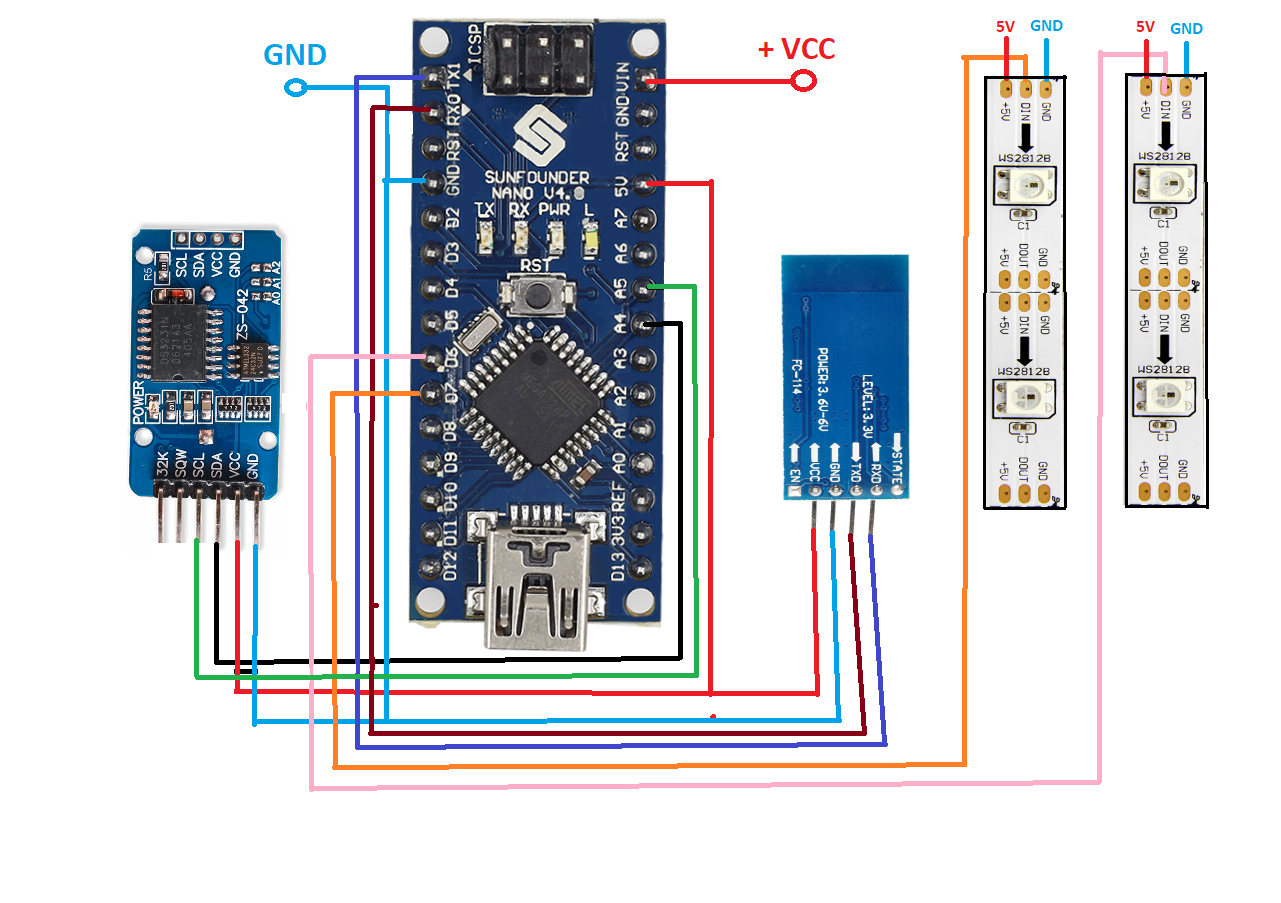 controlling by your phoneclockconnect__Ieit1qA91l.apk