



Arduino UNO Web-Enabled Servo Control with PHPoC WiFi Shield
Components and supplies
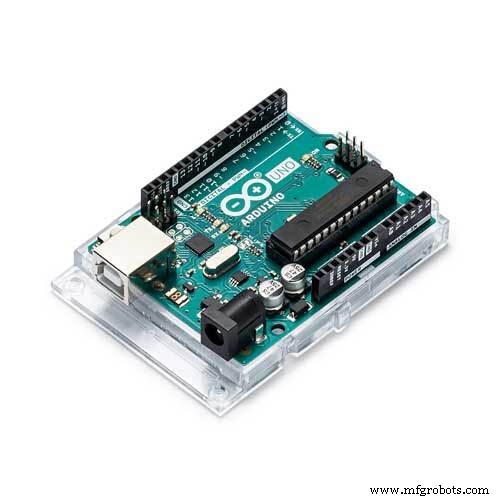 |
| × | 1 | |||
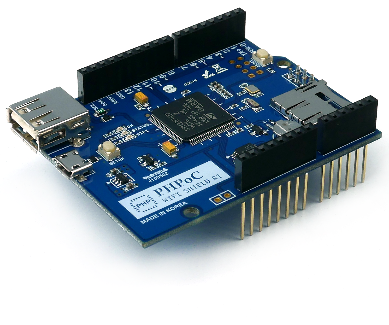 |
| × | 1 | |||
| × | 1 | ||||
| × | 1 |
About this project
IntroductionIf you are beginner, I recommend reading about Arduino - Servo Motor and Arduino - Wifi.
To connect Arduino to internet, we need to use some kind of internet shield such as Ethernet shield, Wifi shield, PHPoC shield, or PHPoC Wifi shield.
The outstanding feature of PHPoC shield is that it not only provides Internet connection like Ethernet and Wifi shield, but also provides a web server which allows to control and monitor Arduino from a web browser. It also supports WebSocket, therefore we can control and monitor Arduino in real-time without reloading a webpage.
PHPoC Shield has some built-in web applications. Refer to this link for more detail.
In this project, I changed UI (User Interface) of Web Remote Control/Slide web application, and wrote Arduino code to rotate servo motor angle according to angle received from web browser.
Wiring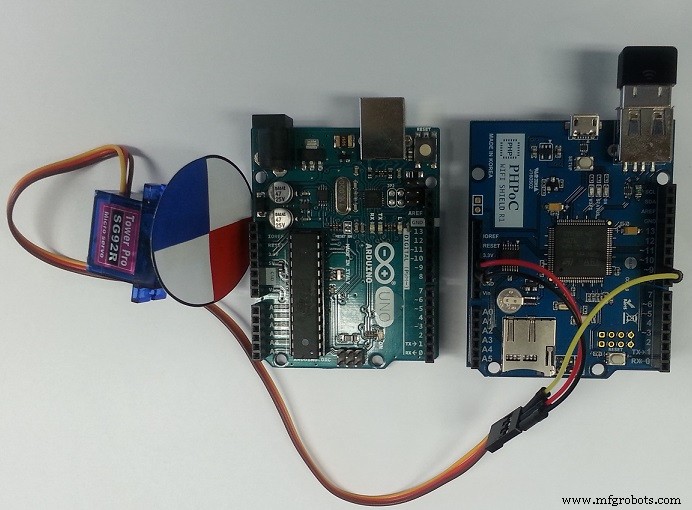
- Stack PHPoC shield on Arduino
- Connect pin GND, VCC and signal of servo motor to GND, 5V and pin 9 of Arduino, respectively.
Web browser ---> PHPoC Shield ---> Arduino
Web app will calculate the angle based on touch or mouse event, send it to PHPoC shield via websocket. When receiving this data, PHPoC shield passes it to Arduino. Arduino rotates servo motor according to the angle.
What We Need to Do- Set Wifi information for PHPoC shield (SSID and password)
- Upload new UI to PHPoC shield
- Write Arduino code
See this instruction: http://www.phpoc.com/support/manual/p4s-347_user_manual/contents.php?id=network_first_setup
Upload new UI to PHPoC Shield- Download PHPoC source code remote_rotate.php (on code section)
- Upload it to PHPoC shield using PHPoC debugger according to this instruction
- Install library for Arduino on Arduino IDE (see the instruction ) and restart Arduino IDE.
- On Arduino IDE, go to File -> Examples -> Phpoc -> WebRemoteSlide and File -> Examples ->Servo->sweep.
- Combine two examples into one, we have the code to control servo motor via webpage (see the source code in code section).
- Click serial button on Arduino IDE to see the IP address
- Open web browser, type http://replace_ip_address/remote_rotate.php
- Click connect button and test it
If you are looking for an Arduino kit, see The Best Arduino Kit for Beginners
Function References- Arduino - Servo Library
- Servo.attach()
- Servo.write()
- Servo.writeMicroseconds()
- Servo.read()
- Servo.attached()
- Servo.detach()
- Serial.begin()
- Serial.println()
- delay()
- for loop
- while loop
- if else
- loop()
- setup()
- String.toInt()
Code
- remote_rotate.php
- Arduino code
remote_rotate.phpPHP
<!DOCTYPE html>
<html>
<head>
<title>PHPoC Shield - Web Remote Control for Arduino</title>
<meta name="viewport" content="width=device-width, initial-scale=0.7, maximum-scale=0.7">
<style>
body { text-align: center; font-size: 15pt; }
h1 { font-weight: bold; font-size: 25pt; }
h2 { font-weight: bold; font-size: 15pt; }
button { font-weight: bold; font-size: 15pt; }
</style>
<script>
var canvas_width = 400, canvas_height = 400;
var plate_radius = 160;
var click_state = 0;
var last_plate_angle = 0
var plate_angle = 0, last_angle = 0;
var ws;
function init()
{
	var canvas = document.getElementById("remote");

	canvas.addEventListener("touchstart", mouse_down);
	canvas.addEventListener("touchend", mouse_up);
	canvas.addEventListener("touchmove", mouse_move);
	canvas.addEventListener("mousedown", mouse_down);
	canvas.addEventListener("mouseup", mouse_up);
	canvas.addEventListener("mousemove", mouse_move);

	var ctx = canvas.getContext("2d");

	ctx.translate(canvas_width / 2, canvas_height / 2);

	rotate_plate(0);
}
function connect_onclick()
{
	if(ws == null)
	{
		var ws_host_addr = "<?echo _SERVER("HTTP_HOST")?>";
		var debug = document.getElementById("debug");
		if((navigator.platform.indexOf("Win") != -1) && (ws_host_addr.charAt(0) == "["))
		{
			// network resource identifier to UNC path name conversion
			ws_host_addr = ws_host_addr.replace(/[\[\]]/g, '');
			ws_host_addr = ws_host_addr.replace(/:/g, "-");
			ws_host_addr += ".ipv6-literal.net";
		}
		//debug.innerHTML = "<br>" + navigator.platform + " " + ws_host_addr;
		ws = new WebSocket("ws://" + ws_host_addr + "/remote_slide", "text.phpoc");
		document.getElementById("ws_state").innerHTML = "CONNECTING";
		ws.onopen = ws_onopen;
		ws.onclose = ws_onclose;
		ws.onmessage = ws_onmessage;
	}
	else
		ws.close();
}
function ws_onopen()
{
	document.getElementById("ws_state").innerHTML = "<font color='blue'>CONNECTED</font>";
	document.getElementById("bt_connect").innerHTML = "Disconnect";
}
function ws_onclose()
{
	document.getElementById("ws_state").innerHTML = "<font color='gray'>CLOSED</font>";
	document.getElementById("bt_connect").innerHTML = "Connect";
	ws.onopen = null;
	ws.onclose = null;
	ws.onmessage = null;
	ws = null;
}
function ws_onmessage(e_msg)
{
	e_msg = e_msg || window.event; // MessageEvent
	alert("msg : " + e_msg.data);
}

function rotate_plate(angle)
{
	var canvas = document.getElementById("remote");
	var ctx = canvas.getContext("2d");

	ctx.clearRect(-canvas_width / 2, -canvas_height / 2, canvas_width, canvas_height);
	ctx.rotate(angle / 180 * Math.PI);

	ctx.strokeStyle="red";
	ctx.fillStyle="red";
	ctx.beginPath();
	ctx.arc(0, 0, plate_radius, Math.PI, Math.PI * 1.5);
	ctx.lineTo(0, 0);
	ctx.lineTo(-plate_radius, 0);
	ctx.fill();
	ctx.stroke();

	ctx.strokeStyle="blue";
	ctx.fillStyle="blue";
	ctx.beginPath();
	ctx.arc(0, 0, plate_radius, 0, Math.PI / 2);
	ctx.lineTo(0, 0);
	ctx.lineTo(plate_radius, 0);
	ctx.fill();
	ctx.stroke();

	ctx.strokeStyle="black";
	ctx.arc(0, 0, plate_radius, 0, Math.PI * 2);
	ctx.stroke();

	ctx.rotate(-angle / 180 * Math.PI);
}
function mouse_down()
{
	if(ws == null)
		return;

	var dist_min, dist_max, dist;

	event.preventDefault();

	if(event.offsetX)
	{
		x = event.offsetX - canvas_width / 2;
		y = canvas_height / 2 - event.offsetY;
		dist_min = 40;
		dist_max = plate_radius;
	}
	else if(event.layerX)
	{
		x = event.layerX - canvas_width / 2;
		y = canvas_height / 2 - event.layerY;
		dist_min = 40;
		dist_max = canvas_width / 2;
	}
	else
	{
		x = (Math.round(event.touches[0].pageX - event.touches[0].target.offsetLeft)) - canvas_width / 2;
		y = canvas_height / 2 - (Math.round(event.touches[0].pageY - event.touches[0].target.offsetTop));
		dist_min = 40;
		dist_max = canvas_width / 2;
	}

	var dist = Math.round(Math.sqrt(x * x + y * y));
	if((dist > dist_min) && (dist < dist_max))
	{
		click_state = 1;
		last_angle = Math.round(Math.atan2(y, x) / Math.PI * 180);
	}
}
function mouse_up()
{
	if(ws == null)
		return;

	event.preventDefault();

	click_state = 0;
}
function mouse_move()
{
	if(ws == null)
		return;

	var dist_min, dist_max, angle, dist;

	event.preventDefault();

	if(!click_state)
		return;

	if(event.offsetX)
	{
		x = event.offsetX - canvas_width / 2;
		y = canvas_height / 2 - event.offsetY;
		dist_min = 40;
		dist_max = plate_radius;
	}
	else if(event.layerX)
	{
		x = event.layerX - canvas_width / 2;
		y = canvas_height / 2 - event.layerY;
		dist_min = 40;
		dist_max = canvas_width / 2;
	}
	else
	{
		x = (Math.round(event.touches[0].pageX - event.touches[0].target.offsetLeft)) - canvas_width / 2;
		y = canvas_height / 2 - (Math.round(event.touches[0].pageY - event.touches[0].target.offsetTop));
		dist_min = 40;
		dist_max = canvas_width / 2;
	}

	angle = Math.round(Math.atan2(y, x) / Math.PI * 180);
	dist = Math.round(Math.sqrt(x * x + y * y));

	if((dist < dist_min) || (dist > dist_max))
	{
		click_state = 0;
		return;
	}

	if((Math.abs(angle) > 90) && (angle * last_angle < 0))
	{
		if(last_angle > 0)
			last_angle = -180;
		else
			last_angle = 180;
	}

	plate_angle += (angle - last_angle);
	last_angle = angle;

	if(plate_angle > 180)
		plate_angle = 180;

	if(plate_angle < 0)
		plate_angle = 0;

	rotate_plate(-plate_angle);

	if(plate_angle != last_plate_angle)
	{
		if(ws && ws.readyState)
		{
			ws.send("C" + plate_angle.toString() + "\r\n");
			last_plate_angle = plate_angle;
			debug = document.getElementById("debug");
			debug.innerHTML = plate_angle;
			//console.log(plate_angle);
		}
	}
}
window.onload = init;
</script>
</head>

<body>

<p>
<h1>Web Remote Control / Rotate</h1>
</p>

<canvas id="remote" width="400" height="400"></canvas>

<h2>
<p>
WebSocket : <span id="ws_state">null</span><br>
Angle : <span id="debug">0</span>
</p>
<button id="bt_connect" type="button" onclick="connect_onclick();">Connect</button>
</h2>

</body>
</html>
Arduino codeArduino
/* arduino web server - remote control (slide switch) */

#include "SPI.h"
#include "Phpoc.h"
#include <Servo.h>

PhpocServer server(80);
Servo myservo;  // create servo object to control a servo

char slideName;
int slideValue;

void setup() {
  Serial.begin(9600);
  while(!Serial)
    ;

  Phpoc.begin(PF_LOG_SPI | PF_LOG_NET);
  //Phpoc.begin();

  server.beginWebSocket("remote_slide");

  Serial.print("WebSocket server address : ");
  Serial.println(Phpoc.localIP());

  myservo.attach(9);  // attaches the servo on pin 9 to the servo object
   myservo.write(1);
}

void loop() {
  // wait for a new client:
  PhpocClient client = server.available();

  if (client) {
    String slideStr = client.readLine();

    if(slideStr)
    {
      slideValue = slideStr.substring(1).toInt();
      myservo.write(slideValue);
      Serial.print("Angle: ");
      Serial.println(slideValue);
    }
  }
}
Manufacturing process
- Web‑Controlled DMX Lighting System – Arduino Master Controller
- Build a Bluetooth‑controlled Arduino Spybot
- Build a Smart Piggy Bank: Control a Coin Acceptor with Arduino Nano
- Arduino Power Control Center: N-FET, P-FET, Relay & RTC Kit
- DIY Arduino Humidifier Controller with Relay – Safe High‑Voltage Setup
- Arduino-Driven GrowBox Controller – Open-Source Firmware & Hardware Guide
- Smart Domotic Greenhouse: Automated Climate Control with Arduino
- ED BMSdiag – Arduino CAN‑BUS & OBD‑II Diagnostic Kit
- Arduino Web-Controlled Light Bulb: Step-by-Step Guide
- Remote Control of a 6‑DOF Arduino Robot Arm via Web Interface