Web‑Controlled DMX Lighting System – Arduino Master Controller
Components and supplies
Arduino Mega 2560
×
1
Arduino UNO
×
1
DMX Master Shield
×
1
Seeed Studio W5200 Ethernet Shield
×
1
LED (generic)
×
4
Solderless Breadboard Half Size
×
1
Jumper wires (generic)
×
1
Resistor 100 ohm
×
4
Delkin Industrial SLC microSD
×
1
Necessary tools and machines
Soldering iron (generic)
About this project
I made this project five to seven years ago because of a need for more refined control of the lights than a pre-programmed box could provide while running lights, sounds, and video graphics for funerals, weddings, and other events at an auxiliary location that doesn't normally have a dedicated lights control console. Since this unit is run from a web browser I could handle all three tasks all from one computer.
When I first started on this 5-7 years ago I had everything on an Arduino UNO. But I found I was unable to command all 512 channels and it kept hitting memory and speed limits. After trying on an Arduino Mega I was still having memory problems and would not operate reliably. So I separated the functions of DMX and Web connectivity into a dedicated Arduino each. Finally after debugging the Ethernet shield problems I finally had a stable platform to reliably run a live lights show, complete with scenes and scene fading. Developing the browser interface front-end was what took the longest, trying to make it as intuitive as possible.
This project is an example of the following:
Arduino-to-Arduino communication over SPI
TinkerKit DMX Master Controller operation
Ethernet and SD Card Shield (over SPI) operation with web server
Interrupt Request signalling and handling (IRQ)
Internal Resets
Direct port pin programming
EEPROM (for storing the Ethernet configuration)
Memory management
The TinkerKit DMX shield came without the connectors soldered on. I only soldered on the one for output. I also modified it by de-soldering the [RX Sel] pull up/down resister to avoid conflicts with the Ethernet Shield when I had everything on one micro-controller board, probably not necessary anymore but I mention it just in case. The old SeeedStudio Ethernet W5200 Shield has a hardware bug that requires you to restart it once you apply power.
If anybody has problems replicating the project for any reason (hardware/software/compiling) let me know and I'll see if I can help you.
Code
Project files archive for the Arduino Mega
Project files archive for the Arduino UNO
Web Server Resources
Project files archive for the Arduino MegaC/C++
Extract and compile it for the Arduino Mega. Will not work correctly on an UNO and may even brick it.
No preview (download only).
Project files archive for the Arduino UNOC/C++
Extract and compile it for the Arduino UNO.
No preview (download only).
Web Server ResourcesHTML
Extract all files and copy it onto the MicroSD card to be installed into the ethernet shield. The MicroSD card will need to be formatted as FAT16. The archive also includes two Windows executables, one for PUTting files onto the SD Card through the Arduino Mega after the Mega has been programmed, and the other for POSTing data to the Mega for testing and debugging.
No preview (download only).
Schematics
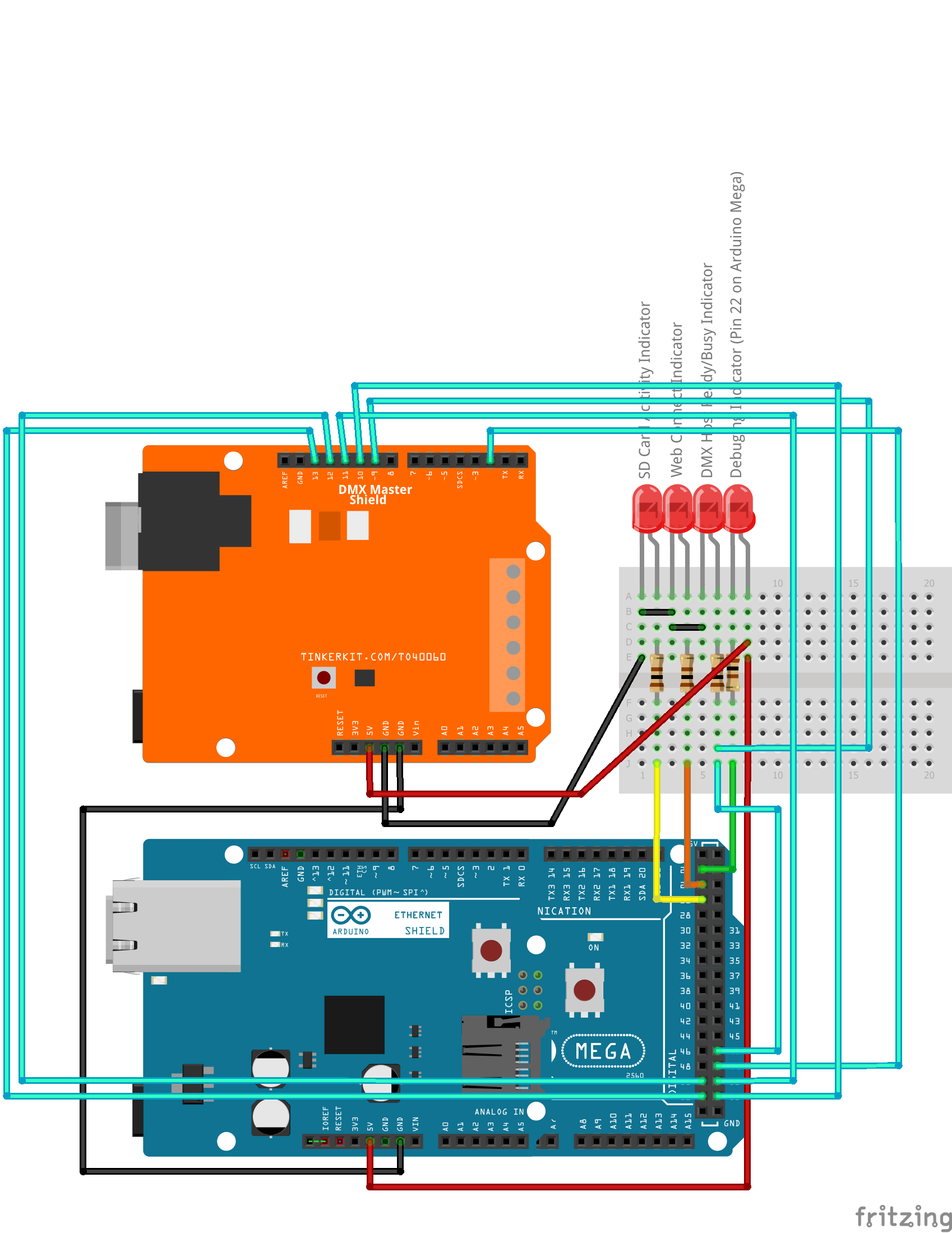
Diagram showing how to connect the Arduino boards, shields, and status indicator LEDs.