



Secure Your Arduino with Web Pattern Unlock – Easy Setup & Remote Control
Components and supplies
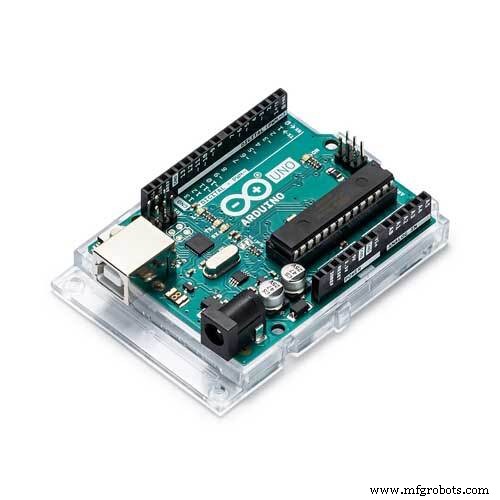 |
| × | 1 | |||
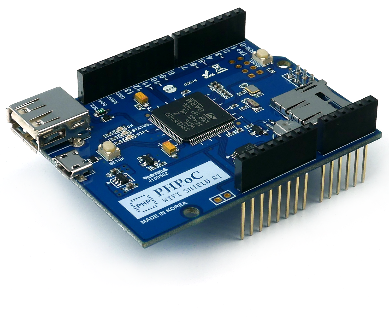 |
| × | 1 | |||
| × | 1 | ||||
| × | 1 |
About this project
IntroductionIf you are beginner, I recommend reading the following tutorials:
- Arduino - Motor
- Arduino - Servo Motor
- Arduino - Wifi
You may be familiar with the unlock pattern when you access your phone. Now this feature is available on Arduino. It prevents the unauthorized people from controlling/monitoring Arduino.
User can freely re-use the code in this project for other application. For the sake of simplicity, I takes the servo motor controlling as an example.
This idea originates from two project, which is written for PHPoC platform:
- https://www.hackster.io/iot_lover/web-based-pattern-unlock-for-iot-device-aeaf44.
- https://forum.phpoc.com/articles/tutorials/350-servo-motor-controlling-servo-motor-via-websocket-with-graphic-ui
I adapt them for Arduino.
In this project, I used PHPoC WiFi Shield to connect Arduino to Internet because:
- PHPoC Shield supports websocket, which is convenient for this project.
- PHPoC Shield has a dedicated embedded web server, allowing to store the embedded web application on the shield.
PHPoC Shield has some built-in web applications that lets user uses embedded web application to control/monitoring Arduino without requiring any knowledge of web programming.
Also, PHPoC shield allows the users who can program web application to develop their own web application and store it on PHPoC Shield.
DemonstrationData FlowWeb browser <---> PHPoC WiFi Shield <---> Arduino
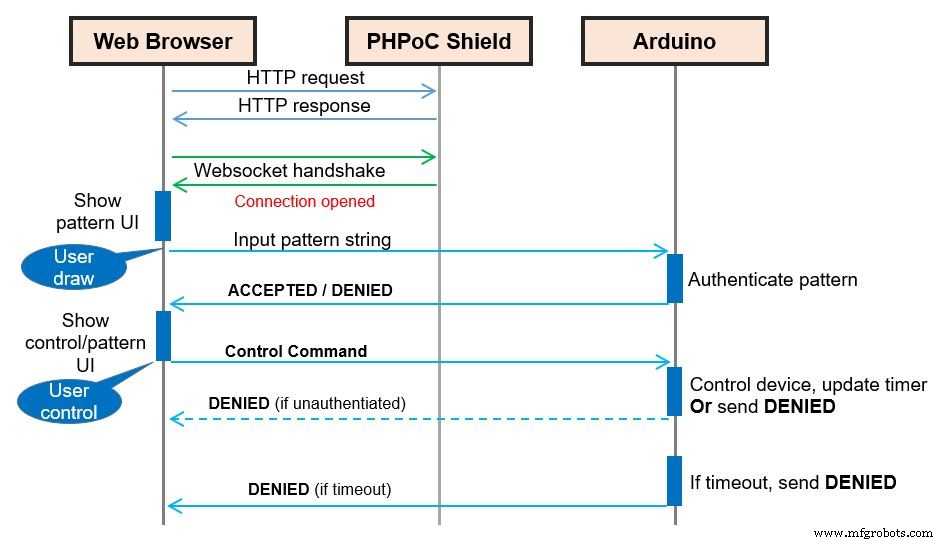
When user draw their pattern on web browser, the pattern is mapped to a string. This pattern string is sent to Arduino through WebSocket (via PHPoC Shield).
When Arduino receives the input pattern string, it will compare the received string with hard-coded pattern string in Arduino. If they are matched, Arduino sends the ACCEPTED code back to client (Web browser) and sets the authenticated variable to true. Otherwise, Arduino sends the DENIED code to client and set the authenticated variable to false.
When Arduino receives a control command from user, it will check the value of the authenticated variable first. If the value is true, It performs the task corresponding with command. If the value is false, It sends the DENIED code to client.
Pattern Mapping
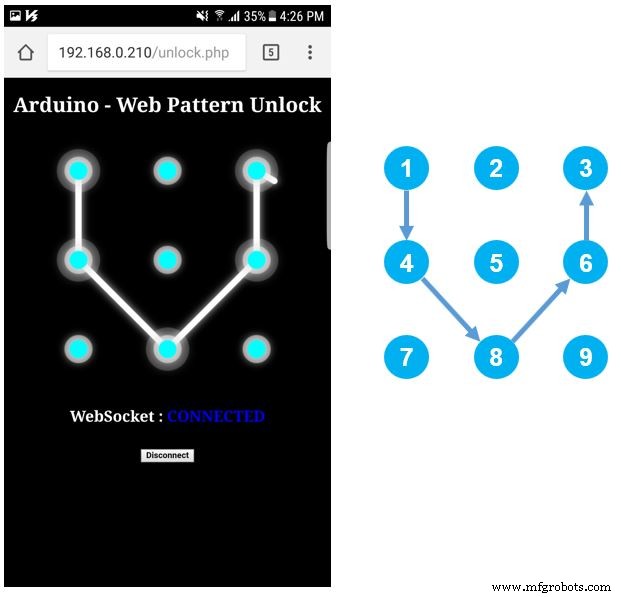
Pattern will be mapped to a string. For example, in above image, pattern string is "1, 4, 8, 6, 3".
A timeout is set. After a period of time, if user does not have any activity, the authentication is expired, user needs to input pattern again to unlock Arduino.
Source code include two files:
- ArduinoUnlockExample.ino: is compiled and upload to Arduino via Arduino IDE
- unlock.php: this is web app code, it is uploaded to PHPoC shield via PHPoC Debugger.
- Set Wifi information for PHPoC shield (SSID and password)
- Upload new UI to PHPoC shield
- Write Arduino code
Setting Wifi Information for PHPoC Shield
See this instruction.
Upload new Web UI to PHPoC Shield
- Download PHPoC source code unlock.php (on code section).
- Download two following image for controlling servo motor
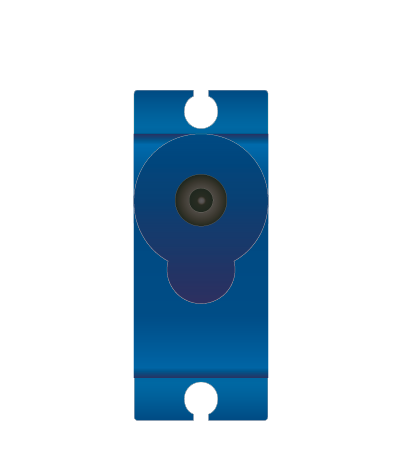
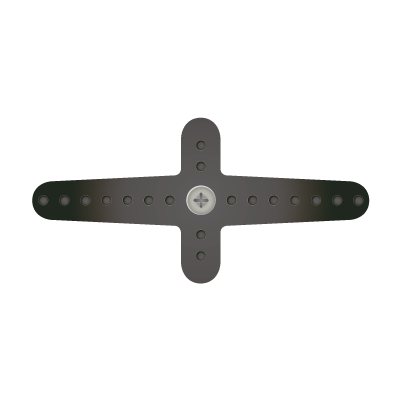
- Upload it to PHPoC shield using PHPoC debugger according to this instruction (note that do NOT delete the existing file on PHPoC Shield)
Write Arduino Code
- Install PHPoC library for Arduino on Arduino IDE (see the instruction )
- See source code in code section.
- Compile and upload to Arduino via Arduino IDE
- Click serial button on Arduino IDE to see the IP address.
- Open web browser, type
http://replace_ip_address/unlock.php - Click connect button and test it.
If you are looking for an Arduino kit, see The Best Arduino Kit for Beginners
Function References- Arduino - Servo Library
- Servo.attach()
- Servo.write()
- Servo.writeMicroseconds()
- Servo.read()
- Servo.attached()
- Servo.detach()
- Serial.begin()
- Serial.println()
- delay()
- millis()
- for loop
- while loop
- if else
- loop()
- setup()
- String.toInt()
- String.substring()
- String.indexOf()
- String.remove()
- String.equals()
Code
- unlock.php
- ArduinoUnlockExample
unlock.phpPHP
This is Web user interface<!DOCTYPE html>
<html>
<head>
<title>Arduino - PHPoC Shield</title>
<meta name="viewport" content="width=device-width, initial-scale=0.7, maximum-scale=0.7">
<meta charset="utf-8">
<style>
body { text-align: center; font-size: width/2pt; }
h1 { font-weight: bold; font-size: width/2pt; }
h2 { font-weight: bold; font-size: width/2pt; }
button { font-weight: bold; font-size: width/2pt; }
</style>
<script>
var CMD_AUTH = 0;
var CMD_CTRL = 1;
var ws;
var authorized = false;
/* unlock variable */
var unlock_width = 400, unlock_height = 400;
var unlock_inner_radius = 14;
var unlock_middle_radius = 22;
var unlock_outer_radius = 34;
var unlock_gap = 140;
var unlock_touch_state = 0;
var unlock_touch_x = 0, unlock_touch_y = 0;
var unlock_touch_list = new Array();
var unlock_ratio = 1;
/* control variable: change as you want, as your application */
var servo_width = 401, servo_height = 466;
var servo_pivot_x = 200, servo_pivot_y = 200;
var servo_bracket_radius = 160, servo_bracket_angle = 0;
var servo_bracket_img = new Image();
var servo_click_state = 0;
var servo_last_angle = 0;
var servo_mouse_xyra = {x:0, y:0, r:0.0, a:0.0};
servo_bracket_img.src = "servo_bracket.png";
function init()
{
/* init unlock part */
var unlock = document.getElementById("unlock");
unlock.width = unlock_width;
unlock.height = unlock_height;
unlock.addEventListener("touchstart", unlock_mouse_down);
unlock.addEventListener("touchend", unlock_mouse_up);
unlock.addEventListener("touchmove", unlock_mouse_move);
unlock.addEventListener("mousedown", unlock_mouse_down);
unlock.addEventListener("mouseup", unlock_mouse_up);
unlock.addEventListener("mousemove", unlock_mouse_move);
var ctx = unlock.getContext("2d");
ctx.translate(unlock_width/2, unlock_height/2);
ctx.shadowBlur = 20;
ctx.shadowColor = "LightGray";
ctx.lineCap="round";
ctx.lineJoin="round";
/* init control part */
var servo = document.getElementById("servo");
servo.width = servo_width;
servo.height = servo_height;
servo.style.backgroundImage = "url('/servo_body.png')";
servo.addEventListener("touchstart", servo_mouse_down);
servo.addEventListener("touchend", servo_mouse_up);
servo.addEventListener("touchmove", servo_mouse_move);
servo.addEventListener("mousedown", servo_mouse_down);
servo.addEventListener("mouseup", servo_mouse_up);
servo.addEventListener("mousemove", servo_mouse_move);
ctx = servo.getContext("2d");
ctx.translate(servo_pivot_x, servo_pivot_y);
update_view();
}
function connect_onclick()
{
if(ws == null)
{
var ws_host_addr = "<?echo _SERVER("HTTP_HOST")?>";
if((navigator.platform.indexOf("Win") != -1) && (ws_host_addr.charAt(0) == "["))
{
// network resource identifier to UNC path name conversion
ws_host_addr = ws_host_addr.replace(/[\[\]]/g, '');
ws_host_addr = ws_host_addr.replace(/:/g, "-");
ws_host_addr += ".ipv6-literal.net";
}
ws = new WebSocket("ws://" + ws_host_addr + "/web_pattern", "text.phpoc");
document.getElementById("ws_state").innerHTML = "CONNECTING";
ws.onopen = ws_onopen;
ws.onclose = ws_onclose;
ws.onmessage = ws_onmessage;
}
else
ws.close();
}
function ws_onopen()
{
document.getElementById("ws_state").innerHTML = "<font color='blue'>CONNECTED</font>";
document.getElementById("bt_connect").innerHTML = "Disconnect";
update_view();
}
function ws_onclose()
{
document.getElementById("ws_state").innerHTML = "<font color='gray'>CLOSED</font>";
document.getElementById("bt_connect").innerHTML = "Connect";
ws.onopen = null;
ws.onclose = null;
ws.onmessage = null;
ws = null;
authorized = false;
update_view();
}
function ws_onmessage(e_msg)
{
e_msg = e_msg || window.event; // MessageEvent
var resp = parseInt(e_msg.data);
if(resp == 202)
authorized = true;
else if(resp == 401)
authorized = false;
else
console.log("unknown:" + resp);
update_view();
}
function update_view()
{
if(!authorized)
unlock_update_view();
else
servo_update_view();
}
function unlock_update_view()
{
document.body.style.backgroundColor = "black";
document.body.style.color = "white";
var unlock_area = document.getElementById('unlock_area');
var control_area = document.getElementById('control_area');
unlock_area.style.display = 'block';
control_area.style.display = 'none';
var unlock = document.getElementById("unlock");
var ctx = unlock.getContext("2d");
ctx.clearRect(-unlock_width/2, -unlock_height/2, unlock_width, unlock_height);
// draw touched point and line
ctx.lineWidth = 10;
ctx.strokeStyle="white";
ctx.globalAlpha=1;
ctx.beginPath();
for (var i = 0; i < unlock_touch_list.length; i++)
{
var temp = unlock_touch_list[i] - 1;
var x = temp % 3 - 1;
var y = Math.floor(temp / 3) - 1;
ctx.lineTo(x*unlock_gap, y*unlock_gap);
}
if(unlock_touch_state)
ctx.lineTo(unlock_touch_x, unlock_touch_y);
ctx.stroke();
for (var i = 0; i < unlock_touch_list.length; i++)
{
var temp = unlock_touch_list[i] - 1;
var x = temp % 3 - 1;
var y = Math.floor(temp / 3) - 1;
ctx.globalAlpha=0.2;
ctx.fillStyle = "white";
ctx.beginPath();
ctx.arc(x*unlock_gap, y*unlock_gap, unlock_outer_radius, 0, 2 * Math.PI);
ctx.fill();
}
// draw base
for(var y = -1; y <= 1; y++)
{
for(var x = -1; x <= 1; x++)
{
ctx.globalAlpha=0.5;
ctx.fillStyle = "white";
ctx.beginPath();
ctx.arc(x*unlock_gap, y*unlock_gap, unlock_middle_radius, 0, 2 * Math.PI);
ctx.fill();
ctx.globalAlpha=1;
ctx.fillStyle = "Cyan";
ctx.beginPath();
ctx.arc(x*unlock_gap, y*unlock_gap, unlock_inner_radius, 0, 2 * Math.PI);
ctx.fill();
}
}
}
function unlock_process_event(event)
{
if(event.offsetX)
{
unlock_touch_x = event.offsetX - unlock_width/2;
unlock_touch_y = event.offsetY - unlock_height/2;
}
else if(event.layerX)
{
unlock_touch_x = event.layerX - unlock_width/2;
unlock_touch_y = event.layerY - unlock_height/2;
}
else
{
unlock_touch_x = (Math.round(event.touches[0].pageX - event.touches[0].target.offsetLeft)) - unlock_width/2;
unlock_touch_y = (Math.round(event.touches[0].pageY - event.touches[0].target.offsetTop)) - unlock_height/2;
}
for(var i = 1; i <= 9; i++)
{
if(i == unlock_touch_list[unlock_touch_list.length - 1])
continue;
var idx_x = (i-1)%3 - 1;
var idx_y = Math.floor((i-1)/3) - 1;
var center_x = idx_x*unlock_gap;
var center_y = idx_y*unlock_gap;
var dist = Math.sqrt( (unlock_touch_x - center_x)*(unlock_touch_x - center_x) + (unlock_touch_y - center_y)*(unlock_touch_y - center_y) );
if(dist < unlock_outer_radius)
{
unlock_touch_list.push(i);
unlock_touch_state = 1;
break;
}
}
update_view();
}
function unlock_mouse_down()
{
if(ws == null || authorized)
return;
event.preventDefault();
unlock_process_event(event);
}
function unlock_mouse_up()
{
if(ws == null || authorized)
return;
event.preventDefault();
if(ws != null && authorized == false)
send_to_Arduino(CMD_AUTH, unlock_touch_list.toString());
unlock_touch_state = 0;
unlock_touch_list.splice(0, unlock_touch_list.length);
update_view();
}
function unlock_mouse_move()
{
if(ws == null || authorized)
return;
event.preventDefault();
if(authorized)
return;
unlock_process_event(event);
}
function servo_update_view()
{
document.body.style.backgroundColor = "white";
document.body.style.color = "black";
var unlock_area = document.getElementById('unlock_area');
var control_area = document.getElementById('control_area');
unlock_area.style.display = 'none';
control_area.style.display = 'block';
/* modify our control area here */
var servo = document.getElementById("servo");
var ctx = servo.getContext("2d");
ctx.clearRect(-servo_pivot_x, -servo_pivot_y, servo_width, servo_height);
ctx.rotate(servo_bracket_angle / 180 * Math.PI);
ctx.drawImage(servo_bracket_img, -servo_pivot_x, -servo_pivot_y);
ctx.rotate(-servo_bracket_angle / 180 * Math.PI);
}
function check_range_xyra(event, servo_mouse_xyra)
{
var x, y, r, a, rc_x, rc_y, radian;
var min_r, max_r, width;
if(event.touches)
{
var touches = event.touches;
x = (touches[0].pageX - touches[0].target.offsetLeft) - servo_pivot_x;
y = servo_pivot_y - (touches[0].pageY - touches[0].target.offsetTop);
min_r = 60;
max_r = servo_pivot_x;
width = 40;
}
else
{
x = event.offsetX - servo_pivot_x;
y = servo_pivot_y - event.offsetY;
min_r = 60;
max_r = servo_bracket_radius;
width = 20;
}
/* cartesian to polar coordinate conversion */
r = Math.sqrt(x * x + y * y);
a = Math.atan2(y, x);
servo_mouse_xyra.x = x;
servo_mouse_xyra.y = y;
servo_mouse_xyra.r = r;
servo_mouse_xyra.a = a;
radian = servo_bracket_angle / 180 * Math.PI;
/* rotate coordinate */
rc_x = x * Math.cos(radian) - y * Math.sin(radian);
rc_y = x * Math.sin(radian) + y * Math.cos(radian);
if((r < min_r) || (r > max_r))
return false;
if((rc_y < -width) || (rc_y > width))
return false;
return true;
}
function servo_mouse_down()
{
if(event.touches && (event.touches.length > 1))
servo_click_state = event.touches.length;
if(servo_click_state > 1)
return;
if(check_range_xyra(event, servo_mouse_xyra))
{
servo_click_state = 1;
servo_last_angle = servo_mouse_xyra.a / Math.PI * 180.0;
}
}
function servo_mouse_up()
{
servo_click_state = 0;
}
function servo_mouse_move()
{
var angle;
if(event.touches && (event.touches.length > 1))
servo_click_state = event.touches.length;
if(servo_click_state > 1)
return;
if(!servo_click_state)
return;
if(!check_range_xyra(event, servo_mouse_xyra))
{
servo_click_state = 0;
return;
}
angle = servo_mouse_xyra.a / Math.PI * 180.0;
if((Math.abs(angle) > 90) && (angle * servo_last_angle < 0))
{
if(servo_last_angle > 0)
servo_last_angle = -180;
else
servo_last_angle = 180;
}
servo_bracket_angle += (servo_last_angle - angle);
servo_last_angle = angle;
if(servo_bracket_angle > 90)
servo_bracket_angle = 90;
if(servo_bracket_angle < -90)
servo_bracket_angle = -90;
servo_update_view();
send_to_Arduino(CMD_CTRL, Math.floor(servo_bracket_angle))
debug = document.getElementById("debug");
debug.innerHTML = Math.floor(servo_bracket_angle);
event.preventDefault();
}
function send_to_Arduino(cmd, data)
{
if(ws.readyState == 1)
{
ws.send(cmd + ":" + data + "\r\n");
}
}
window.onload = init;
</script>
</head>
<body>
<p>
<h1>Arduino - Web Pattern Unlock</h1>
</p>
<div id="unlock_area" style="display:block;">
<canvas id="unlock"></canvas>
</div>
<div id="control_area" style="display:none;">
<canvas id="servo"></canvas>
<p>Angle : <span id="debug">0</span></p>
</div>
<h2>
<p>WebSocket : <span id="ws_state">null</span></p>
<button id="bt_connect" type="button" onclick="connect_onclick();">Connect</button>
</h2>
</body>
</html>
ArduinoUnlockExampleArduino
/* arduino web server - pattern unlock */

#include "SPI.h"
#include "Phpoc.h"
#include <Servo.h>

#define CMD_AUTH    0
#define CMD_CTRL    1
#define ACCEPTED        "202"
#define UNAUTHORIZED    "401"

PhpocServer server(80);
Servo servo;
String pattern;
bool authenticated;
unsigned long timeout;
unsigned long lastActiveTime;

void setup() {
    Serial.begin(9600);
    while(!Serial)
        ;

    Phpoc.begin(PF_LOG_SPI | PF_LOG_NET);
    //Phpoc.begin();

    server.beginWebSocket("web_pattern");

    Serial.print("WebSocket server address : ");
    Serial.println(Phpoc.localIP());

    servo.attach(8);  // attaches the servo on pin 8 to the servo object
    servo.write(90);

    pattern = String("1,4,8,6,3");
    authenticated = false;
    timeout = 10000; // 10000 milllisecond
    lastActiveTime = 0;
}

void loop() {
    // wait for a new client:
    PhpocClient client = server.available();

    if (client) {
        String data = client.readLine();

        if(data) {
            int pos = data.indexOf(':');
            int cmd = data.substring(0, pos).toInt();

            if(cmd == CMD_AUTH) {
                String reqPattern = data.substring(pos+1);

                reqPattern.remove(reqPattern.indexOf(13));
                reqPattern.remove(reqPattern.indexOf(10));

                if(pattern.equals(reqPattern)) {
                    authenticated = true;
                    sendResponse(ACCEPTED, 3);
					lastActiveTime = millis();
                }
                else {
                    //Serial.print(reqPattern);
                    authenticated = false;
                    sendResponse(UNAUTHORIZED, 3);
                }
            }
            else
            if(cmd == CMD_CTRL) {
                if(authenticated) {
                    int angle = data.substring(pos+1).toInt();

					//angle = map(angle, -90, 90, 0, 180);
					angle = map(angle, 90, -90, 0, 180);

                    servo.write(angle);
					lastActiveTime = millis();

					Serial.println(angle);
                }
                else {
                    sendResponse(UNAUTHORIZED, 3);
                }
            }
        }
    }

	if (authenticated && ((millis() - lastActiveTime) > timeout)){
		authenticated = false;
		sendResponse(UNAUTHORIZED, 3);
	}
}

void sendResponse(char *data, int len) {
    server.write(data, len);
}
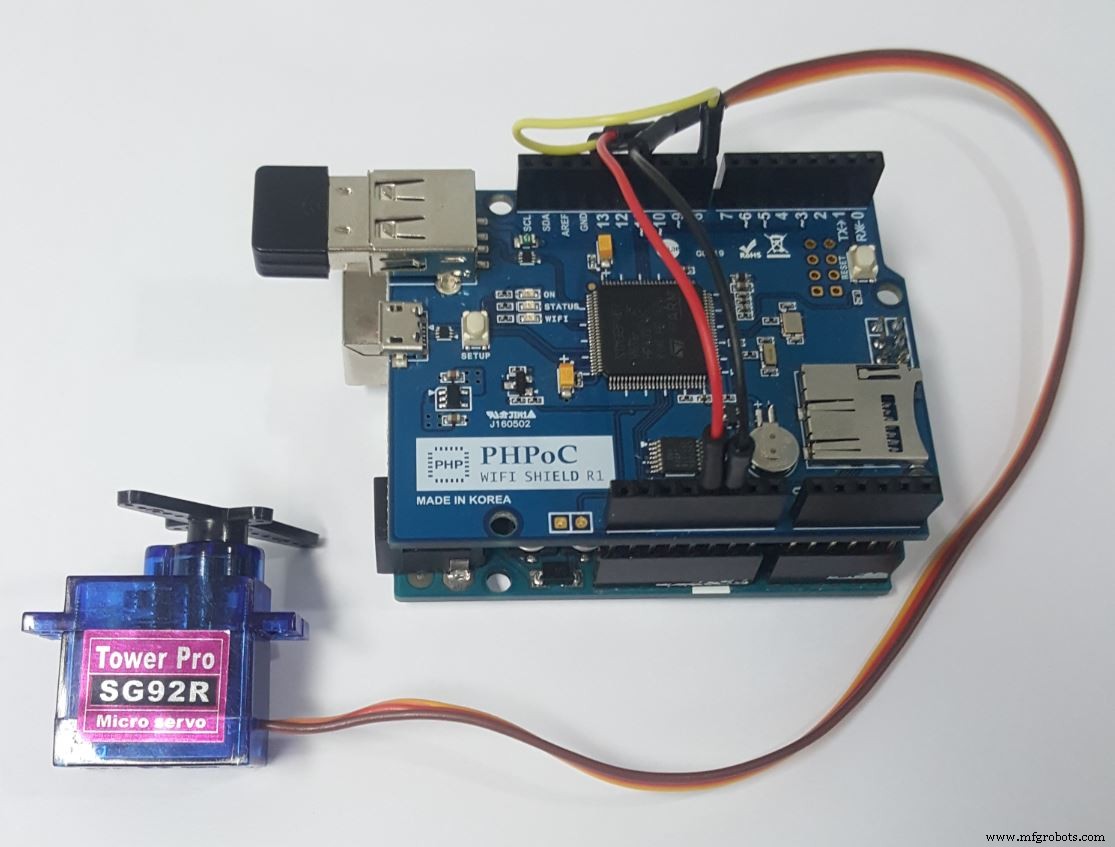
Schematics
Manufacturing process
- The Evolution and Production of Mass‑Produced Clothing Patterns
- Web‑Controlled DMX Lighting System – Arduino Master Controller
- Arduino UNO & WiFi Shield: Real-Time Temperature Display on the Web via Serial
- Arduino Web Oscilloscope with Advanced Triggering – 6 Channels, Customizable Settings
- Arduino Web-Controlled Light Bulb: Step-by-Step Guide
- Create a Web-Operated Joystick with Arduino UNO & WiFi Shield
- Build a Web-Enabled Arduino Thermometer with DS18B20 Sensor
- Build a Web-Enabled Arduino Car Race Brick Game
- Arduino UNO Web-Enabled Servo Control with PHPoC WiFi Shield
- Remote Control of a 6‑DOF Arduino Robot Arm via Web Interface