Otto DIY+ Arduino Bluetooth Robot – Easy 3D‑Print Build Kit
Components and supplies
Otto DIY Builder Kit +
×
1
USB-A to Mini-USB Cable
×
1
Otto DIY Arduino NANO Shield I/O
×
1
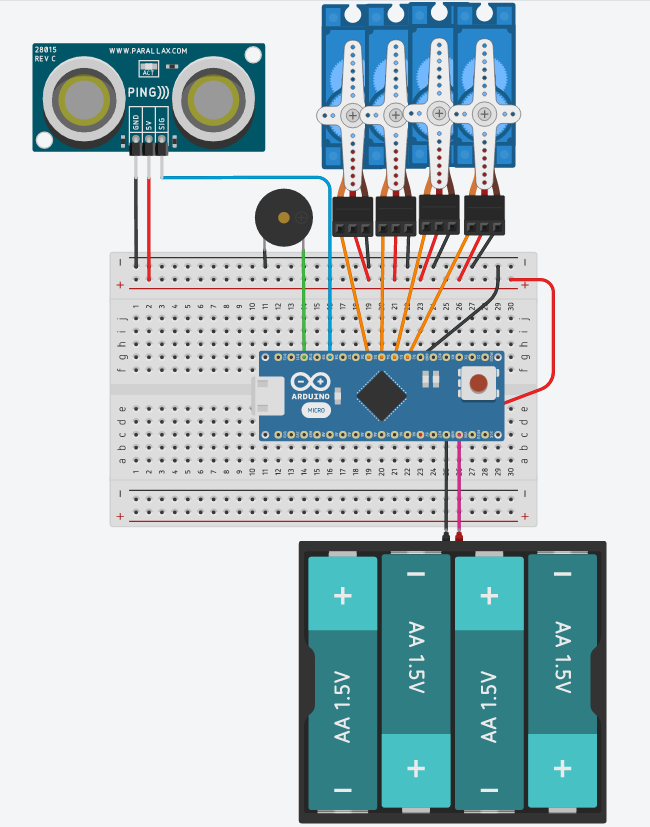
Ultrasonic Sensor - HC-SR04 (Generic)
Buy one that also works on 3.3V if you plan to use Lipo battery without step up converter.
×
1
Otto DIY Micro servo MG90
×
4
Buzzer
×
1
Female/Female Jumper Wires
×
10
Otto DIY 8x8mm Micro Switch Self lock On/Off
×
1
Arduino Nano 33 BLE Sense
×
1
SparkFun Electret Microphone Breakout
×
1
Seeed Grove - I2C Touch Sensor(MPR121)
×
3
4xAA battery holder
×
1
AA Batteries
×
4
Li-Ion Battery 1000mAh
(OPTIONAL)
×
1
Necessary tools and machines
3D Printer (generic)
Soldering iron (generic)
if you buy from ottodiy.com NO need
Phillips Cross screwdriver
Hot glue gun (generic)
Apps and online services
Arduino IDE
Arduino Web Editor
Autodesk Fusion 360
Visuino - Graphical Development Environment for Arduino
Microsoft Visual Studio Code Extension for Arduino
Webduino Blockly
About this project
Otto DIY + would be the improved and advanced version of original #OttoDIY, the idea is to have the same base features DIY robot + Bluetooth control and programming + metal gear servo motors + optional rechargeable + changing modes by touch sensor + sound sensor + ...?
The exciting part is that we are doing open development with makers and hackers around the world so we are open to ideas, not only from experts, you can join us with, feedback, social share, testing or any other contribution that you might think of.
follow our live build video!Start to play with the APP!
Baud-rate for programming module is 9600 or 19200 or 38400, depends on a module. and the code you are using
The BT code for our APP has 9600 baud-rate so BT module must match that speed to be able to communicate with Arduino Nano via serial interface(UART).
Main Code:
Upload this code with the Bluetooth module disconnected
https://wikifactory.com/+OttoDIY/otto-diy-plus
After successful upload connect the Bluetooth module and it will be ready for pairing with your phone.
Android APP:
For Android download for free here.
For iOS download for free here.
If the APP didn't work is probably because the Bluetooth module came with a baud rate different to 9600bpm so you need to setup or change in the code.
CodewithBlocks
The easiest to code your own Otto is by using one of our Blockly based software.
For more advanced coding here there is some basic programming with Arduino IDE:
Here you can find some complimentary tutorials for beginners to quickly get started with Arduino for each component:
- Servo Motor Tutorial: https://arduinogetstarted.com/tutorials/arduino-servo-motor - Ultrasonic Sensor Tutorial: https://arduinogetstarted.com/tutorials/arduino-ultrasonic-sensor