Code
- Giorno’s Theme Part 1 (Primary Arduino)
- Giorno’s Theme Part 2 (Secondary Arduino)
Giorno’s Theme Part 1 Arduino
#include "Color.h"
int S[] = {
  Pink1, 0, Pink1, 0, Pink1, Blue1, 0, Pink1, 0, Orange2, 0, Pink1, 0, Green1, Blue1, 0, Pink1, 0, Pink1, 0, Pink1, Blue1, 0, Pink1, 0, LGreen2, 0, Yellow2, 0, Orange2, Blue1, 0, Pink1, 0, Pink1, 0, Pink1, Blue1, 0, Pink1, 0, Orange2, 0, Pink1, 0, Green1, Blue1, 0, Pink1, 0, Pink1, 0, Pink1, Blue1, Pink1, Orange2, 0, LGreen2, 0, Yellow2, 0, Orange2, Blue1, 0, Pink1, 0, Pink1, 0, Pink1, Blue1, 0, Pink1, 0, Orange2, 0, Pink1, 0, Green1, Blue1, 0, Pink1, 0, Pink1, 0, Pink1, Blue1, 0, Pink1, 0, LGreen2, 0, Yellow2, 0, Orange2, Blue1, 0, Pink1, 0, Pink1, 0, Pink1, Blue1, 0, Pink1, 0, Orange2, 0, Pink1, 0, Green1, Blue1, 0, Pink1, 0, Pink1, 0, Pink1, 0, Blue1, Pink1, 0, 0, 0, 0, Pink1, 0,
  Orange2, 0, Yellow2, LGreen2, 0, Green2, 0, Blue2, 0, Green2, 0, Blue2, Purple2, 0, Pink2, 0, Purple2, 0, Blue2, Green2, 0, Yellow2, 0, Orange2, LBlue1, 0, Blue1, 0, Purple1, 0, Pink1, 0, Orange2, 0, Yellow2, LGreen2, 0, Green2, 0, Blue2, 0, Green2, 0, Blue2, Purple2, 0, Pink2, 0, Blue2, Pink2, Blue2, 0, Purple2, Pink2, 0, LBlue1, 0, LBlue1, Blue1, Blue1, Purple1, 0, Pink1, 0, Orange2, 0, Yellow2, LGreen2, 0, Green2, 0, Blue2, 0, Green2, 0, Blue2, Purple2, 0, Pink2, 0, Purple2, 0, Blue2, Green2, 0, Yellow2, 0, Orange2, LBlue1, 0, Blue1, 0, Purple1, 0, Pink1, 0, Orange2, 0, Yellow2, LGreen2, 0, Green2, 0, Blue2, 0, Green2, 0, Blue2, Purple2, 0, Pink2, 0, Blue2, Pink2, Blue2, 0, Purple2, Pink2, 0, LBlue1, 0, LBlue1, Blue1, Blue1, Purple1, 0,
  Orange2, DOrange2, Pink1, 0, Blue1, 0, 0, Pink1, 0, 0, Pink1, 0, 0, 0, Green1, 0, Blue1, 0, Pink1, 0, DOrange2, 0, 0, Blue1, 0, 0, Pink1, 0, 0, 0, 0, 0, Orange2, DOrange2, Pink1, 0, Blue1, 0, 0, Pink1, 0, 0, Pink1, 0, 0, Green1, 0, 0, DOrange2, 0, Orange2, 0, DOrange2, 0, 0, Blue1, 0, DOrange1, Yellow1, Green1, DOrange1, Green1, LBlue1, Pink1, Orange2, DOrange2, Pink1, 0, Blue1, 0, 0, Pink1, 0, 0, Pink1, 0, 0, 0, Green1, 0, Blue1, 0, Pink1, 0, DOrange2, 0, 0, Blue1, 0, 0, Pink1, 0, 0, 0, 0, 0, Orange2, DOrange2, Pink1, 0, Blue1, Orange2, 0, Green2, Yellow2, Orange2, Pink1, 0, Blue2, LBlue2, 0, Green2, Orange2, DOrange2, 0, Pink1, Blue1, Pink1, 0, Blue1, Pink1, 0, Blue1, Pink1, 0, Blue1, Pink1, 0, Blue1, Pink1, 0, Blue1, Pink1, Orange2, 0,
  Green2, 0, 0, 0, 0, 0, Orange2, 0, 0, 0, 0, 0, 0, Orange2, Yellow2, LGreen2, 0, 0, Yellow2, 0, 0, Orange2, 0, DOrange2, 0, 0, Orange2, 0, 0, Yellow2, 0, Green2, 0, 0, 0, 0, 0, Pink2, 0, 0, 0, 0, 0, Pink1, 0, DOrange2, 0, Orange2, 0, 0, Yellow2, 0, 0, Orange2, 0, DOrange2, 0, 0, Blue2, 0, 0, DGreen2, 0, Green2, 0, 0, 0, 0, 0, Orange2, 0, 0, 0, 0, 0, 0, Orange2, Yellow2, LGreen2, 0, 0, Yellow2, 0, 0, Orange2, 0, DOrange2, 0, 0, Orange2, 0, 0, Yellow2, 0, Green2, 0, 0, 0, 0, 0, Pink2, 0, 0, 0, 0, 0, Green2, 0, Purple2, 0, Pink2, 0, 0, DGreen2, 0, 0, Green2, 0, LGreen2, 0, 0, Pink2, 0, 0, Green2, 0, Green2
};
int L = sizeof(S);
int nds = 10;

void setup() {
  Serial.begin(115200);
  pinMode(2, OUTPUT);
  L = L / 2;
  Serial.println(L);
  Tone();
}

void loop() {}

void Tone() {
  digitalWrite(2, HIGH);
  for (int n = 0; n < L; n++) {
    int nd = 1000 / nds;
    tone(6, S[n], nd);
    int d = nd * 1.2;
    delay(d);
    noTone(6);
  }
}
Giorno’s Theme Part 2 Arduino
#include "Color.h"
int S[] = {
  0, 0, 0, 0, 0, 0, 0, 0, 0, 0, 0, 0, 0, 0, 0, 0, 0, 0, 0, 0, 0, 0, 0, 0, 0, 0, 0, 0, 0, 0, 0, 0, 0, 0, 0, 0, 0, 0, 0, 0, 0, 0, 0, 0, 0, 0, 0, 0, 0, 0, 0, 0, 0, 0, 0, 0, 0, 0, 0, 0, 0, 0, 0, 0, Pink2, 0, Pink2, 0, Pink2, Blue2, 0, Pink2, 0, Orange3, 0, Pink2, 0, Green2, Blue2, 0, Pink2, 0, Pink2, 0, Pink2, Blue2, 0, Pink2, 0, LGreen3, 0, Yellow3, 0, Orange3, Blue2, 0, Pink2, 0, Pink2, 0, Pink2, Blue2, 0, Pink2, 0, Orange3, 0, Pink2, 0, Green2, Blue2, 0, Pink2, 0, Pink2, 0, Pink2, 0, Blue2, Pink2, 0, 0, 0, 0, 0, 0, 0, 0, 0, 0, 0, 0, 0, 0, 0, 0, 0, 0, 0, 0, 0, 0, 0, 0, 0, 0, 0, 0, 0, 0, 0, 0, 0, 0, 0, 0, 0, 0, 0, 0, 0, 0, 0, 0, 0, 0, 0, 0, 0, 0, 0, 0, 0, 0, 0, 0, 0, 0, 0, 0, 0, 0, 0, 0, 0, 0, 0, 0, 0, 0, 0, 0, 0, 0, 0,
  0, 0, 0, 0, 0, 0, 0, 0, 0, 0, 0, 0, 0, 0, 0, 0, 0, 0, 0, 0, 0, 0, 0, 0, 0, 0, 0, 0, 0, 0, 0, 0, 0, 0, 0, 0, 0, 0, 0, 0, 0, 0, 0, 0, 0, 0, 0, 0, 0, 0, 0, 0, 0, 0, 0, 0,
  Orange3, DOrange3, Pink2, 0, Blue2, 0, 0, Pink2, 0, 0, Pink2, 0, 0, 0, Green2, 0, Blue2, 0, Pink2, 0, DOrange3, 0, 0, Blue2, 0, 0, Pink2, 0, 0, 0, 0, 0, Orange3, DOrange3, Pink2, 0, Blue2, 0, 0, Pink2, 0, 0, Pink2, 0, 0, Green2, 0, 0, DOrange3, 0, Orange3, 0, DOrange3, 0, 0, Blue2, 0, DOrange2, Yellow2, Green2, DOrange2, Green2, LBlue2, Pink2, Orange3, DOrange3, Pink2, 0, Blue2, 0, 0, Pink2, 0, 0, Pink2, 0, 0, 0, Green2, 0, Blue2, 0, Pink2, 0, DOrange3, 0, 0, Blue2, 0, 0, Pink2, 0, 0, 0, 0, 0, Orange3, DOrange3, Pink2, 0, Blue2, Orange3, 0, Green3, Yellow3, Orange3, Pink2, 0, Blue3, LBlue3, 0, Green3, Orange3, DOrange3, 0, Pink2, Blue2, Pink2, 0, Blue2, Pink2, 0, Blue2, Pink2, 0, Blue2, Pink2, 0, Blue2, Pink2, Orange3, 0,
  Green2, 0, 0, 0, 0, 0, Orange2, 0, 0, 0, 0, 0, 0, Orange2, Yellow2, LGreen2, 0, 0, Yellow2, 0, 0, Orange2, 0, DOrange2, 0, 0, Orange2, 0, 0, Yellow2, 0, Green2, 0, 0, 0, 0, 0, Pink2, 0, 0, 0, 0, 0, Pink1, 0, DOrange2, 0, Orange2, 0, 0, Yellow2, 0, 0, Orange2, 0, DOrange2, 0, 0, Blue2, 0, 0, DGreen2, 0, Green2, 0, 0, 0, 0, 0, Orange2, 0, 0, 0, 0, 0, 0, Orange2, Yellow2, LGreen2, 0, 0, Yellow2, 0, 0, Orange2, 0, DOrange2, 0, 0, Orange2, 0, 0, Yellow2, 0, Green2, 0, 0, 0, 0, 0, Pink2, 0, 0, 0, 0, 0, Pink2, 0, DOrange3, 0, Orange3, 0, 0, DGreen3, 0, 0, Green3, 0, LGreen3, 0, 0, Orange3, 0, 0, Purple2, 0, Pink2
};
int L = sizeof(S);
int nds = 10;

void setup() {
  Serial.begin(115200);
  pinMode(3, INPUT_PULLUP);
  L = L / 2;
  Serial.println(L);
}

void loop() {
  if(!digitalRead(3)) {
    Tone();
  }
}

void Tone() {
  for (int n = 0; n < L; n++) {
    int nd = 1000 / nds;
    tone(6, S[n], nd);
    int d = nd * 1.2;
    delay(d);
    noTone(6);
  }
}




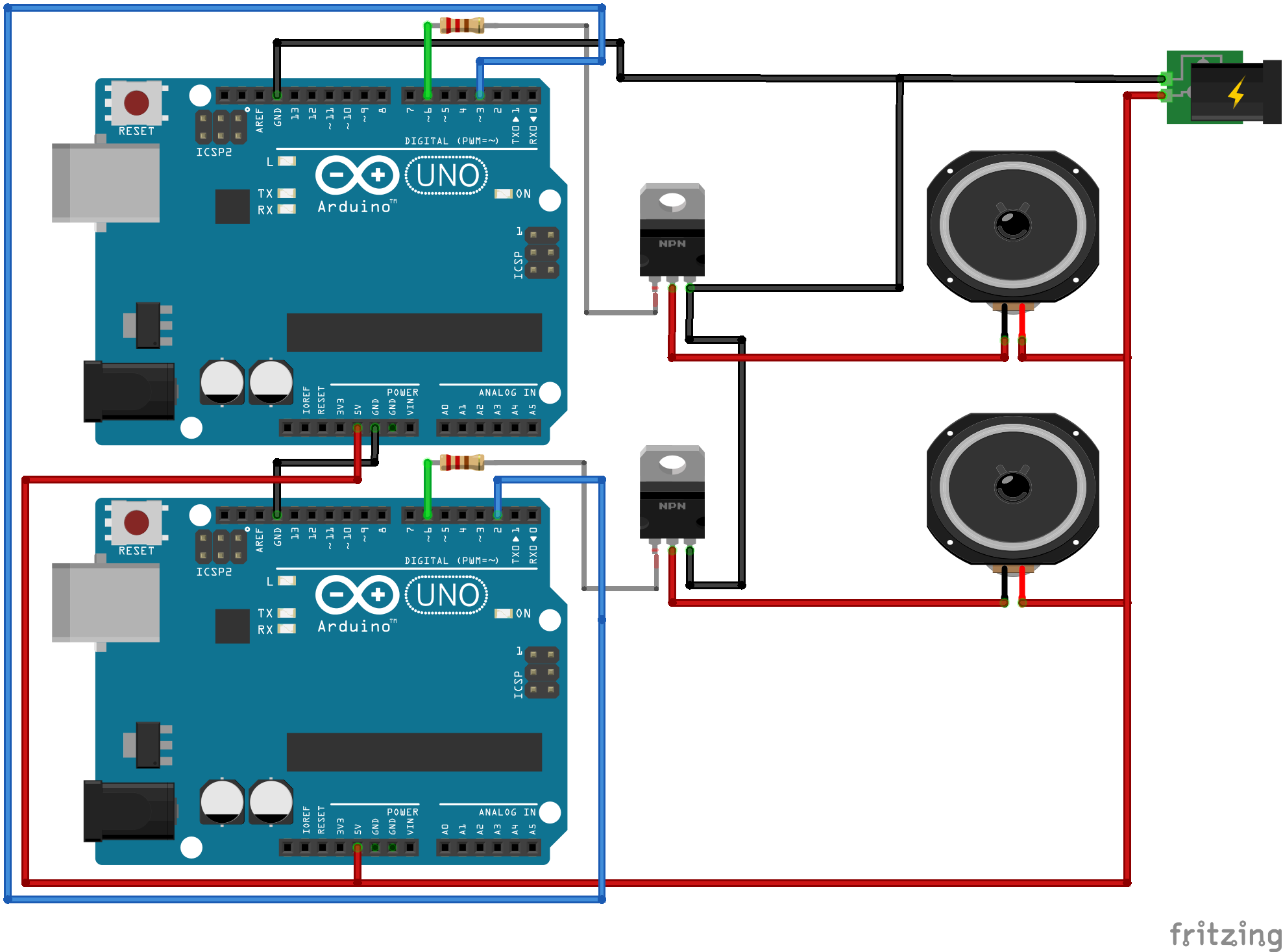 speaker_setup_kNNawzl740.fzz