



Arduino‑Based Switch & LED Panel for Microsoft Flight Simulator 2020
Components and Supplies
 |
|
× | 1 | |||
 |
|
× | 7 | |||
|
|
× | 9 |
Necessary Tools and Machines
 |
|
Apps and Online Services
|
||||
 |
|
About This Project
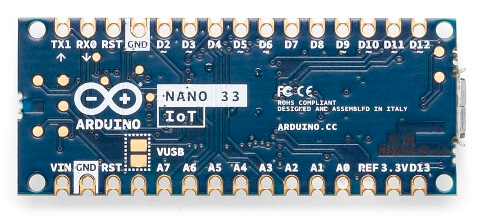
For flight‑simulation enthusiasts eager to build an external control panel, this project offers a straightforward, cost‑effective solution. It requires only an Arduino board (the Arduino Nano 33 IoT is recommended) and a handful of off‑the‑shelf components. The panel communicates with Microsoft Flight Simulator 2020 through the FS2020TA add‑on, eliminating the need for custom PC‑side development.
Once assembled, the panel can be tailored to your cockpit layout by re‑assigning each switch, button, or LED, or by adding new controls entirely. The design is intentionally modular, ensuring future upgrades remain simple.
Full documentation, source code, and schematics are available on GitHub: https://github.com/IWILZ/FS2020-Switch-Panel.
Watch a short demonstration video here (link placeholder).
Panel Capabilities
The panel tracks and controls a range of aircraft systems:
- Flaps – cycle through up to four positions with increment/decrement buttons
- Navigation lights – STROBE, NAV, BEACON, WING, LOGO, CABIN, and PANEL groups
- Landing lights – LANDING and TAXI groups
- Pitot heat activation
- Rudder trim adjustments
- Engine start/stop using the simulator’s AUTO_START and AUTO_SHUTDOWN commands
- A dedicated RESET button to clear all aircraft lights before take‑off
Code and Firmware
Arduino Sketch
The firmware is hosted on GitHub. Download the latest version and upload it to your Arduino Nano 33 IoT using the Arduino IDE.
Repository: https://github.com/IWILZ/FS2020-Switch-Panel
Manufacturing process
- Arduino Nano Flight Simulator 2020 Control Panel – LCD & CDI Display
- Control an LED via Bluetooth with Arduino – Simple DIY Guide
- Build a Smart Arduino Quadruped Robot: Step‑by‑Step Guide
- Mastering an 8×8 LED Matrix with Arduino Uno: A Step‑by‑Step Guide
- DIY Arduino Cockroach Control System – Build for Under $30
- Intelligent Spoon Aid for Parkinson’s Patients
- Arduino-Powered Garage Parking Rangefinder – Accurate Distance Alerts
- Create an Animated Smart LED Strip Controlled by Alexa Using Arduino
- Build Stunning Web-Driven LED Animations with Raspberry Pi & Arduino
- Mastering RGB LEDs with Arduino: A Step-by-Step Tutorial