



JVM Explained: What It Is and Its Architecture
What Is the JVM?
Java Virtual Machine (JVM) is the runtime engine that powers Java applications. It transforms compiled Java bytecode into native machine instructions and executes them on any platform that supports the JVM. The JVM is a core component of the Java Runtime Environment (JRE). Unlike languages that compile directly to machine code for a specific operating system, Java’s compiler produces platform‑agnostic bytecode that the JVM interprets or compiles at runtime.
How the JVM Works
Java source is first compiled into bytecode, which the JVM then interprets or compiles just‑in‑time (JIT) into native code. The JVM also manages memory allocation, thread scheduling, and interaction with native libraries.

In this tutorial you’ll learn:
- JVM architecture
- Software code compilation and execution
- C code compilation and execution
- Java code compilation and execution in the JVM
- Why Java is both compiled and interpreted
- Factors that affect Java performance
JVM Architecture
The JVM’s design is modular, comprising several subsystems that work together to load, verify, and execute Java code.
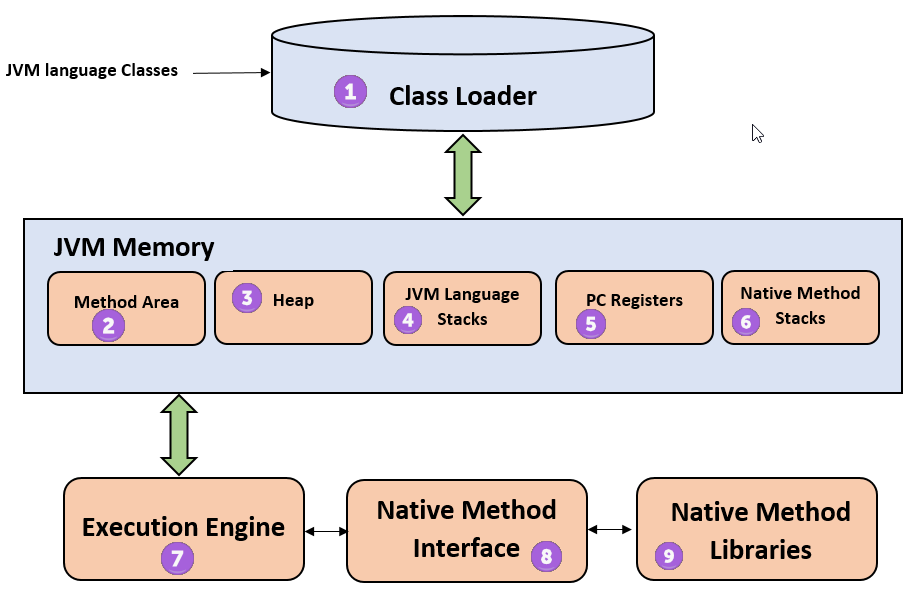
- Class Loader – Loads class files and performs linking (verification, preparation, resolution) and initialization.
- Method Area – Stores class structures, metadata, constant pools, and method code.
- Heap – Holds all objects, instance variables, and arrays. It is shared among all threads.
- Java Stack – Each thread has its own stack that stores local variables and partial results. A new frame is created on method entry and popped on exit.
- Program Counter (PC) Register – Holds the address of the next instruction to execute for each thread.
- Native Method Stack – Stores calls to native code (written in C/C++).
- Execution Engine – Executes bytecode, either by interpretation or via the JIT compiler.
- Native Method Interface (JNI) – Enables Java code to invoke native libraries.
- Native Libraries – Collections of platform‑specific native code used by the execution engine.
Software Code Compilation & Execution Process
Running a program typically involves these steps:
- Editor – Where you write the source code.
- Compiler – Translates high‑level code into native machine code or bytecode.
- Linker – Combines object files and resolves external references.
- Loader – Loads the final executable into memory.
- Execution – The operating system and processor run the program.
C Code Compilation and Execution
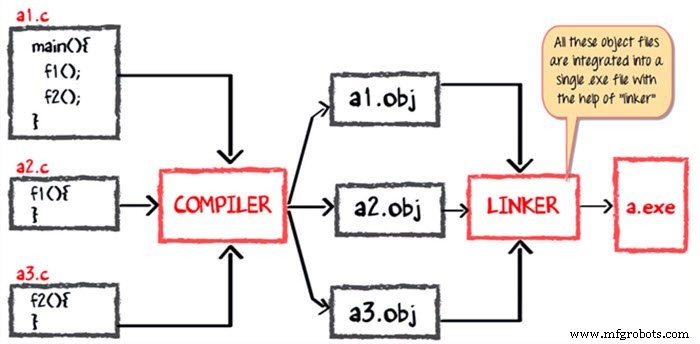
To illustrate the Java process, let’s first examine a simple C program. Assume the main function is in a1.c and calls f1 (in a2.c) and f2 (in a3.c).
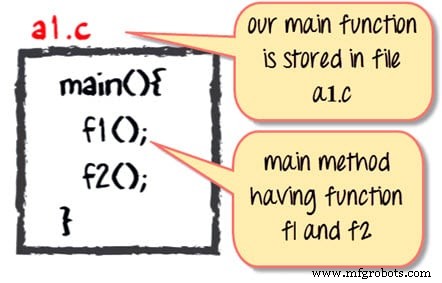
The compiler turns each .c file into an object file containing machine code. The linker then merges these object files into a single .exe executable. When the program starts, the loader maps myapp.exe into RAM and the operating system begins execution.
Java Code Compilation and Execution in the JVM
Java follows a similar yet distinct workflow. The source files a1.java, a2.java, and a3.java are compiled into bytecode files a1.class, a2.class, and a3.class. No separate linking stage occurs; the JVM loads the bytecode on demand.
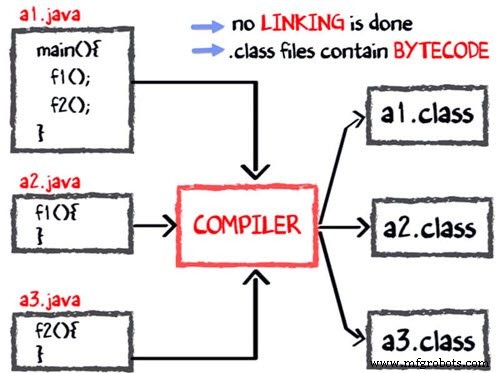
During execution, the JVM’s class loader brings the class files into memory, verifies them for security, and the execution engine either interprets or JIT‑compiles the bytecode into native machine code. This JIT step is what makes Java both compiled and interpreted.
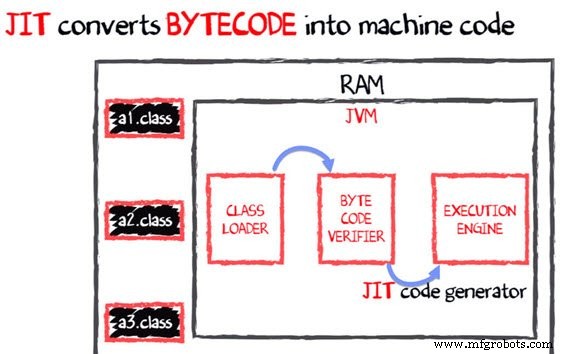
Note: The JIT compiler is a core component of the JVM that performs on‑the‑fly translation of bytecode into efficient native instructions.
Why Is Java Both Compiled and Interpreted?
Java’s design marries the benefits of compiled and interpreted languages:
- The compiler turns source into bytecode, enabling platform independence.
- The JVM interprets or JIT‑compiles the bytecode at runtime, allowing for dynamic optimization.
- Native libraries can be accessed via the Java Native Interface (JNI), providing the flexibility of native code when needed.
Why Is Java Slower?
Java’s runtime overhead originates from two main sources:
- Dynamic Linking – Methods are resolved at runtime rather than at compile time, which adds a small lookup cost.
- Run‑time Bytecode Interpretation – Even with JIT, the initial execution of bytecode incurs a conversion cost before native code is produced.
Modern JVM implementations have dramatically reduced these overheads through aggressive optimization, tiered compilation, and hardware‑specific tuning.
Summary
- The JVM is the engine that executes Java bytecode on any supported platform.
- Its architecture comprises a class loader, memory areas, stacks, a PC register, and an execution engine.
- Java code is compiled to bytecode, which the JVM then interprets or JIT‑compiles at runtime.
- The JIT compiler accelerates execution by converting hot bytecode paths into native machine code.
- While Java historically had performance challenges, recent JVM versions have largely mitigated these issues.
Java
- Virtual Machines Explained: Types, Architecture, and Key Advantages
- Chatbots 101: Design Process, Architecture, and Practical Insights
- Understanding Java: JDK, JRE, and JVM Explained
- What Is CNC? – Understanding Computer Numerical Control for Modern Manufacturing
- Understanding Architecture Design: Principles, Practices, and Impact
- Understanding Binding Machines: Types, Uses, and How They Keep Documents Secure
- Machine Bolts Explained: Types, Uses, and Installation Guide
- How Claw Machines Work: The Thrill of the Arcade Prize Hunt
- Understanding Thread Machines: Precision Threading for Metal and Plastic
- Machine Tending Explained: Benefits, Automation, and Applications