



Command‑Line Arguments in Java: A Practical Guide with Code Examples
What Are Command‑Line Arguments in Java?
In Java, a command‑line argument is any value you provide after the program name when you launch it from a terminal or console. Those values are captured as strings in the String[] args parameter of the main method.
Key Points to Remember
- Arguments are passed as plain strings, so you can supply any text you need.
- There is no limit to the number of arguments you can supply.
- They are commonly used to inject configuration data (file paths, flags, credentials, etc.) into an application at startup.
- The
argsarray holds the values in the exact order you typed them.
Hands‑On Example
- Write the following Java class:
- Compile it:
javac Demo.java - Run it with arguments:
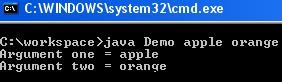
java Demo apple orange
class Demo {
    public static void main(String[] args) {
      System.out.println("First argument: " + args[0]);
      System.out.println("Second argument: " + args[1]);
    }
}After executing the command above, the console will display:
First argument: apple
Second argument: orange
Java HashMap: A Comprehensive Guide
Mastering the 'this' Keyword in Java: Purpose, Usage, and Practical Examples
Java
- Encapsulation in Java: A Comprehensive Guide with Practical Example
- Understanding Java String.charAt(): Syntax, Return Type, Exceptions, and a Practical Example
- Mastering Java’s String.endsWith(): How to Check String Suffixes with Examples
- Java HashMap: A Comprehensive Guide
- Java Abstraction: Mastering Abstract Classes, Methods, and Practical Examples
- Understanding Java's throws Keyword: Examples & Best Practices
- Java Switch‑Case Statement Explained: Syntax, Examples, and Best Practices
- Mastering Java's split() Method: A Practical Guide with Code Examples
- Reading Files in Java with BufferedReader – A Practical Guide with Examples
- Mastering Command Line Arguments in C: A Practical Guide