



Mastering Python's strftime(): Convert Dates and Times to Readable Strings
Python strftime()
In this article, you will learn to convert date, time and datetime objects to its equivalent string (with the help of examples)
Video: Dates and Times in Python
The strftime() method returns a string representing date and time using date, time or datetime object.
Example 1: datetime to string using strftime()
The program below converts a datetime object containing current date and time to different string formats.
from datetime import datetime

now = datetime.now() # current date and time

year = now.strftime("%Y")
print("year:", year)

month = now.strftime("%m")
print("month:", month)

day = now.strftime("%d")
print("day:", day)

time = now.strftime("%H:%M:%S")
print("time:", time)

date_time = now.strftime("%m/%d/%Y, %H:%M:%S")
print("date and time:",date_time)
When you run the program, the output will something like be:
year: 2018
month: 12
day: 24
time: 04:59:31
date and time: 12/24/2018, 04:59:31
Here, year, day, time and date_time are strings, whereas now is a datetime object.
How strftime() works?
In the above program, %Y, %m, %d etc. are format codes. The strftime() method takes one or more format codes as an argument and returns a formatted string based on it.
- We imported
datetimeclass from thedatetimemodule. It's because the object ofdatetimeclass can accessstrftime()method.
- The
datetimeobject containing current date and time is stored in now variable.
- The
strftime()method can be used to create formatted strings.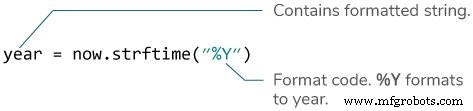
- The string you pass to the
strftime()method may contain more than one format codes.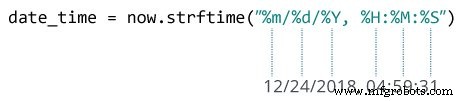
Example 2: Creating string from a timestamp
from datetime import datetime

timestamp = 1528797322
date_time = datetime.fromtimestamp(timestamp)

print("Date time object:", date_time)

d = date_time.strftime("%m/%d/%Y, %H:%M:%S")
print("Output 2:", d)

d = date_time.strftime("%d %b, %Y")
print("Output 3:", d)

d = date_time.strftime("%d %B, %Y")
print("Output 4:", d)

d = date_time.strftime("%I%p")
print("Output 5:", d)
When you run the program, the output will be:
Date time object: 2018-06-12 09:55:22
Output 2: 06/12/2018, 09:55:22
Output 3: 12 Jun, 2018
Output 4: 12 June, 2018
Output 5: 09AM
Format Code List
The table below shows all the codes that you can pass to the strftime() method.
| Directive | Meaning | Example |
%a |
Abbreviated weekday name. | Sun, Mon, ... |
%A |
Full weekday name. | Sunday, Monday, ... |
%w |
Weekday as a decimal number. | 0, 1, ..., 6 |
%d |
Day of the month as a zero-padded decimal. | 01, 02, ..., 31 |
%-d |
Day of the month as a decimal number. | 1, 2, ..., 30 |
%b |
Abbreviated month name. | Jan, Feb, ..., Dec |
%B |
Full month name. | January, February, ... |
%m |
Month as a zero-padded decimal number. | 01, 02, ..., 12 |
%-m |
Month as a decimal number. | 1, 2, ..., 12 |
%y |
Year without century as a zero-padded decimal number. | 00, 01, ..., 99 |
%-y |
Year without century as a decimal number. | 0, 1, ..., 99 |
%Y |
Year with century as a decimal number. | 2013, 2019 etc. |
%H |
Hour (24-hour clock) as a zero-padded decimal number. | 00, 01, ..., 23 |
%-H |
Hour (24-hour clock) as a decimal number. | 0, 1, ..., 23 |
%I |
Hour (12-hour clock) as a zero-padded decimal number. | 01, 02, ..., 12 |
%-I |
Hour (12-hour clock) as a decimal number. | 1, 2, ... 12 |
%p |
Locale’s AM or PM. | AM, PM |
%M |
Minute as a zero-padded decimal number. | 00, 01, ..., 59 |
%-M |
Minute as a decimal number. | 0, 1, ..., 59 |
%S |
Second as a zero-padded decimal number. | 00, 01, ..., 59 |
%-S |
Second as a decimal number. | 0, 1, ..., 59 |
%f |
Microsecond as a decimal number, zero-padded on the left. | 000000 - 999999 |
%z |
UTC offset in the form +HHMM or -HHMM. | |
%Z |
Time zone name. | |
%j |
Day of the year as a zero-padded decimal number. | 001, 002, ..., 366 |
%-j |
Day of the year as a decimal number. | 1, 2, ..., 366 |
%U |
Week number of the year (Sunday as the first day of the week). All days in a new year preceding the first Sunday are considered to be in week 0. | 00, 01, ..., 53 |
%W |
Week number of the year (Monday as the first day of the week). All days in a new year preceding the first Monday are considered to be in week 0. | 00, 01, ..., 53 |
%c |
Locale’s appropriate date and time representation. | Mon Sep 30 07:06:05 2013 |
%x |
Locale’s appropriate date representation. | 09/30/13 |
%X |
Locale’s appropriate time representation. | 07:06:05 |
%% |
A literal '%' character. | % |
Example 3: Locale's appropriate date and time
from datetime import datetime

timestamp = 1528797322
date_time = datetime.fromtimestamp(timestamp)

d = date_time.strftime("%c")
print("Output 1:", d)

d = date_time.strftime("%x")
print("Output 2:", d)

d = date_time.strftime("%X")
print("Output 3:", d)
When you run the program, the output will be:
Output 1: Tue Jun 12 09:55:22 2018
Output 2: 06/12/18
Output 3: 09:55:22
Format codes %c, %x and %X are used for locale's appropriate date and time representation.
We also recommend you to check Python strptime(). The strptime() method creates a datetime object from a string.
Python
- Python Keywords and Identifiers: Mastering Reserved Words and Naming Conventions
- Mastering Python Data Types: A Practical Guide
- Mastering Python Operators: A Comprehensive Guide
- Mastering Python's While Loop: Syntax, Examples, and Best Practices
- Python List Operations: Creation, Access, Modification, and Advanced Techniques
- Mastering Python Tuples: Creation, Access, and Advanced Operations
- Mastering Python Dictionaries: Creation, Manipulation, and Advanced Techniques
- Python Regular Expressions (re Module) – A Practical Guide
- Master Python's strptime() for Accurate Date Parsing
- Mastering Python’s time Module: Functions, Structs, and Practical Examples