



Cloud vs On‑Premise CMMS: Which System Delivers the Best ROI?
Choosing the right Computer‑Aided Maintenance Management System (CMMS) can unlock significant cost savings, operational agility, and data security. Below is a clear, evidence‑based comparison of cloud‑based and on‑premise CMMS solutions, designed to help maintenance leaders make an informed decision.
Table of Contents
- What Is Cloud‑Based CMMS?
- What Is On‑Premise CMMS?
- Pros & Cons of Cloud vs On‑Premise CMMS
- Choosing the Right CMMS for Your Facility
- Implementation & Adoption Tips
- Data Security & Reliability
- Scaling a CMMS as You Grow
- Sustainability Considerations
- Control & Customization
- Bottom Line & Next Steps
What Is Cloud‑Based CMMS?
Cloud‑based CMMS stores data and runs applications on a vendor’s servers, accessed via the internet. Think of it like banking online: you can log in from any device, at any time, as long as you have connectivity. Key attributes include:
- All hardware and software managed by a third‑party provider.
- Automatic upgrades, patches, and security updates.
- Subscription pricing—often per user per month, with minimal upfront cost.
- Native mobile apps for field technicians.
- Optional offline mode for brief connectivity outages.
What Is On‑Premise CMMS?
On‑premise CMMS runs on servers physically located within your facility. The organization owns and maintains the hardware, software, and data. Typical characteristics:
- Requires on‑site servers and network infrastructure.
- Installation and ongoing maintenance handled by in‑house or contracted IT staff.
- Access limited to the local network.
- Mobile functionality, if any, is typically minimal.
- One‑time licensing or perpetual license fees, with additional maintenance costs.
Pros & Cons of Cloud vs On‑Premise CMMS
Cost Considerations
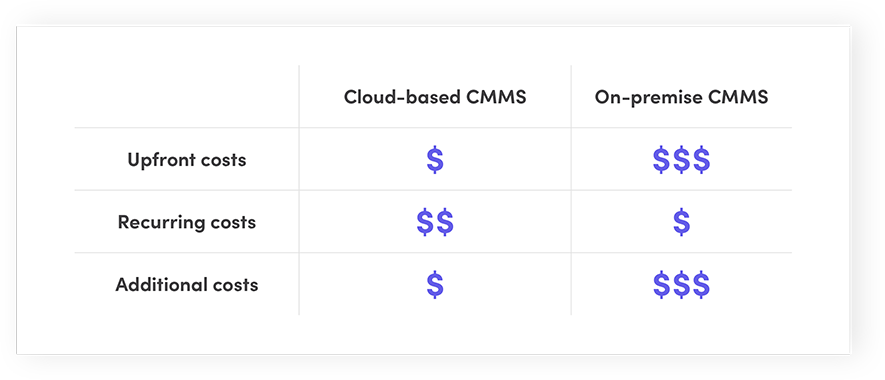
- Upfront Costs: Cloud solutions have negligible upfront fees; on‑premise requires significant capital for hardware and licensing.
- Recurring Costs: Cloud includes maintenance and support in the subscription; on‑premise adds ongoing support, patching, and hardware replacement.
- Additional Expenses: Training, data migration, and integration can affect both models, but are typically lower for cloud.
Feature Set & Flexibility
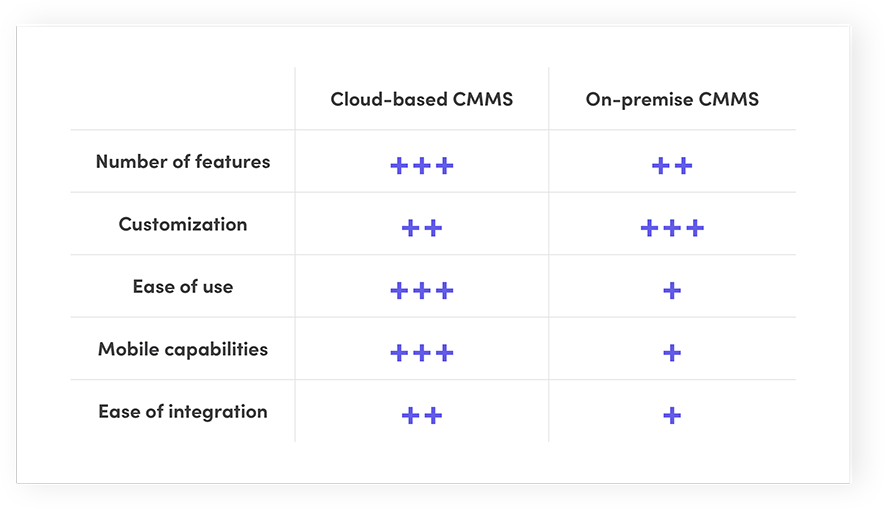
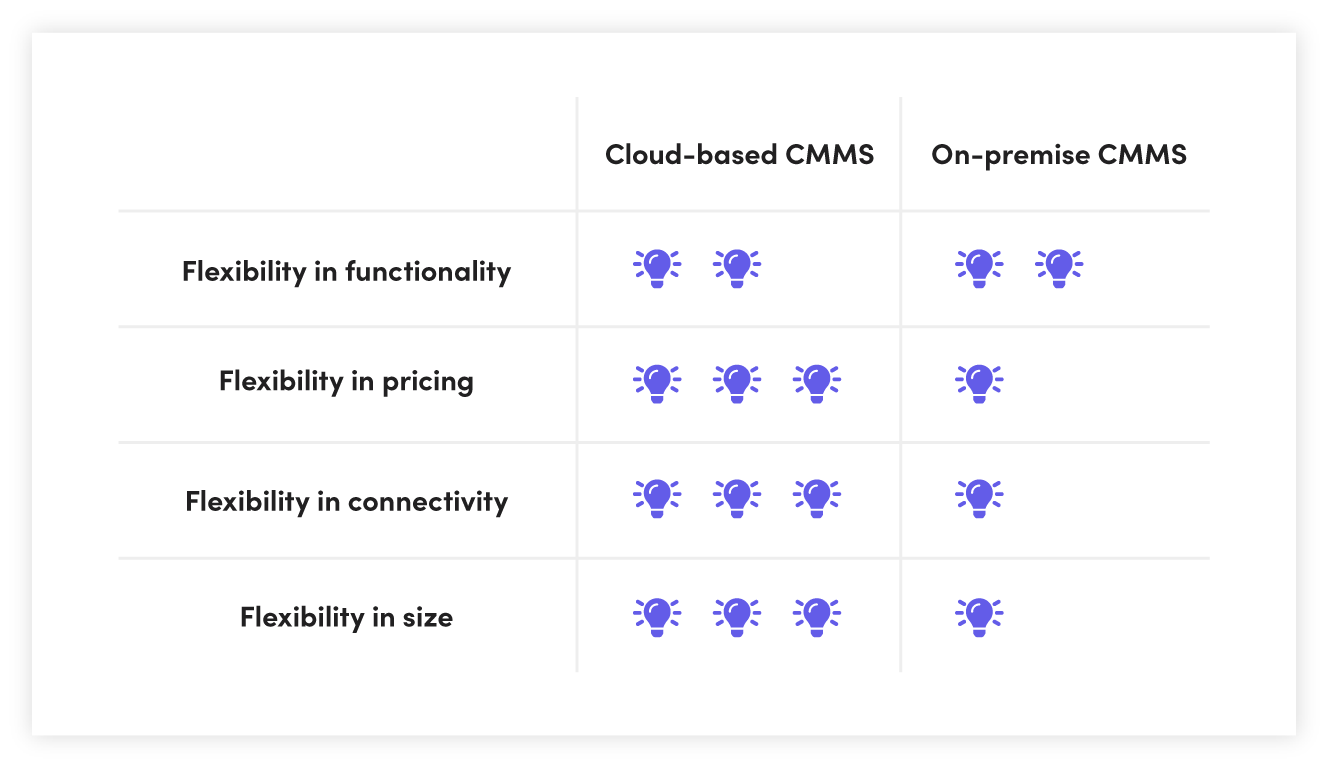
- Both models offer core CMMS functions (work orders, preventive maintenance, asset tracking). Cloud vendors release new features faster due to a subscription model.
- On‑premise systems are highly customizable but changes often require significant effort and cost.
- Cloud CMMS usually provides richer mobile capabilities and seamless integration with ERP, MES, and IoT devices.
Implementation & Adoption
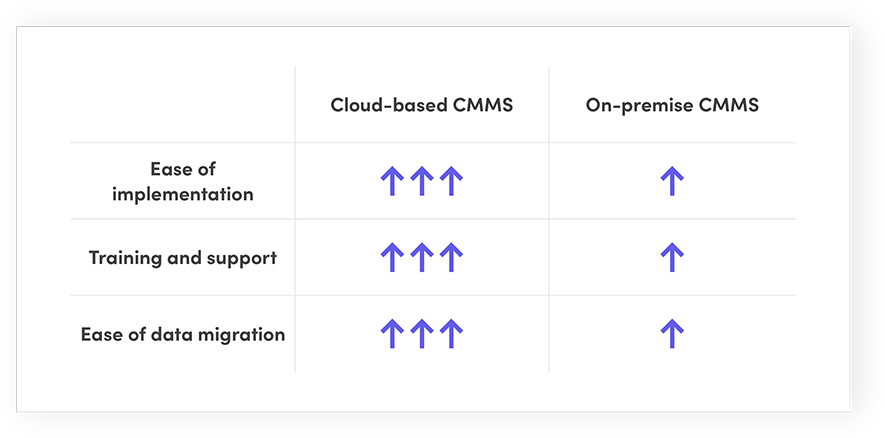
- Cloud deployment is typically 2–4 weeks with minimal IT involvement.
- On‑premise implementation can take 3–6 months, demanding extensive IT resources.
- Training and support are usually bundled with cloud subscriptions; on‑premise vendors may charge extra.
- Data migration is generally easier for cloud solutions due to API and web‑based import tools.
Security & Reliability
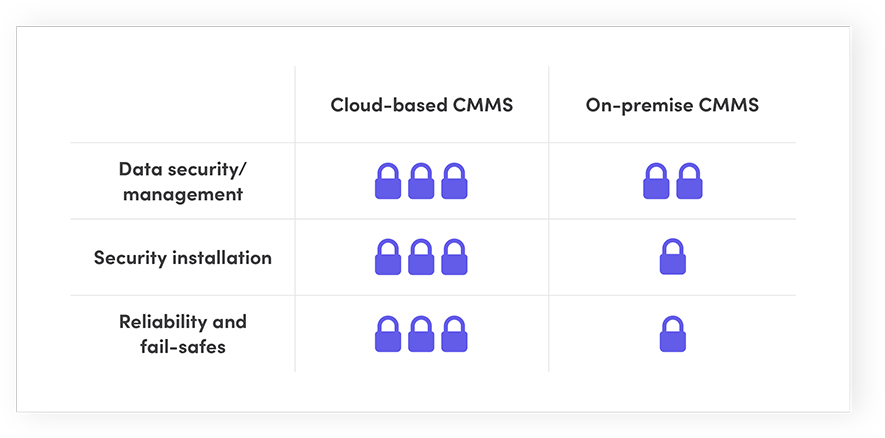
- On‑premise data resides on internal servers, potentially reducing external breach risk, but insider threats remain a concern (53% of breaches in 2019 were internal).
- Cloud providers such as AWS, Azure, and Google Cloud employ SOC 2 Type 2, ISO 27001, and other standards, offering advanced encryption, multi‑factor authentication, and automated patching.
- Cloud services typically guarantee 99.5%+ uptime, with scheduled maintenance windows.
- Data backup and disaster recovery are handled by the vendor, ensuring rapid restoration even after catastrophic events.
Scalability & Sustainability
- Cloud CMMS scales effortlessly—add users, sites, or modules with a few clicks.
- On‑premise scaling requires new servers, licenses, and configuration, often leading to silos.
- A study of Microsoft’s cloud services found a 51% reduction in CO₂ per user versus comparable on‑premise solutions, thanks to server consolidation and energy‑efficient data centers.
Choosing the Right CMMS for Your Facility
Decide based on:
- Budget constraints—cloud lowers capital spend, on‑premise requires upfront investment.
- IT capacity—cloud frees your IT team; on‑premise demands ongoing support.
- Regulatory requirements—ensure the chosen model meets industry data‑protection standards.
- Future growth—cloud offers elastic scaling; on‑premise may lock you into legacy systems.
Implementation & Adoption Tips
- Start with a clear scope and business case.
- Leverage vendor training and support during rollout.
- Use pilot sites to validate functionality before full deployment.
- Encourage user adoption through role‑based dashboards and mobile access.
- Monitor key performance indicators (KPIs) like first‑time fix rate and maintenance cost per asset.
Data Security & Reliability
While both models can be secure, cloud vendors often implement industry‑leading security controls out of the box. Regular patching, automated backups, and geographically distributed data centers reduce the risk of data loss and downtime.
Scaling a CMMS as You Grow
Cloud CMMS solutions allow you to add or remove users, sites, and modules on demand, adapting to changing business needs. On‑premise scaling is constrained by physical infrastructure and licensing, making rapid growth more complex.
Sustainability Considerations
Cloud services leverage shared resources, resulting in lower per‑user energy consumption. On‑premise hardware often operates at lower utilization rates, leading to higher carbon footprints.
Control & Customization
On‑premise offers deep customization but can become unwieldy. Cloud CMMS strikes a balance—providing configurable workflows and integration options while maintaining an intuitive user experience.
Bottom Line & Next Steps
For most facilities, a cloud‑based CMMS delivers superior cost efficiency, scalability, security, and user experience. However, organizations with stringent regulatory controls or limited internet connectivity may still prefer an on‑premise solution.
Ready to evaluate your options? Download our CMMS Implementation Checklist to guide you through the decision and deployment process.
Download a Skeptic’s Guide to Cloud CMMS Software
Equipment Maintenance and Repair
- Stainless Steel Handles: Advantages, Disadvantages, and Expert Insights
- Advantages and Drawbacks of Metal Pickling: A Comprehensive Overview
- Lost‑Foam Casting: Benefits, Drawbacks, and When to Use It
- Cold‑Forming Metalworking: Advantages, Drawbacks, and Key Insights
- Outsourcing Lubrication: Benefits, Drawbacks, and Strategic Considerations
- 7 Proven CMMS Tips to Accelerate Setup and Boost Productivity
- LCD vs. CRT: Pros, Cons, and Which Is Best for You
- Balancing Benefits and Risks: AI in Predictive Maintenance
- Choosing the Right CMMS: Web-Based vs On-Premise – Pros, Cons, and Decision Guide
- The Pros and Cons of Work Order Tracking Software: A Comprehensive Guide