


Industrial manufacturing
CNC Machine

Home » Blog » How To Execute Program In Syntec 6MB Control System Jack Zhang | Founder at Blue Elephant Hi, Im Jack Zhang, here to share my expertise in CNC Machines with you. February 21, 2025 Linkedin Facebook Youtube
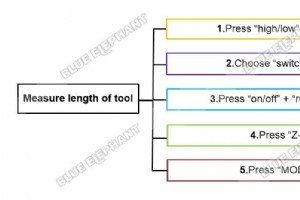
The steps are as follows. Press “high/low”+“on/off” combination key Choose “switch to 1” Press “on/off”+ “run/pause” combination key Press “Z-” Press “MODE”,for change model from “continue”to “step” Press “Z-” Press “OK”,The tool will change from T1 to T2. Press “Z-” Press “MODE”,for change mode
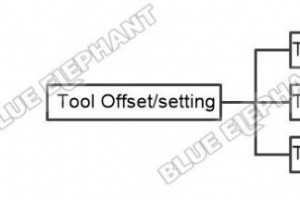
The steps are as follows. The cutter compensation of T3 is the value of T3 minus the value of T1 The cutter compensation of T2 is the value of T2 minus the value of T1 The cutter compensation of T1 is zero The video is as follows.
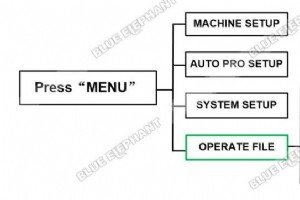
The steps are as follows. Please make sure the flash disk has been prepared before operation Press “MENU”button,then choose”OPERATE FILE “ Choose “Copy File” ,then choose “UDisk File” Choose the file we need,For example,we select the first file named “树” ” The file is copyed successfully.” The v
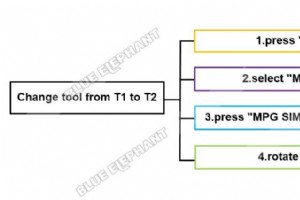
There are two ways to change tool. One is change tool automatically,the other is manually. Firstly,we will show you how to change tool automatically. The steps are as follows. we will change tool from T1 to T2 Press “MON” and “MDI”buttons in control panel. Select “MDI Input”,input “T2” Press “MP
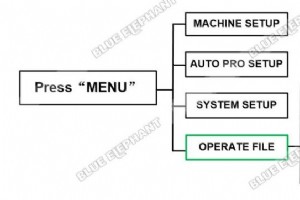
The steps are as follows. Please make sure the flash disk has been inserted before operation. Press “MENU”button,then choose “OPERATE FILE” Choose “Copy File” ,then choose “UDisk File” Choose the file we need.For example,we select the file named “SONIC.NC”. The“STOP/CANCEL”button is used for bac
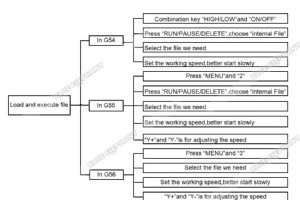
The steps are as follows. G54: 1.Combination key “HIGH/LOW”and “ON/OFF”is for changing tool 2.Press “RUN/PAUSE/DELETE”,choose “internal File” 3.Select the file we need 4.Set the working speed,better start slowly G55: 1.Press “MENU”and “2”combination key,change coordinate from G54 to G55 2.Pres
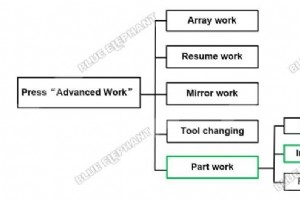
The steps are as follows. Press”ADVANCED FUNCTION”button,then choose “Park Work” Enter”SelectWorkFile”interface.For example,we choose “Internal File” Choose the file we need For example,we choose “SONIC.NC” Input the start source number of working For example,we start from NO.210 Input the stop

Home » Blog » How To Change Language In Syntec 6MB Control System Jack Zhang | Founder at Blue Elephant Hi, Im Jack Zhang, here to share my expertise in CNC Machines with you. February 21, 2025 Linkedin Facebook Youtube

The steps are as follows. Press “X+”or “X-“,it will move in X axis. Press “Y+”or “Y-“,it will move in Y axis. Press “Z-“or “Z+”,it will move in Z axis. The video is as follow.

Home » Blog » How To Do “Part Work” In DSP A15 Handle Control System Jack Zhang | Founder at Blue Elephant Hi, Im Jack Zhang, here to share my expertise in CNC Machines with you. February 21, 2025 Linkedin Facebook Yout
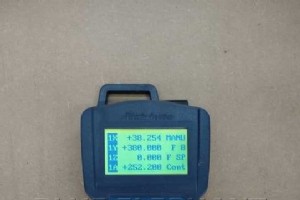
The function of “MODE”button is changing mode between “Continue Mode””Step Mode” and ” Distance Mode”. The data of”Distance Mode” can be changed as what you like,for example we set 100. At the beginning,the value of X axis is 0, Y axis is 0.Move X axis twice and Y axis once.The value of X axis w
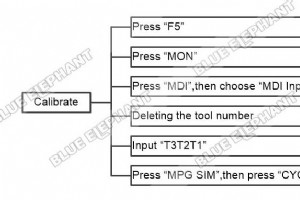
The steps are as follows. Press “F5” Press “MON” Press “MDI”,then choose “MDI Input” Through arrow keyand “BACKSPACE” to deleting the tool number Input “T3T2T1” Press “MPG SIM”,then press “CYCLE START” The video is as follows.
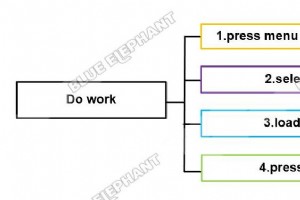
The steps are as follows. The first part is working. Press menu button ,choose “Local Files” Select the file we need. Then load the file to execute. Press green start button to start working. The second part is adjust working speed. Press feed rate up button to improve working speed. Press feed
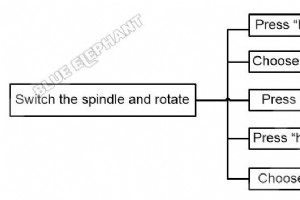
The steps are as follows. 1.Press “high/low”+“on/off” combination key 2.Choose “switch to 1” 3.Press “on/off” 4.Press “high/low”+“on/off” combination key 5.Choose “switch to 2” 6.Press “on/off” 7.Press “high/low”+“on/off” combination key 8.Choose “switch to 3” 9.Press “on/off” 10.Press “high/low
Connect With Us Name Phone Email Country Message For any inquiries, don’t hesitate to contact us at: manager@elephant-cnc.com +86 191 0640 1832
Connect With Us Name Phone Email Country Message For any inquiries, don’t hesitate to contact us at: manager@elephant-cnc.com +86 191 0640 1832
The function of “MODE”button is changing mode between “Continue Mode””Step Mode” and ” Distance Mode”. “step mode”means the axis will move step by step. Every time we press “X+” ,the value of X axis will increase 0.1 and the machine will move in X axis accordingly. The video is as follow.
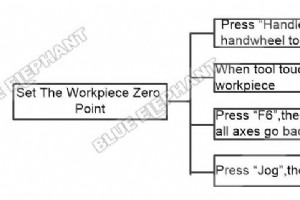
The steps are as follows. Press “Handle”,then turn the handwheel to adjust position When tool touch surface of workpiece Press “F6”,then press “F5”,for all axes go back to zero Press “Jog”,then press “Z+” The video is as follows.
Connect With Us Name Phone Email Country Message For any inquiries, don’t hesitate to contact us at: manager@elephant-cnc.com +86 191 0640 1832
CNC Machine

Build a Strong Talent Pipeline: IMEC’s Strategies for Attracting, Developing, and Retaining Skilled Workers
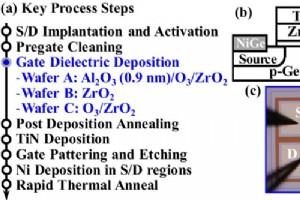
High-Mobility Germanium nMOSFETs Using ZrO₂ Gate Dielectric
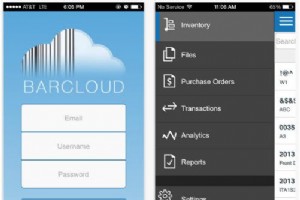
36 Leading Barcode Scanner Apps for iOS & Android – Efficient Inventory Scanning
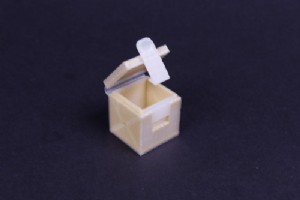
MMF #3: Building Industrial‑Strength 3D‑Printed Hinges with Kevlar‑Reinforced Living Joints

