



Arduino Touch Breakout Game: Build a Classic Arcade on a 2.4″ TFT LCD
Components and supplies
 |
| × | 1 | |||
| × | 1 |
Apps and online services
 |
|
About this project
This a small version of the classic breakout video game for Arduino UNO and TFT LCD screen (240x320 pixel), driver ILI9341 with 8-bit parallel communication.
The gameThis Breakout has multiple screens with different configurable rows and columns of bricks, up to eight rows, with each two rows a different color, that can be programmed on or off with different patterns. Using a single ball, using the touch panel the player must knock down as many bricks as possible by using the walls and/or the paddle below to ricochet the ball against the bricks and eliminate them. If the player's paddle misses the ball's rebound, they will lose a turn.
Each row bricks earn different points each.
uint8_t pointsForRow[] = {7, 7, 5, 5, 3, 3 , 1, 1};Each level can configure the paddle size and the ball size. Ball speed increases at each hit, you can configure initial speed for each screen. Depending on the point of the paddle that hits the ball, the horizontal speed also changes
You can define as new screens with different wall patterns:
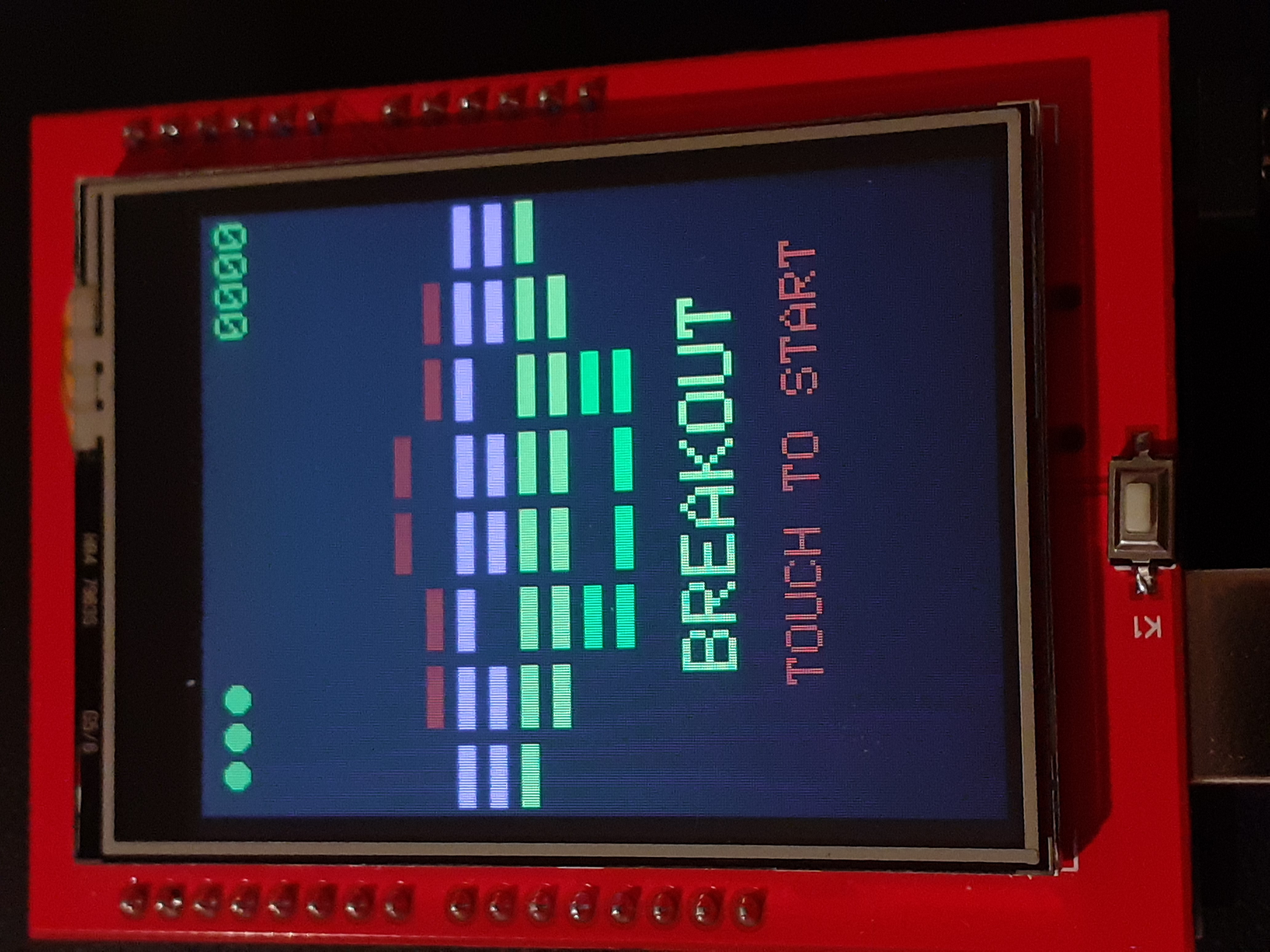
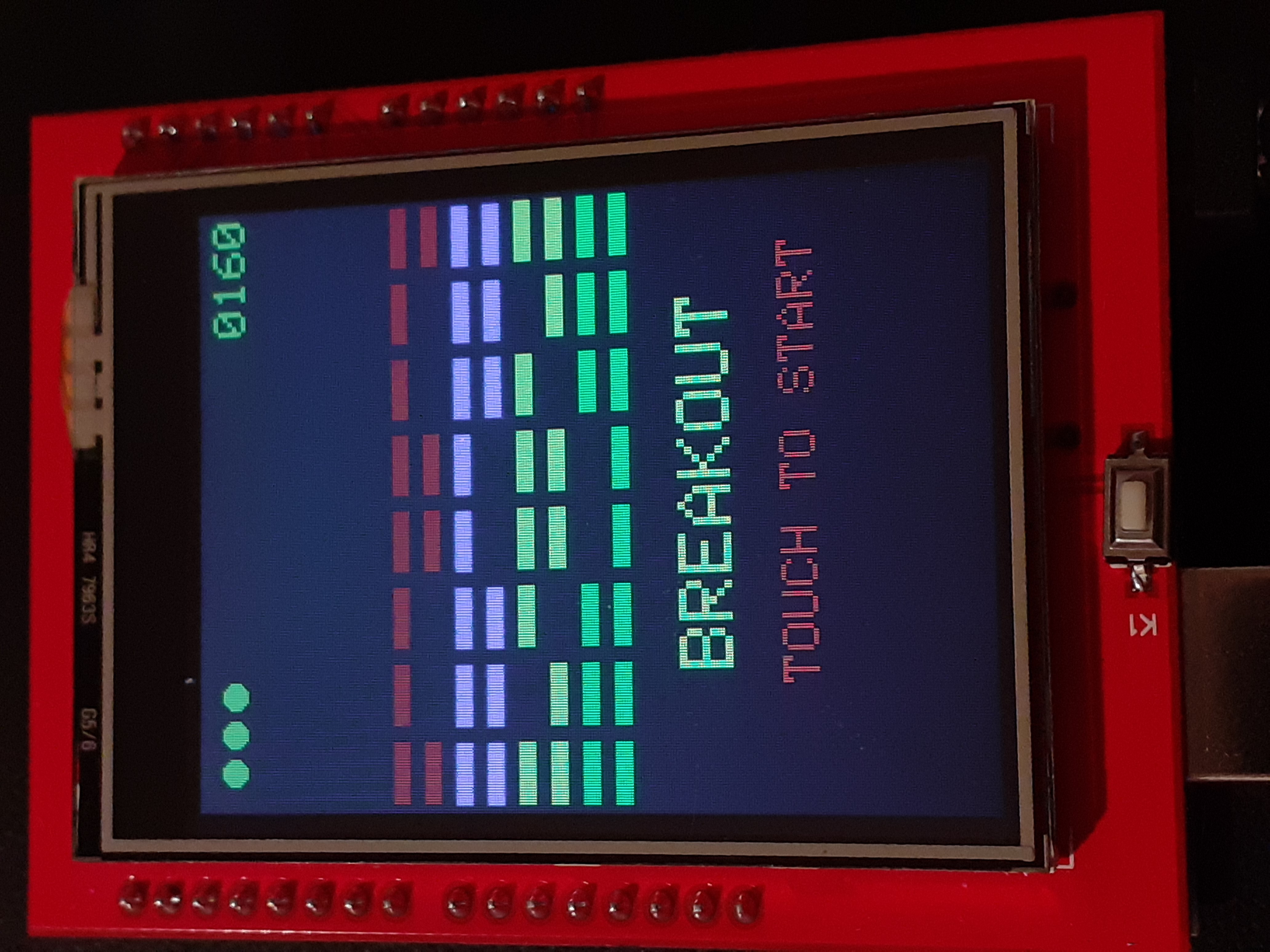
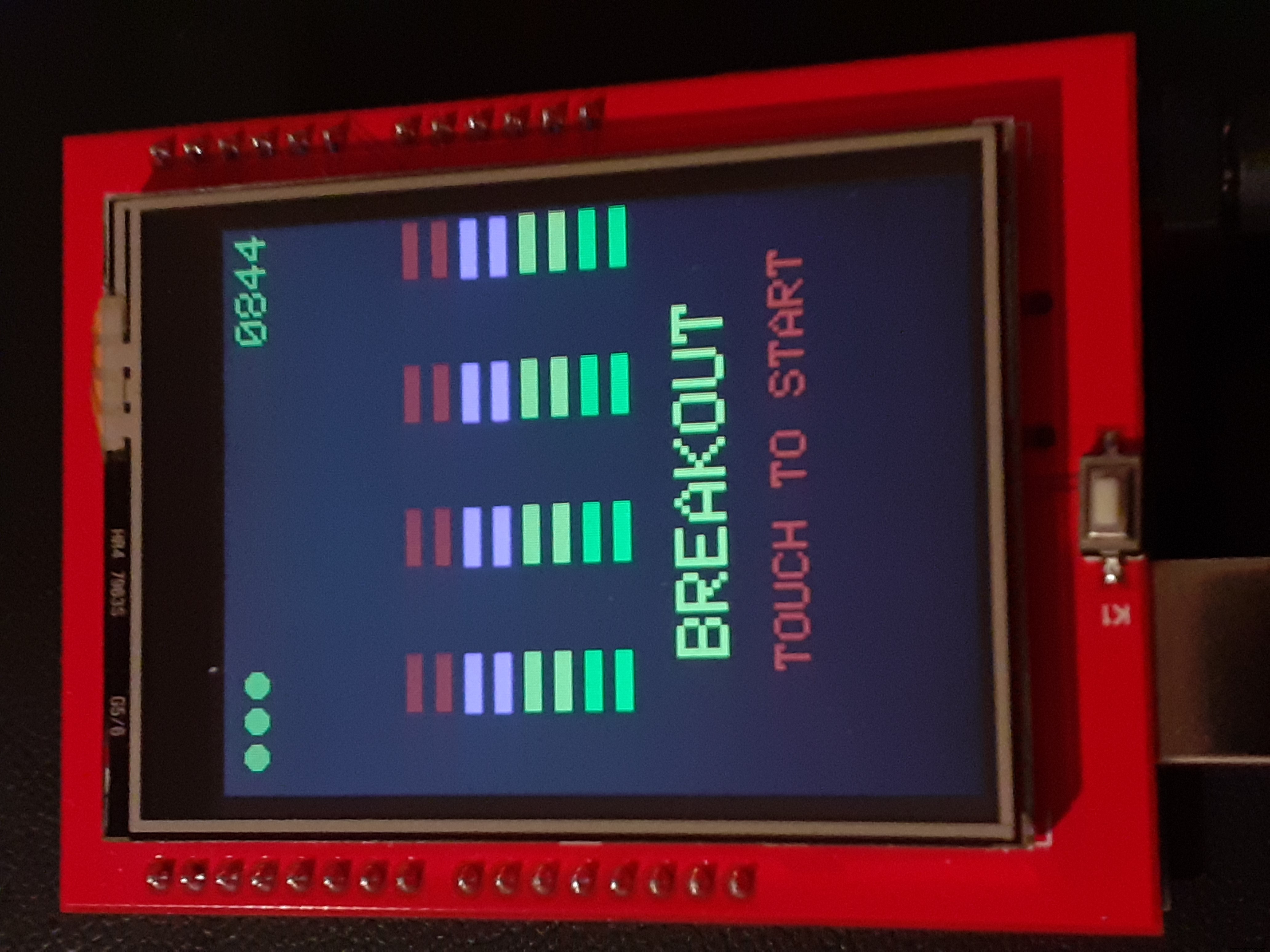
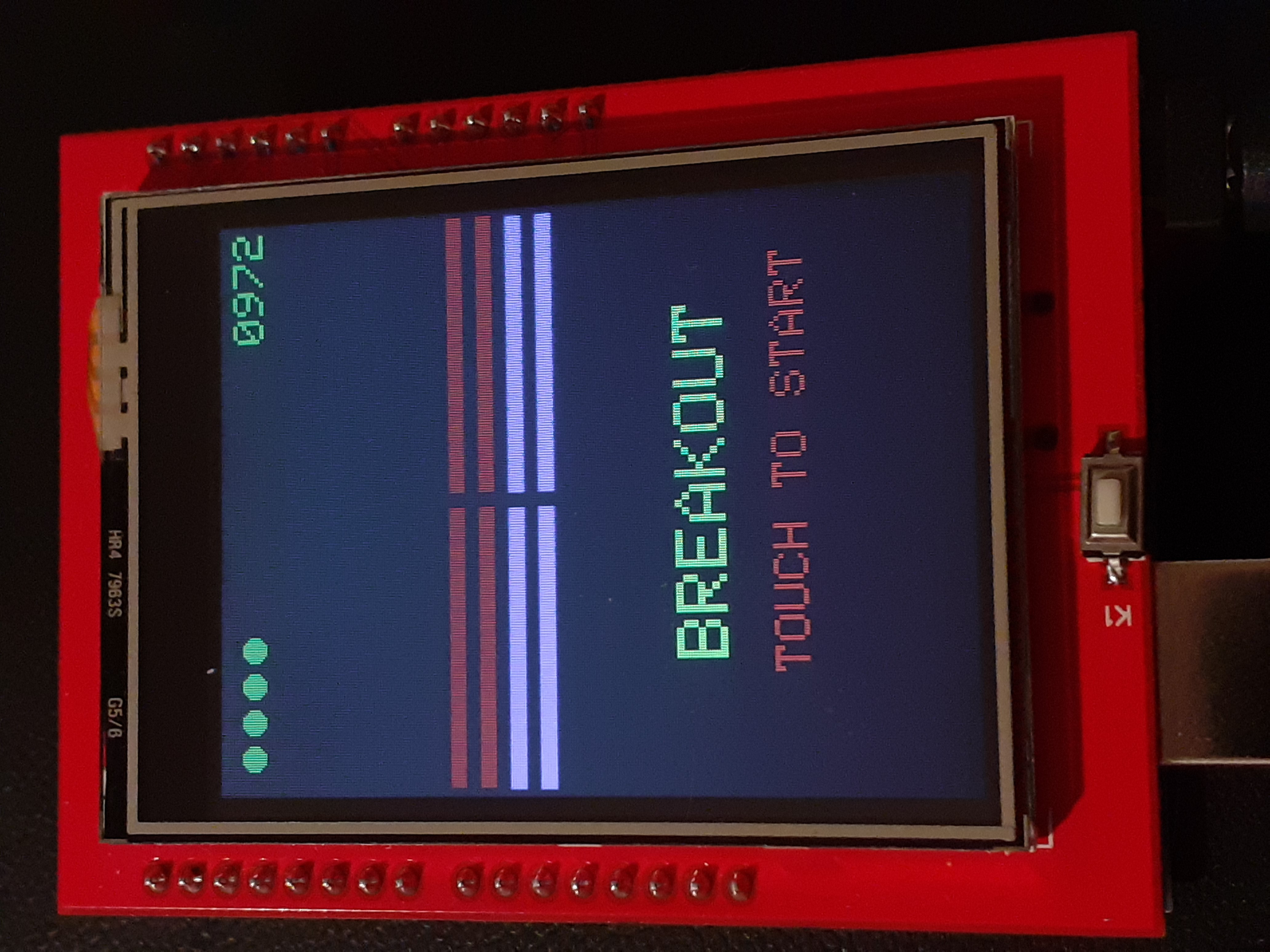
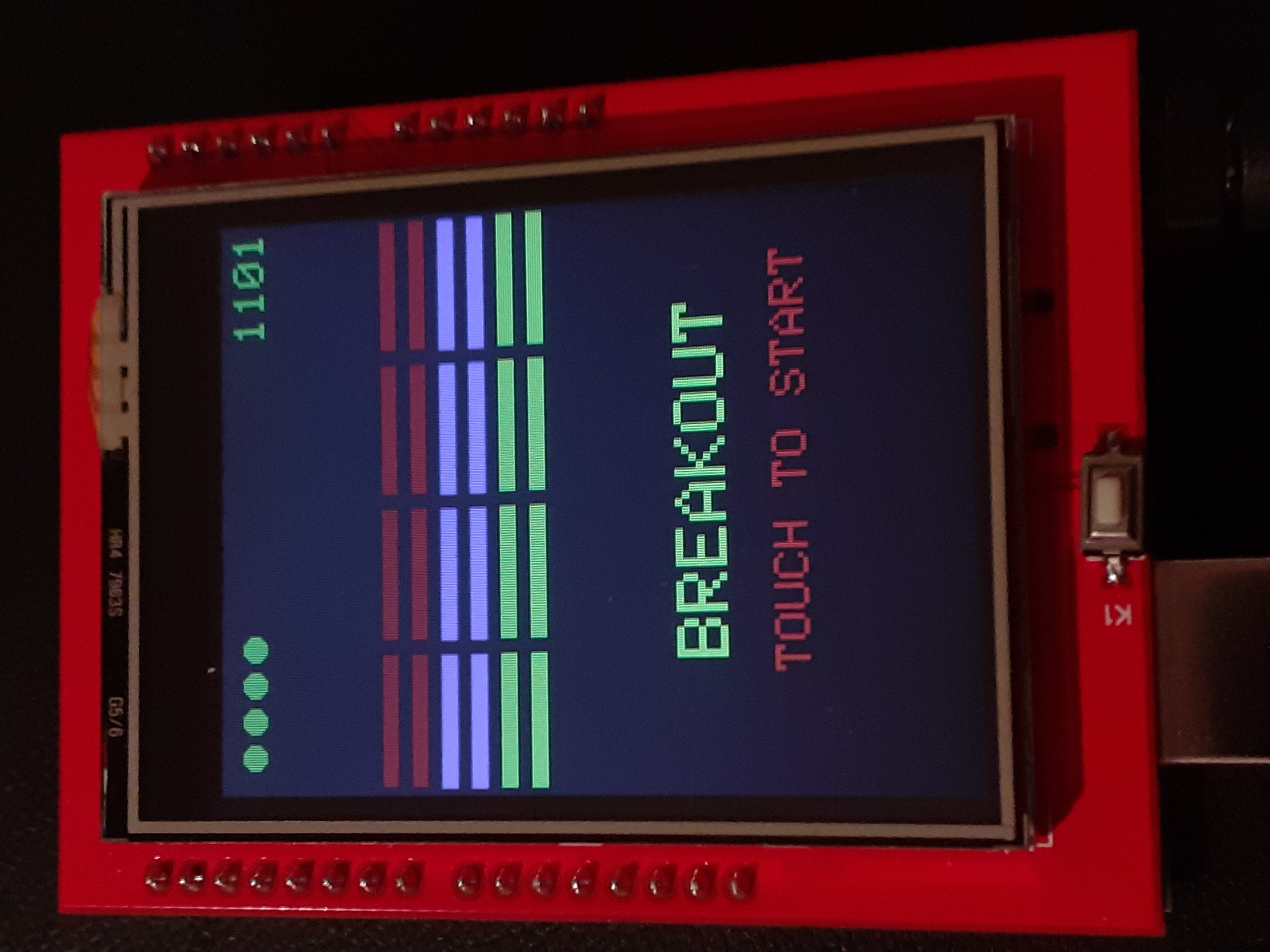
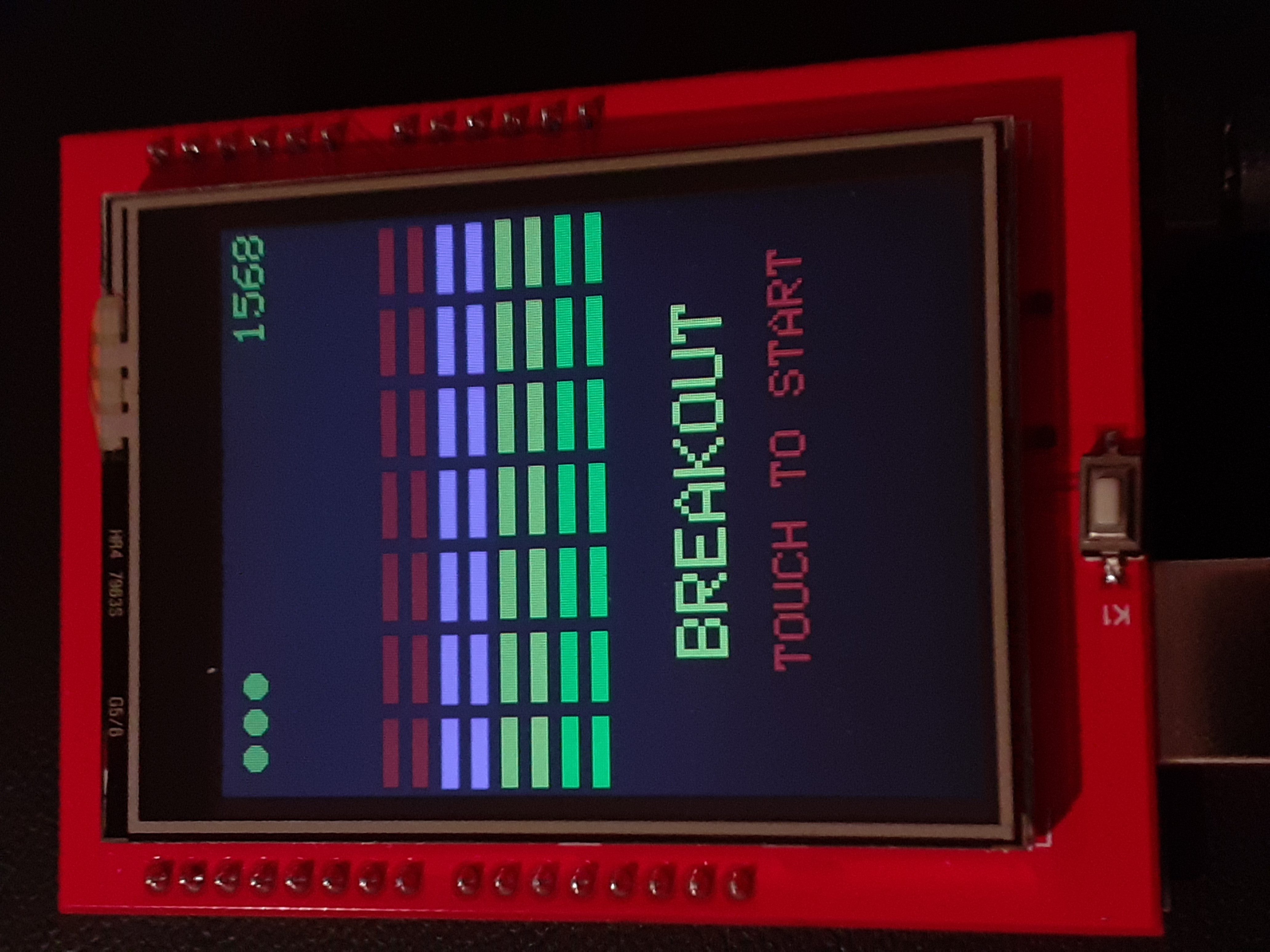
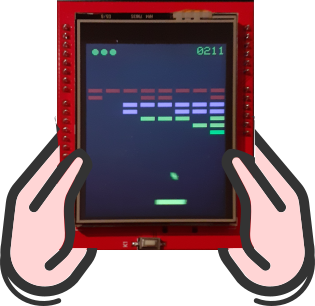
Hold the device with your hands and use your thumbs fingers over the screen to move the paddle to the left or to the right side.
This structure is used to define a new screen:
typedef struct game_type {
  int ballsize;
  int playerwidth;
  int playerheight;
  int exponent;
  int top;
  int rows;
  int columns;
  int brickGap;
  int lives;
  int wall[GAMES_NUMBER];
  int initVelx;
  int initVely;
} game_type;
and add the new screen to the set:
game_type games[GAMES_NUMBER] =
  // ballsize, playerwidth, playerheight, exponent, top, rows, columns, brickGap, lives, wall[8],  initVelx, initVely
{
  { 10, 60, 8, 6, 40 , 8, 8, 3, 3, {0x18, 0x66, 0xFF, 0xDB, 0xFF, 0x7E, 0x24, 0x3C} , 28, -28},
Wall pattern is defined as 8x8 bit array
ej.
{0xAA, 0xAA, 0xAA, 0xAA, 0xAA, 0xAA, 0xAA, 0xAA}that corresponds to this bit array
1,0,1,0,1,0,1,0
1,0,1,0,1,0,1,0
1,0,1,0,1,0,1,0
1,0,1,0,1,0,1,0
1,0,1,0,1,0,1,0
1,0,1,0,1,0,1,0
1,0,1,0,1,0,1,0
1,0,1,0,1,0,1,0
Will produce this wall, note that it is mirrored:
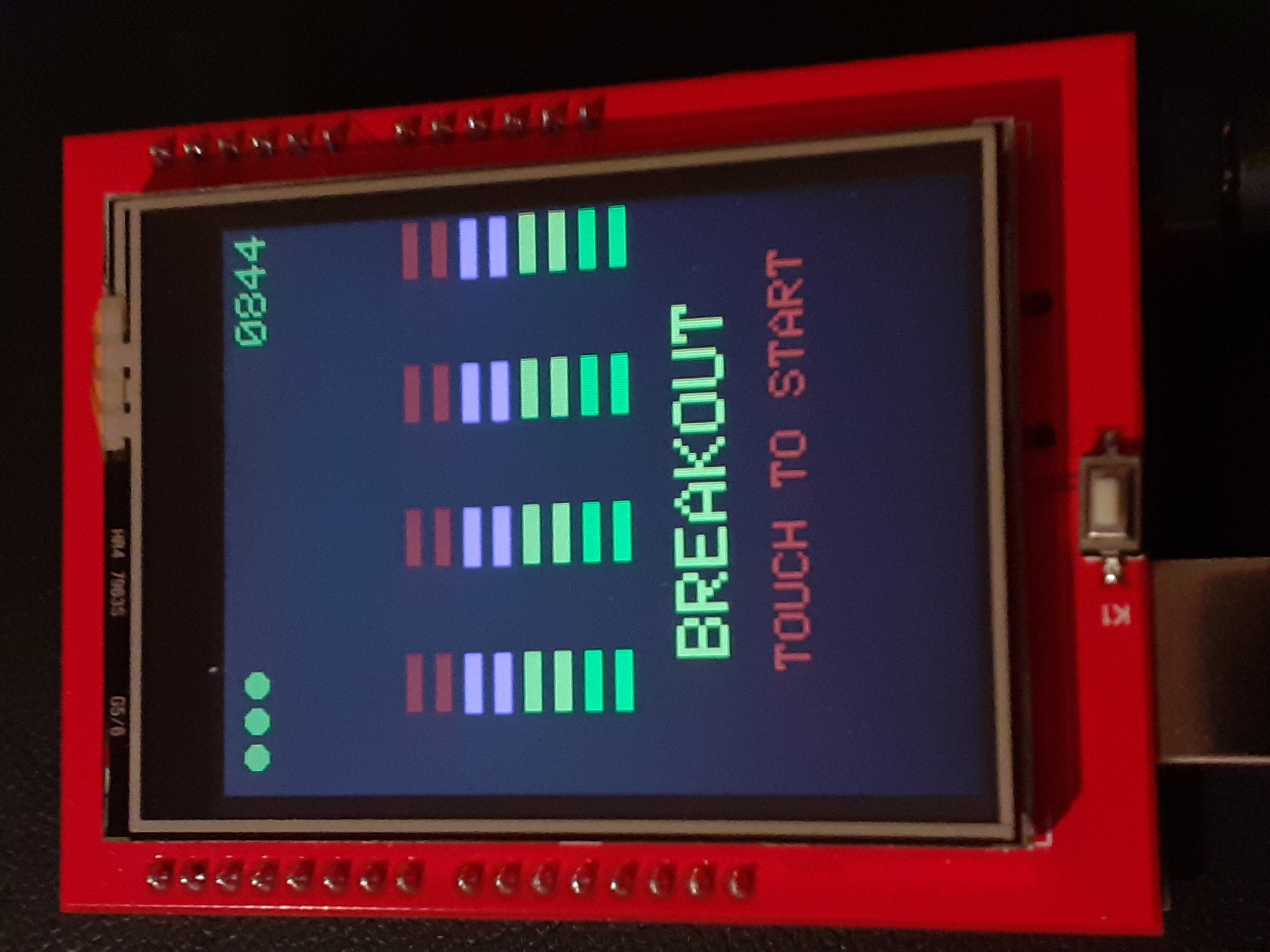
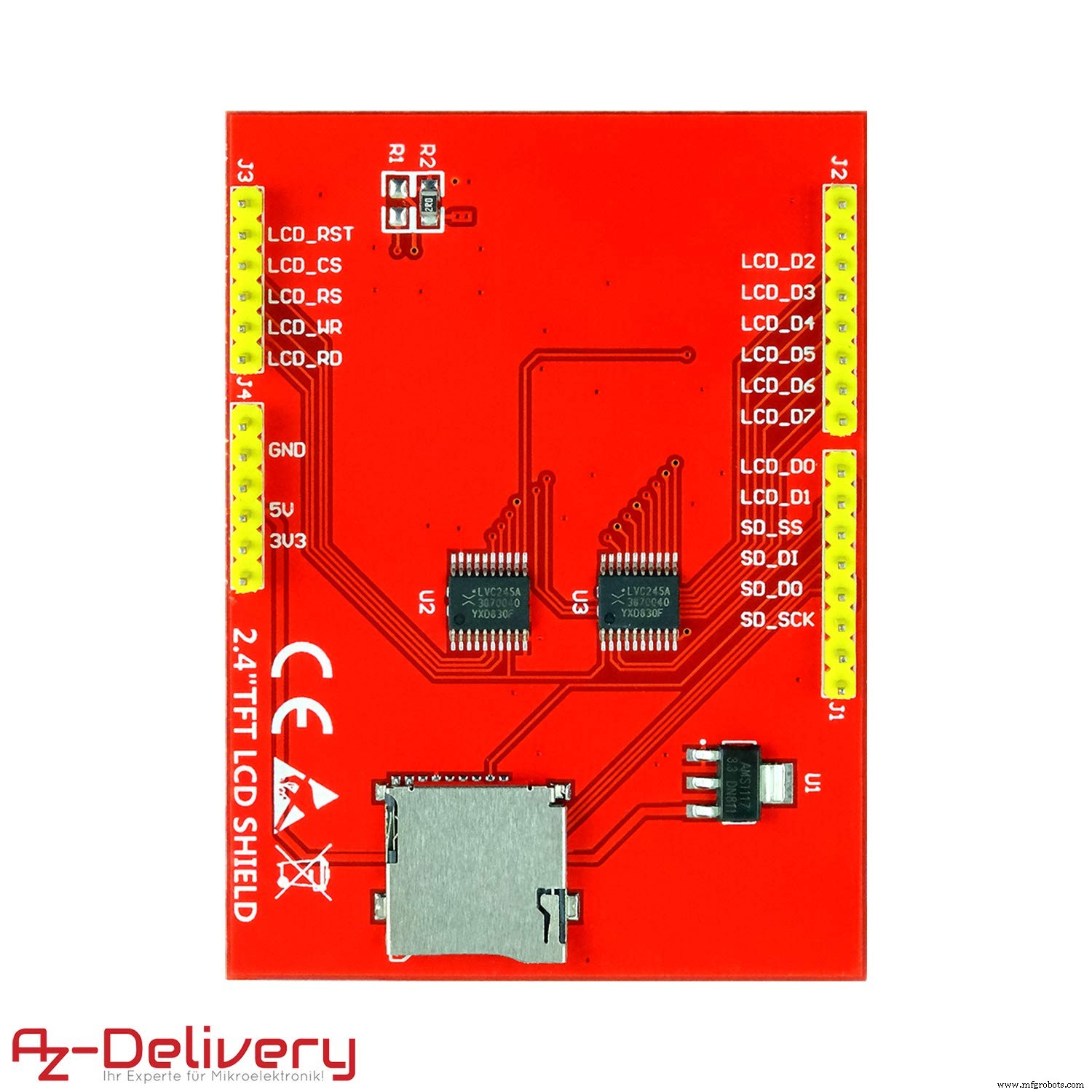
This project uses an AZ-Delivery 2.4 inch TFT LCD display with resistive 4-wire touchscreen and an integrated SD card reader. AZ-Delivery 2.4 inch TFT LCD display.
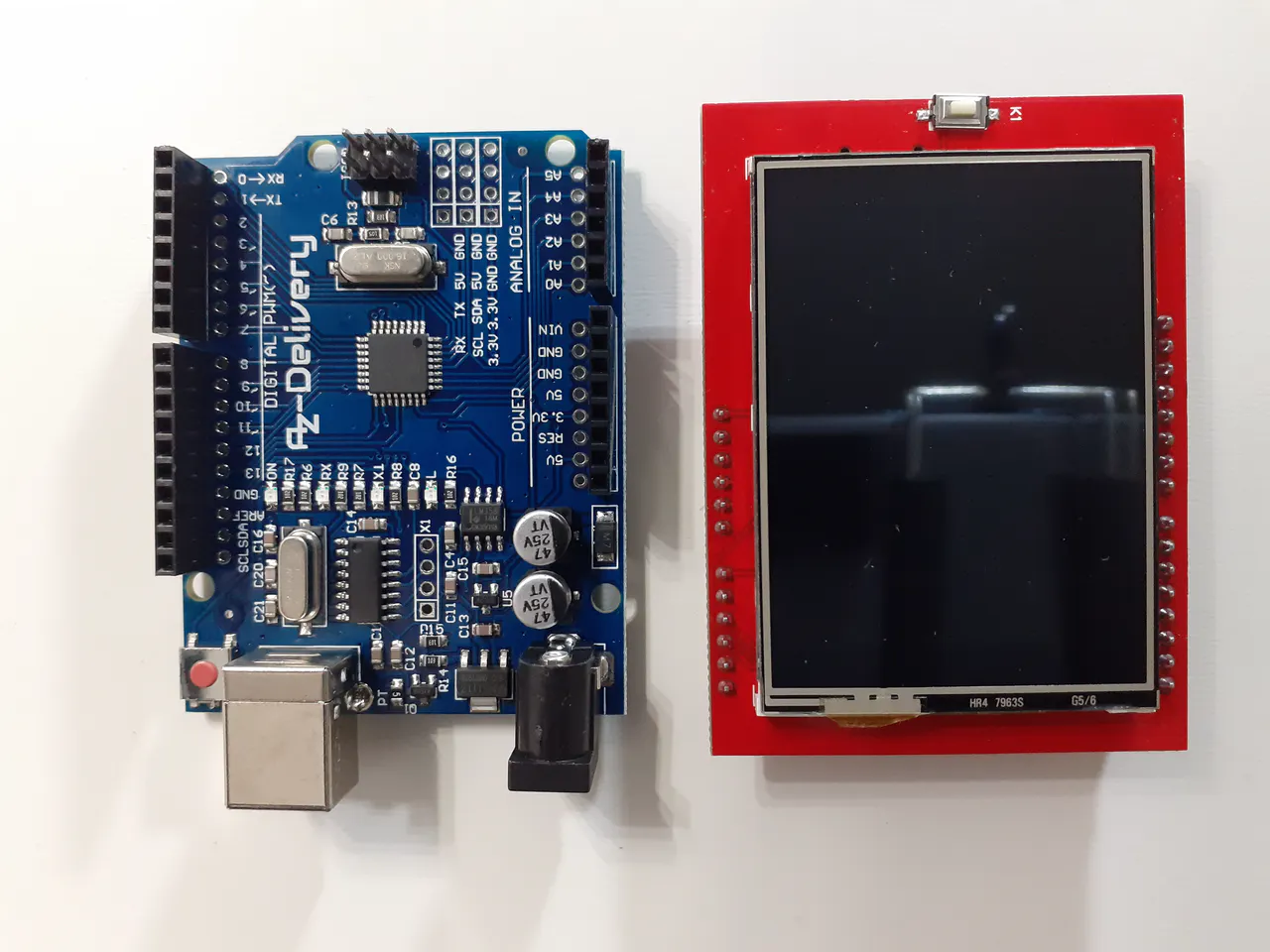
More on this shield in my article "Road testing an AZ-Delivery 2, 4 TFT LCD Touch Display"
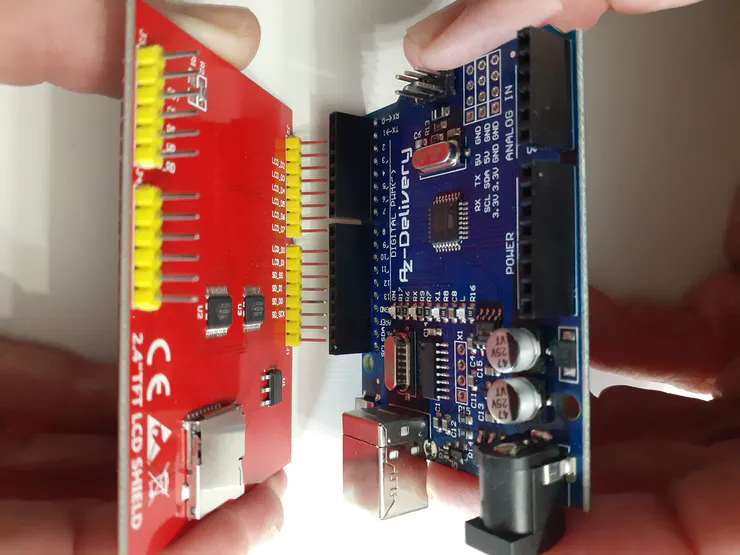
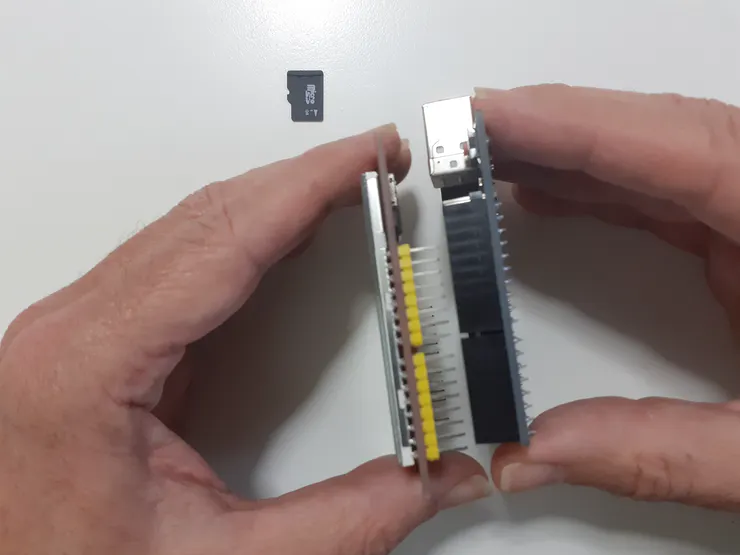
Assembling the shieldYou only need to plug the shield over the Aduino.
Libraries
#include <Adafruit_GFX.h>    // Core graphics library
#include <Adafruit_TFTLCD.h>
#include <TouchScreen.h>You have to calibrate the display so that the position information is correct when you touch the display. MCUFriend_kbv library provides an example with the name "TouchScreen_Calibr_native". The example send the results to the serial port. Start the serial monitor of the Arduino IDE so you can copy the code generated by the example.
Follow the instructions on the touch display, press and hold the position markers displayed, which are highlighted in white. Once you have done all the position marks, the calibration of the display is output to you on the touch display and by the serial port.
For this project you need the data for the "portrait calibration".
TouchScreen.h GFX Calibration
Making all control and bus pins INPUT_PULLUP
Typical 30k Analog pullup with corresponding pin
would read low when digital is written LOW
e.g. reads ~25 for 300R X direction
e.g. reads ~30 for 500R Y direction
Testing : (A2, D8) = 26
Testing : (A3, D9) = 28
ID = 0x9341
cx=153 cy=103 cz=534  X, Y, Pressure
cx=150 cy=475 cz=406  X, Y, Pressure
cx=155 cy=868 cz=231  X, Y, Pressure
cx=517 cy=103 cz=561  X, Y, Pressure
cx=535 cy=855 cz=364  X, Y, Pressure
cx=884 cy=88 cz=650  X, Y, Pressure
cx=908 cy=478 cz=557  X, Y, Pressure
cx=902 cy=864 cz=488  X, Y, Pressure
*** COPY-PASTE from Serial Terminal:
const int XP=8,XM=A2,YP=A3,YM=9; //240x320 ID=0x9341
const int TS_LEFT=118,TS_RT=931,TS_TOP=72,TS_BOT=887;
PORTRAIT  CALIBRATION     240 x 320
x = map(p.x, LEFT=118, RT=931, 0, 240)
y = map(p.y, TOP=72, BOT=887, 0, 320)
LANDSCAPE CALIBRATION     320 x 240
x = map(p.y, LEFT=72, RT=887, 0, 320)
y = map(p.x, TOP=931, BOT=118, 0, 240)To move the image across the screen over time is by using a static velocity and apply it to the the position of an image every time-step.
pos += vel * dt;
Avoiding floating point arithmeticsILI9341 resolution is 240 x 320 so we need two 9 bit integers to reference a pixel in the screen. Using 16 bit integers this let's 6 bits free to represent a decimal part.
nnnn nnnn nndd dddd
We call this number, 6, the binary exponent. And we can use this six bits to have a decimal part ranging from 0.000 to 0.63. So we can use integer math avoiding floating point arithmetics.
To get the integer part of the number we make a right arithmetic shift.
number >> exponent
state.ballx += state.velx;
  state.bally += state.vely;

  // check ball collisions and exit
  checkBallCollisions(game, &state, state.ballx >> game->exponent, state.bally >> game->exponent);
checkBallExit(game, &state, state.ballx >> game->exponent, state.bally >> game->exponent);Uncomment the Define Directive and the paddle will follow the ball as seen in the demo videos:
#define DEMO_MODECreate new patterns a levels and share them!
Code
- Arduino Breakout
Arduino BreakoutArduino
/*
  Arduino Touch TFT Breakout

  Classic breakout game

  Parts needed:
      Ardunio UNO
      AZ-Delivery 2.4 TFT LCD Touch Display Arduino Shield or compatible

  This example code is in the public domain.

  Modified 07 11 2020
  By Enrique Albertos


*/

// #define DEMO_MODE

#include <Adafruit_GFX.h>    // Core graphics library
#include <Adafruit_TFTLCD.h>
#include <TouchScreen.h>


#define BLACK   0x0000
#define BLUE    0x001F
#define RED     0xF800
#define GREEN   0x07E0
#define CYAN    0x07FF
#define MAGENTA 0xF81F
#define YELLOW  0xFFE0
#define WHITE   0xFFFF
#define PRIMARY_COLOR 0x4A11
#define PRIMARY_LIGHT_COLOR 0x7A17
#define PRIMARY_DARK_COLOR 0x4016
#define PRIMARY_TEXT_COLOR 0x7FFF


#define LCD_CS A3 // Chip Select goes to Analog 3
#define LCD_CD A2 // Command/Data goes to Analog 2
#define LCD_WR A1 // LCD Write goes to Analog 1
#define LCD_RD A0 // LCD Read goes to Analog 0
#define LCD_RESET A4 // Can alternately just connect to Arduino's reset pin
Adafruit_TFTLCD tft(LCD_CS, LCD_CD, LCD_WR, LCD_RD, LCD_RESET);

#define LOWFLASH (defined(__AVR_ATmega328P__) && defined(MCUFRIEND_KBV_H_))

// Touch screen presure threshold
#define MINPRESSURE 40
#define MAXPRESSURE 1000
// Touch screen calibration
const int16_t XP = 8, XM = A2, YP = A3, YM = 9; //240x320 ID=0x9341
const int16_t TS_LEFT = 122, TS_RT = 929, TS_TOP = 77, TS_BOT = 884;

const TouchScreen ts = TouchScreen(XP, YP, XM, YM, 300);


#define SCORE_SIZE 30

char scoreFormat[] = "%04d";

typedef struct gameSize_type {
  int16_t x, y, width, height;
} gameSize_type;


gameSize_type gameSize;
uint16_t backgroundColor = BLACK;
int level;

const uint8_t BIT_MASK[] = {0x01, 0x02, 0x04, 0x08, 0x10, 0x20, 0x40, 0x80};
uint8_t pointsForRow[] = {7, 7, 5, 5, 3, 3 , 1, 1};
#define GAMES_NUMBER 16

typedef struct game_type {
  int ballsize;
  int playerwidth;
  int playerheight;
  int exponent;
  int top;
  int rows;
  int columns;
  int brickGap;
  int lives;
  int wall[GAMES_NUMBER];
  int initVelx;
  int initVely;
} game_type;


game_type games[GAMES_NUMBER] =
  // ballsize, playerwidth, playerheight, exponent, top, rows, columns, brickGap, lives, wall[8],                                         initVelx, initVely
{
  { 10,             60,          8,           6,        40 ,     8,       8, 3,       3,  {0x18, 0x66, 0xFF, 0xDB, 0xFF, 0x7E, 0x24, 0x3C} , 28, -28},
  { 10,             50,          8,           6,        40 ,     8,       8, 3,       3,  {0xFF, 0x99, 0xFF, 0xE7, 0xBD, 0xDB, 0xE7, 0xFF} , 28, -28},
  { 10,             50,          8,           6,        40 ,     8,       8, 3,       3,  {0xAA, 0x55, 0xAA, 0x55, 0xAA, 0x55, 0xAA, 0x55} , 28, -28},
  { 8,              50,          8,           6,        40 ,     8,       8, 3,       3,  {0xFF, 0xC3, 0xC3, 0xC3, 0xC3, 0xC3, 0xC3, 0xFF} , 34, -34},
  { 10,             40,          8,           6,        40 ,     8,       8, 3,       3,  {0xFF, 0xAA, 0xAA, 0xFF, 0xFF, 0xAA, 0xAA, 0xFF} , 28, -28},
  { 10,             40,          8,           6,        40 ,     8,       8, 3,       3,  {0xAA, 0xAA, 0xAA, 0xAA, 0xAA, 0xAA, 0xAA, 0xAA} , 28, -28},
  { 12,             64,          8,           6,        60 ,     4,       2, 3,       4,  {0xFF, 0xFF, 0xFF, 0xFF, 0xFF, 0xFF, 0xFF, 0xFF} , 20, -20},
  { 12,             60,          8,           6,        60 ,     5,       3, 3,       4,  {0xFF, 0xFF, 0xFF, 0xFF, 0xFF, 0xFF, 0xFF, 0xFF} , 22, -22},
  { 10,             56,          8,           6,        30 ,     6,       4, 3,       4,  {0xFF, 0xFF, 0xFF, 0xFF, 0xFF, 0xFF, 0xFF, 0xFF} , 24, -24},
  { 10,             52,          8,           6,        30 ,     7,       5, 3,       4,  {0xFF, 0xFF, 0xFF, 0xFF, 0xFF, 0xFF, 0xFF, 0xFF} , 26, -26},
  { 8,              48,          8,           6,        30 ,     8,       6, 3,       3,  {0xFF, 0xFF, 0xFF, 0xFF, 0xFF, 0xFF, 0xFF, 0xFF} , 28, -28},
  { 8,              44,          8,           6,        30 ,     8,       7, 3,       3,  {0xFF, 0xFF, 0xFF, 0xFF, 0xFF, 0xFF, 0xFF, 0xFF} , 30, -30},
  { 8,              40,          8,           6,        30 ,     8,       8, 3,       3,  {0xFF, 0xFF, 0xFF, 0xFF, 0xFF, 0xFF, 0xFF, 0xFF} , 32, -32},
  { 8,              36,          8,           6,        40 ,     8,       8, 3,       3,  {0xFF, 0xFF, 0xFF, 0xFF, 0xFF, 0xFF, 0xFF, 0xFF} , 34, -34},
  { 8,              36,          8,           6,        40 ,     8,       8, 3,       3,  {0xAA, 0xAA, 0xAA, 0xAA, 0xAA, 0xAA, 0xAA, 0xAA} , 34, -34}
};

game_type* game;

typedef struct game_state_type {
  uint16_t ballx;
  uint16_t bally;
  uint16_t ballxold;
  uint16_t ballyold;
  int velx;
  int vely;
  int playerx;
  int playerxold;
  int wallState[8];
  int score;
  int remainingLives;
  int top;
  int bottom;
  int walltop;
  int wallbottom ;
  int brickheight;
  int brickwidth;


};
game_state_type state;


//////////////////////////////////////////////////////////////
// ARDUINO SETUP
//////////////////////////////////////////////////////////////

void setup()
{
  initTft(tft);
  gameSize = {0, 0, tft.width(), tft.height()};
  newGame(&games[0], &state, tft);
}
//////////////////////////////////////////////////////////////
// ARDUINO LOOP
//////////////////////////////////////////////////////////////

int selection = -1;

void loop(void)
{

  selection = readUiSelection(game, &state, selection);

  drawPlayer(game, &state);
  // store old position to remove old pixels
  state.playerxold = state.playerx;

  // calculate new ball position x1 = x0 + vx * dt

  // check max speed
  if (abs( state.vely) > ((1 << game->exponent) - 1)) {
    state.vely = ((1 << game->exponent) - 1) * ((state.vely > 0) - (state.vely < 0));
  }
  if (abs( state.velx) > ((1 << game->exponent) - 1)) {
    state.velx = ((1 << game->exponent) - 1) * ((state.velx > 0) - (state.velx < 0));
  }

  state.ballx += state.velx;
  state.bally += state.vely;

  // check ball collisions and exit
  checkBallCollisions(game, &state, state.ballx >> game->exponent, state.bally >> game->exponent);
  checkBallExit(game, &state, state.ballx >> game->exponent, state.bally >> game->exponent);

  // draw ball in new position
  drawBall(state.ballx >> game->exponent, state.bally >> game->exponent, state.ballxold >> game->exponent, state.ballyold >> game->exponent, game->ballsize );

  // store old position to remove old pixels
  state.ballxold = state.ballx;
  state.ballyold = state.bally;

  // increment velocity
  state.velx = (20 + (state.score >> 3 )) * ( (state.velx > 0) - (state.velx < 0));
  state.vely = (20 + (state.score >> 3 )) * ( (state.vely > 0) - (state.vely < 0));

  // if no bricks go to next level
  if (noBricks(game, &state) && level < GAMES_NUMBER) {
    level++;
    newGame( &games[level], &state, tft);
  } else if ( state.remainingLives <= 0) {
    gameOverTouchToStart();
    state.score = 0;
    level = 0;
    newGame(game, &state, tft);
  }
}


void newGame(game_type* newGame, game_state_type * state,  Adafruit_TFTLCD &tft) {
  game = newGame;
  setupState(game, state, tft);

  clearDialog(gameSize);
  updateLives(game->lives, state->remainingLives);
  updateScore(state->score);

  setupWall(game, state);

  touchToStart();

  clearDialog(gameSize);
  updateLives(game->lives, state->remainingLives);
  updateScore(state->score);
  setupWall(game, state);


}

void setupStateSizes(game_type* game, game_state_type * state, Adafruit_TFTLCD &tft) {
  state->bottom = tft.height() - 30;
  state->brickwidth = tft.width() / game->columns;
  state->brickheight = tft.height() / 24;
}

void setupState(game_type* game, game_state_type * state, Adafruit_TFTLCD &tft) {
  setupStateSizes(game, state, tft);
  for (int i = 0; i < game->rows ; i ++) {
    state->wallState[i] = 0;
  }
  state->playerx = tft.width() / 2 - game->playerwidth / 2;
  state->remainingLives = game->lives;
  state->bally = state->bottom << game->exponent;
  state->ballyold = state->bottom << game->exponent;
  state->velx = game->initVelx;
  state->vely = game->initVely;
}

void updateLives(int lives, int remainingLives) {

  for (int i = 0; i < lives; i++) {
    tft.fillCircle((1 + i) * 15, 15, 5, BLACK);
  }

  for (int i = 0; i < remainingLives; i++) {
    tft.fillCircle((1 + i) * 15, 15, 5, YELLOW);
  }

}


void setupWall(game_type * game, game_state_type * state) {

  int colors[] = {RED, RED, BLUE, BLUE,  YELLOW, YELLOW, GREEN, GREEN};
  state->walltop = game->top + 40;
  state->wallbottom = state->walltop + game->rows * state->brickheight;
  for (int i = 0; i < game->rows; i++) {
    for (int j = 0; j < game->columns; j++) {
      if (isBrickIn(game->wall, j, i)) {
        setBrick(state->wallState, j, i);
        drawBrick(state, j, i, colors[i]);
      }
    }
  }
}


void drawBrick(game_state_type * state, int xBrick, int yBrickRow, uint16_t backgroundColor) {
  tft.fillRect((state->brickwidth * xBrick) + game->brickGap,
               state->walltop + (state->brickheight * yBrickRow) + game->brickGap ,
               state->brickwidth - game->brickGap * 2,
               state->brickheight -  game->brickGap * 2, backgroundColor);

}


boolean noBricks(game_type * game, game_state_type * state) {
  for (int i = 0; i < game->rows ; i++) {
    if (state->wallState[i]) return false;
  }
  return true;
}

void drawPlayer(game_type * game, game_state_type * state) {
  // paint
  tft.fillRect(state->playerx, state->bottom, game->playerwidth, game->playerheight, YELLOW);
  if (state->playerx != state->playerxold) {
    // remove old pixels
    if (state->playerx < state->playerxold) {
      tft.fillRect(state->playerx + game->playerwidth, state->bottom, abs(state->playerx - state->playerxold), game->playerheight, backgroundColor);
    }
    else {
      tft.fillRect(state->playerxold, state->bottom, abs(state->playerx - state->playerxold), game->playerheight, backgroundColor);
    }

  }
}

void drawBall(int x, int y, int xold, int yold, int ballsize) {
  // remove old pixels
  //if (xold != x && yold != y) {
  if (xold <= x && yold <= y) {
    tft.fillRect(xold , yold, ballsize, y - yold, BLACK);
    tft.fillRect(xold , yold, x - xold, ballsize, BLACK);
  } else if (xold >= x && yold >= y) {
    tft.fillRect(x + ballsize , yold, xold - x, ballsize, BLACK);
    tft.fillRect(xold , y + ballsize, ballsize, yold - y, BLACK);
  } else if (xold <= x && yold >= y) {
    tft.fillRect(xold , yold, x - xold, ballsize, BLACK);
    tft.fillRect(xold , y + ballsize, ballsize, yold - y, BLACK);
  } else if (xold >= x && yold <= y) {
    tft.fillRect(xold , yold, ballsize, y - yold, BLACK);
    tft.fillRect(x + ballsize, yold, xold - x, ballsize, BLACK);
  }
  // paint new ball
  tft.fillRect(x , y, ballsize, ballsize, YELLOW);
  // }

}

void touchToStart() {
  drawBoxedString(0, 200, "   BREAKOUT", 3, YELLOW, BLACK);
  drawBoxedString(0, 240, "    TOUCH TO START", 2, RED, BLACK);
  while (waitForTouch() < 0) {}
}

void gameOverTouchToStart() {
  drawBoxedString(0, 180, "  GAME OVER", 3, YELLOW, BLACK);
  drawBoxedString(0, 220, "  TOUCH TO START", 2, RED, BLACK);
  while (waitForTouch() < 0) {}
}


void updateScore (int score) {
  char buffer[5];
  snprintf(buffer, sizeof(buffer), scoreFormat, score);
  drawBoxedString(tft.width() - 50, 6, buffer, 2, YELLOW, PRIMARY_DARK_COLOR);
}

void checkBrickCollision(game_type* game, game_state_type * state, uint16_t x, uint16_t y) {
  int x1 = x + game->ballsize;
  int y1 = y + game->ballsize;
  int collissions = 0;
  collissions += checkCornerCollision(game, state, x, y);
  collissions += checkCornerCollision(game, state, x1, y1);
  collissions += checkCornerCollision(game, state, x, y1);
  collissions += checkCornerCollision(game, state, x1, y);
  if (collissions > 0 ) {
    state->vely = (-1 * state->vely);
    if ((((x % state->brickwidth) == 0)  && ( state->velx < 0 ))
        || ((((x + game->ballsize) % state->brickwidth) == 0)  && ( state->velx > 0 )) ) {
      state->velx = (-1 * state->velx);
    }
  }


}
int checkCornerCollision(game_type * game,  game_state_type * state, uint16_t x, uint16_t y) {
  if ((y > state->walltop) && (y < state->wallbottom)) {
    int yBrickRow = ( y -  state->walltop) / state->brickheight;
    int xBrickColumn = (x / state->brickwidth);
    if (isBrickIn(state->wallState, xBrickColumn, yBrickRow) ) {
      hitBrick(state, xBrickColumn, yBrickRow);
      return 1;
    }
  }
  return 0;
}
void hitBrick(game_state_type * state, int xBrick, int yBrickRow) {
  state->score += pointsForRow[yBrickRow];
  drawBrick(state, xBrick, yBrickRow, WHITE);
  delay(16);
  drawBrick(state, xBrick, yBrickRow, BLUE);
  delay(8);
  drawBrick(state, xBrick, yBrickRow, backgroundColor);
  unsetBrick(state->wallState, xBrick, yBrickRow);
  updateScore(state->score);
}

void checkBorderCollision(game_type * game,  game_state_type * state, uint16_t x, uint16_t y) {
  // check wall collision
  if (x + game->ballsize >=  tft.width()) {
    state->velx = -abs(state->velx);
  }
  if (x <= 0  ) {
    state->velx = abs(state->velx);
  }
  if (y <= SCORE_SIZE ) {
    state->vely = abs(state->vely);
  }
  if (((y + game->ballsize)  >=  state->bottom)
      && ((y + game->ballsize) <= (state->bottom + game->playerheight))
      && (x >= state->playerx)
      && (x <= (state->playerx + game->playerwidth))) {
    // change vel x near player borders
    if (x > (state->playerx + game->playerwidth - 6)) {
      state->velx = state->velx - 1;
    } else if (x < state->playerx + 6) {
      state->velx = state->velx + 1;
    }
    state->vely = -abs(state->vely) ;
  }
}

void checkBallCollisions(game_type * game, game_state_type * state, uint16_t x, uint16_t y) {
  checkBrickCollision(game, state, x, y);
  checkBorderCollision(game, state, x, y);
}

void checkBallExit(game_type * game, game_state_type * state, uint16_t x, uint16_t y) {
  if (((y + game->ballsize)  >=  tft.height())) {
    state->remainingLives--;
    updateLives(game->lives, state->remainingLives);
    delay(500);
    state->vely = -abs(state->vely) ;
  }
}

void setBrick(int wall[], uint8_t x, uint8_t y) {
  wall[y] = wall[y] | BIT_MASK[x];
}

void unsetBrick(int wall[], uint8_t x, uint8_t y) {
  wall[y] = wall[y] & ~BIT_MASK[x];
}

boolean isBrickIn(int wall[], uint8_t x, uint8_t y) {
  return wall[y] &  BIT_MASK[x];
}
//////////////////////////////////////////////////////////////
// TFT SETUP
//////////////////////////////////////////////////////////////

void initTft(Adafruit_TFTLCD & tft) {
  tft.reset();
  uint16_t ID = tft.readID();
  tft.begin(ID);
  tft.setRotation(0);
}

//////////////////////////////////////////////////////////////
// Screen Painting methods
//////////////////////////////////////////////////////////////


/**
  Print a text in forecolor over a filled box with background color.
  Rectangle size is calculated to include the whole text without margins

  @param x horizontal coordinate in points left upper corner
  @param y vertical coordinate in points left upper corner
  @param fontsize font size of the text to print
  @param foreColor forecolor of the text to print
  @param backgroundColor color of the filled rect
  @return void
*/
void drawBoxedString(const uint16_t x, const uint16_t y, const char* string, const uint16_t fontsize, const uint16_t foreColor, const uint16_t backgroundColor) {
  tft.setTextSize(fontsize);
  int16_t  x1, y1;
  uint16_t w, h;
  tft.getTextBounds(string, x, y, &x1, &y1, &w, &h);
  tft.fillRect(x, y, w, h, backgroundColor);
  tft.setCursor(x, y);
  tft.setTextColor(foreColor);
  tft.print(string);
}

/**
  Clear the screen to the default backgrounds

  @param void
  @return void
*/
void clearDialog(gameSize_type gameSize) {
  tft.fillRect(gameSize.x, gameSize.y, gameSize.width, gameSize.height,  backgroundColor);
  tft.fillRect(gameSize.x, gameSize.y, gameSize.width, SCORE_SIZE, PRIMARY_DARK_COLOR);
}


//////////////////////////////////////////////////////////////
// READ UI SELECTION
//////////////////////////////////////////////////////////////

/*
   Checks if the user is selecting any of the visible enabled ui elements
   The onTap callback of the selected element is called and it set as pressed

  @param lastSelected the last selection
  @return the new selection

*/
int readUiSelection(game_type * game, game_state_type * state, const int16_t lastSelected ) {
  int16_t xpos, ypos;  //screen coordinates
  TSPoint tp = ts.getPoint();   //tp.x, tp.y are ADC values

  // if sharing pins, you'll need to fix the directions of the touchscreen pins
  pinMode(XM, OUTPUT);
  pinMode(YP, OUTPUT);
  // we have some minimum pressure we consider 'valid'
  // pressure of 0 means no pressing!

  if (tp.z > MINPRESSURE && tp.z < MAXPRESSURE) {
    xpos = map(tp.x, TS_RT, TS_LEFT, 0, tft.width());
    ypos = map(tp.y, TS_BOT, TS_TOP, 0, tft.height());
    // are we in buttons area ?

    if (xpos > tft.width() / 2) {
      state->playerx += 2;
    } else {
      state->playerx -= 2;
    }
    if (state->playerx >= tft.width() - game->playerwidth) state->playerx = tft.width() - game->playerwidth;
    if (state->playerx < 0) state->playerx = 0;
    return 1;

  }
#ifdef DEMO_MODE
  state->playerx = (state->ballx >> game->exponent) - game->playerwidth / 2;
  if (state->playerx >= tft.width() - game->playerwidth) state->playerx = tft.width() - game->playerwidth;
  if (state->playerx < 0) state->playerx = 0;
#endif

  return -1;
}


int waitForTouch() {
  int16_t xpos, ypos;  //screen coordinates
  TSPoint tp = ts.getPoint();   //tp.x, tp.y are ADC values

  // if sharing pins, you'll need to fix the directions of the touchscreen pins
  pinMode(XM, OUTPUT);
  pinMode(YP, OUTPUT);
  // we have some minimum pressure we consider 'valid'
  // pressure of 0 means no pressing!
  if (tp.z > MINPRESSURE && tp.z < MAXPRESSURE) {
    return 1;
  }
  return -1;
}
Schematics
Manufacturing process
- Build a Classic Pong Game on Arduino UNO with OLED Display – Step‑by‑Step Tutorial
- Build a Portable Capacitive Touch Piano with Arduino – Step‑by‑Step Guide
- DIY Arduino USB Gaming Controller – Build Your Own High-Performance Gamepad
- USB‑BLE Wireless MIDI Adapters – Seamless Connectivity for Musicians
- Pixel Chaser: Interactive One-Tap LED Game with Arduino Nano
- DIY LED Roulette Game – Build a One‑Person Arcade with Arduino Nano
- Build an Arduino Tic‑Tac‑Toe Game on a Touchscreen: A Step‑by‑Step Tutorial
- Build an Arduino Memory Game (Simon Clone) – Step‑by‑Step Tutorial
- Build a Web-Based Two-Player Game with Arduino UNO & PHPoC WiFi Shield
- Build an Interactive LCD Game with Arduino UNO