



Build a Web-Based Two-Player Game with Arduino UNO & PHPoC WiFi Shield
Components and supplies
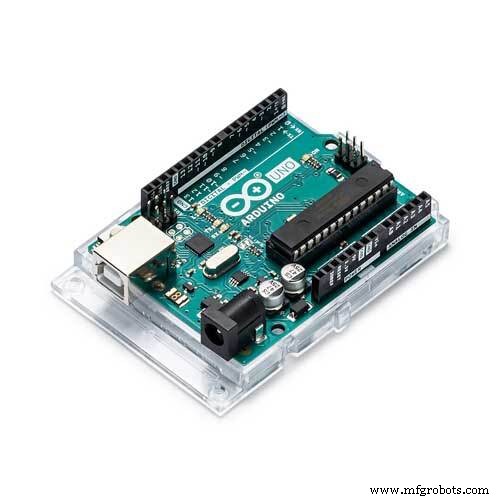 |
| × | 1 | |||
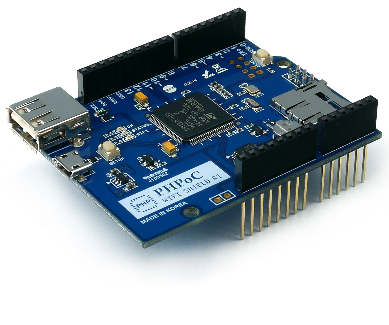 |
| × | 1 | |||
| × | 4 | ||||
 |
| × | 1 | |||
| × | 1 | ||||
| × | 1 |
About this project
If you are a beginner, you can learn about button in Arduino - Button Tutorial.
I made a similar project using but simpler hardware (only PHPoC) here.
DemoData FlowArduino ---> PHPoC WiFi Shield ---> Web browser
There are two people playing game. each people uses two buttons to control direction of goalkeepers. Therefore, we need four buttons.
Arduino reads the states of four buttons, If any of them is changed, Arduino will re-calculated the moving direction of goalkeeper and send the direction values to PHPoC WiFi Shield. When receiving the values, PHPoC WiFi Shield send it to Web Browser via websocket. JavaScript function will update the moving direction of goalkeepers.
JavaScript program will continuously update position of ball, goalkeepers and obstacles based on their direction and check collision as well.
Direction of goalkeepers are changed based on the state of buttons.
Note that: PHPoC shield has a built-in program to pass data from Arduino to web browser. Therefore, we don't need to care about it.
What We Need to Do- Set WiFi information for PHPoC shield (SSID and password)
- Upload new UI to PHPoC shield
- Write Arduino code
Setting WiFi Information for PHPoC Shield
See this instruction.
Upload new Web UI to PHPoC Shield
- Download PHPoC source code remote_game.php (on code section).
- Upload it to PHPoC shield using PHPoC debugger according to this instruction.
When receiving HTTP request from web browser, PHPoC Shield interprets PHP script in this file, and then send the interpreted file to web browser. The interpreted file (contains HTML, CSS and JavaScript code) provides UI (User Interface), updates position of ball, goalkeepers and obstacles based on their direction and checks collision as well. It also receives the moving direction of goalkeepers from websocket.
Write Arduino Code
- Install PHPoC Library for Arduino (see instruction ).
- Upload Arduino code (on code section) to Arduino
- Click serial button on Arduino IDE to see the IP address.
- Open web browser, type
http://replace_ip_address/remote_game.php - Click connect button and test it
See The Best Arduino Kit for Beginners
- pinMode()
- digitalRead()
- Serial.begin()
- Serial.print()
- Serial.println()
Code
- Arduino Code
- PHPoC Shield code (remote_game.php)
Arduino CodeArduino
#include "SPI.h"
#include "Phpoc.h"

PhpocServer server(80);
boolean alreadyConnected = false;

void setup() {
    Serial.begin(9600);
    while(!Serial)
        ;

    Phpoc.begin(PF_LOG_SPI | PF_LOG_NET);

    server.beginWebSocket("game");

    Serial.print("WebSocket server address : ");
    Serial.println(Phpoc.localIP());

    pinMode(6, INPUT);
    pinMode(7, INPUT);
    pinMode(8, INPUT);
    pinMode(9, INPUT);

}

int value_6 = digitalRead(6);
int value_7 = digitalRead(7);
int value_8 = digitalRead(8);
int value_9 = digitalRead(9);
int pre_dir_1 = 0;
int pre_dir_2 = 0;
int dir_1 = 0;
int dir_2 = 0;

void loop() {
    // when the client sends the first byte, say hello:
    PhpocClient client = server.available();
    if (client) {
        value_6 = digitalRead(6);
        value_7 = digitalRead(7);
        value_8 = digitalRead(8);
        value_9 = digitalRead(9);
        dir_1 = value_7 - value_6;
        dir_2 = value_9 - value_8;

        if(dir_1 != pre_dir_1 || dir_2 != pre_dir_2)
        {
            pre_dir_1 = dir_1;
            pre_dir_2 = dir_2;

            String txtMsg = "[" + String(dir_1) + ", " + String(dir_2) + "]\r\n";
            char buf[txtMsg.length()+ 1];
            txtMsg.toCharArray(buf, txtMsg.length() + 1);
            server.write(buf, txtMsg.length());
        }
    }
}
PHPoC Shield code (remote_game.php)PHP
<!DOCTYPE html>
<html>
<head>
<title>PHPoC - Game</title>
<meta name="viewport" content="width=device-width, initial-scale=0.7, maximum-scale=0.7">
<style>
body { text-align: center; font-size: 15pt; font-family: Arial, Helvetica, sans-serif;}
h1 { font-weight: bold; font-size: 25pt; }
h2 { font-weight: bold; font-size: 15pt; }
button { font-weight: bold; font-size: 15pt; }
</style>
<script>
window.requestAnimFrame = (function(callback) {
	return window.requestAnimationFrame || window.webkitRequestAnimationFrame || window.mozRequestAnimationFrame || window.oRequestAnimationFrame || window.msRequestAnimationFrame ||
	function(callback) {
		window.setTimeout(callback, 1000 / 60);
	};
})();

var cvs_width = 400, cvs_height = 500;
var ball = {x:cvs_width / 2, y:cvs_height / 2 , radius:20, dir_x:1, dir_y:1, speed:3};
var obs_1 = {
	x:		100,
	y:		150,
	left:	0, // update later
	right: 	0, // update later
	top:	0, // update later
	bottom:	0, // update later
	width:	105,
	height:	30,
	dir:	1, // up down direction
	speed:	2
	};
var obs_2 = {
	x:		300,
	y:		350,
	left:	0, // update later
	right: 	0, // update later
	top:	0, // update later
	bottom:	0, // update later
	width:	105,
	height:	30,
	dir:	-1, // up down direction
	speed:	2
	};
var obstacles = [obs_1, obs_2];
var keeper_1 = {
	x:		cvs_width / 2,
	y:		15,
	left:	0, // update later
	right: 	0, // update later
	top:	0, // update later
	bottom:	0, // update later
	width:	105,
	height:	30,
	dir:	0, // left right direction
	speed:	8
	};
var keeper_2 = {
	x:		cvs_width / 2,
	y:		cvs_height - 15,
	left:	0, // update later
	right: 	0, // update later
	top:	0, // update later
	bottom:	0, // update later
	width:	105,
	height:	30,
	dir:	0, // left right direction
	speed:	8
	};
var keepers = [keeper_1, keeper_2];
var score = [0, 0];
var delay = 100;

var ws = null;
var ctx = null;

function init()
{
	var width = window.innerWidth;
	var height = window.innerHeight;

	var ratio_x = (width - 105) / (cvs_width);
	var ratio_y = (height - 200) / cvs_height;
	var ratio = (ratio_x < ratio_y) ? ratio_x : ratio_y;

	cvs_width *= ratio;
	cvs_height *= ratio;

	var canvas = document.getElementById("remote");
	canvas.width = cvs_width + 105;
	canvas.height = cvs_height;

	ctx = canvas.getContext("2d");
	ctx.translate(105, 0);
	ctx.lineWidth = 4;

	for( var i = 0; i < obstacles.length; i++)
	{
		obstacles[i].x *= ratio;
		obstacles[i].y *= ratio;
		obstacles[i].width *= ratio;
		obstacles[i].height *= ratio;
		obstacles[i].speed *= ratio;
		obstacles[i].left = obstacles[i].x - obstacles[i].width / 2;
		obstacles[i].right = obstacles[i].x + obstacles[i].width / 2;
		obstacles[i].top = obstacles[i].y - obstacles[i].height / 2;
		obstacles[i].bottom = obstacles[i].y + obstacles[i].height / 2;
	}

	for( var i = 0; i < keepers.length; i++)
	{
		keepers[i].x *= ratio;
		keepers[i].y *= ratio;
		keepers[i].width *= ratio;
		keepers[i].height *= ratio;
		keepers[i].speed *= ratio;
		keepers[i].left = keepers[i].x - keepers[i].width / 2;
		keepers[i].right = keepers[i].x + keepers[i].width / 2;
		keepers[i].top = keepers[i].y - keepers[i].height / 2;
		keepers[i].bottom = keepers[i].y + keepers[i].height / 2;
	}

	ball.x *= ratio;
	ball.y *= ratio;
	ball.radius *= ratio;
	ball.speed *= ratio;

	update_view(ctx);
}
function connect_onclick()
{
	if(ws == null)
	{
		var ws_host_addr = "<?echo _SERVER("HTTP_HOST")?>";
		ws = new WebSocket("ws://" + ws_host_addr + "/game", "text.phpoc");
		document.getElementById("ws_state").innerHTML = "CONNECTING";
		ws.onopen = ws_onopen;
		ws.onclose = ws_onclose;
		ws.onmessage = ws_onmessage;
	}
	else
		ws.close();
}
function ws_onopen()
{
	document.getElementById("ws_state").innerHTML = "<font color='blue'>CONNECTED</font>";
	document.getElementById("bt_connect").innerHTML = "Disconnect";
	ws.send("dummy\r\n");
}
function ws_onclose()
{
	document.getElementById("ws_state").innerHTML = "<font color='gray'>CLOSED</font>";
	document.getElementById("bt_connect").innerHTML = "Connect";
	ws.onopen = null;
	ws.onclose = null;
	ws.onmessage = null;
	ws = null;
}
function ws_onmessage(e_msg)
{
	e_msg = e_msg || window.event; // MessageEvent

	console.log(e_msg.data);
	var arr = JSON.parse(e_msg.data);
	keepers[0].dir = parseInt(arr[0]);
	keepers[1].dir = parseInt(arr[1]);
}
function update_view(ctx)
{
	ctx.clearRect(-105, 0, cvs_width, cvs_height);

	ctx.fillStyle = "black";
	ctx.fillRect(0, 0, cvs_width, cvs_height);

	ctx.beginPath();
	ctx.moveTo(-105, cvs_height / 2);
	ctx.lineTo(0, cvs_height / 2);
	ctx.stroke();
	ctx.font = "120px Georgia";
	ctx.textBaseline = "middle";
	ctx.textAlign = "center";
	var team_1 = score[0];
	var team_2 = score[1];
	ctx.fillStyle = "#00FF00";
	ctx.fillText(team_1.toString(), -50, cvs_height / 2 - 70);
	ctx.fillStyle = "#0000FF";
	ctx.fillText(team_2.toString(), -50, cvs_height / 2 + 50);

	ctx.fillStyle="#FF0000";
	ctx.beginPath();
	ctx.arc(ball.x, ball.y, ball.radius, 0, 2*Math.PI);
	ctx.fill();

	for( var i = 0; i < obstacles.length; i++)
		ctx.fillRect(obstacles[i].left, obstacles[i].top, obstacles[i].width, obstacles[i].height);

	ctx.fillStyle="#00FF00";
	ctx.fillRect(keeper_1.left, keeper_1.top, keeper_1.width, keeper_1.height);

	ctx.fillStyle="#0000FF";
	ctx.fillRect(keeper_2.left, keeper_2.top, keeper_2.width, keeper_2.height);
}
function collision_detect(object)
{
	var dist_x = Math.abs(ball.x - object.x);
	var dist_y = Math.abs(ball.y - object.y);
	var TOUCH_DIST_X = ball.radius + object.width / 2;
	var TOUCH_DIST_Y = ball.radius + object.height / 2;

	if(ball.x >= object.left && ball.x <= object.right)
	{
		if(dist_y <= TOUCH_DIST_Y)
		{
			ball.dir_y *= -1;

			if(ball.y < object.top)
				ball.y = object.top - ball.radius;
			else if(ball.y > object.bottom)
				ball.y = object.bottom + ball.radius;

			return true;
		}

		return false;
	}

	if(ball.y >= object.top && ball.y <= object.bottom)
	{
		if(dist_x <= TOUCH_DIST_X)
		{

			ball.dir_x *= -1;

			if(ball.x < object.left)
				ball.x = object.left - ball.radius;
			else if(ball.x > object.right)
				ball.x = object.right + ball.radius;

			return true;
		}

		return false;
	}


	if(dist_x < TOUCH_DIST_X && dist_y < TOUCH_DIST_Y)
	{
		dist_x -= object.width / 2; //distance to corner
		dist_y -= object.height / 2; //distance to corner
		if(dist_x == dist_y)
		{
			ball.dir_x *= -1;
			ball.dir_y *= -1;
		}
		else if(dist_x > dist_y)
			ball.dir_x *= -1;
		else
			ball.dir_y *= -1;

		return true;
	}
}
function check_edges()
{
	if((ball.x + ball.radius) >= cvs_width || (ball.x - ball.radius) <= 0)
		ball.dir_x *= -1;

	if((ball.y - ball.radius) >= cvs_height || (ball.y + ball.radius) <= 0)
	{
		if((ball.y - ball.radius) >= cvs_height)
			score[0] += 1;
		else
			score[1] += 1;

		ball.dir_y *= -1;
		ball.x = cvs_width / 2;
		ball.y = cvs_height / 2;
		delay = 100;
	}
}
function check_keepers()
{
	for( var i = 0; i < keepers.length; i++)
	{
		var obs = keepers[i];
		collision_detect(obs);
	}
}
function check_obstacles()
{
	for( var i = 0; i < obstacles.length; i++)
	{
		var obs = obstacles[i];
		collision_detect(obs);
	}
}
function move_ball()
{
	ball.x += ball.dir_x * ball.speed;
	ball.y += ball.dir_y * ball.speed;
}
function move_obstacles()
{
	for( var i = 0; i < obstacles.length; i++)
	{
		obstacles[i].y += obstacles[i].dir * obstacles[i].speed;

		if(obstacles[i].dir == 1 && obstacles[i].y > (cvs_height - 8*ball.radius))
			obstacles[i].dir = -1;
		else if(obstacles[i].dir == -1 && obstacles[i].y < (8*ball.radius))
			obstacles[i].dir = 1;

		obstacles[i].top = obstacles[i].y - obstacles[i].height / 2;
		obstacles[i].bottom = obstacles[i].y + obstacles[i].height / 2;
	}
}
function move_keepers()
{
	for( var i = 0; i < keepers.length; i++)
	{
		keepers[i].x += keepers[i].dir*keepers[i].speed;

		if(keepers[i].right > cvs_width && keepers[i].dir == 1)
		{
			keepers[i].dir *= 0;
			keepers[i].x = cvs_width - keepers[i].width / 2
		}

		if(keepers[i].left < 0 && keepers[i].dir == -1)
		{
			keepers[i].dir = 0;
			keepers[i].x = keepers[i].width / 2
		}

		keepers[i].left = keepers[i].x - keepers[i].width / 2;
		keepers[i].right = keepers[i].x + keepers[i].width / 2;
	}
}
function animate(ctx)
{
	if(ws != null)
	{
		move_keepers();

		if(!delay)
		{
			move_ball();
			move_obstacles();
			check_edges();
			check_keepers();
			check_obstacles();
		}
		else
			delay--;

		update_view(ctx);
	}

	// request new frame
	requestAnimFrame(function() {
		animate(ctx);
	});
}

setTimeout(function() {
	animate(ctx);
}, 100);

window.onload = init;
</script>
</head>

<body>
<center>
<p>
<h1>PHPoC - Web-based Game</h1>
</p>
<canvas id="remote" width="400" height="500"></canvas>
<h2>
<p>
WebSocket : <span id="ws_state">null</span>
</p>
<button id="bt_connect" type="button" onclick="connect_onclick();">Connect</button>
</h2>
</center>
</body>
</html>
Schematics
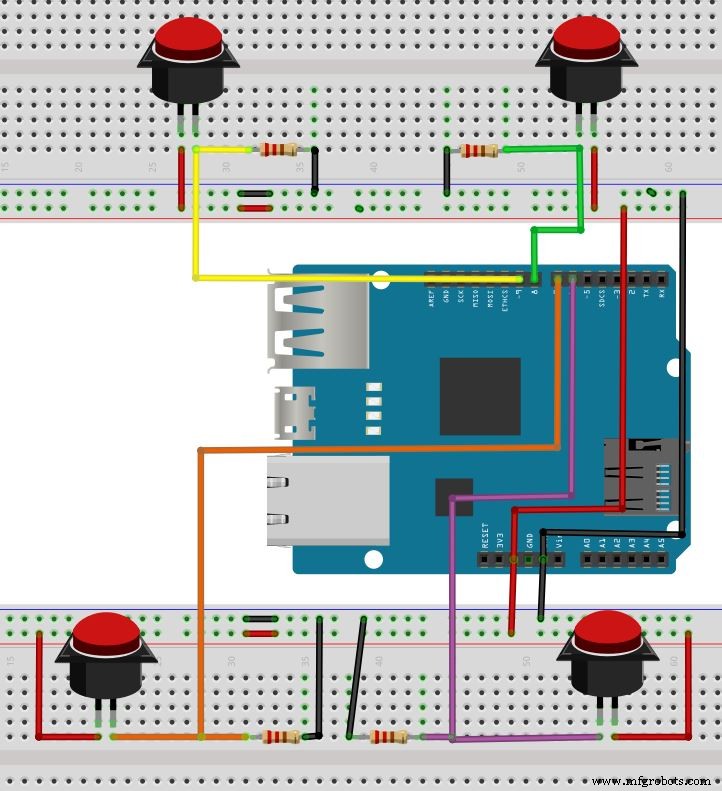
1. Stack PHPoC wifi shield or PHPoC shield on Arduino2. Wiring like below image
Manufacturing process
- DIY Arduino USB Gaming Controller – Build Your Own High-Performance Gamepad
- Arduino Web‑Controlled MP3 Player: Easy Audio Playback via Browser
- Pixel Chaser: Interactive One-Tap LED Game with Arduino Nano
- DIY LED Roulette Game – Build a One‑Person Arcade with Arduino Nano
- Create a Web-Operated Joystick with Arduino UNO & WiFi Shield
- Build a Web-Enabled Arduino Thermometer with DS18B20 Sensor
- Build a Web-Enabled Arduino Car Race Brick Game
- Build an Arduino Tic‑Tac‑Toe Game on a Touchscreen: A Step‑by‑Step Tutorial
- Build an Arduino Memory Game (Simon Clone) – Step‑by‑Step Tutorial
- Build an Interactive LCD Game with Arduino UNO