



Arduino Web‑Controlled MP3 Player: Easy Audio Playback via Browser
Components and supplies
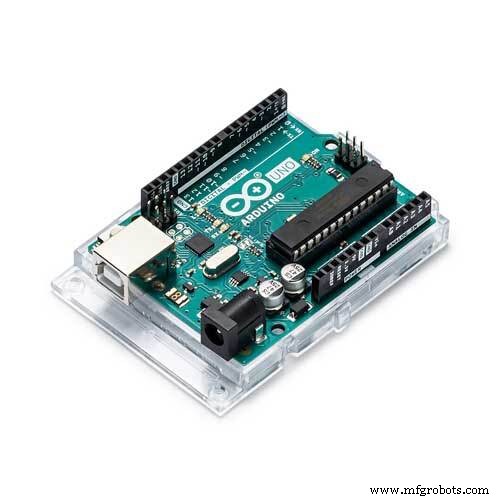 |
| × | 1 | |||
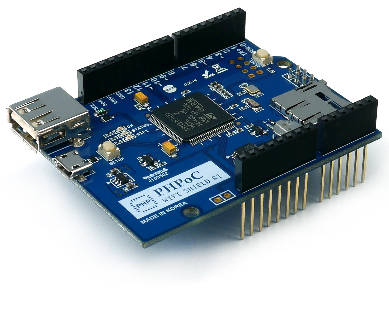 |
| × | 1 | |||
| × | 1 | ||||
| × | 1 | ||||
| × | 1 |
About this project
I have a similar project using only PHPoC here.
MP3 player may be useful in museum or exhibition to provide voice-based information to visitors on demand. This project shows how to control MP3 via webpage using Arduino Uno.
If you are a beginner, you can learn about Arduino here.
Serial MP3 Player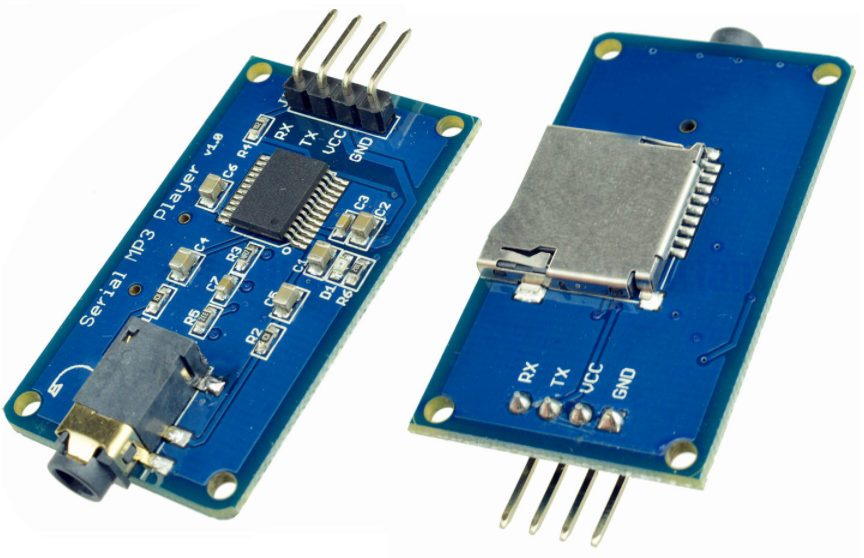
Serial MP3 player have two interfaces:
- jack to speaker
- interface to micro-controller (in this project is Arduino)
When receiving a command from micro-controller (e.g PLAY, PAUSE, VOLUME UP...), MP3 player read .mp3 file from SD card and perform action based on the command.
Before using, it need to copy .mp3 files to SD card and mount it to MP3 Player.
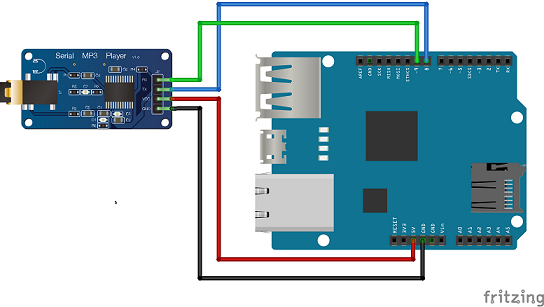
Wiring- Stack PHPoC shield on Arduino
- Connect pin GND, VCC TX and RX of MP3 Player to GND, 5V, pin 8 and pin 9 of Arduino, respectively.
Web browser ---> PHPoC WiFi Shield ---> Arduino
Web app on web browser will send commands and data based on touch or click event to PHPoC shield via WebSocket. When receiving the command, PHPoC shield passes it to Arduino. Arduino sends command to MP3 player according to the command received from PHPoC Shield.
Command Set
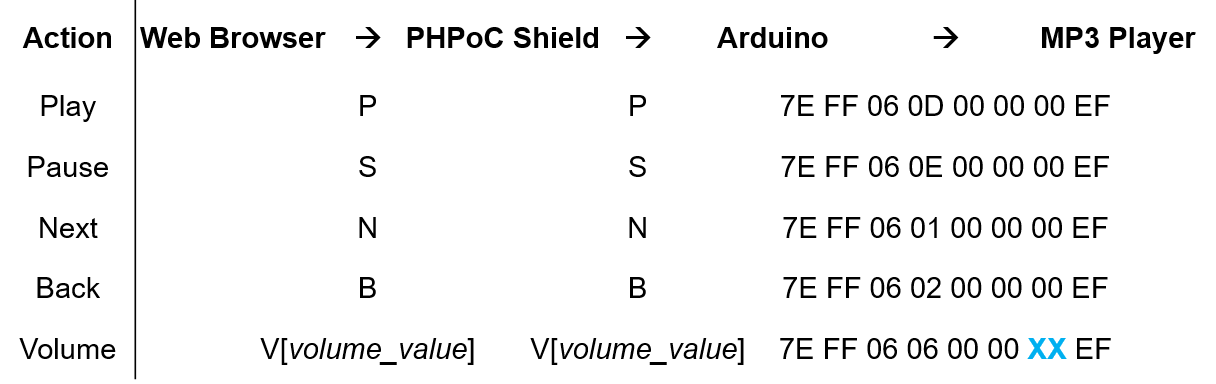
Where, XX is volume value.
Note that: PHPoC shield has a built-in program to pass data from web browser to Arduino. Therefore, we don't need to care about it.
What We Need to Do- Set Wifi information for PHPoC shield (SSID and password)
- Upload new UI to PHPoC shield
- Write Arduino code
See this instruction.
Upload new Web UI to PHPoC Shield- Download PHPoC source code remote_mp3.php (on code section).
- Upload it to PHPoC shield using PHPoC debugger according to this instruction.
Note that: This Web UI contains command set to send to Arduino.
Write Arduino Code- Install library for Arduino on Arduino IDE (see the instruction ) and restart Arduino IDE.
- On Arduino IDE, go to File -> Examples -> Phpoc -> WebRemoteSlide.
- I modified the example (see the source code in code section).
- Click serial button on Arduino IDE to see the IP address.
- Open web browser, type
http://replace_ip_address/remote_mp3.php - Click connect button and test it.
See The Best Arduino Kit for Beginners
Function References- Serial.begin()
- Serial.println()
- delay()
- millis()
- for loop
- while loop
- if else
- loop()
- setup()
- String.toInt()
- String.substring()
- String.indexOf()
- String.remove()
- String.equals()
Code
- Arduino Code
- Web IU (remote_mp3.php)
Arduino CodeArduino
#include "SPI.h"
#include "Phpoc.h"
#include <AltSoftSerial.h>

#define ARDUINO_RX 8	// should connect to TX of the Serial MP3 Player module
#define ARDUINO_TX 9	// connect to RX of the module
AltSoftSerial mySerial(ARDUINO_RX, ARDUINO_TX);

static int8_t Send_buf[8] = {0} ;

#define CMD_PLAY_NEXT		0x01
#define CMD_PLAY_PREV		0x02
#define CMD_PLAY_W_INDEX	0x03
#define CMD_SET_VOLUME		0x06
#define CMD_SEL_DEV			0x09
#define CMD_PLAY_W_VOL		0x22
#define CMD_PLAY			0x0D
#define CMD_PAUSE			0x0E
#define CMD_SINGLE_CYCLE	0x19
#define DEV_TF				0x02
#define SINGLE_CYCLE_ON		0x00
#define SINGLE_CYCLE_OFF	0x01

// Arduino web server
PhpocServer server(80);
char name;
int value;

void setup() {
	 mySerial.begin(9600);
	delay(500);							// wait chip initialization is complete

	sendCommand(CMD_SEL_DEV, DEV_TF);	// select the TF card
	delay(200);							// wait for 200ms

	Serial.begin(9600);
	while(!Serial)
		;

	Phpoc.begin(PF_LOG_SPI | PF_LOG_NET);
	//Phpoc.begin();

	server.beginWebSocket("remote_slide");

	Serial.print("WebSocket server address : ");
	Serial.println(Phpoc.localIP());
}

void loop() {
	// wait for a new client:
	PhpocClient client = server.available();

	 if (client) {
		String slideStr = client.readLine();

		if(slideStr)
		{
			name = slideStr.charAt(0);
			value = slideStr.substring(1).toInt();

			if(name == 'P')
			{
				 Serial.println("Play mp3");
				 sendCommand(CMD_PLAY, 0x0000);
			}

			if(name == 'S')
			{
				 Serial.println("Pause mp3");
				 sendCommand(CMD_PAUSE, 0x0000);
			}

			if(name == 'N')
			{
				 Serial.println("Play next mp3");
				 sendCommand(CMD_PLAY_NEXT, 0x0000);
			}
			if(name == 'B')
			{
				 Serial.println("Play previous mp3");
				 sendCommand(CMD_PLAY_PREV, 0x0000);
			}
			if(name == 'V')
			{
				 Serial.print("Change volume to ");
				 Serial.println(value);
				 sendCommand(CMD_SET_VOLUME, value);
			}
		}
	}
}

void sendCommand(int8_t command, int16_t dat)
{
	delay(20);
	Send_buf[0] = 0x7e; // starting byte
	Send_buf[1] = 0xff; // version
	Send_buf[2] = 0x06; // the number of bytes of the command without starting byte and ending byte
	Send_buf[3] = command;	//
	Send_buf[4] = 0x00;		 // 0x00 = no feedback, 0x01 = feedback
	Send_buf[5] = (int8_t)(dat >> 8); // datah
	Send_buf[6] = (int8_t)(dat);			// datal
	Send_buf[7] = 0xef; // ending byte
	for(uint8_t i=0; i<8; i++)
	{
		mySerial.write(Send_buf[i]) ;
	}
}
Web IU (remote_mp3.php)PHP
<!DOCTYPE html>
<html>
<head>
<title>PHPoC Shield - IoT MP3 Player</title>
<meta name="viewport" content="width=device-width, initial-scale=0.7, maximum-scale=0.7">
<style>
body { text-align: center; font-size: 15pt; }
h1 { font-weight: bold; font-size: 25pt; }
h2 { font-weight: bold; font-size: 15pt; }
button { font-weight: bold; font-size: 15pt; }
</style>
<script>
var canvas_width = 450, canvas_height = 250;
var trans_x = canvas_width/2, trans_y = canvas_height/2 - 30;
var plate_width = 300, plate_height = 80;
var volume_width = 300, volume_height = 8;
var circle_radius = 80;
var volume_y = circle_radius + 35;
var inner_radius;
var pause_width, pause_height;
var play_width, play_height;
var next_width, next_height, next_top, next_right;
var arrow_width;

var play_state = 0; // 0: pause. 1: playing
var volume = 20;
var click_state = 0; // 0: no click, 1: back button click, 2: next button click
var ws;

function init()
{
	var canvas = document.getElementById("remote");
	canvas.style.backgroundColor = "#999999";
	canvas.width = canvas_width;
	canvas.height = canvas_height;

	canvas.addEventListener("touchstart", mouse_down);
	canvas.addEventListener("touchend", mouse_up);
	canvas.addEventListener("touchmove", mouse_move);
	canvas.addEventListener("mousedown", mouse_down);
	canvas.addEventListener("mouseup", mouse_up);
	canvas.addEventListener("mousemove", mouse_move);

	var ctx = canvas.getContext("2d");

	ctx.translate(trans_x, trans_y);

	inner_radius = circle_radius - 25;
	next_height = Math.round(0.6 * plate_height);
	arrow_width = Math.round(next_height * Math.cos(Math.PI/3.5));
	next_width = 2*arrow_width - 7;
	next_top = next_height / 2;
	next_right = plate_width / 2 + 15;

	update_view();
}
function connect_onclick()
{
	if(ws == null)
	{
		var ws_host_addr = "<?echo _SERVER("HTTP_HOST")?>";
		if((navigator.platform.indexOf("Win") != -1) && (ws_host_addr.charAt(0) == "["))
		{
			// network resource identifier to UNC path name conversion
			ws_host_addr = ws_host_addr.replace(/[\[\]]/g, '');
			ws_host_addr = ws_host_addr.replace(/:/g, "-");
			ws_host_addr += ".ipv6-literal.net";
		}

		ws = new WebSocket("ws://" + ws_host_addr + "/remote_slide", "text.phpoc");
		document.getElementById("ws_state").innerHTML = "CONNECTING";
		ws.onopen = ws_onopen;
		ws.onclose = ws_onclose;
		ws.onmessage = ws_onmessage;
	}
	else
		ws.close();
}
function ws_onopen()
{
	document.getElementById("ws_state").innerHTML = "<font color='blue'>CONNECTED</font>";
	document.getElementById("bt_connect").innerHTML = "Disconnect";
}
function ws_onclose()
{
	document.getElementById("ws_state").innerHTML = "<font color='gray'>CLOSED</font>";
	document.getElementById("bt_connect").innerHTML = "Connect";
	ws.onopen = null;
	ws.onclose = null;
	ws.onmessage = null;
	ws = null;
}
function ws_onmessage(e_msg)
{
	e_msg = e_msg || window.event; // MessageEvent
	alert("msg : " + e_msg.data);
}
function update_view()
{
	var canvas = document.getElementById("remote");
	var ctx = canvas.getContext("2d");

	ctx.clearRect(-trans_x, -trans_y, canvas_width, canvas_height);

	ctx.fillStyle="#404040";
	ctx.beginPath();
	ctx.arc(-plate_width / 2, 0, plate_height / 2, 0.5 * Math.PI, 1.5 * Math.PI);
	ctx.lineTo(plate_width / 2, -plate_height / 2);
	ctx.arc(plate_width / 2, 0, plate_height / 2, 1.5 * Math.PI, 0.5 * Math.PI);
	ctx.lineTo(-plate_width / 2, plate_height / 2);
	ctx.fill();

	var gradient=ctx.createLinearGradient(0,-circle_radius,0,circle_radius);
	gradient.addColorStop(0,"white");
	gradient.addColorStop(0.5,"#cceeff");
	gradient.addColorStop(1,"white");

	ctx.fillStyle=gradient;
	ctx.beginPath();
	ctx.arc(0, 0, circle_radius, 0 , 2 * Math.PI);
	ctx.fill();

	var arrow1_right = next_right;
	var arrow1_left = next_right - arrow_width;
	var arrow2_left = next_right - next_width;
	var arrow2_right = arrow2_left + arrow_width;

	// Back button
	if(click_state == 1)
		ctx.fillStyle="#66ffff";
	else
		ctx.fillStyle=gradient;
	ctx.beginPath();
	ctx.lineTo(-arrow1_right, 0);
	ctx.lineTo(-arrow1_left, next_height / 2);
	ctx.lineTo(-arrow1_left, -next_height / 2);
	ctx.fill();
	ctx.beginPath();
	ctx.lineTo(-arrow2_right, 0);
	ctx.lineTo(-arrow2_left, next_height / 2);
	ctx.lineTo(-arrow2_left, -next_height / 2);
	ctx.fill();

	// Next button
	if(click_state == 2)
		ctx.fillStyle="#66ffff";
	else
		ctx.fillStyle=gradient;
	ctx.beginPath();
	ctx.lineTo(arrow1_right, 0);
	ctx.lineTo(arrow1_left, next_height / 2);
	ctx.lineTo(arrow1_left, -next_height / 2);
	ctx.fill();
	ctx.beginPath();
	ctx.lineTo(arrow2_right, 0);
	ctx.lineTo(arrow2_left, next_height / 2);
	ctx.lineTo(arrow2_left, -next_height / 2);
	ctx.fill();

	var x = Math.round(inner_radius * Math.cos(Math.PI/3));
	var y = Math.round(inner_radius * Math.cos(Math.PI/6));
	ctx.fillStyle="#2eb82e";

	if(!play_state)
	{
		// Pausing button
		ctx.beginPath();
		ctx.lineTo(inner_radius, 0);
		ctx.lineTo(-x, y);
		ctx.lineTo(-x, -y);
		ctx.fill();
	}
	else
	{
		// Playing button
		x -= 3;
		y -= 3;
		var bar_width = 14;
		ctx.beginPath();
		ctx.lineTo(-x - bar_width, -y);
		ctx.lineTo(-x - bar_width, y);
		ctx.lineTo(-x + bar_width, y);
		ctx.lineTo(-x + bar_width, -y);
		ctx.fill();
		ctx.beginPath();
		ctx.lineTo(x - bar_width, -y);
		ctx.lineTo(x - bar_width, y);
		ctx.lineTo(x + bar_width, y);
		ctx.lineTo(x + bar_width, -y);
		ctx.fill();
	}

	// Volume
	volume_height += 4;
	ctx.fillStyle="#404040";
	ctx.beginPath();
	ctx.arc(-volume_width / 2, volume_y, volume_height / 2, 0.5 * Math.PI, 1.5 * Math.PI);
	ctx.lineTo(volume_width / 2, volume_y - volume_height / 2);
	ctx.arc(volume_width / 2, volume_y, volume_height / 2, 1.5 * Math.PI, 0.5 * Math.PI);
	ctx.lineTo(-volume_width / 2, volume_y + volume_height / 2);
	ctx.fill();

	volume_height -= 6;
	var temp = volume * volume_width / 30 - volume_width / 2;
	ctx.fillStyle="#2eb82e";
	ctx.beginPath();
	ctx.arc(-volume_width / 2, volume_y, volume_height / 2, 0.5 * Math.PI, 1.5 * Math.PI);
	ctx.lineTo(temp, volume_y - volume_height / 2);
	ctx.arc(temp, volume_y, volume_height / 2, 1.5 * Math.PI, 0.5 * Math.PI);
	ctx.lineTo(-volume_width / 2, volume_y + volume_height / 2);
	ctx.fill();
	volume_height += 2;
	ctx.fillStyle="white";
	ctx.beginPath();
	ctx.arc(temp, volume_y, volume_height*2, 0, 2 * Math.PI);
	ctx.fill();

}
function mouse_down()
{
	if(ws == null)
		return;

	event.preventDefault();

	var x, y;

	if(event.offsetX)
	{
		x = event.offsetX - trans_x;
		y = event.offsetY - trans_y;
	}
	else if(event.layerX)
	{
		x = event.layerX - trans_x;
		y = event.layerY - trans_y;
	}
	else
	{
		x = (Math.round(event.touches[0].pageX - event.touches[0].target.offsetLeft)) - trans_x;
		y = (Math.round(event.touches[0].pageY - event.touches[0].target.offsetTop)) - trans_y;
	}

	var radius = Math.sqrt(x*x + y*y);
	if(radius < inner_radius)
	{
		// pause/play button is click
		play_state = (play_state + 1)%2;

		if(play_state)
			ws.send("P" + "0\r\n");
		else
			ws.send("S" + "0\r\n");
	}
	else if((y < next_top) && (y > -next_top))
	{
		if((x < next_right) && (x > (next_right-next_width)))
		{
			ws.send("N" + "0\r\n");
			console.log("next button is pressed!");
			click_state = 2;
		}
		else if((x > -next_right) && (x < -(next_right-next_width)))
		{
			ws.send("B" + "0\r\n");
			console.log("back button is pressed!");
			click_state = 1;
		}
	}
	else
	{
		if((y > (volume_y - volume_height*3))
			&& (y < (volume_y + volume_height*3))
			&& (x < (volume_width / 2))
			&& (x > -(volume_width / 2)))
			{
				volume = Math.round((volume_width / 2 + x)/ volume_width *30);
				ws.send("V" + volume.toString() + "\r\n");
				console.log("volume changed!");
			}
	}

	update_view();
}
function mouse_up()
{
	if(ws == null)
		return;

	event.preventDefault();

	click_state = 0;

	update_view();
}
function mouse_move()
{
	if(ws == null)
		return;

	event.preventDefault();

	var x, y;

	if(event.offsetX)
	{
		x = event.offsetX - trans_x;
		y = event.offsetY - trans_y;
	}
	else if(event.layerX)
	{
		x = event.layerX - trans_x;
		y = event.layerY - trans_y;
	}
	else
	{
		x = (Math.round(event.touches[0].pageX - event.touches[0].target.offsetLeft)) - trans_x;
		y = (Math.round(event.touches[0].pageY - event.touches[0].target.offsetTop)) - trans_y;
	}

	if((y > (volume_y - volume_height*3))
	&& (y < (volume_y + volume_height*3))
	&& (x < (volume_width / 2))
	&& (x > -(volume_width / 2)))
	{
		volume = Math.round((volume_width / 2 + x)/ volume_width *30);
		ws.send("V" + volume.toString() + "\r\n");
		console.log("volume changed!");
	}

	update_view();
}
window.onload = init;
</script>
</head>

<body>

<p>
<h1>Web Remote Control / IoT MP3 Player</h1>
</p>

<canvas id="remote"></canvas>

<h2>
<p>
WebSocket : <span id="ws_state">null</span>
</p>
<button id="bt_connect" type="button" onclick="connect_onclick();">Connect</button>
</h2>

</body>
</html>
Schematics
Manufacturing process
- Player Piano: Merging Acoustic Tradition with Automated Precision
- Build a Bluetooth‑controlled Arduino Spybot
- How to Play Audio with Arduino UNO and DFPlayer Mini – Step‑by‑Step Guide
- Catalex Serial MP3 Player for Arduino UNO – Easy Setup & Control
- Create a Web-Operated Joystick with Arduino UNO & WiFi Shield
- Build a Web-Enabled Arduino Thermometer with DS18B20 Sensor
- Build a Web-Enabled Arduino Car Race Brick Game
- Build a Web-Based Two-Player Game with Arduino UNO & PHPoC WiFi Shield
- Create an Interactive Arduino MP3 Player with an Ultrasonic Distance Sensor
- DIY Arduino Touch‑Screen MP3 Player & Alarm Clock – Step‑by‑Step Guide