Motion‑Activated RGB LED Color Changer – Arduino Project
Components and supplies
Sparkfun APDS-9960
×
1
Jumper wires (generic)
×
1
Arduino UNO
×
1
Resistor 4.75k ohm
×
1
RGB Diffused Common Cathode
×
1
Apps and online services
Arduino IDE
About this project
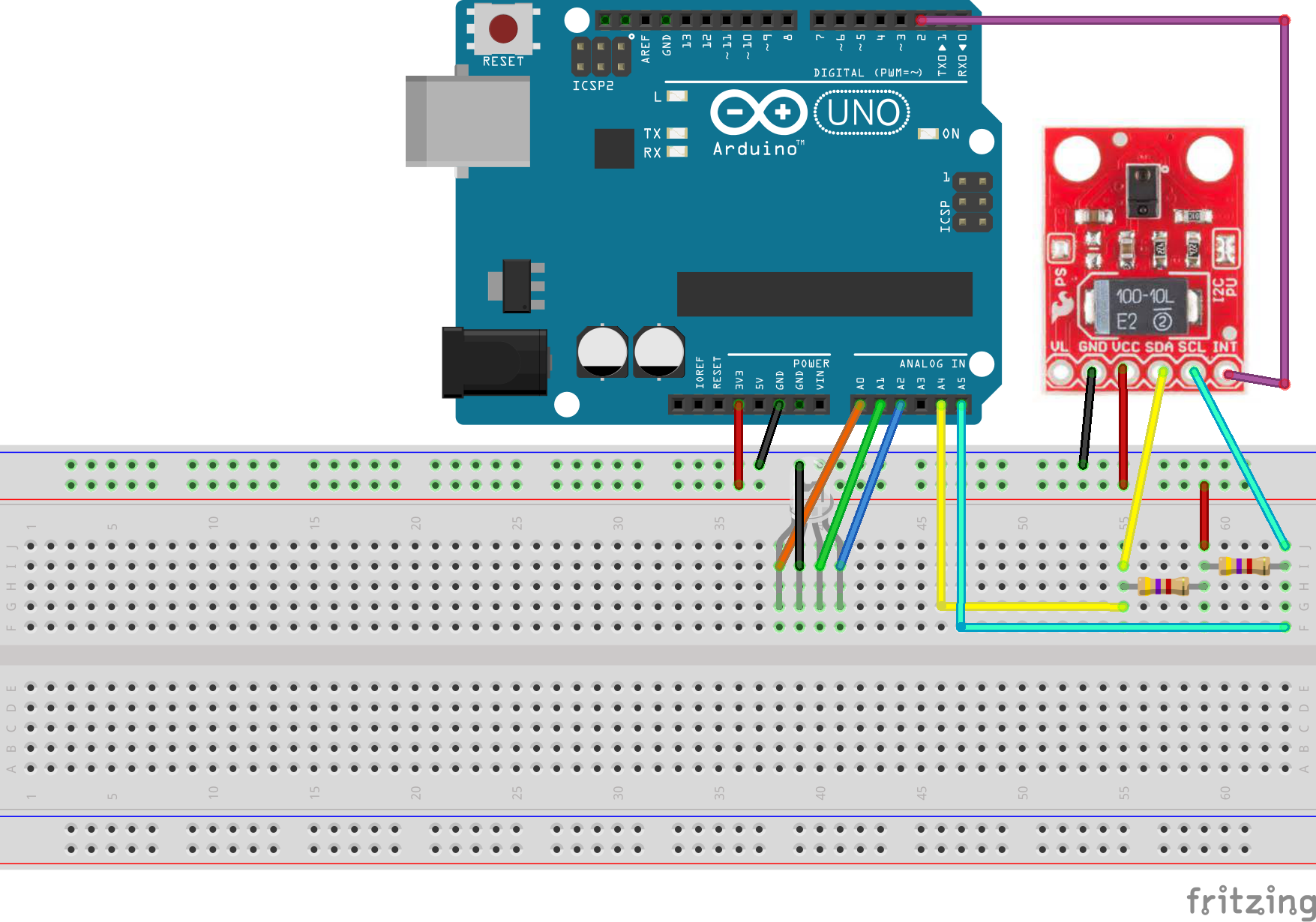
This project will enable you to harness the power of your motions to control an RGB LED. You will need the Sparkfun APDS-9960 and a common CATHODE, not anode, RGB LED. Make sure to use a 5v Arduino board with the 4.7k Ohm resistors, as this sensor uses the I2C protocol. Then connect as so in the schematic. From there you can add custom colors in the code. I have put 6 already. The default controls are: swipe up to turn it on, swipe down to turn it off, swipe right to advance forward to the next color, and left to reverse. This code can be adapted to fit many other types of projects as well! Feel free to experiment and create more awesome projects. Happy making!
A picture of the product on a breadboard:
Code
Arduino Code
Arduino CodeC/C++
Copy and Paste
#include <Wire.h>
#include <SparkFun_APDS9960.h>

// Pins
#define APDS9960_INT    2 // Needs to be an interrupt pin

// Constants
int red_pin = A0;
int green_pin = A1;
int blue_pin = A2;

int onOff_flag = 0;

//Make the array to loop through
int colorNumber = 0;

// Global Variables
SparkFun_APDS9960 apds = SparkFun_APDS9960();
int isr_flag = 0;

void setup() {

  // Set interrupt pin as input
  pinMode(APDS9960_INT, INPUT);

  // Initialize Serial port
  Serial.begin(9600);
  Serial.println();
  Serial.println(F("--------------------------------"));
  Serial.println(F("SparkFun APDS-9960 - GestureTest"));
  Serial.println(F("--------------------------------"));

  // Initialize interrupt service routine
  attachInterrupt(0, interruptRoutine, FALLING);

  // Initialize APDS-9960 (configure I2C and initial values)
  if ( apds.init() ) {
    Serial.println(F("APDS-9960 initialization complete"));
  } else {
    Serial.println(F("Something went wrong during APDS-9960 init!"));
  }

  // Start running the APDS-9960 gesture sensor engine
  if ( apds.enableGestureSensor(true) ) {
    Serial.println(F("Gesture sensor is now running"));
  } else {
    Serial.println(F("Something went wrong during gesture sensor init!"));
  }
  pinMode(A0, OUTPUT);
  pinMode(A1, OUTPUT);
  pinMode(A2, OUTPUT);
  analogWrite(A0, 0);
  analogWrite(A1, 0);
  analogWrite(A2, 0);
}

void loop() {
  if( isr_flag == 1 ) {
    detachInterrupt(0);
    handleGesture();
    isr_flag = 0;
    attachInterrupt(0, interruptRoutine, FALLING);
  }
  if (onOff_flag == 1){
  switch (colorNumber){
    case 0:
    Serial.println("red");
      analogWrite(red_pin, 255);
      analogWrite(green_pin, 0);
      analogWrite(blue_pin, 0);
      break;
    case 1:
    Serial.println("baby blue");
      analogWrite(red_pin, 255);
      analogWrite(green_pin, 153);
      analogWrite(blue_pin, 204);
      break;
    case 2:
    Serial.println("dark blue");
      analogWrite(red_pin, 100);
      analogWrite(green_pin, 0);
      analogWrite(blue_pin, 170);
      break;
    case 3:
    Serial.println("green");
      analogWrite(red_pin, 0);
      analogWrite(green_pin, 255);
      analogWrite(blue_pin, 0);
      break;
    case 4:
    Serial.println("blue");
      analogWrite(red_pin, 0);
      analogWrite(green_pin, 0);
      analogWrite(blue_pin, 255);
      break;
    case 5:
    Serial.println("violet");
      analogWrite(red_pin, 191);
      analogWrite(green_pin, 0);
      analogWrite(blue_pin, 255);
      break;
  }
}
else if(onOff_flag == 0){
  analogWrite(red_pin, 0);
  analogWrite(green_pin, 0);
  analogWrite(blue_pin, 0);
}
delay(1000);
}

void interruptRoutine() {
  isr_flag = 1;
}

void handleGesture() {
    if ( apds.isGestureAvailable() ) {
    switch ( apds.readGesture() ) {
      case DIR_UP:
        Serial.println("UP");
        onOff_flag = 1;
        break;
      case DIR_DOWN:
        Serial.println("DOWN");
        onOff_flag = 0;
        break;
      case DIR_LEFT:
        Serial.println("LEFT");
        if(onOff_flag == 1){
          if(colorNumber>0){
            colorNumber -= 1;
            Serial.println(colorNumber);
        }
        else if(colorNumber < 1){
          colorNumber = 5;
          Serial.println(colorNumber);
        }
        }
        break;
      case DIR_RIGHT:
        Serial.println("RIGHT");
        if(onOff_flag == 1){
          if(colorNumber < 5){
            colorNumber += 1;
            Serial.println(colorNumber);
          }
          else if(colorNumber > 4){
            colorNumber = 0;
            Serial.println(colorNumber);
          }
        }
        break;
      case DIR_NEAR:
        Serial.println("NEAR");
        break;
      case DIR_FAR:
        Serial.println("FAR");
        break;
      default:
        Serial.println("NONE");
    }
  }
}