



Master C++ String Functions: strcpy, strcat, strlen, strcmp – Practical Examples
What Is a String?
A string is simply a sequence of characters. In modern C++ we usually work with objects of the std::string class, which handles memory allocation, resizing, and a host of useful member functions automatically. This eliminates the need for manual buffer management and reduces the risk of buffer overflows.
For educational purposes, C++ still supports the traditional C‑style null‑terminated character arrays. Both approaches have their place: use std::string for everyday programming, and reserve C‑style strings for legacy APIs or performance‑critical low‑level code.
Declaring Strings
- C‑style character string: a one‑dimensional array of
charterminated by a null character (\0). - std::string: a class from the C++ Standard Library that provides a rich interface for string manipulation.
C‑Style Character String
Example:
char name[5] = {'J', 'o', 'h', 'n', '\0'};
or more concisely:
char name[] = "John"; // compiler inserts the terminating '\0'
std::string
To use std::string, include the header and declare a variable:
#include <string>

std::string name = "John";
Accessing String Values
Below is a simple console program that prints a C‑style string and an std::string value.
#include <iostream>
#include <string>

using namespace std;

int main() {
    char cName[5] = "John";          // C‑style
    string cppName = "Guru99";       // std::string

    cout << "C‑style string: " << cName << endl;
    cout << "std::string: " << cppName << endl;

    return 0;
}
Output:

Key C String Functions
These functions are defined in the cstring header. They operate on C‑style strings (null‑terminated arrays of char).
strcpy()
Copies the source string into the destination buffer. The destination must be large enough to hold the source.
strcpy(dest, src); // dest must have enough space
strcat()
Appends the source string to the end of the destination string. Again, the destination buffer must be large enough to accommodate the result.
strcat(dest, src); // dest must have enough space
strlen()
Returns the number of characters in the string, excluding the terminating null byte.
size_t len = strlen(str);
strcmp()
Compares two strings lexicographically. Returns 0 if they are equal, a negative value if the first string is less, and a positive value if the first string is greater.
int cmp = strcmp(str1, str2);
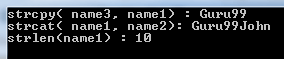
Practical Example
#include <iostream>
#include <cstring>

using namespace std;

int main() {
    char name1[10] = "Guru99";
    char name2[10] = "John";
    char name3[20]; // Ensure it can hold the concatenated result

    // Copy
    strcpy(name3, name1);
    cout << "strcpy(name3, name1): " << name3 << endl;

    // Concatenate
    strcat(name1, name2);
    cout << "strcat(name1, name2): " << name1 << endl;

    // Length
    size_t len = strlen(name1);
    cout << "strlen(name1): " << len << endl;

    // Comparison
    int cmp = strcmp(name1, name3);
    cout << "strcmp(name1, name3): " << cmp << endl;

    return 0;
}
Output:
Takeaway
- Use
std::stringfor most C++ code – it’s safer and easier. - When you must work with raw character arrays, the
cstringfunctions are essential. - Always ensure destination buffers are large enough to avoid overflows.
- Use
strlenonly when you need the length;std::string::size()is preferable forstd::stringobjects. - Prefer
strcmpfor legacy APIs;std::string::compare()or the overloadedoperator==give clearer semantics in modern C++.
C Language
- C Programming Strings: Mastering Declaration, Initialization, and I/O
- Master Python Strings: Creation, Formatting, and Manipulation
- Mastering Java Strings: Creation, Methods, and Best Practices
- C++ do‑while Loop: Syntax, Practical Examples, and Nested Loops
- Mastering C++ Pointers: Concepts, Examples & Practical Applications
- C++ Operator Overloading – A Practical Guide with Code Examples
- C Strings: How Null-Terminated Character Arrays Work
- Mastering C++ Strings: C-Style vs std::string
- Mastering Strings in C#: Best Practices & Tips
- Mastering Python Strings: Creation, Access, and Manipulation