



C# Methods Explained: Declaration, Calling, Parameters, Return Types & More
C# Methods Explained
Master the fundamentals of C# methods—how to declare them, invoke them, handle parameters, return values, and leverage built‑in functionality—with clear examples.
A method is a reusable block of code that performs a specific task. For instance, if you’re building a drawing program that needs to create and color a circle, you could split the work into two distinct methods: one to draw the circle and another to color it. This modular approach improves readability, testability, and reusability.
Declaring a Method in C#
The basic syntax for defining a method in C# is:
returnType methodName() {
  // method body
}
Components:
- returnType – Specifies the data type returned by the method. If no value is returned, use
void. - methodName – An identifier used to reference the method.
- method body – The statements that execute when the method runs, enclosed in braces.
Example:
void display() {
  // code
}
Here, display() is the method name and void indicates it does not return a value.
Calling a Method in C#
Once declared, you invoke a method by its name followed by parentheses. For the display() example:
// call the method
display();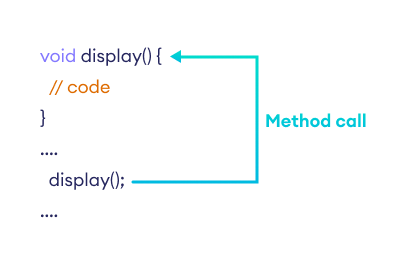
Practical Example: Using a Method
using System;

namespace MethodDemo {
  class Program {
    // Method declaration
    public void Display() {
      Console.WriteLine("Hello World");
    }

    static void Main(string[] args) {
      // Create an instance of Program
      Program p1 = new Program();

      // Invoke the Display method
      p1.Display();

      Console.ReadLine();
    }
  }
}
Output
Hello World
This demonstrates creating an object p1 of the Program class and calling its Display() method.
Method Return Types
Methods can return data or be void. When a return value is required, the return statement sends the value back to the caller, and the method’s return type must match the value’s type.
int AddNumbers() {
  int sum = 5 + 14;
  return sum;
}
Example: Returning an Integer
using System;

namespace MethodDemo {
  class Program {
    // Static method with return type
    static int AddNumbers() {
      int sum = 5 + 14;
      return sum;
    }

    static void Main(string[] args) {
      int sum = AddNumbers();
      Console.WriteLine(sum);
      Console.ReadLine();
    }
  }
}
Output
19
Note that static methods belong to the class itself, so no instance is required to call them.
Methods with Parameters
Parameters allow methods to accept input values. They are declared in the method signature and passed during invocation.
int AddNumber(int a, int b) {
  return a + b;
}
Calling the method with arguments:
AddNumber(100, 100);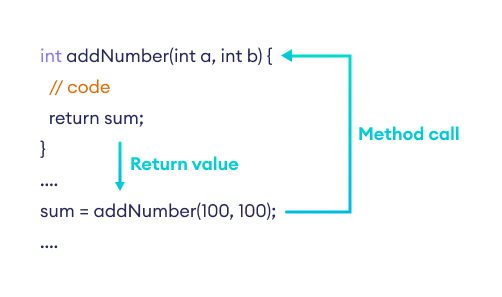
Example 1: Adding Two Numbers
using System;

namespace MethodDemo {
  class Program {
    int AddNumber(int a, int b) {
      return a + b;
    }

    static void Main(string[] args) {
      Program p1 = new Program();
      int sum = p1.AddNumber(100, 100);
      Console.WriteLine("Sum: " + sum);
      Console.ReadLine();
    }
  }
}
Output
Sum: 200
Example 2: Single Parameter Method
using System;

namespace MethodDemo {
  class Program {
    string Work(string task) {
      return task;
    }

    static void Main(string[] args) {
      Program p1 = new Program();
      string result = p1.Work("Cleaning");
      Console.WriteLine("Work: " + result);
      Console.ReadLine();
    }
  }
}
Output
Work: Cleaning
Built‑In Methods
Beyond user‑defined methods, C# offers a rich library of built‑in methods. For example:
Math.Sqrt()– Calculates the square root.string.ToUpper()– Converts a string to uppercase.
Example: Using Math.Sqrt
using System;

namespace MethodDemo {
  class Program {
    static void Main(string[] args) {
      double result = Math.Sqrt(9);
      Console.WriteLine("Square root of 9: " + result);
    }
  }
}
Output
Square root of 9: 3
Here, Math.Sqrt is part of the System.Math class in .NET, documented by Microsoft.
Learn more about C# built‑in methods.
Method Overloading
C# allows multiple methods with the same name, provided their parameter lists differ. This is called method overloading.
using System;

namespace MethodOverloadDemo {
  class Program {
    // One-parameter overload
    void Display(int a) {
      Console.WriteLine("Arguments: " + a);
    }

    // Two-parameter overload
    void Display(int a, int b) {
      Console.WriteLine("Arguments: " + a + " and " + b);
    }

    static void Main(string[] args) {
      Program p1 = new Program();
      p1.Display(100);
      p1.Display(100, 200);
      Console.ReadLine();
    }
  }
}
Output
Arguments: 100
Arguments: 100 and 200
Overloading enhances readability and flexibility. For deeper insights, see C# Method Overloading.
C Language
- Branch Current Method: A Step‑by‑Step Guide to Solving Circuit Networks
- Mastering the Node Voltage Method for Precise Circuit Analysis
- Mastering C# Abstract Classes & Methods: A Practical Guide
- Understanding C# Partial Classes and Methods
- Master sealed classes and methods in C#—learn when to use them, see clear examples, and boost code safety and performance.
- Mastering Method Overloading in C#: Concepts, Examples, and Best Practices
- Java Methods: How to Define, Call, and Use Them Effectively
- Mastering Java Polymorphism: Concepts, Examples, and Best Practices
- C# Methods: Defining, Calling, and Using Functions
- EPA Method 21: Comprehensive Leak Detection & Repair Protocol