



Java 9: Generate HTML5 JavaDocs with the Javadoc Tool
Java documentation can be generated using javadoc tool. It currently generates documentation in html 4.0 format. In java 9, we can generate documentation in html 5 format by using -html5 option in command line arguments.
Old style java documentation
Consider the following code in C:/JAVA folder.
Tester.java
Live Demo
/**
  * @author MahKumar
  * @version 0.1
*/
public class Tester {
   /**
      * Default method to be run to print
      * <p>Hello world</p>
      * @param args command line arguments
   */
   public static void main(String []args) {
      System.out.println("Hello World");
   }
}
Now run the javadoc tool of jdk 7 to generate documentation.
C:\JAVA>javadoc -d C:/JAVA Tester.java
Loading source file tester.java...
Constructing Javadoc information...
Standard Doclet version 1.7.0_21
Building tree for all the packages and classes...
Generating C:\JAVA\Tester.html...
Generating C:\JAVA\package-frame.html...
Generating C:\JAVA\package-summary.html...
Generating C:\JAVA\package-tree.html...
Generating C:\JAVA\constant-values.html...
Building index for all the packages and classes...
Generating C:\JAVA\overview-tree.html...
Generating C:\JAVA\index-all.html...
Generating C:\JAVA\deprecated-list.html...
Building index for all classes...
Generating C:\JAVA\allclasses-frame.html...
Generating C:\JAVA\allclasses-noframe.html...
Generating C:\JAVA\index.html...
Generating C:\JAVA\help-doc.html...
It will create the java documentation page in C:/JAVA directory and you will see the following output.
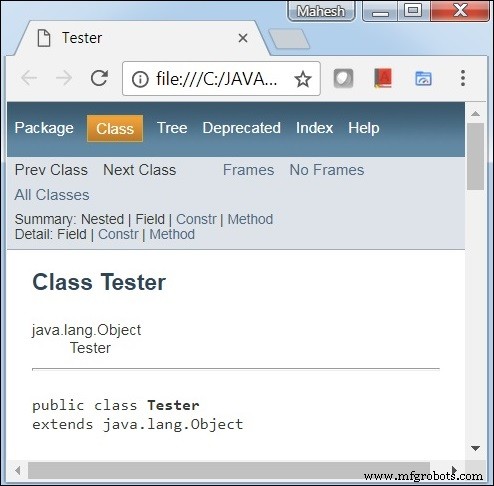
New java documentation with Search and HTML5 support
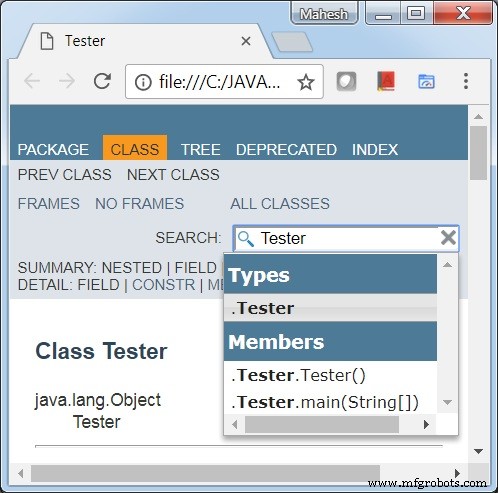
Run the javadoc tool of jdk 9 with -html5 flag to generate new type of documentation.
C:\JAVA> javadoc -d C:/JAVA -html5 Tester.java
Loading source file Tester.java...
Constructing Javadoc information...
Standard Doclet version 9.0.1
Building tree for all the packages and classes...
Generating C:\JAVA\Tester.html...
Generating C:\JAVA\package-frame.html...
Generating C:\JAVA\package-summary.html...
Generating C:\JAVA\package-tree.html...
Generating C:\JAVA\constant-values.html...
Building index for all the packages and classes...
Generating C:\JAVA\overview-tree.html...
Generating C:\JAVA\index-all.html...
Generating C:\JAVA\deprecated-list.html...
Building index for all classes...
Generating C:\JAVA\allclasses-frame.html...
Generating C:\JAVA\allclasses-frame.html...
Generating C:\JAVA\allclasses-noframe.html...
Generating C:\JAVA\allclasses-noframe.html...
Generating C:\JAVA\index.html...
Generating C:\JAVA\help-doc.html...
It will create the updated java documentation page in D:/test directory and you will see the following output.
Java 9 REPL (JShell): Interactive Coding & Testing Made Simple
Java 9 Multirelease JAR: Harnessing Platform-Specific Class Versions
Java
- Master Java Operators: Types, Syntax, & Practical Examples
- Java Comments: Types, Usage, and Best Practices
- Mastering Java if…else: Control Flow Explained
- Mastering the Java Enhanced For Loop: Syntax, Examples, and Best Practices
- Java Break Statement: How, When, and Labeled Breaks Explained
- Mastering Java's super Keyword: Advanced Usage & Practical Examples
- Mastering Java Interfaces: Concepts, Implementation, and Best Practices
- Mastering Java Try‑with‑Resources: Automatic Resource Management Explained
- Java Annotations Explained: Types, Placement, and Practical Examples
- Java 9: Generate HTML5 JavaDocs with the Javadoc Tool