



Java PriorityQueue: Fundamentals, Operations, and Custom Sorting
Java PriorityQueue
Explore the PriorityQueue class in Java’s collections framework through clear examples and best‑practice guidance.
The PriorityQueue class implements the heap data structure and satisfies the Queue interface, offering efficient retrieval of elements based on priority rather than insertion order.
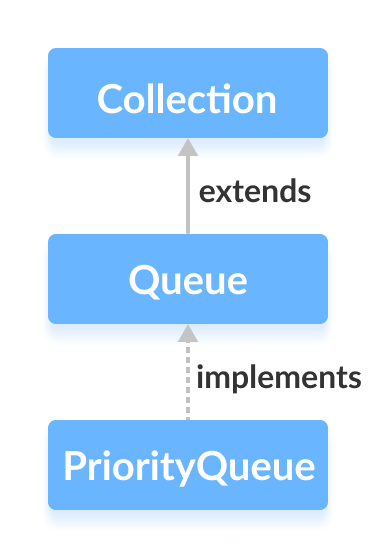
Unlike standard queues, elements are returned in sorted order. If you need ascending order, the head of the queue is the smallest element; each subsequent removal yields the next smallest value. Note that the internal ordering is not guaranteed—only the extraction order is sorted.
Creating a PriorityQueue
Begin by importing java.util.PriorityQueue:
import java.util.PriorityQueue;
PriorityQueue<Integer> numbers = new PriorityQueue<>();
This default configuration uses natural ordering (ascending). You can customize the order by supplying a Comparator when constructing the queue.
Key Methods of PriorityQueue
All methods defined in the Queue interface are available, plus a few queue‑specific operations.
Inserting Elements
add()– Adds an element; throws an exception if the queue is full.offer()– Adds an element; returnsfalseif the queue is full.
Example:
import java.util.PriorityQueue;

class Main {
    public static void main(String[] args) {
        PriorityQueue<Integer> numbers = new PriorityQueue<>();
        numbers.add(4);
        numbers.add(2);
        System.out.println("PriorityQueue: " + numbers);
        numbers.offer(1);
        System.out.println("Updated PriorityQueue: " + numbers);
    }
}
Output
PriorityQueue: [2, 4]
Updated PriorityQueue: [1, 4, 2]
Even though 4 was added before 2, the head remains 2 because it is the smallest element. Adding 1 reorders the queue so that 1 becomes the head.
Accessing Elements
Use peek() to view the head without removing it:
import java.util.PriorityQueue;

class Main {
    public static void main(String[] args) {
        PriorityQueue<Integer> numbers = new PriorityQueue<>();
        numbers.add(4);
        numbers.add(2);
        numbers.add(1);
        System.out.println("PriorityQueue: " + numbers);
        int number = numbers.peek();
        System.out.println("Accessed Element: " + number);
    }
}
Output
PriorityQueue: [1, 4, 2]
Accessed Element: 1
Removing Elements
remove()– Deletes a specified element, returningtrueif successful.poll()– Retrieves and removes the head of the queue.
Example:
import java.util.PriorityQueue;

class Main {
    public static void main(String[] args) {
        PriorityQueue<Integer> numbers = new PriorityQueue<>();
        numbers.add(4);
        numbers.add(2);
        numbers.add(1);
        System.out.println("PriorityQueue: " + numbers);
        boolean result = numbers.remove(2);
        System.out.println("Is the element 2 removed? " + result);
        int number = numbers.poll();
        System.out.println("Removed Element Using poll(): " + number);
    }
}
Output
PriorityQueue: [1, 4, 2]
Is the element 2 removed? true
Removed Element Using poll(): 1
Iterating Over a PriorityQueue
Iterate with iterator() (requires java.util.Iterator):
import java.util.PriorityQueue;
import java.util.Iterator;

class Main {
    public static void main(String[] args) {
        PriorityQueue<Integer> numbers = new PriorityQueue<>();
        numbers.add(4);
        numbers.add(2);
        numbers.add(1);
        System.out.print("PriorityQueue using iterator(): ");
        Iterator<Integer> iterate = numbers.iterator();
        while (iterate.hasNext()) {
            System.out.print(iterate.next());
            System.out.print(", ");
        }
    }
}
Output
PriorityQueue using iterator(): 1, 4, 2,
Additional Methods
| Method | Description |
|---|---|
contains(element) | Returns true if the element exists in the queue. |
size() | Returns the number of elements in the queue. |
toArray() | Converts the queue to an array. |
Custom Sorting with Comparator
To reverse natural order or implement any custom priority, supply a Comparator when creating the queue:
import java.util.PriorityQueue;
import java.util.Comparator;

class Main {
    public static void main(String[] args) {
        PriorityQueue<Integer> numbers = new PriorityQueue<>(new CustomComparator());
        numbers.add(4);
        numbers.add(2);
        numbers.add(1);
        numbers.add(3);
        System.out.print("PriorityQueue: " + numbers);
    }
}

class CustomComparator implements Comparator<Integer> {
    @Override
    public int compare(Integer a, Integer b) {
        return b.compareTo(a); // reverse order
    }
}
Output
PriorityQueue: [4, 3, 1, 2]
The custom comparator ensures the head is the largest element. For deeper insights, refer to the Java Comparator API.
Java
- Master Java Operators: Types, Syntax, & Practical Examples
- Java Comments: Types, Usage, and Best Practices
- Mastering Java's super Keyword: Advanced Usage & Practical Examples
- Mastering Java Interfaces: Concepts, Implementation, and Best Practices
- Mastering Java Try‑with‑Resources: Automatic Resource Management Explained
- Java Annotations Explained: Types, Placement, and Practical Examples
- Mastering Java’s Queue Interface: Methods, Implementations, and Practical Use
- Java BlockingQueue: Thread‑Safe Queues with Blocking Operations
- Java ArrayBlockingQueue: Advanced Guide to Blocking Queues and Thread‑Safe Operations
- Mastering Java's LinkedBlockingQueue: Comprehensive Guide & Examples