



Mastering Java's LinkedBlockingQueue: Comprehensive Guide & Examples
Java LinkedBlockingQueue
Explore the LinkedBlockingQueue class, its core methods, and real‑world examples to unlock thread‑safe queueing in Java.
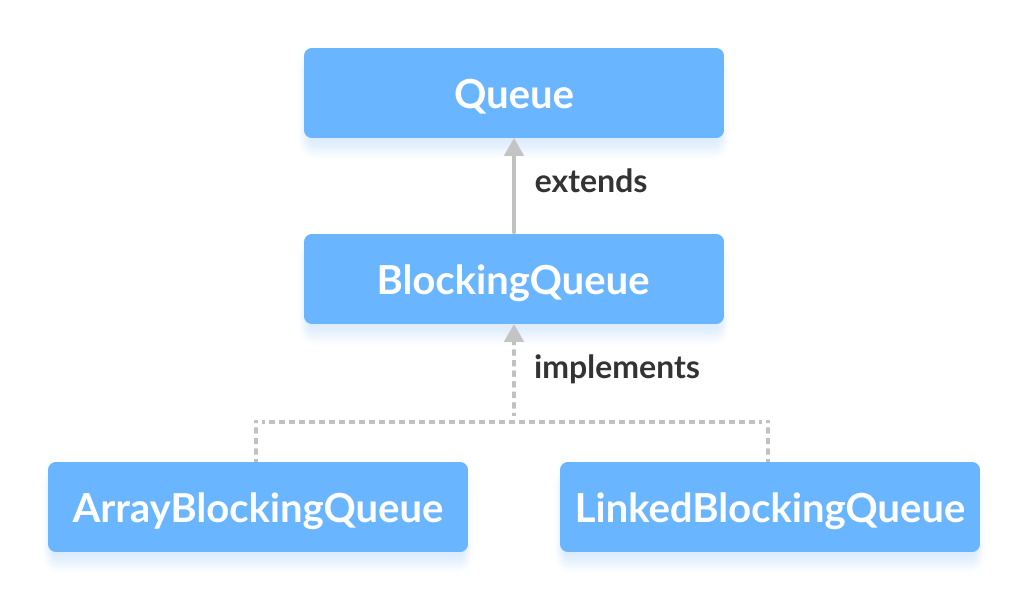
The LinkedBlockingQueue class, part of Java’s java.util.concurrent package, implements a blocking queue backed by a linked list. It conforms to the BlockingQueue interface, providing a robust, thread‑safe structure for concurrent producer‑consumer scenarios.
Creating a LinkedBlockingQueue
To use this queue, import java.util.concurrent.LinkedBlockingQueue:
import java.util.concurrent.LinkedBlockingQueue;1. Without an initial capacity
LinkedBlockingQueue<Type> queue = new LinkedBlockingQueue<>();The default capacity is Integer.MAX_VALUE (231–1), making the queue effectively unbounded.
2. With a specified capacity
LinkedBlockingQueue<Type> queue = new LinkedBlockingQueue<>(int capacity);Type– the element type (e.g.,String,Integer)capacity– maximum number of elements the queue can hold
Example:
// String queue with capacity 5
LinkedBlockingQueue<String> animals = new LinkedBlockingQueue<>(5);

// Integer queue with capacity 5
LinkedBlockingQueue<Integer> ages = new LinkedBlockingQueue<>(5);
Note: Capacity is optional; omitting it creates an unbounded queue.
Key Methods of LinkedBlockingQueue
The class implements all BlockingQueue methods, enabling insertion, retrieval, and removal of elements. Two methods—put() and take()—provide blocking behavior that distinguishes this queue from standard ones.
Insert Elements
add(E e)– Adds an element, throwing an exception if the queue is full.offer(E e)– Adds an element, returningfalseif the queue is full.
Example:
import java.util.concurrent.LinkedBlockingQueue;

public class Main {
    public static void main(String[] args) {
        LinkedBlockingQueue<String> animals = new LinkedBlockingQueue<>(5);

        animals.add("Dog");
        animals.add("Cat");
        animals.offer("Horse");
        System.out.println("LinkedBlockingQueue: " + animals);
    }
}
Output
LinkedBlockingQueue: [Dog, Cat, Horse]
Access Elements
peek()– Retrieves, but does not remove, the head element; returnsnullif empty.iterator()– Provides a fail‑safe iterator over the queue. Importjava.util.Iteratorto use it.
Example:
import java.util.concurrent.LinkedBlockingQueue;
import java.util.Iterator;

public class Main {
    public static void main(String[] args) {
        LinkedBlockingQueue<String> animals = new LinkedBlockingQueue<>(5);
        animals.add("Dog");
        animals.add("Cat");
        animals.add("Horse");
        System.out.println("LinkedBlockingQueue: " + animals);

        String head = animals.peek();
        System.out.println("Accessed Element: " + head);

        Iterator<String> it = animals.iterator();
        System.out.print("LinkedBlockingQueue Elements: ");
        while (it.hasNext()) {
            System.out.print(it.next() + ", ");
        }
    }
}
Output
LinkedBlockingQueue: [Dog, Cat, Horse]
Accessed Element: Dog
LinkedBlockingQueue Elements: Dog, Cat, Horse,
Remove Elements
remove()– Removes and returns the head; throws an exception if empty.poll()– Removes and returns the head; returnsnullif empty.clear()– Eliminates all elements.
Example:
import java.util.concurrent.LinkedBlockingQueue;

public class Main {
    public static void main(String[] args) {
        LinkedBlockingQueue<String> animals = new LinkedBlockingQueue<>(5);
        animals.add("Dog");
        animals.add("Cat");
        animals.add("Horse");
        System.out.println("LinkedBlockingQueue: " + animals);

        String removed = animals.remove();
        System.out.println("Using remove(): " + removed);

        String polled = animals.poll();
        System.out.println("Using poll(): " + polled);

        animals.clear();
        System.out.println("Updated LinkedBlockingQueue: " + animals);
    }
}
Output
LinkedBlockingQueue: [Dog, Cat, Horse]
Using remove(): Dog
Using poll(): Cat
Updated LinkedBlockingQueue: []
Blocking Operations: put() & take()
In concurrent contexts, put() and take() block the calling thread until the operation can proceed, ensuring safe coordination between producers and consumers.
put()
Inserts an element at the tail, waiting if the queue is full.
Example:
import java.util.concurrent.LinkedBlockingQueue;

public class Main {
    public static void main(String[] args) {
        LinkedBlockingQueue<String> animals = new LinkedBlockingQueue<>(5);
        try {
            animals.put("Dog");
            animals.put("Cat");
            System.out.println("LinkedBlockingQueue: " + animals);
        } catch (InterruptedException e) {
            Thread.currentThread().interrupt();
            System.err.println(e.getMessage());
        }
    }
}
Output
LinkedBlockingQueue: [Dog, Cat]
take()
Retrieves and removes the head element, blocking if the queue is empty.
Example:
import java.util.concurrent.LinkedBlockingQueue;

public class Main {
    public static void main(String[] args) {
        LinkedBlockingQueue<String> animals = new LinkedBlockingQueue<>(5);
        try {
            animals.put("Dog");
            animals.put("Cat");
            System.out.println("LinkedBlockingQueue: " + animals);

            String removed = animals.take();
            System.out.println("Removed Element: " + removed);
            System.out.println("New LinkedBlockingQueue: " + animals);
        } catch (InterruptedException e) {
            Thread.currentThread().interrupt();
            System.err.println(e.getMessage());
        }
    }
}
Output
LinkedBlockingQueue: [Dog, Cat]
Removed Element: Dog
New LinkedBlockingQueue: [Cat]
Additional Utility Methods
| Method | Description |
|---|---|
contains(Object o) | Checks if the queue holds the specified element. |
size() | Returns the current number of elements. |
toArray() | Converts the queue to an array. |
toString() | Provides a string representation of the queue. |
Why Choose LinkedBlockingQueue?
Because it uses a linked list internally, LinkedBlockingQueue offers:
- Thread‑safety out of the box.
- Optional bounded capacity for back‑pressure control.
- Blocking methods that naturally coordinate producers and consumers.
In multithreaded applications where one thread may produce slower than another consumes, the queue will automatically suspend the consumer until new items arrive, preventing busy‑waiting and reducing CPU overhead.
For high‑performance concurrent workloads, the Java concurrency API recommends LinkedBlockingQueue as a go‑to structure for producer‑consumer pipelines.
---
Java
- Master Java Operators: Types, Syntax, & Practical Examples
- Java Comments: Types, Usage, and Best Practices
- Mastering Java's super Keyword: Advanced Usage & Practical Examples
- Mastering Java Interfaces: Concepts, Implementation, and Best Practices
- Mastering Java Try‑with‑Resources: Automatic Resource Management Explained
- Java Annotations Explained: Types, Placement, and Practical Examples
- Mastering Java’s Queue Interface: Methods, Implementations, and Practical Use
- Java PriorityQueue: Fundamentals, Operations, and Custom Sorting
- Java BlockingQueue: Thread‑Safe Queues with Blocking Operations
- Java ArrayBlockingQueue: Advanced Guide to Blocking Queues and Thread‑Safe Operations