



Java ArrayBlockingQueue: Advanced Guide to Blocking Queues and Thread‑Safe Operations
Java ArrayBlockingQueue
Explore the Java ArrayBlockingQueue – learn how to create, manipulate, and thread‑safely use this fixed‑size blocking queue with clear examples.
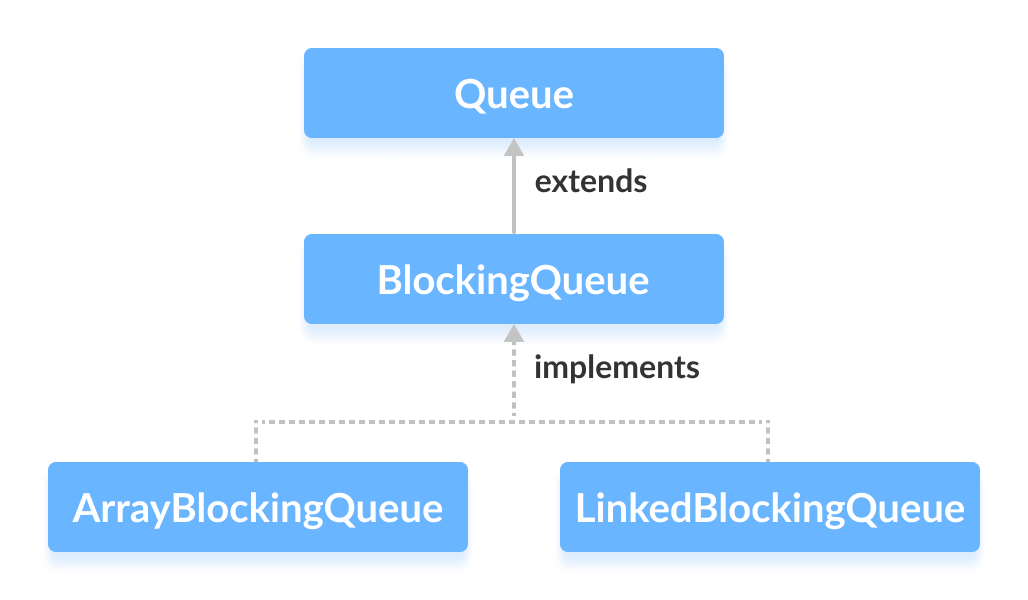
The ArrayBlockingQueue class in the Java Collections Framework provides a bounded, thread‑safe queue backed by an array. It implements the BlockingQueue interface, allowing producers and consumers to coordinate via blocking operations.
Creating an ArrayBlockingQueue
Import java.util.concurrent.ArrayBlockingQueue and instantiate with a fixed capacity:
ArrayBlockingQueue<Type> queue = new ArrayBlockingQueue<>(capacity);Where Type is the element type and capacity is the maximum size.
- Example – String queue of size 5:
ArrayBlockingQueue<String> animals = new ArrayBlockingQueue<>(5); - Example – Integer queue of size 5:
ArrayBlockingQueue<Integer> ages = new ArrayBlockingQueue<>(5);
Note: Capacity is mandatory; it determines the queue’s bounded size.
Core Methods of ArrayBlockingQueue
The class implements all methods from BlockingQueue for inserting, accessing, and removing elements. Below are the most frequently used operations.
Insert Elements
add(E e)– Adds the element; throwsIllegalStateExceptionif full.offer(E e)– Adds the element; returnsfalseif full.
ArrayBlockingQueue<String> animals = new ArrayBlockingQueue<>(5);
animals.add("Dog");
animals.offer("Cat");
animals.offer("Horse");
System.out.println("ArrayBlockingQueue: " + animals);
Output: ArrayBlockingQueue: [Dog, Cat, Horse]
Access Elements
peek()– Retrieves the head without removal; returnsnullif empty.iterator()– Provides a fail‑fast iterator over the queue.
String head = animals.peek();
System.out.println("Head element: " + head);
Iterator<String> it = animals.iterator();
while (it.hasNext()) {
    System.out.print(it.next() + ", ");
}
Output: Head element: Dog followed by the list of elements.
Remove Elements
remove()– Removes and returns the head; throwsNoSuchElementExceptionif empty.poll()– Removes and returns the head; returnsnullif empty.clear()– Empties the queue.
String removed1 = animals.remove();
String removed2 = animals.poll();
animals.clear();
System.out.println("Updated queue: " + animals);
Output: Updated queue: []
Blocking Operations: put() and take()
These methods are essential for producer‑consumer patterns. They block until the operation can be performed, ensuring thread coordination.
put()
Inserts an element, waiting if the queue is full. It may throw InterruptedException.
try {
    animals.put("Dog");
    animals.put("Cat");
} catch (InterruptedException e) {
    Thread.currentThread().interrupt();
}
take()
Removes and returns the head, waiting if the queue is empty. It may throw InterruptedException.
try {
    String element = animals.take();
    System.out.println("Removed: " + element);
} catch (InterruptedException e) {
    Thread.currentThread().interrupt();
}
Additional Convenience Methods
| Method | Description |
|---|---|
contains(Object o) | Returns true if the queue contains the specified element. |
size() | Returns the current number of elements. |
toArray() | Converts the queue to an array. |
toString() | String representation of the queue. |
Why Use ArrayBlockingQueue?
Because it offers:
- Thread safety: Built‑in synchronization for concurrent access.
- Fixed size: Prevents uncontrolled memory growth.
- Blocking semantics: Simplifies producer‑consumer coordination.
When one thread produces slower than the consumer, the consumer blocks automatically, avoiding busy‑waiting and ensuring efficient CPU usage.
Java
- Master Java Operators: Types, Syntax, & Practical Examples
- Java Comments: Types, Usage, and Best Practices
- Mastering Java's super Keyword: Advanced Usage & Practical Examples
- Mastering Java Interfaces: Concepts, Implementation, and Best Practices
- Mastering Java Try‑with‑Resources: Automatic Resource Management Explained
- Java Annotations Explained: Types, Placement, and Practical Examples
- Mastering Java’s Queue Interface: Methods, Implementations, and Practical Use
- Java PriorityQueue: Fundamentals, Operations, and Custom Sorting
- Java BlockingQueue: Thread‑Safe Queues with Blocking Operations
- Mastering Java's LinkedBlockingQueue: Comprehensive Guide & Examples