



Mastering Java EnumMap: Efficient Key-Value Mapping with Enums
Java EnumMap
In this tutorial, we will learn about the Java EnumMap class and its operations with the help of examples.
The EnumMap class of the Java collections framework provides a map implementation for elements of an enum.
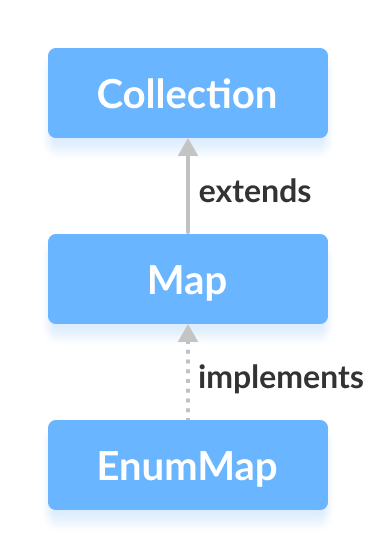
In EnumMap, enum elements are used as keys. It implements the Map interface.
Before we learn about EnumMap, make sure to know about the Java Enums.
Creating an EnumMap
In order to create an enum map, we must import the java.util.EnumMap package first. Once we import the package, here is how we can create enum maps in Java.
enum Size {
    SMALL, MEDIUM, LARGE, EXTRALARGE
}

EnumMap<Size, Integer> sizes = new EnumMap<>(Size.class);
In the above example, we have created an enum map named sizes.
Here,
- Size - keys of the enum that map to values
- Integer - values of the enum map associated with the corresponding keys
Methods of EnumMap
The EnumMap class provides methods that allow us to perform various elements on the enum maps.
Insert Elements to EnumMap
put()- inserts the specified key/value mapping (entry) to the enum mapputAll()- inserts all the entries of a specified map to this map
For example,
import java.util.EnumMap;

class Main {

    enum Size {
        SMALL, MEDIUM, LARGE, EXTRALARGE
    }
    public static void main(String[] args) {

        // Creating an EnumMap of the Size enum
        EnumMap<Size, Integer> sizes1 = new EnumMap<>(Size.class);

        // Using the put() Method
        sizes1.put(Size.SMALL, 28);
        sizes1.put(Size.MEDIUM, 32);
        System.out.println("EnumMap1: " + sizes1);

        EnumMap<Size, Integer> sizes2 = new EnumMap<>(Size.class);

        // Using the putAll() Method
        sizes2.putAll(sizes1);
        sizes2.put(Size.LARGE, 36);
        System.out.println("EnumMap2: " + sizes2);
    }
}
Output
EnumMap1: {SMALL=28, MEDIUM=32}
EnumMap2: {SMALL=28, MEDIUM=32, LARGE=36}
In the above example, we have used the putAll() method to insert all the elements of an enum map sizes1 to an enum map of sizes2.
It is also possible to insert elements from other maps such as HashMap, TreeMap, etc. to an enum map using putAll(). However, all maps should be of the same enum type.
Access EnumMap Elements
1. Using entrySet(), keySet() and values()
entrySet()- returns a set of all the keys/values mapping (entry) of an enum mapkeySet()- returns a set of all the keys of an enum mapvalues()- returns a set of all the values of an enum map
For example,
import java.util.EnumMap;

class Main {

    enum Size {
        SMALL, MEDIUM, LARGE, EXTRALARGE
    }
    public static void main(String[] args) {

        // Creating an EnumMap of the Size enum
        EnumMap<Size, Integer> sizes = new EnumMap<>(Size.class);
        sizes.put(Size.SMALL, 28);
        sizes.put(Size.MEDIUM, 32);
        sizes.put(Size.LARGE, 36);
        sizes.put(Size.EXTRALARGE, 40);
        System.out.println("EnumMap: " + sizes);

        // Using the entrySet() Method
        System.out.println("Key/Value mappings: " + sizes.entrySet());

        // Using the keySet() Method
        System.out.println("Keys: " + sizes.keySet());

        // Using the values() Method
        System.out.println("Values: " + sizes.values());
    }
}
Output
EnumMap: {SMALL=28, MEDIUM=32, LARGE=36, EXTRALARGE=40}
Key/Value mappings: [SMALL=28, MEDIUM=32, LARGE=36, EXTRALARGE=40]
Keys: [SMALL, MEDIUM, LARGE, EXTRALARGE]
Values: [28, 32, 36, 40]
2. Using the get() Method
The get() method returns the value associated with the specified key. It returns null if the specified key is not found.
For example,
import java.util.EnumMap;

class Main {

    enum Size {
        SMALL, MEDIUM, LARGE, EXTRALARGE
    }
    public static void main(String[] args) {

        // Creating an EnumMap of the Size enum
        EnumMap<Size, Integer> sizes = new EnumMap<>(Size.class);
        sizes.put(Size.SMALL, 28);
        sizes.put(Size.MEDIUM, 32);
        sizes.put(Size.LARGE, 36);
        sizes.put(Size.EXTRALARGE, 40);
        System.out.println("EnumMap: " + sizes);

        // Using the get() Method
        int value = sizes.get(Size.MEDIUM);
        System.out.println("Value of MEDIUM: " + value);
    }
}
Output
EnumMap: {SMALL=28, MEDIUM=32, LARGE=36, EXTRALARGE=40}
Value of MEDIUM: 32
Remove EnumMap Elements
remove(key)- returns and removes the entry associated with the specified key from the mapremove(key, value)- removes the entry from the map only if the specified key mapped to the specified value and return a boolean value
For example,
import java.util.EnumMap;

class Main {

    enum Size {
        SMALL, MEDIUM, LARGE, EXTRALARGE
    }
    public static void main(String[] args) {

        // Creating an EnumMap of the Size enum
        EnumMap<Size, Integer> sizes = new EnumMap<>(Size.class);
        sizes.put(Size.SMALL, 28);
        sizes.put(Size.MEDIUM, 32);
        sizes.put(Size.LARGE, 36);
        sizes.put(Size.EXTRALARGE, 40);
        System.out.println("EnumMap: " + sizes);

        // Using the remove() Method
        int value = sizes.remove(Size.MEDIUM);
        System.out.println("Removed Value: " + value);

        boolean result = sizes.remove(Size.SMALL, 28);
        System.out.println("Is the entry {SMALL=28} removed? " + result);

        System.out.println("Updated EnumMap: " + sizes);
    }
}
Output
EnumMap: {SMALL=28, MEDIUM=32, LARGE=36, EXTRALARGE=40}
Removed Value: 32
Is the entry {SMALL=28} removed? True
Updated EnumMap: {LARGE=36, EXTRALARGE=40}
Replace EnumMap Elements
replace(key, value)- replaces the value associated with the specified key by the new valuereplace(key, old, new)- replaces the old value with the new value only if the old value is already associated with the specified keyreplaceAll(function)- replaces each value of the map with the result of the specified function
import java.util.EnumMap;

class Main {

    enum Size {
        SMALL, MEDIUM, LARGE, EXTRALARGE
    }
    public static void main(String[] args) {

        // Creating an EnumMap of the Size enum
        EnumMap<Size, Integer> sizes = new EnumMap<>(Size.class);
        sizes.put(Size.SMALL, 28);
        sizes.put(Size.MEDIUM, 32);
        sizes.put(Size.LARGE, 36);
        sizes.put(Size.EXTRALARGE, 40);
        System.out.println("EnumMap: " + sizes);

        // Using the replace() Method
        sizes.replace(Size.MEDIUM, 30);
        sizes.replace(Size.LARGE, 36, 34);
        System.out.println("EnumMap using replace(): " + sizes);

        // Using the replaceAll() Method
        sizes.replaceAll((key, oldValue) -> oldValue + 3);
        System.out.println("EnumMap using replaceAll(): " + sizes);
    }
}
Output
EnumMap: {SMALL=28, MEDIUM=32, LARGE=36, EXTRALARGE=40}
EnumMap using replace(): {SMALL=28, MEDIUM=30, LARGE=34, EXTRALARGE=40}
EnumMap using replaceAll(): {SMALL=31, MEDIUM=33, LARGE=37, EXTRALARGE=43}
In the above program, notice the statement
sizes.replaceAll((key, oldValue) -> oldValue + 3);
Here, the method accesses all the entries of the map. It then replaces all the values with the new values provided by the lambda expressions.
Other Methods
| Method | Description |
|---|---|
clone() |
Creates a copy of the EnumMap |
containsKey() |
Searches the EnumMap for the specified key and returns a boolean result |
containsValue() |
Searches the EnumMap for the specified value and returns a boolean result |
size() |
Returns the size of the EnumMap |
clear() |
Removes all the entries from the EnumMap |
EnumSet Vs. EnumMap
Both the EnumSet and EnumMap class provides data structures to store enum values. However, there exist some major differences between them.
- Enum set is represented internally as a sequence of bits, whereas the enum map is represented internally as arrays.
- Enum set is created using its predefined methods like
allOf(),noneOf(),of(), etc. However, an enum map is created using its constructor.
Clonable and Serializable Interfaces
The EnumMap class also implements Cloneable and Serializable interfaces.
Cloneable Interface
It allows the EnumMap class to make a copy of instances of the class.
Serializable Interface
Whenever Java objects need to be transmitted over a network, objects need to be converted into bits or bytes. This is because Java objects cannot be transmitted over the network.
The Serializable interface allows classes to be serialized. This means objects of the classes implementing Serializable can be converted into bits or bytes.
Java
- Mastering C Enums: Definition, Declaration, and Flag Operations
- Master Java Operators: Types, Syntax, & Practical Examples
- Mastering Java's super Keyword: Advanced Usage & Practical Examples
- Mastering Java Interfaces: Concepts, Implementation, and Best Practices
- Master Java Enums: A Complete Guide to Enums & Enum Classes
- Java Enum Constructors Explained with Practical Example
- Mastering String Representations in Java Enums
- Mastering Java Try‑with‑Resources: Automatic Resource Management Explained
- Java Annotations Explained: Types, Placement, and Practical Examples
- Mastering Java EnumMap: Efficient Key-Value Mapping with Enums