



Java WeakHashMap – Understanding, Usage, and Key Differences
Java WeakHashMap
A comprehensive guide to Java’s WeakHashMap, covering its creation, key differences from HashMap, practical examples, and essential methods.
The WeakHashMap class is part of the Java Collections Framework and implements the Map interface. It behaves like a normal hash table but stores keys as weak references, allowing them to be reclaimed by the garbage collector when no longer in use.
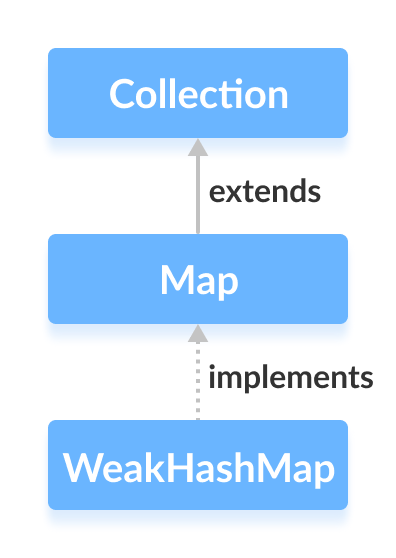
Note: Keys in a WeakHashMap are wrapped in WeakReference objects.
A weak reference can be garbage‑collected if the program no longer holds a strong reference to the key object.
Creating a WeakHashMap
First, import java.util.WeakHashMap:
import java.util.WeakHashMap;
Then instantiate it, optionally specifying an initial capacity and load factor:
// WeakHashMap with a capacity of 8 and a load factor of 0.6
WeakHashMap<Key, Value> numbers = new WeakHashMap<>(8, 0.6);
Parameters:
- capacity – the number of entries the map can hold before resizing. Default is 16.
- loadFactor – the threshold at which the map expands. Default is 0.75.
When no parameters are supplied, the default values apply:
WeakHashMap<Key, Value> numbers = new WeakHashMap<>();
HashMap vs. WeakHashMap
While both implement Map, the key distinction lies in reference strength:
- HashMap – keys are strong references; entries persist until explicitly removed.
- WeakHashMap – keys are weak references; entries disappear when the key is no longer reachable.
Example demonstrating the behavior:
import java.util.WeakHashMap;

class Main {
    public static void main(String[] args) {
        WeakHashMap<String, Integer> numbers = new WeakHashMap<>();
        String two = new String("Two");
        Integer twoValue = 2;
        String four = new String("Four");
        Integer fourValue = 4;

        numbers.put(two, twoValue);
        numbers.put(four, fourValue);
        System.out.println("WeakHashMap: " + numbers);

        // Nullify the reference to the key
        two = null;
        System.gc();
        System.out.println("WeakHashMap after GC: " + numbers);
    }
}
Output:
WeakHashMap: {Four=4, Two=2}
WeakHashMap after GC: {Four=4}
The entry for “Two” disappears because its key is no longer strongly reachable. In contrast, a HashMap would retain the entry:
import java.util.HashMap;

class Main {
    public static void main(String[] args) {
        HashMap<String, Integer> numbers = new HashMap<>();
        String two = new String("Two");
        Integer twoValue = 2;
        String four = new String("Four");
        Integer fourValue = 4;

        numbers.put(two, twoValue);
        numbers.put(four, fourValue);
        System.out.println("HashMap: " + numbers);

        two = null;
        System.gc();
        System.out.println("HashMap after GC: " + numbers);
    }
}
Output:
HashMap: {Four=4, Two=2}
HashMap after GC: {Four=4, Two=2}
Thus, WeakHashMap is ideal when you want the map to automatically release memory tied to unused keys.
Converting from Another Map
Instantiate a WeakHashMap from an existing map to copy its entries:
import java.util.HashMap;
import java.util.WeakHashMap;

class Main {
    public static void main(String[] args) {
        HashMap<String, Integer> evenNumbers = new HashMap<>();
        String two = new String("Two");
        evenNumbers.put(two, 2);
        System.out.println("HashMap: " + evenNumbers);

        WeakHashMap<String, Integer> numbers = new WeakHashMap<>(evenNumbers);
        System.out.println("WeakHashMap: " + numbers);
    }
}
Output:
HashMap: {Two=2}
WeakHashMap: {Two=2}
Key Methods of WeakHashMap
Below is a selection of the most frequently used operations.
Inserting Entries
put(key, value)– adds a mapping.putAll(map)– merges another map.putIfAbsent(key, value)– inserts only if the key is absent.
Example:
import java.util.WeakHashMap;

class Main {
    public static void main(String[] args) {
        WeakHashMap<String, Integer> evenNumbers = new WeakHashMap<>();
        evenNumbers.put(new String("Two"), 2);
        evenNumbers.putIfAbsent(new String("Four"), 4);
        System.out.println("Even numbers: " + evenNumbers);

        WeakHashMap<String, Integer> numbers = new WeakHashMap<>();
        numbers.put(new String("One"), 1);
        numbers.putAll(evenNumbers);
        System.out.println("All numbers: " + numbers);
    }
}
Output:
Even numbers: {Four=4, Two=2}
All numbers: {Two=2, Four=4, One=1}
Accessing Entries
Retrieve data via:
get(key)– returns the value ornullif absent.getOrDefault(key, default)– returns a default when the key is missing.entrySet(),keySet(),values()– iterate over entries, keys, or values.
Example:
import java.util.WeakHashMap;

class Main {
    public static void main(String[] args) {
        WeakHashMap<String, Integer> numbers = new WeakHashMap<>();
        numbers.put(new String("One"), 1);
        numbers.put(new String("Two"), 2);
        System.out.println("Map: " + numbers);
        System.out.println("Entry set: " + numbers.entrySet());
        System.out.println("Keys: " + numbers.keySet());
        System.out.println("Values: " + numbers.values());
        System.out.println("Get Two: " + numbers.get("Two"));
        System.out.println("GetOrDefault Four: " + numbers.getOrDefault("Four", 4));
    }
}
Output:
Map: {Two=2, One=1}
Entry set: [Two=2, One=1]
Keys: [Two, One]
Values: [1, 2]
Get Two: 2
GetOrDefault Four: 4
Removing Entries
remove(key)– removes and returns the value.remove(key, value)– removes only if the current mapping matches the provided value.clear()– empties the map.containsKey(key),containsValue(value),size(),isEmpty()
Example:
import java.util.WeakHashMap;

class Main {
    public static void main(String[] args) {
        WeakHashMap<String, Integer> numbers = new WeakHashMap<>();
        numbers.put(new String("One"), 1);
        numbers.put(new String("Two"), 2);
        System.out.println("Map: " + numbers);

        int removed = numbers.remove("Two");
        System.out.println("Removed value: " + removed);

        boolean removedIf = numbers.remove("One", 3);
        System.out.println("Removed {One=3}? " + removedIf);

        System.out.println("After removal: " + numbers);
    }
}
Output:
Map: {Two=2, One=1}
Removed value: 2
Removed {One=3}? false
After removal: {One=1}
Additional Utilities
| Method | Description |
|---|---|
clear() | Deletes all entries. |
containsKey(key) | Checks if the key exists. |
containsValue(value) | Checks if a value is present. |
size() | Returns the number of entries. |
isEmpty() | Returns true if the map has no entries. |
For a deeper dive, refer to the official Java WeakHashMap documentation.
Java
- Master Java Operators: Types, Syntax, & Practical Examples
- Java Comments: Types, Usage, and Best Practices
- Mastering Java if…else: Control Flow Explained
- Mastering Java's super Keyword: Advanced Usage & Practical Examples
- Mastering Java Interfaces: Concepts, Implementation, and Best Practices
- Mastering Java Try‑with‑Resources: Automatic Resource Management Explained
- Java Annotations Explained: Types, Placement, and Practical Examples
- Mastering Java HashMap: Operations, Examples, and Best Practices
- Java WeakHashMap – Understanding, Usage, and Key Differences
- Java HashMap: A Comprehensive Guide