



Mastering Java HashMap: Operations, Examples, and Best Practices
Mastering Java HashMap
Explore the Java HashMap class—its core features, common operations, and practical examples—so you can confidently use it in real‑world applications.
The HashMap class, part of Java’s collections framework, implements a hash table that stores data in key/value pairs. Each key is unique and acts as an identifier for its associated value. The class implements the Map interface, providing a versatile API for manipulating data.
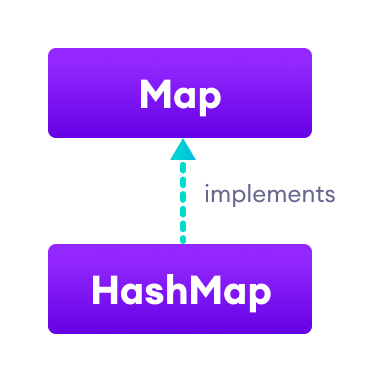
Creating a HashMap
Begin by importing the java.util.HashMap package:
import java.util.HashMap;Then instantiate the map. You can specify a generic key type K and value type V, or rely on type inference:
HashMap<K, V> numbers = new HashMap<>();Example with concrete types:
HashMap<String, Integer> numbers = new HashMap<>();Example 1: Basic HashMap Creation
import java.util.HashMap;

class Main {
  public static void main(String[] args) {
    HashMap<String, Integer> languages = new HashMap<>();
    languages.put("Java", 8);
    languages.put("JavaScript", 1);
    languages.put("Python", 3);
    System.out.println("HashMap: " + languages);
  }
}
Output
HashMap: {Java=8, JavaScript=1, Python=3}
Core Operations on HashMap
The HashMap class offers a rich set of methods. Below we cover the most frequently used ones:
- Add elements
- Access elements
- Update elements
- Remove elements
1. Adding Elements
Use put() to insert a key/value pair. If the key already exists, the value is replaced.
import java.util.HashMap;

class Main {
  public static void main(String[] args) {
    HashMap<String, Integer> numbers = new HashMap<>();
    System.out.println("Initial HashMap: " + numbers);
    numbers.put("One", 1);
    numbers.put("Two", 2);
    numbers.put("Three", 3);
    System.out.println("HashMap after put(): " + numbers);
  }
}
Output
Initial HashMap: {}
HashMap after put(): {One=1, Two=2, Three=3}
Key: String, Value: Integer in this example.
2. Accessing Elements
Retrieve a value with get(key). The method returns null if the key is absent.
import java.util.HashMap;

class Main {
  public static void main(String[] args) {
    HashMap<Integer, String> languages = new HashMap<>();
    languages.put(1, "Java");
    languages.put(2, "Python");
    languages.put(3, "JavaScript");
    System.out.println("HashMap: " + languages);
    String value = languages.get(1);
    System.out.println("Value at key 1: " + value);
  }
}
Output
HashMap: {1=Java, 2=Python, 3=JavaScript}
Value at key 1: Java
You can also obtain the complete key set, value collection, or entry set via keySet(), values(), and entrySet():
import java.util.HashMap;

class Main {
  public static void main(String[] args) {
    HashMap<Integer, String> languages = new HashMap<>();
    languages.put(1, "Java");
    languages.put(2, "Python");
    languages.put(3, "JavaScript");
    System.out.println("HashMap: " + languages);
    System.out.println("Keys: " + languages.keySet());
    System.out.println("Values: " + languages.values());
    System.out.println("Entries: " + languages.entrySet());
  }
}
Output
HashMap: {1=Java, 2=Python, 3=JavaScript}
Keys: [1, 2, 3]
Values: [Java, Python, JavaScript]
Entries: [1=Java, 2=Python, 3=JavaScript]
3. Updating Values
The replace(key, newValue) method swaps the existing value for the given key. It returns the old value or null if the key was absent.
import java.util.HashMap;

class Main {
  public static void main(String[] args) {
    HashMap<Integer, String> languages = new HashMap<>();
    languages.put(1, "Java");
    languages.put(2, "Python");
    languages.put(3, "JavaScript");
    System.out.println("Original HashMap: " + languages);
    languages.replace(2, "C++");
    System.out.println("After replace(): " + languages);
  }
}
Output
Original HashMap: {1=Java, 2=Python, 3=JavaScript}
After replace(): {1=Java, 2=C++, 3=JavaScript}
4. Removing Elements
Delete a mapping with remove(key), which returns the removed value. For conditional removal, use remove(key, value), which only removes if the current mapping matches the specified value.
import java.util.HashMap;

class Main {
  public static void main(String[] args) {
    HashMap<Integer, String> languages = new HashMap<>();
    languages.put(1, "Java");
    languages.put(2, "Python");
    languages.put(3, "JavaScript");
    System.out.println("HashMap: " + languages);
    String removed = languages.remove(2);
    System.out.println("Removed value: " + removed);
    System.out.println("Updated HashMap: " + languages);
  }
}
Output
HashMap: {1=Java, 2=Python, 3=JavaScript}
Removed value: Python
Updated HashMap: {1=Java, 3=JavaScript}
Additional HashMap Methods
| Method | Description |
|---|---|
| clear() | Removes all mappings |
| compute() | Computes a new value for a key |
| computeIfAbsent() | Computes a value only if the key is missing |
| computeIfPresent() | Computes a value only if the key exists |
| merge() | Merges a new mapping with an existing one |
| clone() | Creates a shallow copy |
| containsKey() | Checks for a specific key |
| containsValue() | Checks for a specific value |
| size() | Number of key/value pairs |
| isEmpty() | Whether the map is empty |
Iterating Through a HashMap
Use a for‑each loop to traverse keys, values, or entries. Import java.util.Map.Entry for entry iteration.
import java.util.HashMap;
import java.util.Map.Entry;

class Main {
  public static void main(String[] args) {
    HashMap<Integer, String> languages = new HashMap<>();
    languages.put(1, "Java");
    languages.put(2, "Python");
    languages.put(3, "JavaScript");
    System.out.println("HashMap: " + languages);

    System.out.print("Keys: ");
    for (Integer key : languages.keySet()) {
      System.out.print(key + ", ");
    }

    System.out.print("\nValues: ");
    for (String value : languages.values()) {
      System.out.print(value + ", ");
    }

    System.out.print("\nEntries: ");
    for (Entry<Integer, String> entry : languages.entrySet()) {
      System.out.print(entry + ", ");
    }
  }
}
Output
HashMap: {1=Java, 2=Python, 3=JavaScript}
Keys: 1, 2, 3,
Values: Java, Python, JavaScript,
Entries: 1=Java, 2=Python, 3=JavaScript,
Creating a HashMap from Another Map
Instantiate a HashMap with an existing map’s contents:
import java.util.HashMap;
import java.util.TreeMap;

class Main {
  public static void main(String[] args) {
    TreeMap<String, Integer> evenNumbers = new TreeMap<>();
    evenNumbers.put("Two", 2);
    evenNumbers.put("Four", 4);
    System.out.println("TreeMap: " + evenNumbers);

    HashMap<String, Integer> numbers = new HashMap<>(evenNumbers);
    numbers.put("Three", 3);
    System.out.println("HashMap: " + numbers);
  }
}
Output
TreeMap: {Four=4, Two=2}
HashMap: {Two=2, Three=3, Four=4}
Optional constructor parameters allow you to set the initial capacity and load factor:
HashMap<K, V> numbers = new HashMap<>(8, 0.6f);- Capacity: 8 entries before rehashing.
- Load factor: 0.6 triggers a resize when 60% full.
Defaults are capacity = 16 and load factor = 0.75.
For deeper dives, consult the official Java documentation or authoritative resources like "Effective Java" by Joshua Bloch.
Java
- Master Java Operators: Types, Syntax, & Practical Examples
- Java Comments: Types, Usage, and Best Practices
- Mastering Java if…else: Control Flow Explained
- Mastering Java's super Keyword: Advanced Usage & Practical Examples
- Mastering Java Interfaces: Concepts, Implementation, and Best Practices
- Mastering Java Try‑with‑Resources: Automatic Resource Management Explained
- Java Annotations Explained: Types, Placement, and Practical Examples
- Mastering Java HashMap: Operations, Examples, and Best Practices
- Java WeakHashMap – Understanding, Usage, and Key Differences
- Java HashMap: A Comprehensive Guide