



Java EnumSet: Creation, Operations, and Performance Tips
Java EnumSet
This guide walks you through creating, manipulating, and optimizing Java EnumSet collections with hands‑on code examples and best‑practice insights.
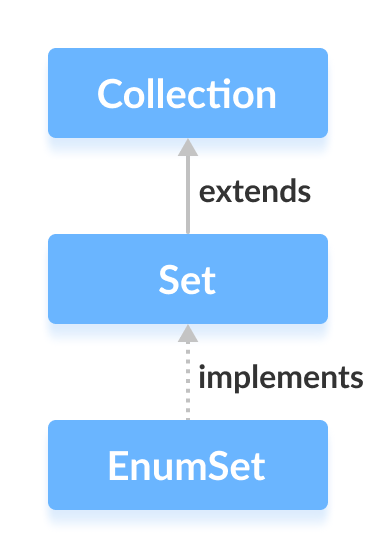
The EnumSet class is a high‑performance set implementation designed exclusively for enum types. It implements the java.util.Set interface and also inherits Cloneable and Serializable, making it both versatile and efficient.
Before diving into EnumSet, make sure you’re comfortable with Java enums, as the set is tightly coupled to a single enum type.
Creating an EnumSet
Unlike other set implementations, EnumSet does not expose public constructors. Instead, you use its static factory methods to build a set.
1. Using EnumSet.allOf()
The allOf() method creates a set that contains every constant of the specified enum type.
import java.util.EnumSet;

class Main {
    enum Size { SMALL, MEDIUM, LARGE, EXTRALARGE }

    public static void main(String[] args) {
        EnumSet<Size> sizes = EnumSet.allOf(Size.class);
        System.out.println("EnumSet: " + sizes);
    }
}
Output
EnumSet: [SMALL, MEDIUM, LARGE, EXTRALARGE]
2. Using EnumSet.noneOf()
Creates an empty set that can only contain values of the specified enum type.
import java.util.EnumSet;

class Main {
    enum Size { SMALL, MEDIUM, LARGE, EXTRALARGE }

    public static void main(String[] args) {
        EnumSet<Size> sizes = EnumSet.noneOf(Size.class);
        System.out.println("Empty EnumSet: " + sizes);
    }
}
Output
Empty EnumSet: []
Note: The resulting set accepts only Size constants because it was instantiated with Size.class.
3. Using EnumSet.range()
Builds a set containing all enum constants from a lower bound to an upper bound, inclusive.
import java.util.EnumSet;

class Main {
    enum Size { SMALL, MEDIUM, LARGE, EXTRALARGE }

    public static void main(String[] args) {
        EnumSet<Size> sizes = EnumSet.range(Size.MEDIUM, Size.EXTRALARGE);
        System.out.println("EnumSet: " + sizes);
    }
}
Output
EnumSet: [MEDIUM, LARGE, EXTRALARGE]
4. Using EnumSet.of()
Creates a set containing one or more specific enum constants.
import java.util.EnumSet;

class Main {
    enum Size { SMALL, MEDIUM, LARGE, EXTRALARGE }

    public static void main(String[] args) {
        EnumSet<Size> sizes1 = EnumSet.of(Size.MEDIUM);
        System.out.println("EnumSet1: " + sizes1);
        EnumSet<Size> sizes2 = EnumSet.of(Size.SMALL, Size.LARGE);
        System.out.println("EnumSet2: " + sizes2);
    }
}
Output
EnumSet1: [MEDIUM]
EnumSet2: [SMALL, LARGE]
Common Operations on EnumSet
Adding Elements
add()– inserts a single enum constant.addAll()– merges another collection of the same enum type.
import java.util.EnumSet;

class Main {
    enum Size { SMALL, MEDIUM, LARGE, EXTRALARGE }

    public static void main(String[] args) {
        EnumSet<Size> all = EnumSet.allOf(Size.class);
        EnumSet<Size> selected = EnumSet.noneOf(Size.class);
        selected.add(Size.MEDIUM);
        System.out.println("After add(): " + selected);
        selected.addAll(all);
        System.out.println("After addAll(): " + selected);
    }
}
Output
After add(): [MEDIUM]
After addAll(): [SMALL, MEDIUM, LARGE, EXTRALARGE]
Note that addAll() accepts any Collection<Size>, including lists or sets, as long as they contain the same enum type.
Iterating Elements
Use an Iterator to traverse the set:
import java.util.EnumSet;
import java.util.Iterator;

class Main {
    enum Size { SMALL, MEDIUM, LARGE, EXTRALARGE }

    public static void main(String[] args) {
        EnumSet<Size> sizes = EnumSet.allOf(Size.class);
        Iterator<Size> it = sizes.iterator();
        System.out.print("EnumSet: ");
        while (it.hasNext()) {
            System.out.print(it.next() + ", ");
        }
    }
}
Output
EnumSet: SMALL, MEDIUM, LARGE, EXTRALARGE,
Removing Elements
remove()– deletes a specific constant.removeAll()– clears the set when passed itself.
import java.util.EnumSet;

class Main {
    enum Size { SMALL, MEDIUM, LARGE, EXTRALARGE }

    public static void main(String[] args) {
        EnumSet<Size> sizes = EnumSet.allOf(Size.class);
        System.out.println("EnumSet: " + sizes);
        boolean removed = sizes.remove(Size.MEDIUM);
        System.out.println("Is MEDIUM removed? " + removed);
        boolean cleared = sizes.removeAll(sizes);
        System.out.println("Are all elements removed? " + cleared);
    }
}
Output
EnumSet: [SMALL, MEDIUM, LARGE, EXTRALARGE]
Is MEDIUM removed? true
Are all elements removed? true
Additional Helper Methods
| Method | Description |
|---|---|
copyOf() | Creates a new EnumSet containing the same elements. |
contains() | Checks whether a specific constant is present. |
isEmpty() | Returns true if the set has no elements. |
size() | Returns the number of elements. |
clear() | Removes all elements. |
Cloneable and Serializable
EnumSet implements Cloneable, enabling you to create a shallow copy via clone(). It also implements Serializable, allowing safe transmission over networks or persistence to disk.
Why Use EnumSet?
Because EnumSet stores its values as a bit vector, operations such as add, remove, and contains execute in constant time with minimal memory overhead. The JVM already knows the exact set of possible constants for a given enum, which makes EnumSet far more efficient than generic implementations like HashSet or TreeSet.
In practice, choose EnumSet whenever you need a high‑performance set of enum values.
Java
- Master Java Operators: Types, Syntax, & Practical Examples
- Java Comments: Types, Usage, and Best Practices
- Mastering Java if…else: Control Flow Explained
- Mastering Java's super Keyword: Advanced Usage & Practical Examples
- Mastering Java Interfaces: Concepts, Implementation, and Best Practices
- Master Java Enums: A Complete Guide to Enums & Enum Classes
- Java Enum Constructors Explained with Practical Example
- Mastering Java Try‑with‑Resources: Automatic Resource Management Explained
- Java Annotations Explained: Types, Placement, and Practical Examples
- Java EnumSet: Creation, Operations, and Performance Tips