



Automating Facebook Login with Python and Selenium: A Step‑by‑Step Guide
Automating a Facebook login with Python is a practical way to test web flows, scrape public data, or integrate with internal tools. This tutorial uses Selenium WebDriver to control a browser, navigate to Facebook, and submit credentials securely.
Prerequisites
- Python 3.8+ installed on your machine. Download here.
- Install the Selenium package:
pip install selenium. - Download the appropriate browser driver (e.g., geckodriver for Firefox or ChromeDriver for Chrome). Ensure the driver is on your system PATH.
Step‑by‑Step Implementation
- Launch the browser – Create a WebDriver instance. In this example we use Firefox:
browser = webdriver.Firefox() - Navigate to Facebook – Open the login page:
browser.get("https://www.facebook.com") - Locate form elements – Find the email, password, and login button by their HTML IDs:
username = browser.find_element_by_id("email") password = browser.find_element_by_id("pass") submit = browser.find_element_by_id("loginbutton") - Enter credentials – Replace the placeholder text with your own credentials (or read from a secure vault in production):
username.send_keys("you@email.com") password.send_keys("yourpassword") - Submit the form – Click the login button:
submit.click()
The code above will log you into Facebook. Remember to handle exceptions and close the browser after use:
browser.quit()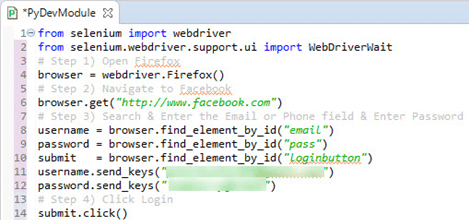
Explanation of Key Lines
webdriver.Firefox()– Initializes a new Firefox session.browser.get(url)– Navigates to the specified URL and waits until the page fully loads.find_element_by_id(id)– Retrieves a page element by its ID attribute.send_keys()– Types the supplied string into the selected input field.click()– Simulates a mouse click on the targeted element.
Sample Output
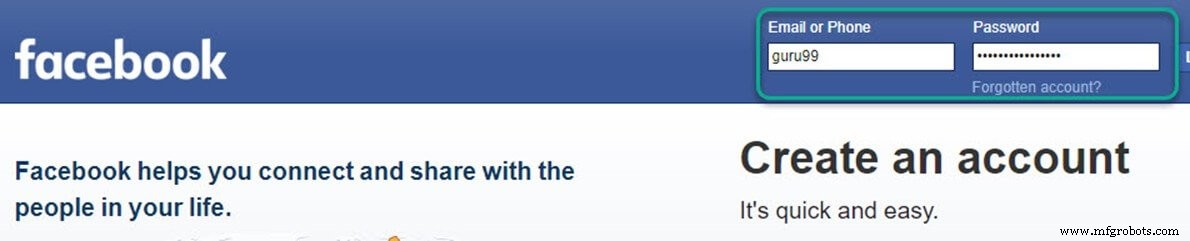
The script will print the user’s Facebook feed upon successful login (see images below).

FAQ
Q: What alternatives exist to Selenium for automating Facebook login with Python?
A: The official Facebook Graph API allows programmatic authentication for approved applications, but it is intended for API access rather than UI login. For UI automation, alternatives such as Playwright or Robot Framework can be used, though Selenium remains the most widely adopted library for Python.
Q: Is it safe to store credentials in a script?
A: No. In production, credentials should be stored securely (e.g., environment variables, AWS Secrets Manager, or a vault) and accessed at runtime. Hard‑coding credentials is discouraged.
Python
- Mastering Python’s strip() Method: Comprehensive Guide & Practical Examples
- Python len(): A Practical Guide to Measuring Object Lengths
- Python Queue: Understanding FIFO & LIFO with Practical Examples
- Python Counter in collections – Efficient Counting, Updating, and Arithmetic Operations
- How to Rename Files and Directories in Python with os.rename() – Step-by-Step Guide
- Creating ZIP Archives in Python: From Full Directory to Custom File Selection
- Calculating Averages in Python: A Practical Guide
- Python List index() – How to Find Element Positions with Practical Examples
- Python Calendar Module: Expert Guide with Code Examples
- Convert Strings to Title Case with Python – Fast & Reliable