



Python Calendar Module: Expert Guide with Code Examples
Python’s built‑in calendar module offers powerful tools for working with dates, months, and years. By leveraging classes like TextCalendar and HTMLCalendar, developers can create printable or web‑friendly calendars, iterate through days, and even compute custom scheduling rules.
Below is a step‑by‑step walkthrough of the most common use cases, complete with ready‑to‑run code snippets for both Python 2 and Python 3.
Step 1 – Generate a Text Calendar
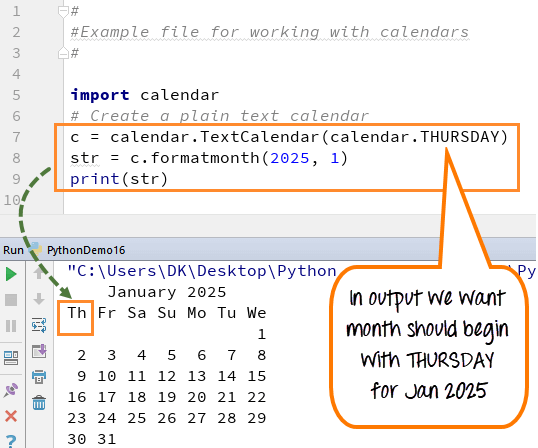
Run the following script to see a plain‑text calendar for January 2025, starting the week on Thursday:
- Line 1:
import calendarloads the module. - Line 3:
c = calendar.TextCalendar(calendar.THURSDAY)creates a calendar object whose weeks start on Thursday. - Line 4:
txt = c.formatmonth(2025, 1)formats the month of January 2025. - Line 5:
print(txt)outputs the calendar.
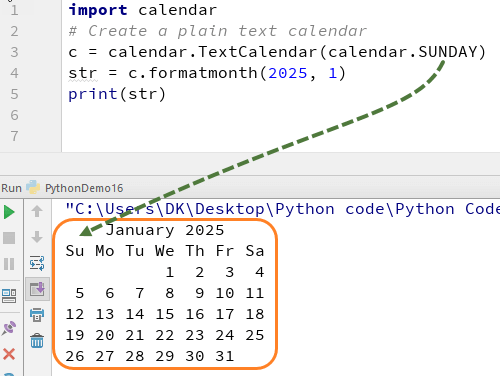
Change the start day to Sunday to verify the flexibility:
Step 2 – Render an HTML Calendar
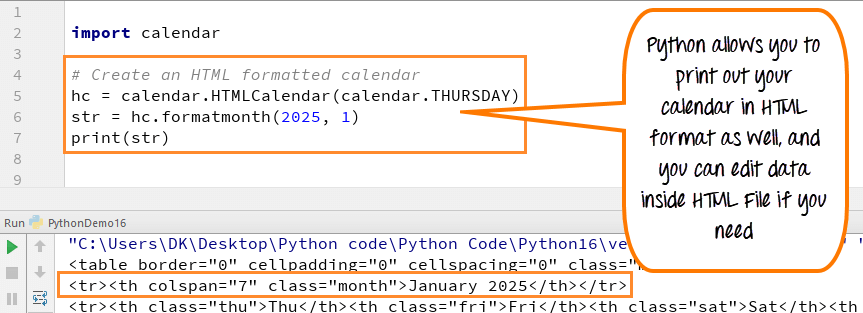
For web applications, HTMLCalendar can generate a full HTML table that can be styled with CSS:
Step 3 – Iterate Over Days of a Month
The itermonthdays method yields all days in the month, including padding zeros for days that belong to adjacent months. This is useful for aligning calendars:
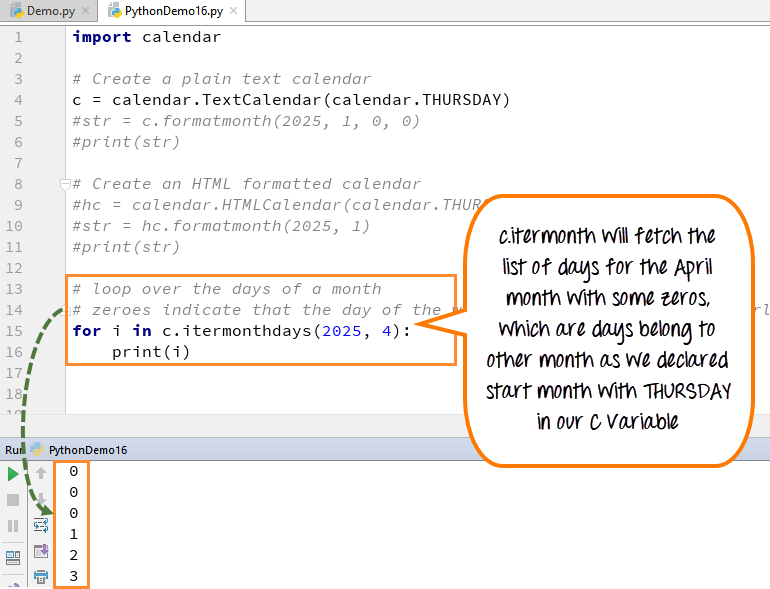
- Zeros indicate slots that fall outside the target month.
- They help determine which week the month starts and ends on.
Step 4 – Retrieve Locale‑Aware Names
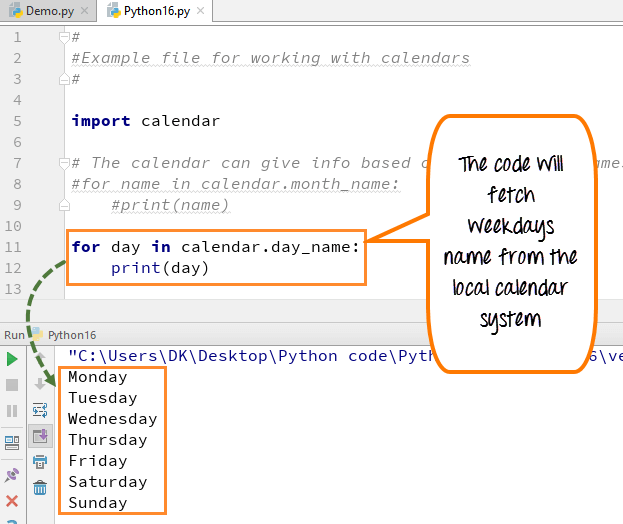
Python automatically honors the system’s locale for month and weekday names. Below is a sample output when printing calendar.month_name and calendar.day_name:
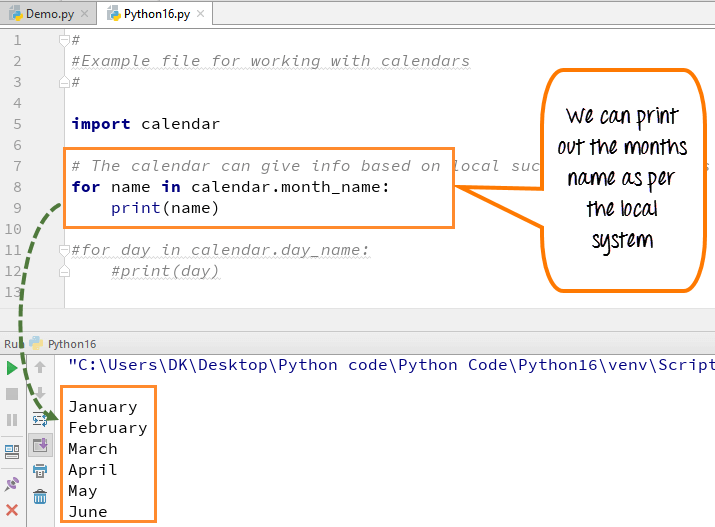
Locale settings vary by machine, so the results may differ for users in other countries.
Step 5 – Compute Custom Dates (e.g., First Monday of Each Month)
Below is a concise script that finds the first Monday of every month in 2025:
The logic uses calendar.monthcalendar to get a matrix of weeks, then checks the first two weeks for a non‑zero Monday value.
Python 2 Example
import calendar
# Create a plain text calendar
c = calendar.TextCalendar(calendar.THURSDAY)
text = c.formatmonth(2025, 1)
print text

# Create an HTML formatted calendar
hc = calendar.HTMLCalendar(calendar.THURSDAY)
html = hc.formatmonth(2025, 1)
print html

# Loop over the days of a month
for i in c.itermonthdays(2025, 4):
    print i

# Locale‑aware names of months and days
for name in calendar.month_name:
    print name
for day in calendar.day_name:
    print day

# Find the first Monday of each month
for month in range(1, 13):
    mycal = calendar.monthcalendar(2025, month)
    week1 = mycal[0]
    week2 = mycal[1]
    if week1[calendar.MONDAY] != 0:
        auditday = week1[calendar.MONDAY]
    else:
        auditday = week2[calendar.MONDAY]
    print "%10s %2d" % (calendar.month_name[month], auditday)
Python 3 Example
import calendar
# Create a plain text calendar
c = calendar.TextCalendar(calendar.THURSDAY)
text = c.formatmonth(2025, 1)
print(text)

# Create an HTML formatted calendar
hc = calendar.HTMLCalendar(calendar.THURSDAY)
html = hc.formatmonth(2025, 1)
print(html)

# Loop over the days of a month
for i in c.itermonthdays(2025, 4):
    print(i)

# Locale‑aware names of months and days
for name in calendar.month_name:
    print(name)
for day in calendar.day_name:
    print(day)

# Find the first Monday of each month
for month in range(1, 13):
    mycal = calendar.monthcalendar(2025, month)
    week1 = mycal[0]
    week2 = mycal[1]
    if week1[calendar.MONDAY] != 0:
        auditday = week1[calendar.MONDAY]
    else:
        auditday = week2[calendar.MONDAY]
    print("%10s %2d" % (calendar.month_name[month], auditday))
Takeaway
- Customize week start days and formats with
TextCalendarandHTMLCalendar. - Use
itermonthdaysfor precise calendar layouts, handling padding zeros. - Locale data is automatically available via
calendar.month_nameandcalendar.day_name. - Compute rule‑based dates (e.g., first Monday) using
calendar.monthcalendarand simple logic.
Python
- C# Windows Forms Development: A Hands‑On Tutorial
- Mastering Python’s strip() Method: Comprehensive Guide & Practical Examples
- Mastering Python’s Yield: Generator vs Return – A Practical Guide
- Python Counter in collections – Efficient Counting, Updating, and Arithmetic Operations
- Creating ZIP Archives in Python: From Full Directory to Custom File Selection
- Master Python Unit Testing with PyUnit: A Practical Guide & Example
- Python List index() – How to Find Element Positions with Practical Examples
- Master Python Regular Expressions: re.match(), re.search(), re.findall() – Practical Examples
- Master Python Multithreading: GIL Explained with Practical Examples
- Master Python Attrs: Build Advanced Data Classes with Practical Examples