



Master Python Multithreading: GIL Explained with Practical Examples
Python offers both multiprocessing and multithreading to accelerate workloads. This guide walks you through creating robust, thread‑based applications, the nuances of the Global Interpreter Lock (GIL), and how to avoid common pitfalls like deadlocks and race conditions.
What Is a Thread?
A thread is a lightweight unit of execution within a single process. Threads share the process’s memory space, allowing efficient data exchange, while the operating system schedules them to run concurrently on one or more CPU cores.
What Is a Process?
A process is an independent program instance. When you launch an application—say a browser or text editor—the OS creates a separate process with its own code, data, and memory map.
Python Multithreading Fundamentals
Python’s threading module provides a high‑level API for managing threads, whereas the legacy _thread module is deprecated and only retained for backward compatibility. Threads are ideal for I/O‑bound tasks, while CPU‑bound work should use the multiprocessing module to bypass the GIL.
- Thread: shared memory, lightweight.
- Process: isolated memory, heavier.
- GIL: a mutex that protects Python bytecode execution.
When to Use Multithreading
Multithreading shines when you need to perform several I/O‑heavy operations—network requests, file I/O, or database calls—simultaneously. Properly designed threads can improve responsiveness and throughput without the overhead of spawning new processes.
Key Python Modules for Threading
- _thread – Low‑level, deprecated.
- threading – Modern, feature‑rich, and the recommended choice.
Using the threading Module
The threading module offers a Thread class, synchronization primitives (Lock, RLock, Semaphore, Condition, Event, Barrier), and utility functions such as activeCount() and enumerate(). Below is a minimal example that demonstrates thread creation and synchronization.
import time
import _thread


def thread_test(name, wait):
    for i in range(4):
        time.sleep(wait)
        print(f"Running {name}")
    print(f"{name} has finished execution")

if __name__ == "__main__":
    _thread.start_new_thread(thread_test, ("First Thread", 1))
    _thread.start_new_thread(thread_test, ("Second Thread", 2))
    _thread.start_new_thread(thread_test, ("Third Thread", 3))
Running this code produces interleaved output that demonstrates concurrent execution.
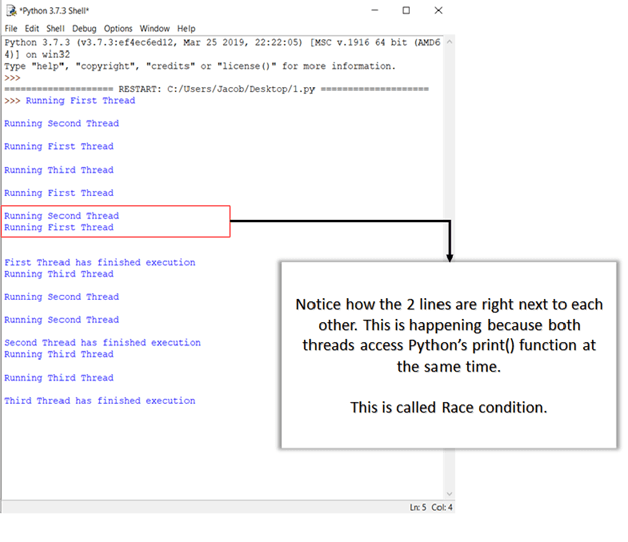
Explanation
- Import
timeand the legacy_threadmodule. - Define
thread_testto perform work and log its progress. - Launch three independent threads via
start_new_thread.
Modern Threading with threading.Thread
In practice, you’ll subclass threading.Thread and override its run() method. The following example mirrors the previous behavior but uses the high‑level API.
import time
import threading

class ThreadTester(threading.Thread):
    def __init__(self, name, delay):
        super().__init__()
        self.name = name
        self.delay = delay

    def run(self):
        for _ in range(4):
            time.sleep(self.delay)
            print(f"Running {self.name}")
        print(f"{self.name} has finished execution")

if __name__ == "__main__":
    threads = [
        ThreadTester("First Thread", 1),
        ThreadTester("Second Thread", 2),
        ThreadTester("Third Thread", 3),
    ]
    for t in threads:
        t.start()
    for t in threads:
        t.join()
Output:
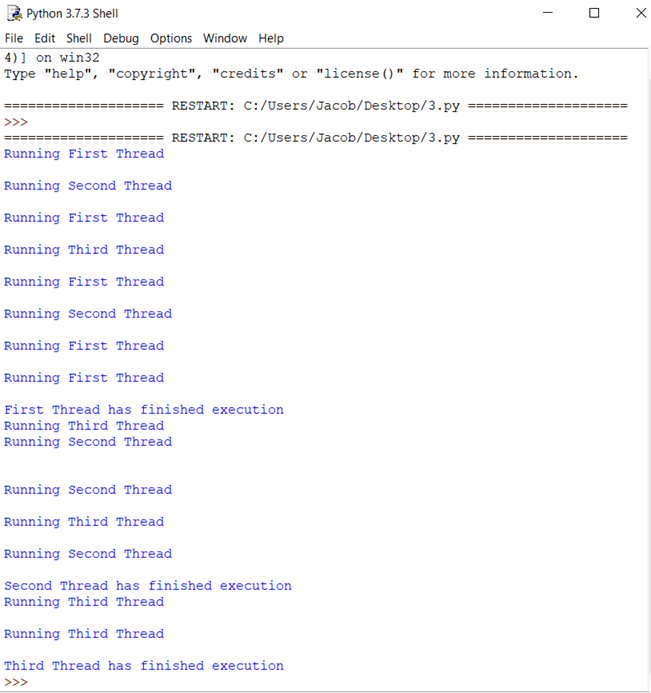
Explanation
- Subclass
Threadto encapsulate thread behavior. - Override
__init__to store thread‑specific data. - Override
runto define the task. - Instantiate, start, and join each thread.
Common Threading Pitfalls
Deadlocks
A deadlock occurs when two or more threads wait indefinitely for resources held by each other. Classic illustration: the Dining Philosophers problem—five philosophers compete for five forks, each needing two forks to eat. If every philosopher picks up the right fork first, a circular wait arises, halting all progress.
Race Conditions
When multiple threads modify shared data without proper coordination, the final state can be unpredictable. For example:
i = 0
for _ in range(100):
    print(i)
    i += 1
Launching this loop in parallel threads can produce a scrambled sequence because increments overlap.
Synchronizing Threads
The threading module supplies several synchronization primitives. The most fundamental is Lock, which ensures exclusive access to a shared resource.
import threading
lock = threading.Lock()


def worker(name):
    for _ in range(5):
        lock.acquire()
        print(f"{name} acquired lock")
        # critical section
        lock.release()

if __name__ == "__main__":
    t1 = threading.Thread(target=worker, args=("Thread A",))
    t2 = threading.Thread(target=worker, args=("Thread B",))
    t1.start(); t2.start()
    t1.join(); t2.join()
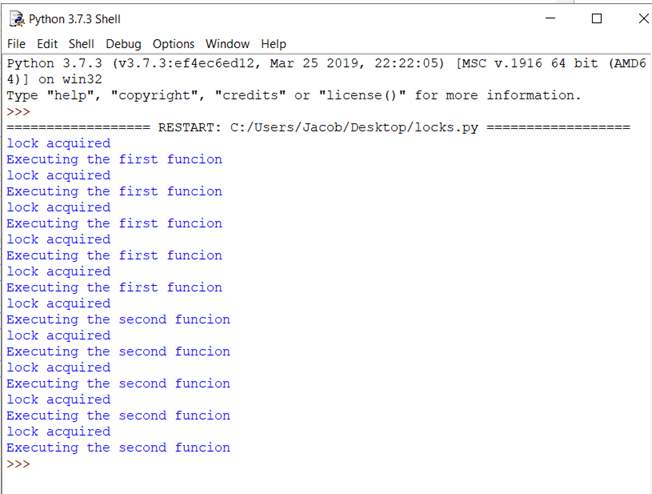
Output demonstrates serialized access to the critical section.
Other Synchronization Tools
- RLock – re‑entrant lock.
- Semaphore – controls access to a finite number of resources.
- Condition – allows threads to wait for specific conditions.
- Event – simple flag for inter‑thread signaling.
- Barrier – blocks a set of threads until all reach a point.
Understanding the Global Interpreter Lock (GIL)
CPython uses the GIL to serialize bytecode execution across threads. While this protects the interpreter’s internal structures (e.g., reference counting) from race conditions, it also limits parallelism for CPU‑bound tasks on multi‑core systems.
- When a thread starts, it acquires the GIL.
- If another thread needs the GIL, it blocks until the first releases it.
- IO‑bound threads release the GIL during blocking calls, allowing others to run.
- CPU‑bound threads hold the GIL, preventing other threads from executing Python code.
Consequently, multithreading in Python yields little benefit for compute‑heavy workloads; multiprocessing is the preferred approach in those cases.
Why the GIL Exists
The CPython garbage collector relies on reference counting. Without a global lock, concurrent updates to reference counts would lead to race conditions and memory corruption. A per‑object lock would introduce significant overhead, so the GIL was adopted as a simple, effective solution.
Practical Takeaways
- Use
threadingfor I/O‑bound concurrency. - Prefer
multiprocessingfor CPU‑bound parallelism. - Always synchronize shared data with locks or higher‑level primitives.
- Be aware of the GIL’s impact when scaling across cores.
- Subclass
Threadand overriderun()for clean, maintainable code.
Python
- Java HashMap: A Comprehensive Guide
- Python OOP Fundamentals: Classes, Objects, Inheritance, and Constructors Explained
- Mastering Python’s strip() Method: Comprehensive Guide & Practical Examples
- Python Counter in collections – Efficient Counting, Updating, and Arithmetic Operations
- Creating ZIP Archives in Python: From Full Directory to Custom File Selection
- Master Python Unit Testing with PyUnit: A Practical Guide & Example
- Python List index() – How to Find Element Positions with Practical Examples
- Master Python Regular Expressions: re.match(), re.search(), re.findall() – Practical Examples
- Python Calendar Module: Expert Guide with Code Examples
- Master Python Attrs: Build Advanced Data Classes with Practical Examples