



Eliminating Contact Bounce in Mechanical Switches
In an ideal scenario, a mechanical switch should close instantly, creating a continuous electrical path as soon as the contacts meet.
In reality, however, the moving contact’s mass and the inherent elasticity of the switch mechanism cause a brief “bounce” when the contacts first meet. This oscillation can last from a fraction of a millisecond to several milliseconds before the contacts settle into a steady state. For most low‑speed applications, such as turning on an incandescent lamp, the bounce is imperceptible because the lamp’s warm‑up time dwarfs the bounce duration.
When the switch feeds a high‑speed electronic circuit—such as an amplifier, microcontroller, or digital counter—bounce can introduce multiple unintended transitions. The result is noisy output or erroneous counting.
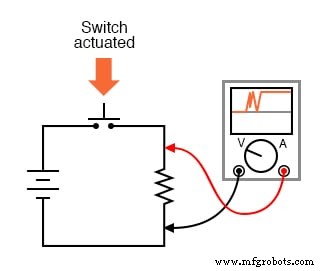
A closer look at the oscilloscope reveals a series of rapid make‑and‑break pulses each time the switch is actuated:
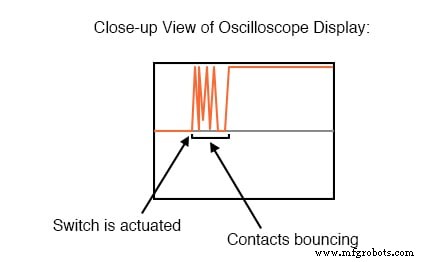
For example, a pushbutton intended to increment a digital counter by one on each actuation may instead cause the counter to advance several counts because of the multiple transitions produced by the bounce.
Mechanical switches are ubiquitous in modern electronic systems, so designers must routinely address bounce to ensure clean, crisp off‑on transitions.
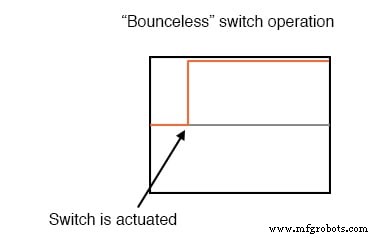
Debouncing Switch Contacts
Debouncing can be tackled at the source—by redesigning the switch—or by adding external circuitry to filter or latch the signal. Below are practical strategies for minimizing bounce at the mechanical level:
- Reduce the kinetic energy of the moving contact by using lighter materials or a softer return spring. This lessens the impact force and therefore the amplitude of the bounce.
- Employ “buffer springs” on the stationary contacts so they can absorb impact energy and gently decelerate the moving contact.
- Design the switch for a wiping or sliding contact rather than a direct impact. Knife‑edge or slide switches maintain contact without a hard collision.
- Incorporate an air or oil shock‑absorber mechanism to dampen motion.
- Use multiple parallel contacts with slightly varied mass or spacing. When one contact rebounds, another remains in firm contact, providing continuous closure.
- In sealed, low‑current applications, wet the contacts with liquid mercury. Surface tension keeps the circuit closed even if the moving contact bounces several times.
Each of these mechanical solutions trades off performance metrics—such as voltage rating, current handling, wear life, or mounting flexibility—against reduced bounce. For instance, lighter contacts or softer springs may limit the maximum current the switch can interrupt, while sliding contacts can introduce electrical noise and accelerate wear.
When redesigning the switch is impractical, external debouncing techniques can be applied:
- A simple RC low‑pass filter on the switch output attenuates high‑frequency bounce spikes while preserving the intended transition.
- Hysteretic transistor circuits—also known as multivibrators—create a latch that holds the output steady for a preset delay, effectively filtering out rapid transitions.
- One‑shot (monostable) circuits can generate a single clean pulse in response to a noisy trigger, guaranteeing only one transition per actuation.
These electronic approaches add minimal complexity while providing robust protection against bounce in digital and analog circuits.
RELATED WORKSHEETS:
- Design Project: Event Counter Worksheet
Industrial Technology
- Circuit With a Switch: A Practical Guide to Basic Electrical Circuits
- Commutating Diode Experiment: Suppressing Inductive Kickback with a Neon Lamp
- Using a Transistor as an Electrically Controlled Switch
- Understanding Electrical Switches: Types, Functions, and Applications
- Designing Reliable Switch Contacts: Materials, Types, and Protection Strategies
- Understanding Normal Positions and Contact Sequences in Process Switches
- Understanding Time-Delay Relays: Types, Applications, and Advanced Features
- Multimeters: From Analog to Digital – A Comprehensive Guide
- Mastering the C# Switch Statement: Syntax, Examples & Best Practices
- Professional Wiring Guide for Combo Switch/Outlet Devices – Diagrams & Installation Tips