



Multi-Display LCD Alarm Clock with Customizable Faces
Components and supplies
 |
| × | 1 | |||
 |
| × | 4 | |||
 |
| × | 1 | |||
 |
| × | 1 | |||
 |
| × | 1 | |||
 |
| × | 1 | |||
 |
| × | 1 | |||
 |
| × | 1 | |||
 |
| × | 1 | |||
 |
| × | 1 | |||
 |
| × | 1 |
Necessary tools and machines
 |
|
Apps and online services
 |
|
About this project
An new version with 10 clock faces can be found here.
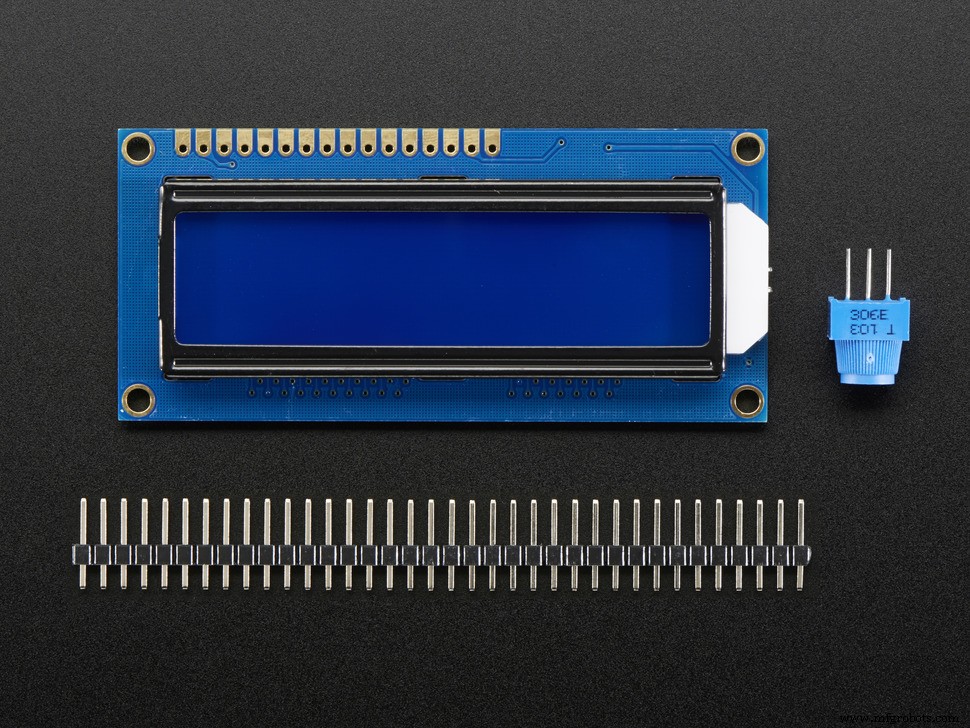
Looking around for something to build, I decided on a LCD 1602 clock. After perusing the Web and finding many different implementations, I decided why not make one clock that incorporates all of them.
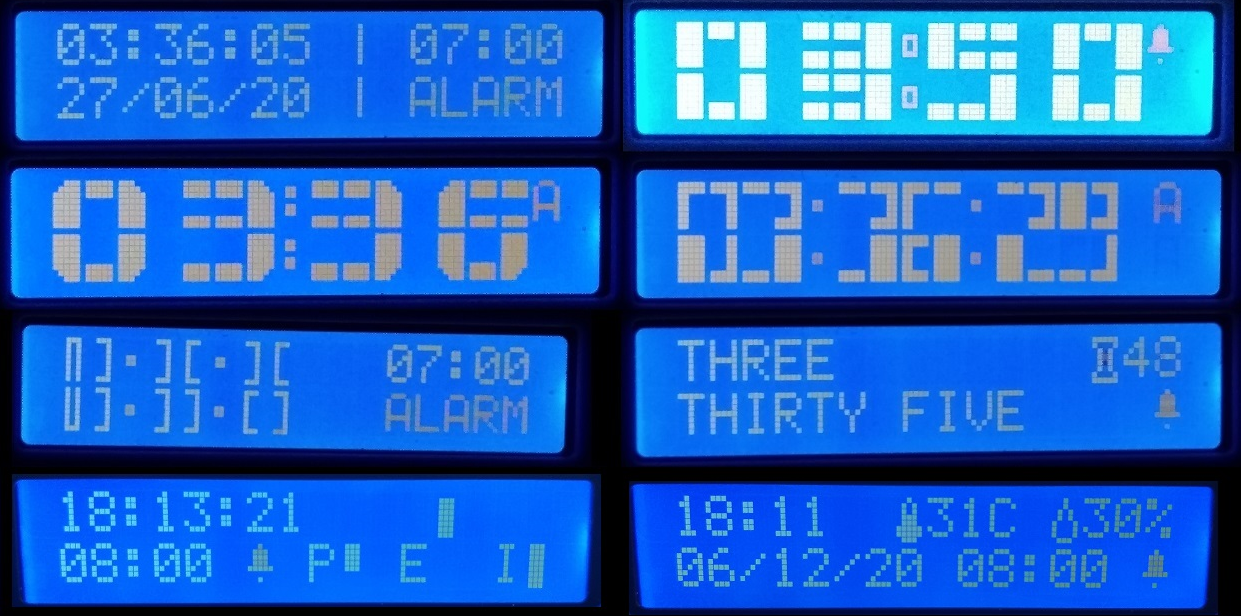
Clock Features- Eight different display styles
- Set time, current date, birth date and alarm
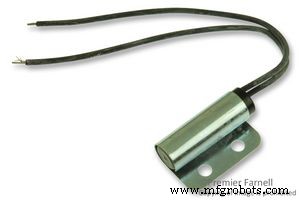
- Mercury switch to switch off alarm
- Backlight control
- DHT21 Temperature and Humidity Sensor
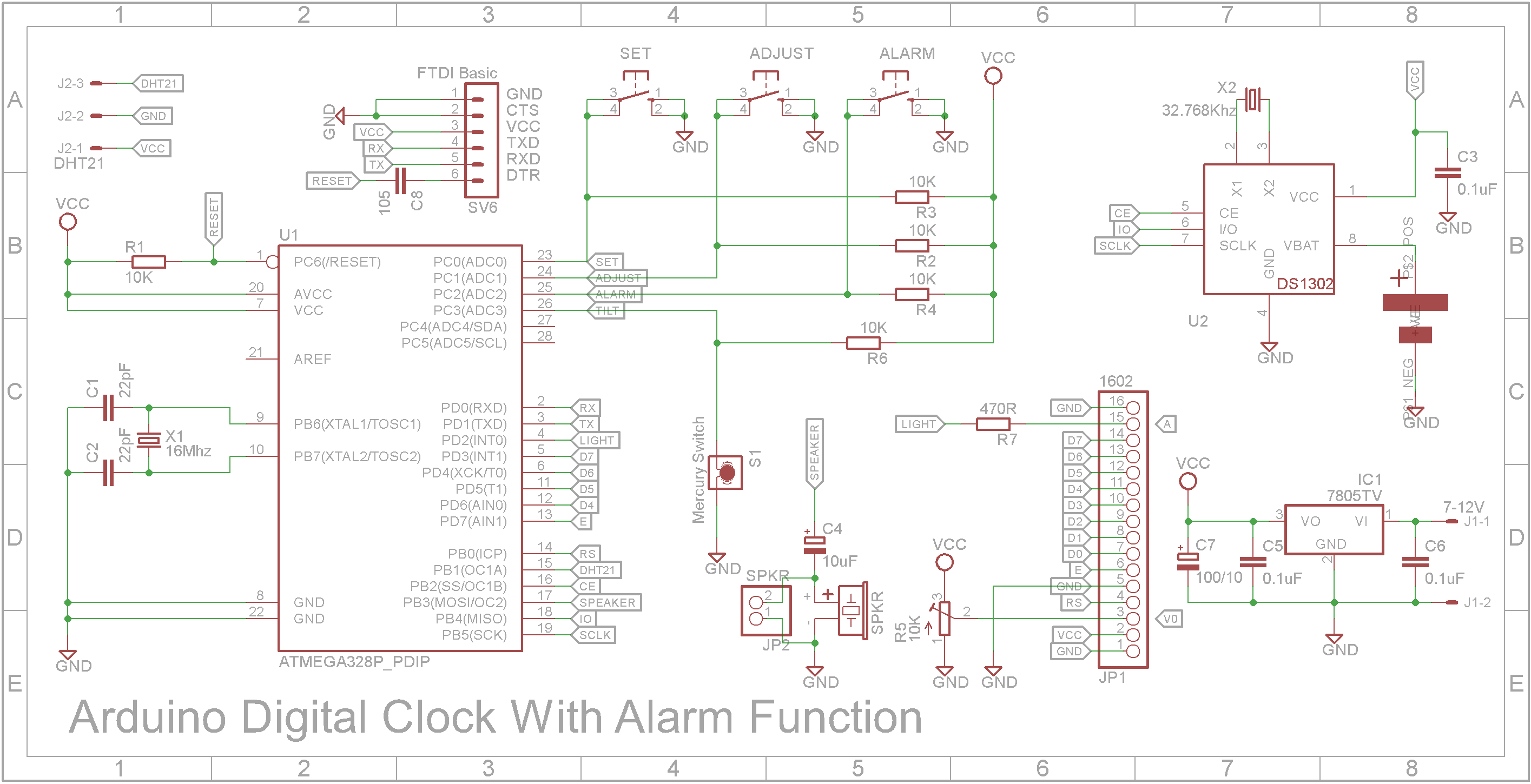
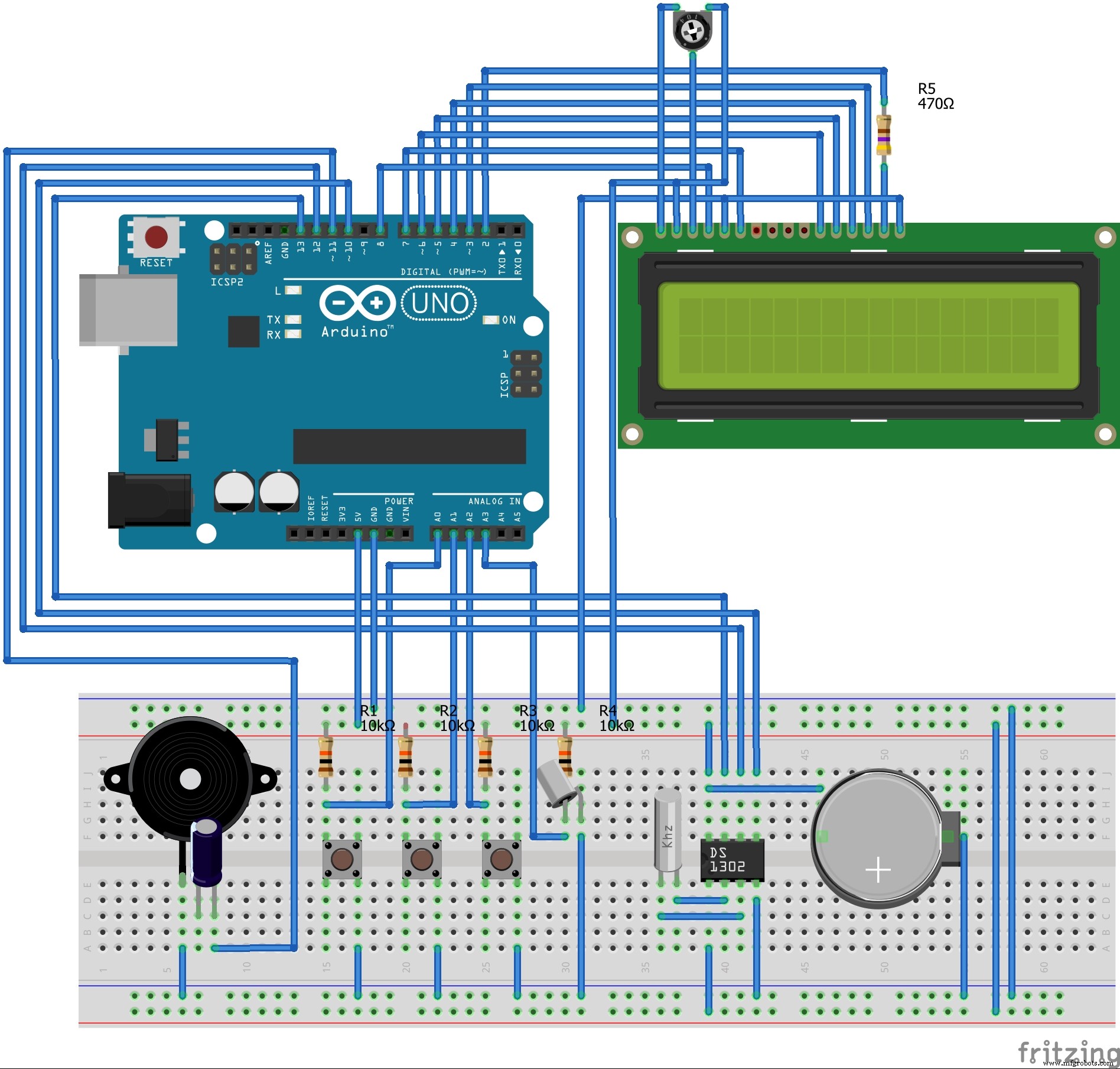
The actual electronics is fairly simple.
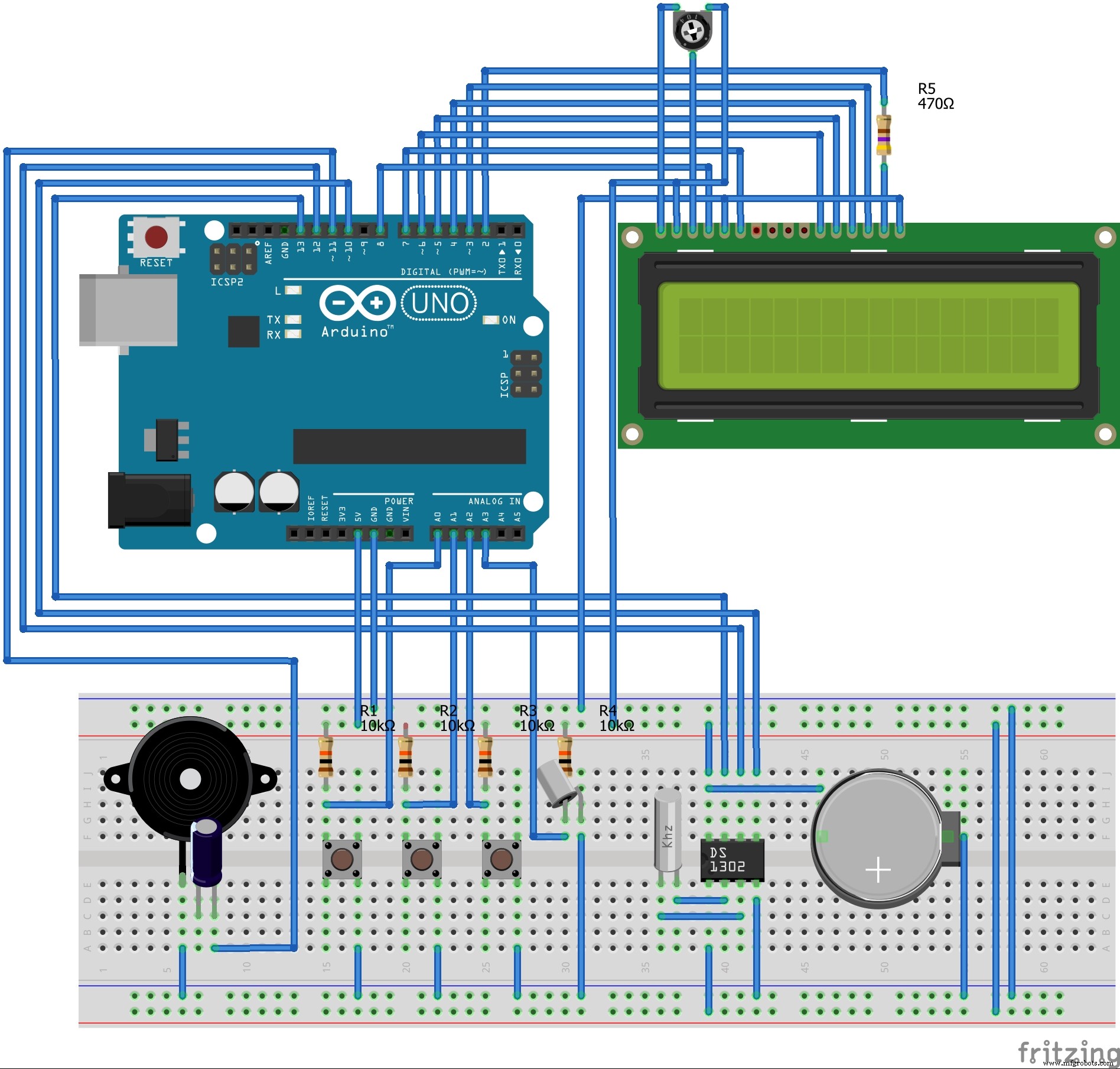
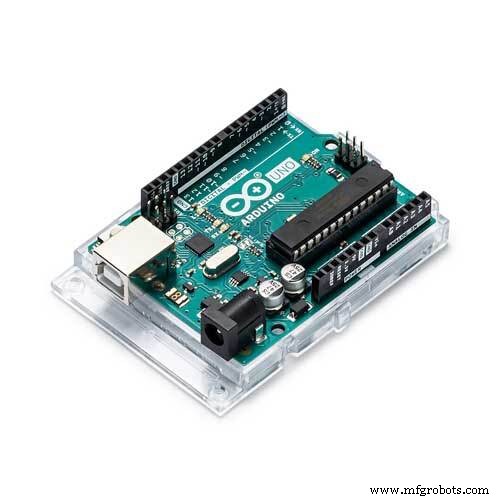
Once wired, load the sketch into your Arduino IDE and upload to the Arduino UNO. (Not shown is the DHT21 is wired to D9)
Using the clockThe clock has three buttons - SETUP, INCREMENT, DECREMENT and a TILT switch.
When the backlight is off, pressing any button will switch the backlight on. If no buttons are pressed while the backlight is on, it will switch itself off after 5 seconds. While the backlight is on, the buttons will perform the following tasks:
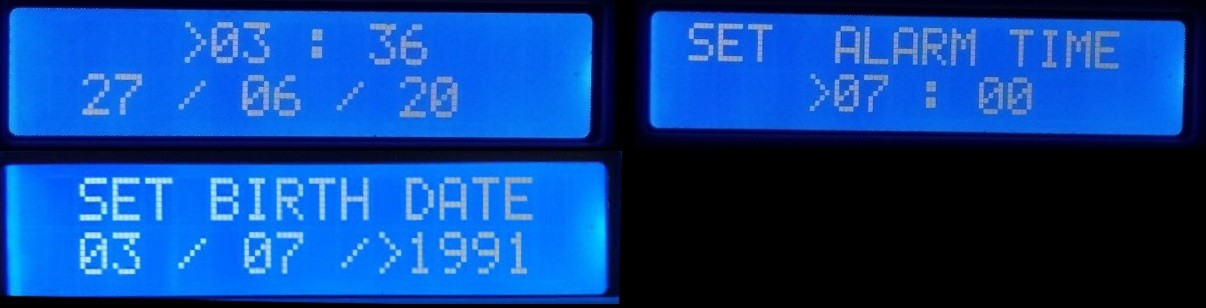
SETUP - This brings up the SETUP screens. The right angle bracket character is the cursor. Pressing the INCREMENT or DECREMENT buttons will increase or decrease the value the cursor is on respectively. Pressing the SETUP button again will cycle the cursor between Hours, Minutes, Day, Month, Year, Birth Day, Birth Month, Birth Year, Alarm Hours, Alarm Minutes and back to CLOCK mode.
INCREMENT - When not in the SETUP screens, this button switches between the various clock styles.
DECREMENT - When not in the SETUP screens, this button toggles the Alarm on or off.
TILT SWITCH - When the alarm is sounding, tilting the clock or pressing any button will switch off the alarm.
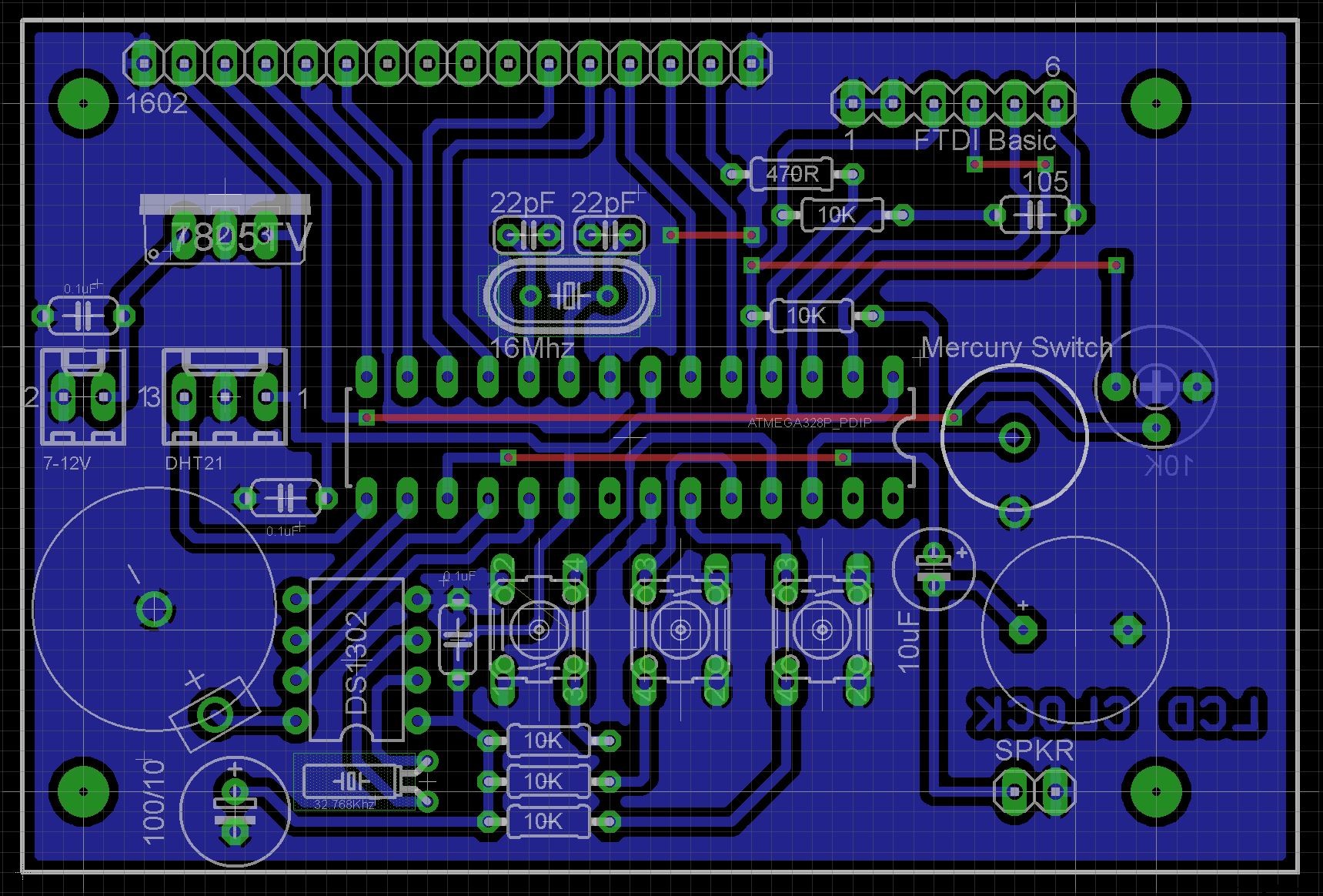
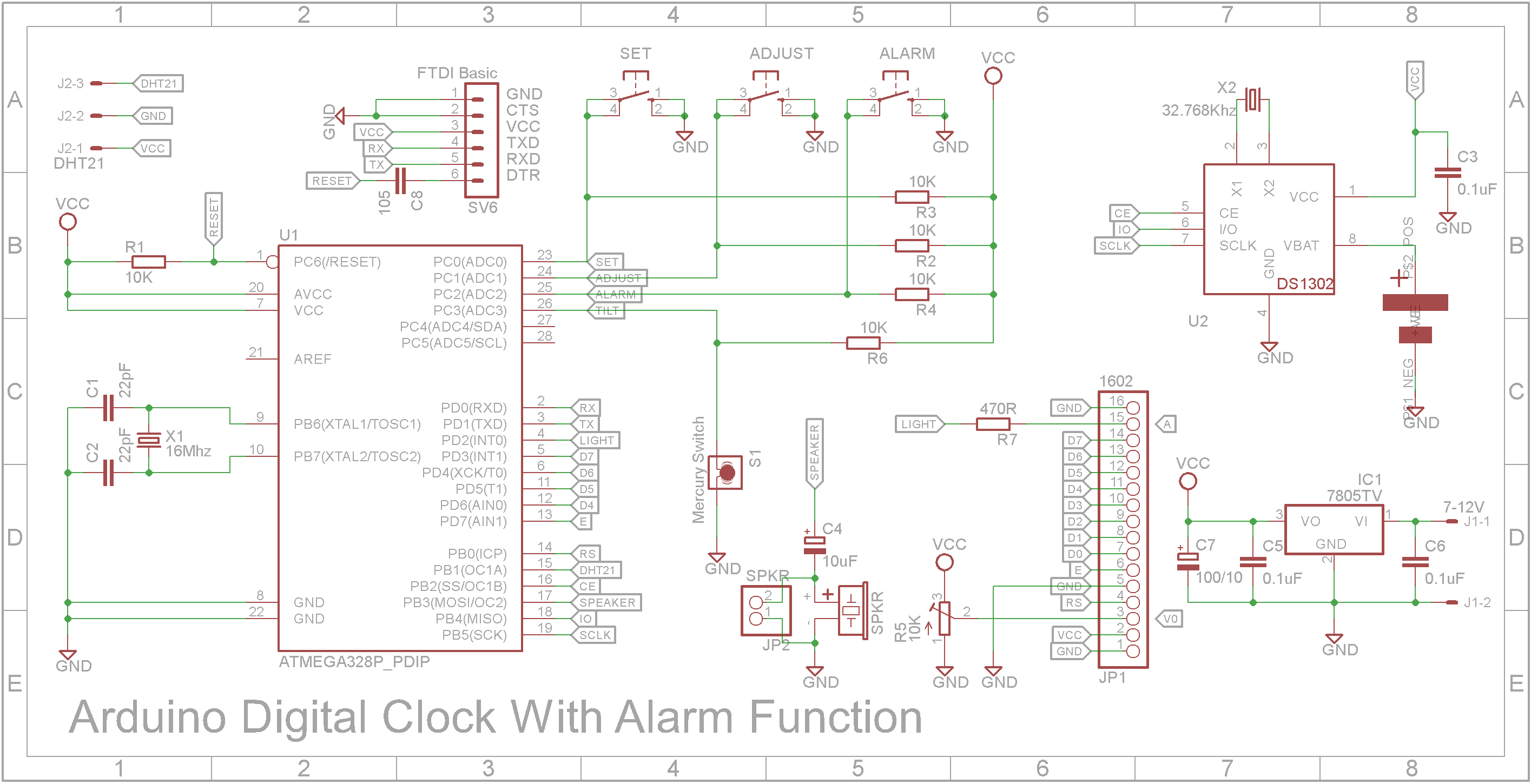
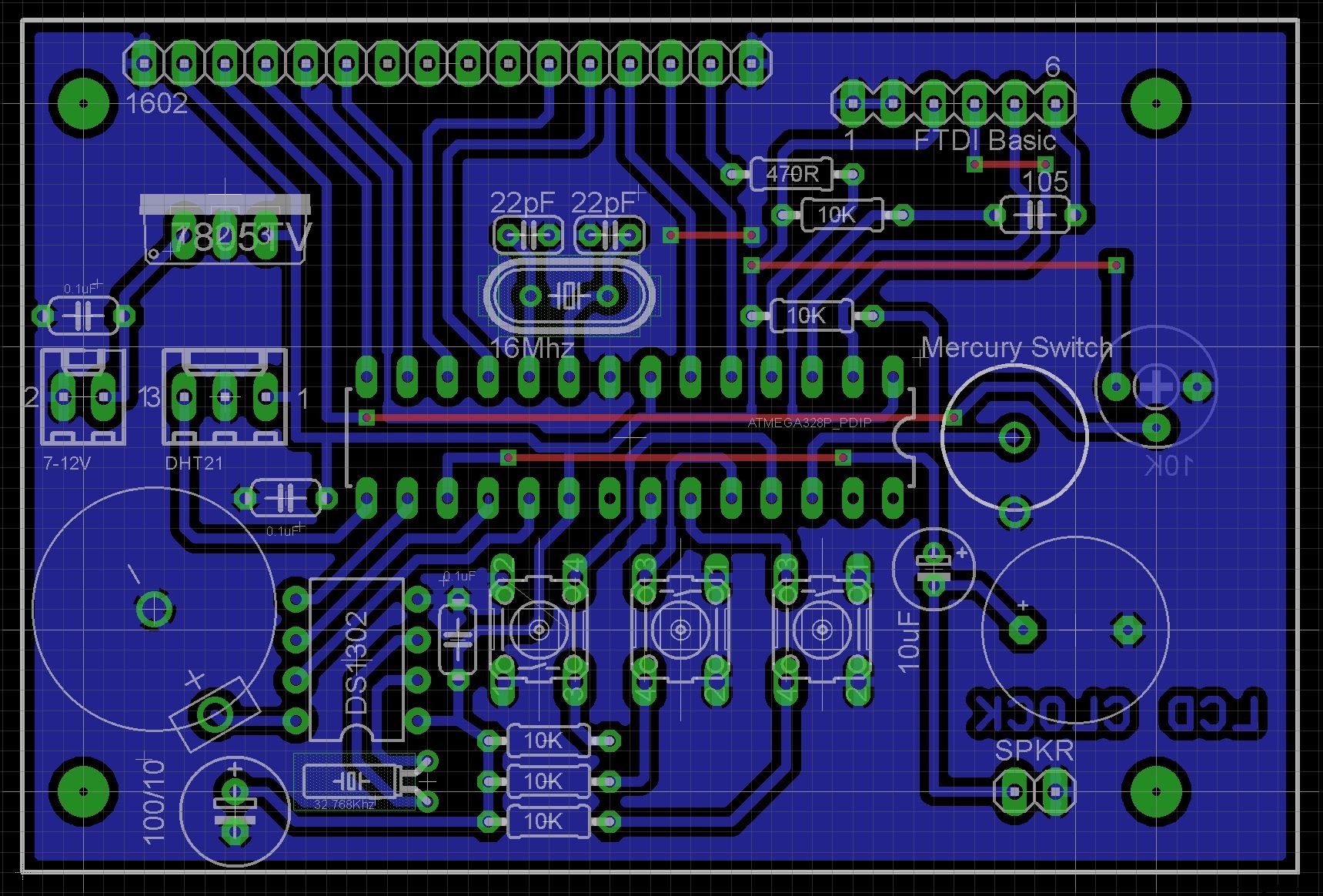
Building a fully finished clockTaking your build from the breadboard to a fully finished clock will require a printed circuit board and some extra components. The Eagle files are attached should you wish to have the PCB commercially made or do as I did and make it yourself. I used the Toner method.
NOTE: Because the LCD 1602 display is connected to the main PCB using a right-angle pin header, it can be very difficult to insert the board and display into the case when they are already soldered together. Having a double sided board with through hole plating will allow you to solder the display to the board in-place.
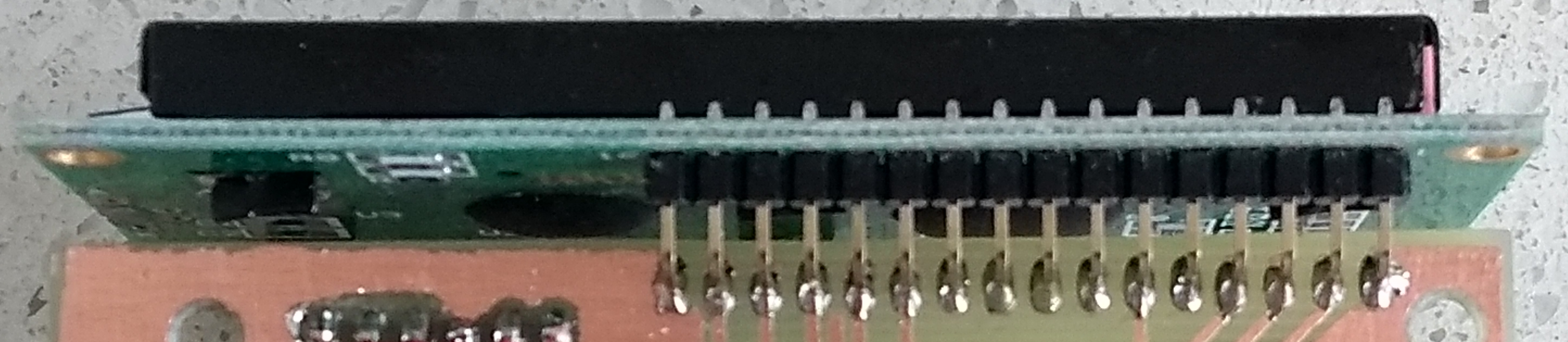
Using parts that I had around the workshop, the Arduino UNO was replaced with a ATMega328 DIL chip, 16MHz crystal and two 22pf ceramic capacitors. The 5V regulator is a 7805 TO-220 type and a 100uF 16V capacitor for smoothing. The RTC is a DS1302 with a 32.768 KHz watch crystal. The speaker is a passive buzzer which is DC isolated with a 10uF 16V capacitor. The 0.1uF and 1uF capacitors are monolithic ceramic capacitors (5mm hole spacing). Resistors are 5% 1/8 watt or you can use 1/4 watt if you wish. The mercury switch can be any size. Mine was 5mm diameter but a smaller one will suffice. The three tactile buttons mounted on the back of the board are 6mmx6mm with a 13mm shaft.
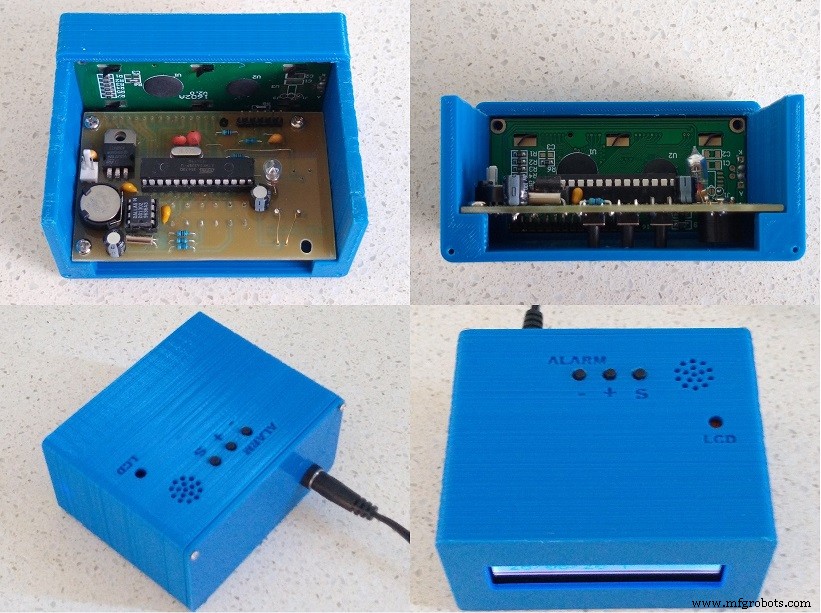
The case is 3D printed using a 0.2mm layer height and no supports. Drill out the PCB mount holes with a 2.5mm drill and create a thread using a 3mm tap. Use M3 6mm screws to secure the board in place. I also drilled out the four mount holes on the PCB to 4mm to allow for any adjustment required to stop the buttons from sticking on the case when securing the board.
This clock is a mash-up of a number of clocks that various makers have made over the years.
The base of this clock is Arduino Digital Clock With Alarm Function (custom PCB). I modified the case so it was printed as two pieces and not four.
- Standard screen design by Michalis Vasilakis
- Dual Thick font by Arduino World
- Dual Beveled font by Arduino Forum
- Dual Trek font by Carrie Sundra
- Dual Thin font by Arduino World
- Word concept by LAGSILVA
- Biorhythm clock by John Bradnam
- Weather Clock by ARDUinoautoMOTIVE
29/06/20
- Fixed spelling mistakes in WORD clock
- Added #defines to control backlight
- Increased backlight timeout from 5 to 10 seconds
23/11/20
- Added Birth date setup and EEPROM storage
- Added Biorhythm clock face
- Cleaned up Setup screen coding
It is hypothesised that based on our birth date, biorhythms might determine the highs and lows of our life. Biorhythms comprises three cycles: a 23-day physical cycle, a 28-day emotional cycle and a 33-day intellectual cycle. The biorhythm clock shows each state as a bar.
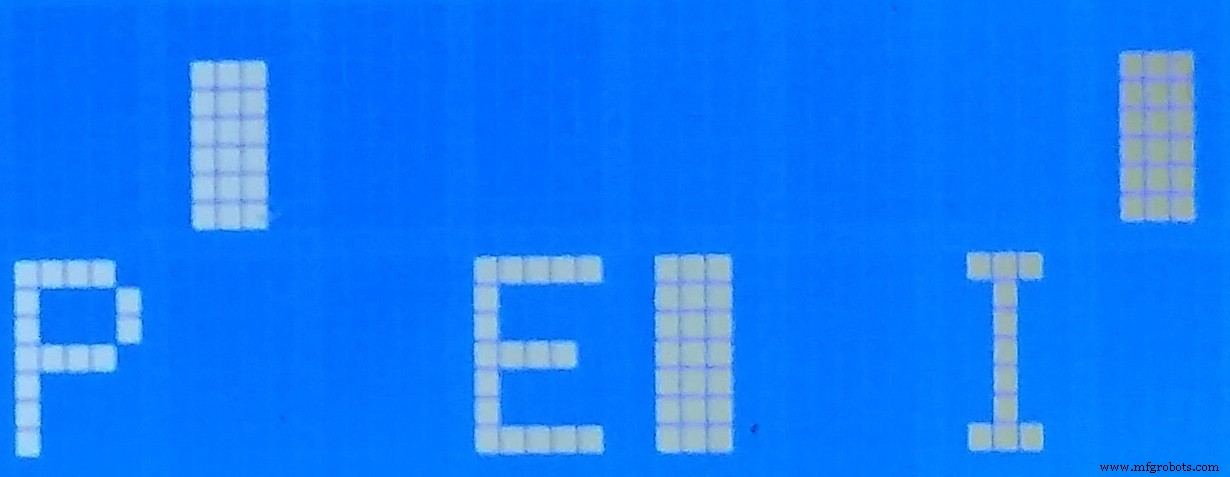
The bar shows that the biorhythm is either in a positive cycle (top bar) or a negative cycle (bottom bar). The length of the bar shows how positive or negative in the cycle it is.
06/12/20
- Added DHT21 Support
- Added Thermometer and Humidity clock face
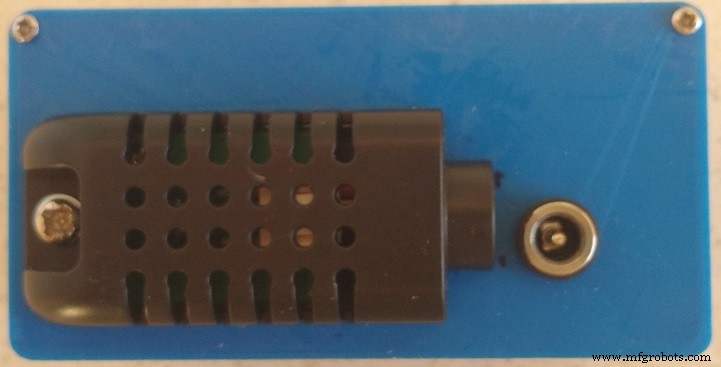
A new weather clock face has been added. It reads a DHT21 temperature and humidity sensor added to the back of the case. The PCB has been updated to include a 3-pin connector to the DHT21 sensor.
Code
- DigitalClockAlarmV7.ino
DigitalClockAlarmV7.inoC/C++
/*  1602 LCD alarm clock
 *  by John Bradnam (jbrad2089@gmail.com)
 *
 *  Display 16x2:         Setup:            Setup Alarm
 *  +----------------+  +----------------+ +----------------+
 *  |HH:MM:SS | HH:MM|  |    >HH :>MM    | |   Set Alarm    |
 *  |DD/MM/YY | ALARM|  |>DD />MM />YYYY | |   >HH :>MM     |
 *  +----------------+  +----------------+ +----------------+
 *
 *  25/06/2020
 *    - Took Michalis Vasilakis's clock as code base (https://www.instructables.com/id/Arduino-Digital-Clock-With-Alarm-Function-custom-P/)
 *    - Modified to suit hardware - DS1302 RTC and LCD backlight
 *    - Added support for different display styles
 *      - Standard screen design by Michalis Vasilakis
 *      - Dual Thick font by Arduino World (https://www.hackster.io/thearduinoworld/arduino-digital-clock-version-1-b1a328)
 *      - Dual Bevelled font by Arduino Forum (https://forum.arduino.cc/index.php/topic,8882.0.html)
 *      - Dual Trek font by Carrie Sundra (https://www.alpenglowindustries.com/blog/the-big-numbers-go-marching-2x2)
 *      - Dual Thin font by Arduino World (https://www.hackster.io/thearduinoworld/arduino-digital-clock-version-2-5bab65)
 *      - Word concept by LAGSILVA (https://www.hackster.io/lagsilva/text-clock-bilingual-en-pt-with-arduino-881a6e)
 *  29/06/20
 *    - Fixed spelling mistakes in WORD clock
 *    - Added #defines to control backlight
 *    - Increased backlight timeout from 5 to 10 seconds
 *  22/11/20
 *    - Added Birth date setup and EEPROM storage
 *    - Added Biorhythm clock face
 *    - Cleaned up Setup screen coding
 *  xx/xx/21
 *    - Added DHT21 Support
 *    - Added Thermometer and Humidity clock face
 */

//Libraries
#include <Wire.h>
#include <TimeLib.h>
#include <DS1302RTC.h>
#include <LiquidCrystal.h>
#include <EEPROM.h>
#include <dht.h>

//uncomment if you want the dual thick or thin display variant to show 12hr format
//#define DUAL_THICK_12HR
//#define DUAL_THIN_12HR

//uncomment to control backlight
//#define NO_BACKLIGHT
//#define BACKLIGHT_ALWAYS_ON
#define BACKLIGHT_TIMEOUT 10000

//uncomment to test biorhythm graphs
//#define TEST_BIO_GRAPHS

#define LIGHT           2  //PD2
#define LCD_D7          3  //PD3
#define LCD_D6          4  //PD4
#define LCD_D5          5  //PD5
#define LCD_D4          6  //PD6
#define LCD_E           7  //PD7
#define LCD_RS          8  //PB0
#define BTN_SET         A0 //PC0
#define BTN_ADJUST      A1 //PC1
#define BTN_ALARM       A2 //PC2
#define BTN_TILT        A3 //PC3
#define SPEAKER         11 //PB3
#define DHT21           9  //PB1
#define RTC_CE          10 //PB2
#define RTC_IO          12 //PB4
#define RTC_SCLK        13 //PB5


//Connections and constants
LiquidCrystal lcd(LCD_RS, LCD_E, LCD_D4, LCD_D5, LCD_D6, LCD_D7);
DS1302RTC rtc(RTC_CE, RTC_IO, RTC_SCLK);
dht DHT;

char daysOfTheWeek[7][12] = {"Sunday","Monday", "Tuesday", "Wednesday", "Thursday", "Friday", "Saturday"};
const int monthDays[12] = { 31, 28, 31, 30, 31, 30, 31, 31, 30, 31, 30, 31 };
long interval = 300;
int melody[] = { 600, 800, 1000,1200 };

//Variables
int DD, MM, YY, H, M, S, temp, hum, set_state, adjust_state, alarm_state, AH, AM, shake_state, BY, BM, BD;
int shakeTimes = 0;
int i = 0;
String sDD;
String sMM;
String sYY;
String sH;
String sM;
String sS;
String sBD;
String sBM;
String sBY;
String aH="12";
String aM="00";
String sTMP;
String sHUM;
//String alarm = "     ";
long prevAlarmMillis = 0;
long prevDhtMillis = 0;

//Boolean flags
boolean setupScreen = false;
boolean alarmON=false;
boolean turnItOn = false;

enum STYLE { STANDARD, DUAL_THICK, DUAL_BEVEL, DUAL_TREK, DUAL_THIN, WORD, BIO, THERMO };
STYLE currentStyle = STANDARD;

enum SETUP { CLOCK, TIME_HOUR, TIME_MIN, TIME_DAY, TIME_MONTH, TIME_YEAR, BIRTH_DAY, BIRTH_MONTH, BIRTH_YEAR, ALARM_HOUR, ALARM_MIN };
SETUP setupMode = CLOCK;


bool backlightOn = false;
long backlightTimeout = 0;

byte customChar[8];

//--------------------- EEPROM ------------------------------------------
#define EEPROM_AH 0   //Alarm Hours
#define EEPROM_AM 1   //Alarm Minutes
#define EEPROM_AO 2   //Alarm On/Off
#define EEPROM_CS 3   //Current style
#define EEPROM_BY 4   //Birth Year
#define EEPROM_BM 6   //Birth Month
#define EEPROM_BD 7   //Birth Day

//--------------------- Word clock --------------------------------------
String units[] = {"HUNDRED", "ONE", "TWO", "THREE", "FOUR", "FIVE", "SIX", "SEVEN", "EIGHT", "NINE"};
String teens[] = {"TEN", "ELEVEN", "TWELVE", "THIRTEEN", "FOURTEEN", "FIFTEEN", "SIXTEEN", "SEVENTEEN", "EIGHTEEN", "NINETEEN"};
String tens[] = {"", "", "TWENTY", "THIRTY", "FORTY", "FIFTY"};

//---------------------- Hourglass animation ----------------------------
#define HOURGLASS_FRAMES 8
#define HOURGLASS_CHAR 0
#define FRAME_TIMEOUT 200;
int nextFrame = 0;
long frameTimeout = 0;
const byte hourglass[HOURGLASS_FRAMES][8] PROGMEM = {
  { B11111,  B11111,  B01010,  B01010,  B01010,  B01010,  B10001,  B11111 },
  { B11111,  B11011,  B01110,  B01010,  B01010,  B01010,  B10001,  B11111 },
  { B11111,  B10001,  B01110,  B01110,  B01010,  B01010,  B10001,  B11111 },
  { B11111,  B10001,  B01010,  B01110,  B01110,  B01010,  B10001,  B11111 },
  { B11111,  B10001,  B01010,  B01010,  B01110,  B01110,  B10001,  B11111 },
  { B11111,  B10001,  B01010,  B01010,  B01010,  B01110,  B10101,  B11111 },
  { B11111,  B10001,  B01010,  B01010,  B01010,  B01110,  B11011,  B11111 },
  { B11111,  B10001,  B01010,  B01010,  B01010,  B01010,  B11111,  B11111 },
  //{ B11111,  B10001,  B01010,  B01010,  B01010,  B01010,  B10001,  B11111 }
};

//---------------------- Alarm, clock and DHT custom characters ----------------------------
#define BELL_CHAR 1
#define CLOCK_CHAR 2
#define THERMOMETER_CHAR 3
#define DROPLET_CHAR 4
const byte bell[8] PROGMEM  = {0x4, 0xe, 0xe, 0xe, 0x1f, 0x0, 0x4};
const byte clock[8] PROGMEM = {0x0, 0xe, 0x15, 0x17, 0x11, 0xe, 0x0};
const byte thermometer[8] PROGMEM = {0x4, 0xa, 0xa, 0xe, 0xe, 0x1f, 0x1f, 0xe};
const byte droplet[8] PROGMEM = {0x4, 0x4, 0xa, 0xa, 0x11, 0x11, 0x11, 0xe};

#define DHT_UPDATE_INTERVAL 6000

//---------------------- BioRhythm Clock ----------------------------
//Custom character constants (M is MSB or upper bar character, L is LSB or lower bar character
#define PHYSICAL_M 3
#define PHYSICAL_L 4
#define EMOTIONAL_M 5
#define EMOTIONAL_L 6
#define INTELLECTUAL_M 7
#define INTELLECTUAL_L 8

//---------------------- Thick Square Font ----------------------------
#define C0 3
#define C1 4
#define C2 5
#define C3 6
const byte C_0[8] PROGMEM = {0x1F,0x1F,0x1F,0x00,0x00,0x00,0x00,0x00};
const byte C_1[8] PROGMEM = {0x1F,0x1F,0x1F,0x00,0x00,0x1F,0x1F,0x1F};
const byte C_2[8] PROGMEM = {0x00,0x00,0x00,0x00,0x00,0x1F,0x1F,0x1F};
const byte C_3[8] PROGMEM = {0x00,0x00,0x0E,0x0A,0x0A,0x0E,0x00,0x00};

const byte blockChar[11][2][3] = {
  {{ 255, C0, 255}, {255, C2, 255}}, //0
  {{ C0, 255, 32}, {C2, 255, C2}}, //1
  {{ C0, C0, 255}, {255, C1, C2}}, //2
  {{ C1, C1, 255}, {C1, C1, 255}}, //3
  {{ 255, C2, 255}, {32, 32, 255}}, //4
  {{ 255, C1, C1}, {C2, C2, 255}}, //5
  {{ 255, C0, C0}, {255, C1, 255}}, //6
  {{ C0, C1, 255}, {32, C0, 255}}, //7
  {{ 255, C1, 255}, {255, C1, 255}}, //8
  {{ 255, C1, 255}, {C2, C2, 255}}, //9
  {{ 32, 32, 32}, {32, 32, 32}}, //Blank
};

//---------------------- Thick Bevel Font ----------------------------
#define LT 0
#define UB 1
#define RT 2
#define LL 3
#define LB 4
#define LR 5
#define UMB 6
#define LMB 7

const byte _LT[8] PROGMEM = { B00111, B01111, B11111, B11111, B11111, B11111, B11111, B11111};
const byte _UB[8] PROGMEM = { B11111, B11111, B11111, B00000, B00000, B00000, B00000, B00000};
const byte _RT[8] PROGMEM = { B11100, B11110, B11111, B11111, B11111, B11111, B11111, B11111};
const byte _LL[8] PROGMEM = { B11111, B11111, B11111, B11111, B11111, B11111, B01111, B00111};
const byte _LB[8] PROGMEM = { B00000, B00000, B00000, B00000, B00000, B11111, B11111, B11111};
const byte _LR[8] PROGMEM = { B11111, B11111, B11111, B11111, B11111, B11111, B11110, B11100};
const byte _UMB[8] PROGMEM = { B11111, B11111, B11111, B00000, B00000, B00000, B11111, B11111};
const byte _LMB[8] PROGMEM = { B11111, B11111, B11111, B11111, B11111, B11111, B11111, B11111};

const byte bevelChar[11][2][3] = {
  {{LT, UB, RT}, {LL, LB, LR}}, //0
  {{UB, RT, 32}, {LB, LMB, LB}}, //1
  {{UMB, UMB, RT}, {LL, LB, LB}}, //2
  {{UMB, UMB, RT}, {LB, LB, LR}}, //3
  {{LL, LB, LMB}, {32, 32, LMB}}, //4
  {{LT, UMB, UMB}, {LB, LB, LR}}, //5
  {{LT, UMB, UMB}, {LL, LB, LR}}, //6
  {{UB, UB, RT}, {32, 32, LT}}, //7
  {{LT, UMB, RT}, {LL, LB, LR}}, //8
  {{LT, UMB, RT}, {32, 32, LR}}, //9
  {{ 32, 32, 32}, {32, 32, 32}} //Blank
};

//---------------------- Trek Font ----------------------------
#define K0 0
#define K1 1
#define K2 2
#define K3 3
#define K4 4
#define K5 5
#define K6 6
#define K7 7
const byte K_0[8] PROGMEM = {0x1F,0x1F,0x00,0x00,0x00,0x00,0x00,0x00};
const byte K_1[8] PROGMEM = {0x18,0x18,0x18,0x18,0x18,0x18,0x18,0x18};
const byte K_2[8] PROGMEM = {0x00,0x00,0x00,0x00,0x00,0x00,0x1F,0x1F};
const byte K_3[8] PROGMEM = {0x1F,0x1F,0x03,0x03,0x03,0x03,0x1F,0x1F};
const byte K_4[8] PROGMEM = {0x1F,0x1F,0x18,0x18,0x18,0x18,0x1F,0x1F};
const byte K_5[8] PROGMEM = {0x1F,0x1F,0x18,0x18,0x18,0x18,0x18,0x18};
const byte K_6[8] PROGMEM = {0x03,0x03,0x03,0x03,0x03,0x03,0x1F,0x1F};
const byte K_7[8] PROGMEM = {0x1F,0x1F,0x03,0x03,0x03,0x03,0x03,0x03};

const byte trekChar[11][2][2] = {
  {{ K5, K7}, {255, K6}}, //0
  {{ K0, K1}, {K2, 255}}, //1
  {{ K0, K3}, {255, K2}}, //2
  {{ K0, K3}, {K2, 255}}, //3
  {{ K1, 255}, {K0, K1}}, //4
  {{ K4, K0}, {K2, 255}}, //5
  {{ K5, K0}, {K4, 255}}, //6
  {{ K0, 255}, {32, K1}}, //7
  {{ 255, K3}, {K4, 255}}, //8
  {{ 255, K3}, {K2, K6}}, //9
  {{ 32, 32}, {32, 32}}, //Blank
};


//---------------------- Thin Font ----------------------------
#define T0 0
#define T1 1
#define T2 2
#define T3 3
#define T4 4
#define T5 5
#define T6 6
#define T7 7

const byte T_0[8] PROGMEM = {0x02,0x02,0x02,0x02,0x02,0x02,0x02,0x02};
const byte T_1[8] PROGMEM = {0x0E,0x02,0x02,0x02,0x02,0x02,0x02,0x0E};
const byte T_2[8] PROGMEM = {0x0E,0x08,0x08,0x08,0x08,0x08,0x08,0x0E};
const byte T_3[8] PROGMEM = {0x0E,0x0A,0x0A,0x0A,0x0A,0x0A,0x0A,0x0E};
const byte T_5[8] PROGMEM = {0x0A,0x0A,0x0A,0x0A,0x0A,0x0A,0x0A,0x0E};
const byte T_4[8] PROGMEM = {0x0E,0x0A,0x0A,0x0A,0x0A,0x0A,0x0A,0x0A};
const byte T_6[8] PROGMEM = {0x0E,0x02,0x02,0x02,0x02,0x02,0x02,0x02};
const byte T_7[8] PROGMEM = {0x18,0x18,0x18,0x18,0x18,0x1E,0x1F,0x1F};

//lcd draw character functions
const byte thinChar[11][2] = {
  {T4, T5}, //0
  {T0, T0}, //1
  {T1, T2}, //2
  {T1, T1}, //3
  {T5, T6}, //4
  {T2, T1}, //5
  {T2, T3}, //6
  {T6, T0}, //7
  {T3, T3}, //8
  {T3, T1}, //9
  {32, 32}  //blank
};

//---------------------- General initialisation ----------------------------
void setup()
{
  Serial.begin(115200);

  //Set outputs/inputs
  pinMode(BTN_SET,INPUT);
  pinMode(BTN_ADJUST,INPUT);
  pinMode(BTN_ALARM, INPUT);
  pinMode(BTN_TILT, INPUT);
  pinMode(SPEAKER, OUTPUT);
  pinMode(LIGHT, OUTPUT);

  //Check if RTC has a valid time/date, if not set it to 00:00:00 01/01/2018.
  //This will run only at first time or if the coin battery is low.

  //setSyncProvider() causes the Time library to synchronize with the
  //external RTC by calling RTC.get() every five minutes by default.
  setSyncProvider(rtc.get);
  if (timeStatus() != timeSet)
  {
    Serial.println("Setting default time");
    //Set RTC
    tmElements_t tm;
    tm.Year = CalendarYrToTm(2020);
    tm.Month = 06;
    tm.Day = 26;
    tm.Hour = 7;
    tm.Minute = 52;
    tm.Second = 0;
    time_t t = makeTime(tm);
    //use the time_t value to ensure correct weekday is set
    if (rtc.set(t) == 0)
    { // Success
      setTime(t);
    }
    else
    {
      Serial.println("RTC set failed!");
    }
  }

  delay(100);
  //Read alarm time from EEPROM memmory
  AH = EEPROM.read(EEPROM_AH);
  AM = EEPROM.read(EEPROM_AM);
  byte ao = EEPROM.read(EEPROM_AO);
  alarmON = (ao != 0);
  byte cs = EEPROM.read(EEPROM_CS);
  //Check if the numbers that you read are valid. (Hours:0-23 and Minutes: 0-59)
  if (AH > 23)
  {
    AH = 0;
  }
  if (AM > 59){
    AM = 0;
  }
  //Read Birth date from EEPROM
  BY = (EEPROM.read(EEPROM_BY + 0) << 8) | EEPROM.read(EEPROM_BY + 1);
  if (BY < 1900 || BY > 2099)
  {
    BY = 2000;
  }
  BM = EEPROM.read(EEPROM_BM);
  if (BM < 0 || BM > 12)
  {
    BM = 1;
  }
  BD = EEPROM.read(EEPROM_BD);
  if (BD < 0 || BD > 31)
  {
    BD = 1;
  }
  //Setup current style
  lcd.begin(16,2);
  currentStyle = (cs > (uint8_t)THERMO) ? STANDARD : (STYLE)cs;
  switch (currentStyle)
  {
    case STANDARD: lcdStandardSetup(); break;
    case DUAL_THICK: lcdDualThickSetup(); break;
    case DUAL_BEVEL: lcdDualBevelSetup(); break;
    case DUAL_TREK: lcdDualTrekSetup(); break;
    case DUAL_THIN: lcdDualThinSetup(); break;
    case WORD: lcdWordSetup(); break;
    case BIO: lcdBioRhythmSetup(); break;
    case THERMO: lcdThermometerSetup(); break;
  }

#ifdef BACKLIGHT_ALWAYS_ON
  switchBacklight(true);
#endif

}

//---------------------- Main program loop ----------------------------
void loop()
{
  readBtns();       //Read buttons
  getTimeDate();    //Read time and date from RTC
  getTempHum();     //Read temperature and humidity
  if (!setupScreen)
  {
    lcdPrint();     //Normanlly print the current time/date/alarm to the LCD
    if (alarmON)
    {
      callAlarm();  // and check the alarm if set on
      if (turnItOn)
      {
        switchBacklight(true);
      }
    }
    //Serial.println("backlightTimeout=" + String(backlightTimeout) + ", millis()=" + String(millis()) + ", backlightOn=" + String(backlightOn));
#ifdef BACKLIGHT_TIMEOUT
    if (backlightOn && (millis() > backlightTimeout))
    {
      switchBacklight(false);
    }
#endif
  }
  else
  {
    timeSetup();    //If button set is pressed then call the time setup function
    switchBacklight(true);
  }
}

//--------------------------------------------------
//Read buttons state
void readBtns()
{
  set_state = digitalRead(BTN_SET);
  adjust_state = digitalRead(BTN_ADJUST);
  alarm_state = digitalRead(BTN_ALARM);
  if (!backlightOn && !setupScreen)
  {
    if (set_state == LOW || adjust_state == LOW || alarm_state == LOW)
    {
      //Turn on backlight
      switchBacklight(true);
      //need to hold down button for at least 1/2 a second
      delay(500);
    }
  }
  else
  {
    if(!setupScreen)
    {
      if (alarm_state == LOW)
      {
        alarmON = !alarmON;
        EEPROM.write(EEPROM_AO, (alarmON) ? 1 : 0);
        delay(500);
        switchBacklight(true);
      }
      else if (adjust_state == LOW)
      {
        currentStyle = (currentStyle == THERMO) ? STANDARD : (STYLE)((int)currentStyle + 1);
        EEPROM.write(EEPROM_CS, (byte)currentStyle);
        switch (currentStyle)
        {
          case STANDARD: lcdStandardSetup(); break;
          case DUAL_THICK: lcdDualThickSetup(); break;
          case DUAL_BEVEL: lcdDualBevelSetup(); break;
          case DUAL_TREK: lcdDualTrekSetup(); break;
          case DUAL_THIN: lcdDualThinSetup(); break;
          case WORD: lcdWordSetup(); break;
          case BIO: lcdBioRhythmSetup(); break;
          case THERMO: lcdThermometerSetup(); break;
        }
        lcd.clear();
        lcdPrint();
        delay(500);
        switchBacklight(true);
      }
    }

    if (set_state == LOW)
    {
      setupMode = (setupMode == ALARM_MIN) ? CLOCK : (SETUP)((int)setupMode + 1);
      if( setupMode != CLOCK )
      {
        setupScreen = true;
        if (setupMode == TIME_HOUR)
        {
          lcd.clear();
          lcd.setCursor(0,0);
          lcd.print("------SET------");
          lcd.setCursor(0,1);
          lcd.print("-TIME and DATE-");
          delay(2000);
          lcd.clear();
        }
      }
      else
      {
        lcd.clear();
        //Set RTC
        tmElements_t tm;
        tm.Year = CalendarYrToTm(YY);
        tm.Month = MM;
        tm.Day = DD;
        tm.Hour = H;
        tm.Minute = M;
        tm.Second = 0;
        time_t t = makeTime(tm);
        //use the time_t value to ensure correct weekday is set
        if (rtc.set(t) == 0)
        { // Success
          setTime(t);
        }
        else
        {
          Serial.println("RTC set failed!");
        }
        //rtc.adjust(DateTime(YY, MM, DD, H, M, 0)); //Save time and date to RTC IC

        EEPROM.write(EEPROM_AH, AH);  //Save the alarm hours to EEPROM
        EEPROM.write(EEPROM_AM, AM);  //Save the alarm minuted to EEPROM
        EEPROM.write(EEPROM_BY + 0, BY >> 8);  //Save the birth year to EEPROM
        EEPROM.write(EEPROM_BY + 1, BY & 0xFF);  //Save the birth year to EEPROM
        EEPROM.write(EEPROM_BM, BM);  //Save the birth month to EEPROM
        EEPROM.write(EEPROM_BD, BD);  //Save the birth day to EEPROM

        lcd.print("Saving....");
        delay(2000);
        lcd.clear();
        setupScreen = false;
        setupMode = CLOCK;
        switchBacklight(true);
      }
      delay(500);
    }
  }
}

//--------------------------------------------------
//Read time and date from rtc ic
void getTimeDate()
{
  if (!setupScreen)
  {
    //DateTime now = rtc.now();
    time_t t = now();
    DD = day(t);
    MM = month(t);
    YY = year(t);
    H = hour(t);
    M = minute(t);
    S = second(t);
  }
  //Make some fixes...
  sDD = ((DD < 10) ? "0" : "") + String(DD);
  sMM = ((MM < 10) ? "0" : "") + String(MM);
  sYY = String(YY-2000);
  sH = ((H < 10) ? "0" : "") + String(H);
  sM = ((M < 10) ? "0" : "") + String(M);
  sS = ((S < 10) ? "0" : "") + String(S);

  sBD = ((BD < 10) ? "0" : "") + String(BD);
  sBM = ((BM < 10) ? "0" : "") + String(BM);
  sBY = String(BY);

  aH = ((AH < 10) ? "0" : "") + String(AH);
  aM = ((AM < 10) ? "0" : "") + String(AM);

}

//--------------------------------------------------
//Read temperature and humidity every 6 seconds from DHT sensor
void getTempHum()
{
  unsigned long currentMillis = millis();
  if (currentMillis - prevDhtMillis >= DHT_UPDATE_INTERVAL)
  {
    int chk = DHT.read21(DHT21);
    prevDhtMillis = currentMillis;
    hum = min(round(DHT.humidity),99);
    temp = min(round(DHT.temperature),99);
    sTMP = ((temp > 9) ? "" : " ") + String(temp);
    sHUM = ((hum > 9) ? "" : " ") + String(hum);
  }
}


//--------------------------------------------------
//Switch on or off backlight
void switchBacklight(bool on)
{
  #ifdef NO_BACKLIGHT
    digitalWrite(LIGHT, LOW);
    backlightOn = true;  //Fool software into thinking its on even though it isn't
  #else
    #ifdef BACKLIGHT_ALWAYS_ON
      digitalWrite(LIGHT, HIGH);
      backlightOn = true;
    #else
      digitalWrite(LIGHT, (on) ? HIGH : LOW);
      backlightOn = on;
      backlightTimeout = millis() + BACKLIGHT_TIMEOUT;
    #endif
  #endif
}

//--------------------------------------------------
//Print values to the display
void lcdPrint()
{
  switch (currentStyle)
  {
    case STANDARD: lcdStandardLayout(); break;
    case DUAL_THICK: lcdDualThickLayout(); break;
    case DUAL_BEVEL: lcdDualBevelLayout(); break;
    case DUAL_TREK: lcdDualTrekLayout(); break;
    case DUAL_THIN: lcdDualThinLayout(); break;
    case WORD: lcdWordLayout(); break;
    case BIO: lcdBioRhythmLayout(); break;
    case THERMO: lcdThermometerLayout(); break;
  }
}

//------------------------------------------------ Standard layout ---------------------------------------------------------------------
void lcdStandardSetup()
{
}

void lcdStandardLayout()
{
  String line1 = sH+":"+sM+":"+sS+" | "+aH+":"+aM;
  String line2 = sDD+"/"+sMM+"/"+sYY +" | " + ((alarmON && (S & 0x01)) ? "ALARM" : "     ");

  lcd.setCursor(0,0); //First row
  lcd.print(line1);
  lcd.setCursor(0,1); //Second row
  lcd.print(line2);
}

//Create a custom character from program memory
void createCharP(byte slot, byte* p)
{

  for (int i = 0; i < 8; i++)
  {
    customChar[i] = pgm_read_byte(p++);
  }
  lcd.createChar(slot, customChar);
}

//------------------------------------------------ Dual Thick layout ---------------------------------------------------------------------
void lcdDualThickSetup()
{
  createCharP(C0, C_0);
  createCharP(C1, C_1);
  createCharP(C2, C_2);
  createCharP(C3, C_3);

  createCharP(BELL_CHAR, bell);
}

void lcdDualThickLayout()
{

#ifdef DUAL_THICK_12HR

  int h = (H >= 12) ? H - 12 : H;
  if (h == 0)
  {
    h = 12;
  }
  lcdDualThickPrintNumber(8, M, true);
  lcdDualThickPrintNumber(0, h, false);

  lcd.setCursor(15,0);
  lcd.print((H >= 12) ? "p" : "a");
  lcd.setCursor(15,1);
  lcd.print("m");

#else

  lcdDualThickPrintNumber(8, M, true);
  lcdDualThickPrintNumber(0, H, true);

  bool alarm = (S & 0x01);
  lcdWordShowBell(15, 0, alarm, BELL_CHAR); //bottonm right corner
  lcdWordShowBell(15, 1, !alarm, BELL_CHAR); //bottonm right corner

#endif

  byte c = (S & 1) ? C3 : 32;
  lcd.setCursor(7,0);
  lcd.write(c);
  lcd.setCursor(7,1);
  lcd.write(c);
}

//Draw a 2 line number
// pos - x position to draw number
// number - value to draw
// leadingZero - whether leading zeros should be displayed
void lcdDualThickPrintNumber(int pos, int number, int leadingZero)
{
  int t = number / 10;
  int u = number % 10;
  if (t == 0 && !leadingZero)
  {
    t = 11;
  }
  lcdDualThickPrintDigit(pos, t);
  lcdDualThickPrintDigit(pos + 4, u);
}

//Draw a 2 line digit
// pos - x position to draw number
// number - value to draw
void lcdDualThickPrintDigit(int pos, int number)
{
  for (int y = 0; y < 2; y++)
  {
    lcd.setCursor(pos, y);
    for (int x = 0; x < 3; x++)
    {
      lcd.write(blockChar[number][y][x]);
    }
  }
}

//------------------------------------------------ Dual Bevel layout ---------------------------------------------------------------------
void lcdDualBevelSetup()
{
  createCharP(LT, _LT);
  createCharP(UB, _UB);
  createCharP(RT, _RT);
  createCharP(LL, _LL);
  createCharP(LB, _LB);
  createCharP(LR, _LR);
  createCharP(UMB, _UMB);
  createCharP(LMB, _LMB);
}

void lcdDualBevelLayout()
{

#ifdef DUAL_THICK_12HR

  int h = (H >= 12) ? H - 12 : H;
  if (h == 0)
  {
    h = 12;
  }
  lcdDualBevelPrintNumber(8, M, true);
  lcdDualBevelPrintNumber(0, h, false);

  lcd.setCursor(15,0);
  lcd.print((H >= 12) ? "p" : "a");
  lcd.setCursor(15,1);
  lcd.print("m");

#else

  lcdDualBevelPrintNumber(8, M, true);
  lcdDualBevelPrintNumber(0, H, true);

  bool alarm = (S & 0x01);
  lcdWordShowBell(15, 0, alarm, 65); //bottonm right corner
  lcdWordShowBell(15, 1, !alarm, 65); //bottonm right corner

#endif

  byte c = (S & 1) ? 58 : 32;
  lcd.setCursor(7,0);
  lcd.write(c);
  lcd.setCursor(7,1);
  lcd.write(c);
}

//Draw a 2 line number
// pos - x position to draw number
// number - value to draw
// leadingZero - whether leading zeros should be displayed
void lcdDualBevelPrintNumber(int pos, int number, int leadingZero)
{
  int t = number / 10;
  int u = number % 10;
  if (t == 0 && !leadingZero)
  {
    t = 11;
  }
  lcdDualBevelPrintDigit(pos, t);
  lcdDualBevelPrintDigit(pos + 4, u);
}

//Draw a 2 line digit
// pos - x position to draw number
// number - value to draw
void lcdDualBevelPrintDigit(int pos, int number)
{
  for (int y = 0; y < 2; y++)
  {
    lcd.setCursor(pos, y);
    for (int x = 0; x < 3; x++)
    {
      lcd.write(bevelChar[number][y][x]);
    }
  }
}

//------------------------------------------------ Dual Trek layout ---------------------------------------------------------------------
void lcdDualTrekSetup()
{
  createCharP(K0, K_0);
  createCharP(K1, K_1);
  createCharP(K2, K_2);
  createCharP(K3, K_3);
  createCharP(K4, K_4);
  createCharP(K5, K_5);
  createCharP(K6, K_6);
  createCharP(K7, K_7);
}

void lcdDualTrekLayout()
{
  lcdDualTrekPrintNumber(10, S, true);
  lcdDualTrekPrintNumber(5, M, true);
  lcdDualTrekPrintNumber(0, H, true);

  byte c = (S & 1) ? 165 : 32;
  lcd.setCursor(4,0);
  lcd.write(c);
  lcd.setCursor(4,1);
  lcd.write(c);
  lcd.setCursor(9,0);
  lcd.write(c);
  lcd.setCursor(9,1);
  lcd.write(c);

  bool alarm = (S & 0x01);
  lcdWordShowBell(15, 0, alarm, 65); //bottonm right corner
  lcdWordShowBell(15, 1, !alarm, 65); //bottonm right corner
}

//Draw a 2 line number
// pos - x position to draw number
// number - value to draw
// leadingZero - whether leading zeros should be displayed
void lcdDualTrekPrintNumber(int pos, int number, int leadingZero)
{
  int t = number / 10;
  int u = number % 10;
  if (t == 0 && !leadingZero)
  {
    t = 11;
  }
  lcdDualTrekPrintDigit(pos, t);
  lcdDualTrekPrintDigit(pos + 2, u);
}

//Draw a 2 line digit
// pos - x position to draw number
// number - value to draw
void lcdDualTrekPrintDigit(int pos, int number)
{
  for (int y = 0; y < 2; y++)
  {
    lcd.setCursor(pos, y);
    for (int x = 0; x < 2; x++)
    {
      lcd.write(trekChar[number][y][x]);
    }
  }
}

//------------------------------------------------ Dual Thin layout ---------------------------------------------------------------------
void lcdDualThinSetup()
{
  createCharP(T0, T_0);
  createCharP(T1, T_1);
  createCharP(T2, T_2);
  createCharP(T3, T_3);
  createCharP(T4, T_4);
  createCharP(T5, T_5);
  createCharP(T6, T_6);
  createCharP(T7, T_7);
}

void lcdDualThinLayout()
{

#ifdef DUAL_THIN_12HR

  int h = (H >= 12) ? H - 12 : H;
  if (h == 0)
  {
    h = 12;
  }
  lcdDualThinPrintNumber(6, S, true);
  lcdDualThinPrintNumber(3, M, true);
  lcdDualThinPrintNumber(0, h, false);

  lcd.setCursor(9,0);
  lcd.print((H >= 12) ? "p" : "a");
  lcd.setCursor(9,1);
  lcd.print("m");

#else

  lcdDualThinPrintNumber(6, S, true);
  lcdDualThinPrintNumber(3, M, true);
  lcdDualThinPrintNumber(0, H, true);

#endif

  byte c = (S & 1) ? 165 : 32;
  lcd.setCursor(2,0);
  lcd.write(c);
  lcd.setCursor(2,1);
  lcd.write(c);
  lcd.setCursor(5,0);
  lcd.write(c);
  lcd.setCursor(5,1);
  lcd.write(c);

  String line1 = aH+":"+aM;
  String line2 = (alarmON && (S & 0x01)) ? "ALARM" : "     ";
  lcd.setCursor(11,0); //First row
  lcd.print(line1);
  lcd.setCursor(11,1); //Second row
  lcd.print(line2);

}

//Draw a 2 line number
// pos - x position to draw number
// number - value to draw
// leadingZero - whether leading zeros should be displayed
void lcdDualThinPrintNumber(int pos, int number, int leadingZero)
{
  int t = number / 10;
  int u = number % 10;
  if (t == 0 && !leadingZero)
  {
    t = 11;
  }
  lcdDualThinPrintDigit(pos, t);
  lcdDualThinPrintDigit(pos + 1, u);
}

//Draw a 2 line digit
// pos - x position to draw number
// number - value to draw
void lcdDualThinPrintDigit(int pos, int number)
{
  for (int y = 0; y < 2; y++)
  {
    lcd.setCursor(pos, y);
    lcd.write(thinChar[number][y]);
  }
}

//------------------------------------------------ Word layout ---------------------------------------------------------------------
void lcdWordSetup()
{
  createCharP(BELL_CHAR, &bell[0]);
}

void lcdWordLayout()
{
  String line1 = numberToWord(H, false);
  String line2 = numberToWord(M, true);
  lcd.setCursor(0,0); //First row
  printClear(line1, 13);
  lcd.setCursor(0,1); //Second row
  printClear(line2, 14);

  if (millis() > frameTimeout)
  {
    frameTimeout = millis() + FRAME_TIMEOUT;
    //lcd.createChar(HOURGLASS_CHAR, &hourglass[nextFrame][0]);
    createCharP(HOURGLASS_CHAR, &hourglass[nextFrame][0]);
    nextFrame = (nextFrame + 1) % HOURGLASS_FRAMES;
    lcd.setCursor(13,0); //First row
    lcd.write((int)HOURGLASS_CHAR);
    lcd.print(sS);
  }

  bool alarm = (S & 0x01);
  lcdWordShowBell(14, 1, alarm, BELL_CHAR); //Second row
  lcdWordShowBell(15, 1, !alarm, BELL_CHAR); //Second row
}

//Display the bell symbol if alarm is on
// x - x position (0..15)
// y - y position (0..1)
// show - true to show
void lcdWordShowBell(int x, int y, bool show, byte chr)
{
  lcd.setCursor(x,y);
  lcd.print(" ");
  if (alarmON && show)
  {
    lcd.setCursor(x,y);
    lcd.write(chr);
  }
}

//Print character string and clear to right
// s - String to print
...

This file has been truncated, please download it to see its full contents.
Custom parts and enclosures
stl_files_ZuDXHCHZCl.zipSchematics
 Schematic and PCB in Eagle fileseagle_files_ZN59zdeNf5.zip
Manufacturing process
- Build a Headless Raspberry Pi 2 Water Alarm with Adafruit T‑Cobbler Plus
- Arduino Nano Flight Simulator 2020 Control Panel – LCD & CDI Display
- Build an Arduino Real‑Time Clock for Islamic Prayer Times
- Precision Word Clock: Minute‑Level Time Display in Words
- TM1637 Digital Clock with Time Setup & Alarm – Arduino Nano Prototype
- Arduino Ultrasonic Distance & Temperature Monitor with LCD Alarm System
- Build a Simple Nixie Tube Clock Using Arduino – Step‑by‑Step Guide
- Build a Reliable Alarm Clock with DS1302 RTC and Arduino UNO
- Reliable Arduino UNO Digital Clock: Simple, Accurate, and Easy to Build
- Build a Reliable Arduino Clock with Date, Time, and LCD Display