



JDK, JRE, and JVM Explained: Key Differences and How They Work Together
What is the Java Development Kit (JDK)?
The JDK is a comprehensive toolkit that lets developers write, compile, debug, and run Java applications. It ships with the Java compiler (javac), core class libraries, and a suite of development tools such as the debugger and JavaDoc. The kit is available for Windows, macOS, Linux, and Solaris, and multiple versions can coexist on the same machine.
What is the Java Runtime Environment (JRE)?
The JRE is the runtime package that enables a computer to execute Java programs. It bundles the Java Virtual Machine (JVM), core libraries, and supporting files. Non‑developers who only need to run Java applications can install the JRE instead of the full JDK.
What is the Java Virtual Machine (JVM)?
The JVM is the engine that interprets or just‑in‑time compiles Java bytecode into native machine language. It is the core of the Java platform, providing platform‑independent execution, memory management, and security.
Why Use the JDK?
- Includes the compiler, debugger, and launcher needed to build Java applications.
- Enables developers to generate bytecode that runs on any JVM.
- Provides tools for performance tuning, code analysis, and documentation.
Why Use the JRE?
- Offers a ready‑to‑use environment to run Java applications without the overhead of development tools.
- Contains the full set of core libraries required by most Java programs.
- Ideal for end‑users who only need to run, not develop, Java software.
Why Use the JVM?
- Runs Java bytecode on any platform that has a compatible JVM, realizing Java’s “write once, run anywhere” promise.
- Features a Just‑In‑Time (JIT) compiler that optimizes performance at runtime.
- Handles memory allocation, garbage collection, and security checks.
Key Features of the JDK
- Full suite of development tools: compiler, debugger, JavaDoc, and more.
- Supports modern language features such as the diamond operator (
<>) for generics. - Cross‑platform: install on Windows, macOS, Linux, or Solaris.
- Includes all components of the JRE, making it a superset.
Key Features of the JRE
- Contains the JVM and core class libraries needed to run Java applications.
- Provides deployment technologies like Java Web Start and the Java Plug‑in.
- Includes networking and database APIs such as JDBC, RMI, and JNDI.
- Excludes development tools, keeping the package lightweight.
Key Features of the JVM
- Interprets bytecode or compiles it with JIT for efficient execution.
- Manages memory, garbage collection, and security policies.
- Offers a flexible architecture: class loader, method area, heap, and stacks.
- Hardware‑agnostic: the same bytecode runs on any platform with a compatible JVM.
How the JDK Works
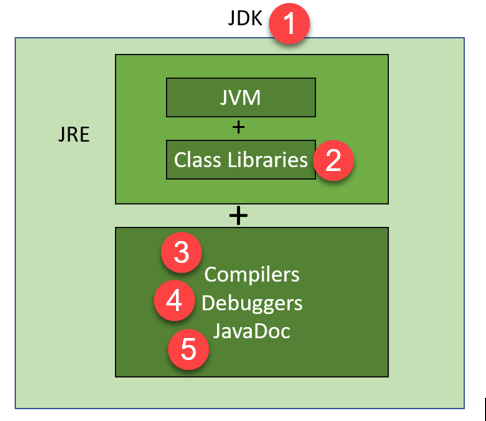
The JDK integrates the JRE and adds development tools. Developers write code, javac compiles it to bytecode, and the Java launcher (java) starts the JVM to execute the program.
How the JRE Works
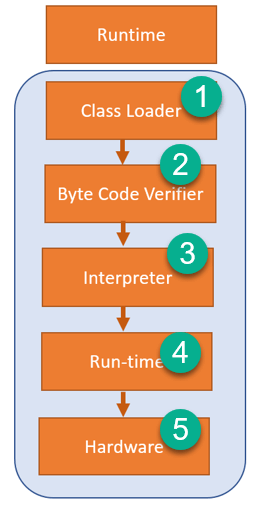
The JRE contains the JVM, class loaders, and the runtime libraries. When a program is launched, the JVM loads classes, verifies bytecode, and executes it via the interpreter or JIT compiler.
How the JVM Works
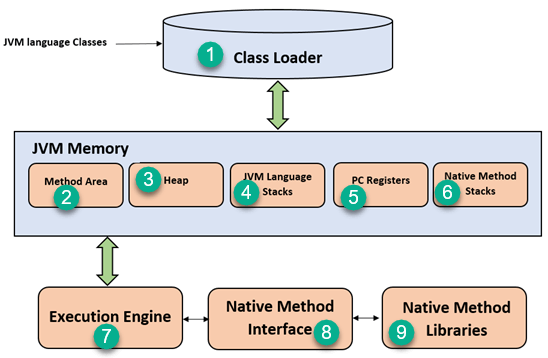
The JVM’s core components include:
- Class Loader: Loads, links, and initializes class files.
- Method Area: Stores class structures, static variables, and method bytecode.
- Heap: Holds objects and arrays shared across threads.
- Java Stacks: Stores local variables and method frames for each thread.
- PC Registers: Tracks the current instruction for each thread.
- Execution Engine: Executes bytecode, using JIT to compile hot spots.
- Native Method Interface & Libraries: Allows integration with native code.
Comparing JDK, JRE, and JVM
| Component | Full Form | Purpose | Platform Dependency | Included Tools |
|---|---|---|---|---|
| JDK | Java Development Kit | Complete development environment for Java applications. | Platform dependent | Compiler, debugger, JavaDoc, and more. |
| JRE | Java Runtime Environment | Runs Java applications by providing core libraries and the JVM. | Platform dependent | None (runtime only) |
| JVM | Java Virtual Machine | Executes Java bytecode; provides platform‑independent runtime. | Platform dependent (implementation varies) | None (execution engine only) |
Java
- Understanding Java: JDK, JRE, and JVM Explained
- Mastering Java NavigableMap: Features, Methods, and TreeMap Implementation
- JVM Explained: What It Is and Its Architecture
- How to Download and Install Java JDK 8 on Windows 10 (64‑Bit) – Step‑by‑Step Guide
- Java vs. C#: 10 Key Differences Explained
- Java vs Python: Core Differences and Choosing the Right Language
- Java 10: Unified JDK Forest Repository
- Java 10 Thread‑Local Handshake: Faster VM Safepoints & Performance Boost
- Master Java Logging: Essential Best Practices for Reliable Code
- Pulumi vs Terraform: A Comprehensive Comparison of Key Features