



Mastering Java Reader Class: Subclasses, Methods, and Practical Example
Java Reader Class
This guide walks you through Java’s Reader class, its key subclasses, essential methods, and a step‑by‑step example using FileReader.
What is the Reader Class?
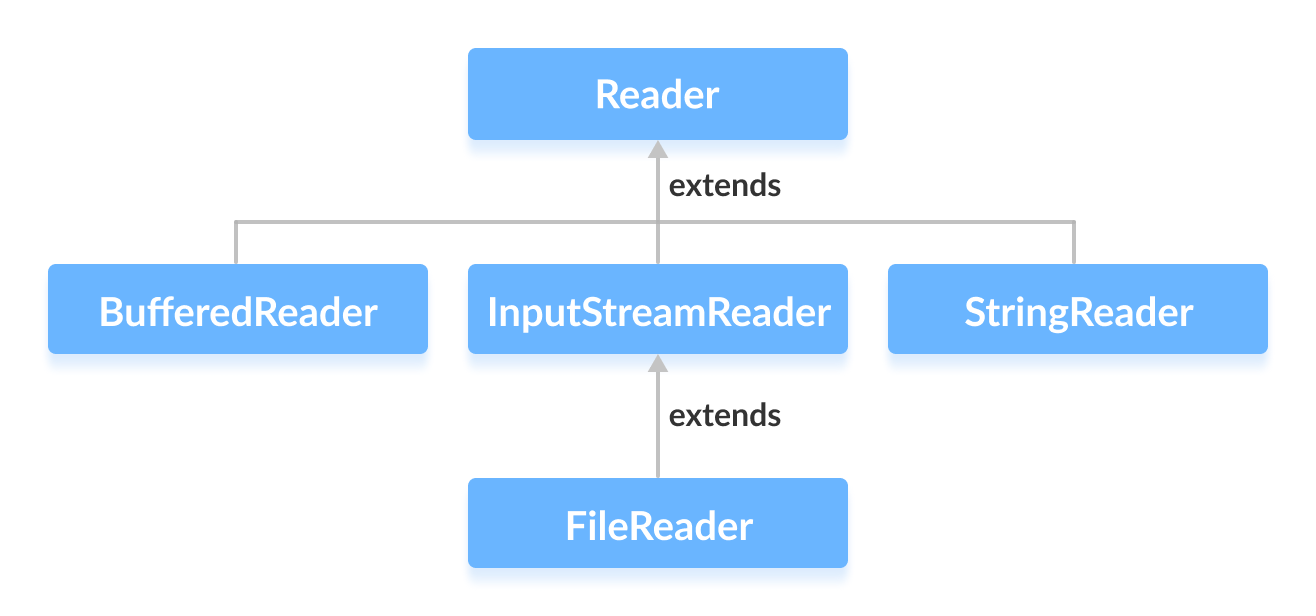
The Reader class in the java.io package is an abstract superclass that represents a character input stream. While it can’t be instantiated directly, its concrete subclasses provide the functionality needed to read text data from various sources.
Common Subclasses of Reader
- BufferedReader – Adds buffering for efficient reading of characters, arrays, and lines.
- InputStreamReader – Bridges byte streams to character streams using a specified charset.
- FileReader – Convenience class for reading files encoded in the default charset.
- StringReader – Reads characters from a string as a stream.
We’ll dive deeper into each subclass in a dedicated tutorial.
Instantiating a Reader
To create a concrete reader, import java.io.Reader and one of its subclasses. For example, using FileReader:
import java.io.Reader;
import java.io.FileReader;

Reader input = new FileReader("input.txt");
Because Reader is abstract, you must use a subclass; otherwise, a compile‑time error occurs.
Tip: You can instantiate any of the other subclasses in the same way.
Key Methods Provided by Reader
boolean ready()– Returnstrueif the stream is ready to be read without blocking.int read(char[] cbuf)– Reads characters into an array and returns the number read.int read(char[] cbuf, int off, int len)– Reads up tolencharacters intocbufstarting atoff.void mark(int readAheadLimit)– Marks the current position in the stream.void reset()– Repositions the stream to the last marked position.long skip(long n)– Skips over and discardsncharacters.
Example: Reading a File with FileReader
Assume we have a file named input.txt containing:
This is a line of text inside the file.
Below is a complete, production‑ready example that reads the file and prints its contents:
import java.io.FileReader;
import java.io.IOException;
import java.io.Reader;

public class Main {
    public static void main(String[] args) {
        // Allocate a buffer large enough for the expected content
        char[] buffer = new char[100];

        // Use try‑with‑resources to ensure the reader is closed automatically
        try (Reader reader = new FileReader("input.txt")) {
            System.out.println("Is there data in the stream? " + reader.ready());
            int charsRead = reader.read(buffer);
            System.out.println("Data in the stream:\n" + new String(buffer, 0, charsRead));
        } catch (IOException e) {
            e.printStackTrace();
        }
    }
}
Output
Is there data in the stream? true
Data in the stream:
This is a line of text inside the file.
Key takeaways:
- Always close the reader—
try‑with‑resourceshandles this automatically. - Use
ready()to verify that data is available before attempting to read. - Handle
IOExceptionto cover file‑not‑found or read‑error scenarios.
For more detailed documentation, visit the official Java Reader Javadoc.
Happy coding!
Java
- Understanding Java’s final Keyword: Variables, Methods, and Classes
- Java instanceof Operator: A Comprehensive Guide
- Mastering Java Inheritance: Concepts, Types, and Practical Examples
- Understanding Java Nested Static Classes: Usage, Differences, and Examples
- Mastering Java Anonymous Inner Classes: Definition, Syntax, and Practical Examples
- Mastering Java’s ObjectInputStream: A Comprehensive Guide
- Mastering Java ObjectOutputStream: Serialization, Methods, and Practical Examples
- Mastering Java’s PrintStream Class: Print, Println, and Printf Explained
- Mastering Java Generics – Building Reusable, Type‑Safe Code
- Mastering Java File Operations with java.io – Creation, Reading, Writing & Deletion