



Mastering Java FileReader: Comprehensive Guide & Practical Examples
Java FileReader Class
This guide walks you through Java’s FileReader, covering its constructors, key methods, and practical examples.
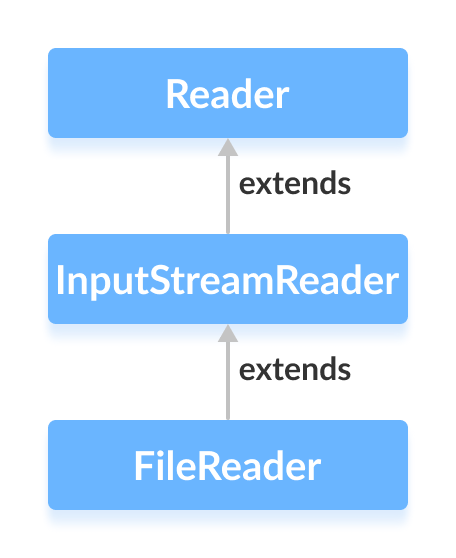
The FileReader class in the java.io package reads character data from files. It extends InputStreamReader and supports different character encodings.
Before diving into FileReader, make sure you understand Java’s File API.
Creating a FileReader
First, import the class:
import java.io.FileReader;1. By file name
FileReader input = new FileReader("path/to/file.txt");Creates a reader that opens the specified file.
2. By File object
File fileObj = new File("path/to/file.txt");
FileReader input = new FileReader(fileObj);
3. Specifying a charset (Java 11+)
FileReader input = new FileReader("path/to/file.txt", StandardCharsets.UTF_8);Using Charset allows you to read files with the desired encoding.
Key Methods of FileReader
FileReader implements all methods from Reader and adds its own functionality.
read() Method
read()– reads a single character.read(char[] array)– fills the array with characters.read(char[] array, int offset, int length)– readslengthcharacters into the array starting atoffset.
Example: Reading input.txt containing “This is a line of text inside the file.”
import java.io.FileReader;
class Main {
    public static void main(String[] args) {
        char[] buffer = new char[100];
        try (FileReader reader = new FileReader("input.txt")) {
            int readCount = reader.read(buffer);
            System.out.println("Data in the file:");
            System.out.println(new String(buffer, 0, readCount));
        } catch (Exception e) {
            e.printStackTrace();
        }
    }
}
Output
Data in the file:
This is a line of text inside the file.
Note: Place input.txt in the current working directory.
getEncoding() Method
Retrieve the charset used by the reader:
import java.io.FileReader;
import java.nio.charset.StandardCharsets;
class Main {
    public static void main(String[] args) {
        try {
            FileReader defaultReader = new FileReader("input.txt");
            FileReader utf8Reader = new FileReader("input.txt", StandardCharsets.UTF_8);
            System.out.println("Default encoding: " + defaultReader.getEncoding());
            System.out.println("UTF-8 encoding: " + utf8Reader.getEncoding());
        } catch (Exception e) {
            e.printStackTrace();
        }
    }
}
Output
Default encoding: Cp1252
UTF-8 encoding: UTF-8
When a charset is specified, getEncoding() returns that charset; otherwise it reflects the platform default.
close() Method
Always close the reader after use. The try-with-resources statement shown above handles this automatically.
Additional FileReader Methods
| Method | Description |
|---|---|
ready() | Indicates whether the stream is ready to be read. |
mark() | Marks the current position in the stream. |
reset() | Resets the stream to the most recent mark. |
For more details, refer to the official Java FileReader documentation.
Java
- Mastering Java Anonymous Inner Classes: Definition, Syntax, and Practical Examples
- Mastering Java FileInputStream: A Practical Guide with Code Examples
- Mastering Java’s ObjectInputStream: A Comprehensive Guide
- Mastering Java ObjectOutputStream: Serialization, Methods, and Practical Examples
- Mastering Java BufferedInputStream: Efficient Byte Reading & Advanced Methods
- Mastering Java’s PrintStream Class: Print, Println, and Printf Explained
- Mastering Java FileWriter: A Complete Tutorial
- Mastering Java BufferedReader: Efficient Character Stream Handling
- Java BufferedWriter: Efficient Character I/O Explained
- Mastering Java File Operations with java.io – Creation, Reading, Writing & Deletion