



Java OutputStream: Core Concepts, Methods, and a Practical FileExample
Java OutputStream Class
Discover the fundamentals of Java’s OutputStream, its primary methods, and a hands‑on example using FileOutputStream.
The OutputStream class, located in the java.io package, is an abstract superclass that represents a stream of bytes destined for an output destination. Because it is abstract, you cannot instantiate it directly; instead, you rely on its concrete subclasses to perform actual I/O operations.
Key Subclasses of OutputStream
Below are the most commonly used subclasses that extend OutputStream:
FileOutputStream– writes bytes directly to a file.ByteArrayOutputStream– captures bytes in an expandable array, useful for in‑memory operations.ObjectOutputStream– serializes Java objects into a byte stream.
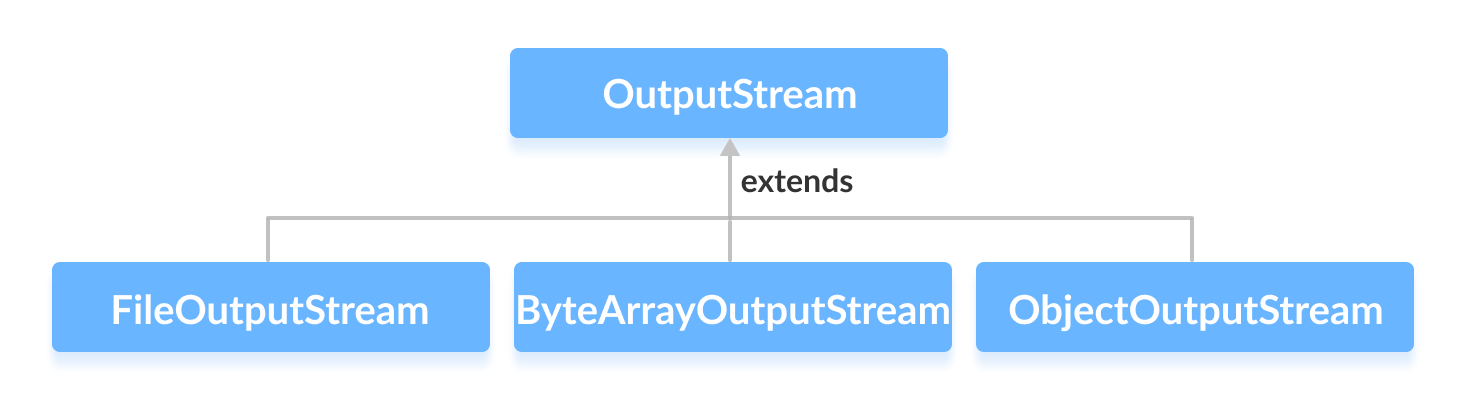
We’ll explore each subclass in dedicated tutorials.
Creating an OutputStream Instance
To create an instance of an OutputStream, import the package and instantiate a concrete subclass:
// Instantiate a FileOutputStream
OutputStream out = new FileOutputStream("example.txt");
Because OutputStream is abstract, you must always use a subclass. The example above demonstrates creating a stream that writes to example.txt.
Tip: You can replace FileOutputStream with any other subclass (e.g., ByteArrayOutputStream) to target a different destination.
Core Methods of OutputStream
The abstract class declares several essential methods that its subclasses must implement:
write(int b)– writes a single byte to the stream.write(byte[] b)– writes an entire byte array.flush()– forces any buffered data to be written out.close()– releases system resources associated with the stream.
Example: Writing Text to a File with FileOutputStream
Below is a complete, ready‑to‑run program that writes a line of text to output.txt using FileOutputStream:
import java.io.FileOutputStream;
import java.io.OutputStream;

public class Main {
    public static void main(String[] args) {
        String data = "This is a line of text inside the file.";

        try (OutputStream out = new FileOutputStream("output.txt")) {
            byte[] dataBytes = data.getBytes();
            out.write(dataBytes);
            System.out.println("Data written to output.txt");
        } catch (Exception e) {
            e.printStackTrace();
        }
    }
}
Key points demonstrated:
- Conversion of a
Stringto a byte array withgetBytes(). - Writing the byte array to the stream via
write(). - Automatic stream closure using a try‑with‑resources block, which calls
close()for you.
After execution, output.txt will contain:
This is a line of text inside the file.
For deeper exploration of OutputStream, refer to the official Java documentation.
Java OutputStream (official Java documentation)
Java
- Mastering Java Anonymous Inner Classes: Definition, Syntax, and Practical Examples
- Java FileOutputStream Class – Comprehensive Guide
- Mastering Java ByteArrayOutputStream: Methods, Usage, and Practical Examples
- Mastering Java’s ObjectInputStream: A Comprehensive Guide
- Mastering Java ObjectOutputStream: Serialization, Methods, and Practical Examples
- Java BufferedOutputStream: Efficient Byte Writing Explained
- Mastering Java’s PrintStream Class: Print, Println, and Printf Explained
- Java Writer Class – Mastering Character Streams
- Mastering Java’s OutputStreamWriter: Converting Characters to Bytes with Practical Examples
- Mastering Java PrintWriter: Features, Methods, and Practical Examples